
- Mark as New
- Bookmark
- Subscribe
- Mute
- Subscribe to RSS Feed
- Permalink
- Report Inappropriate Content
好,当我玩《底特律变人》时,游戏开始前会出现一条消息(第一张图片),现在,当我尝试开始第11章“从死里复活”时,我的游戏立即崩溃(无论你图形设置如何)。请帮帮我。
我的显卡
英特尔® Arc™显卡
GPU驱动程序版本(最新版本)
32.0.101.8136
我的游戏平台
Steam(游戏未破解、未修改并使用最新补丁)
我的处理器/处理器编号
英特尔® 酷睿™ Ultra 7 处理器 155H(1.4 GHz 至 4.8 GHz 24MB L8 服务器)
Windows 内部版本号
Windows 11,版本 25H2
设备/平台名称
LG GRAM 16Z90S-G


Link Copied
- Mark as New
- Bookmark
- Subscribe
- Mute
- Subscribe to RSS Feed
- Permalink
- Report Inappropriate Content

- Mark as New
- Bookmark
- Subscribe
- Mute
- Subscribe to RSS Feed
- Permalink
- Report Inappropriate Content
Hello Jesse_Smith,
Thank you for posting in Intel community Forum.
请注意,我只能用英语为您提供支持。我使用了网络翻译工具来翻译此回复,因此可能存在一些翻译不准确的地方。
For me to better understand and diagnose the issue further, let me ask you to provide detailed responses to the following questions. This information will help me isolate the problem and determine the most appropriate course of action moving forward.
- Was it working fine before?
- If yes, what was the last change made in the system before the issue started?
- What are the troubleshooting steps that you tried so far?
- How did you update the driver?
If you have questions, please let us know. Thank you.
Best regards,
Michael L.
Intel Customer Support Technician
- Mark as New
- Bookmark
- Subscribe
- Mute
- Subscribe to RSS Feed
- Permalink
- Report Inappropriate Content
Hi Michael,
Thank you very much for your reply and for taking the time to assist me with this issue.
I appreciate your support and will provide the detailed information you requested below.
Best regards,
Jesse
1. Was it working fine before?
Yes, it was working fine before.
2. If yes, what was the last change made in the system before the issue started?
No changes were made to the system before the issue occurred.
3. What are the troubleshooting steps that you tried so far?
I have tried the following troubleshooting steps:
Updated the graphics driver to the latest version.
Disabled fullscreen mode.
Lowered graphics settings.
Used Display Driver Uninstaller (DDU) in Safe Mode to uninstall the graphics driver.
Updated Windows 11 to the latest version.
Loaded from the previous chapter and tried again.
Reinstalled the entire game on steam.
I also referred to the following forum posts, but none of these solutions worked:
https://github.com/IGCIT/Intel-GPU-Community-Issue-Tracker-IGCIT/issues/628
https://community.intel.com/t5/Intel-ARC-Graphics/bd-p/arc-graphics
4. How did you update the driver?
I downloaded the latest driver from the official Intel website and installed it manually:
https://www.intel.com/content/www/us/en/download/785597/intel-arc-graphics-windows.html?src=arc_graphics_idsa
- Mark as New
- Bookmark
- Subscribe
- Mute
- Subscribe to RSS Feed
- Permalink
- Report Inappropriate Content
Hello Jesse_Smith,
Thank you for the update.
For this issue, we have a documented fix. Kindly refer to the link below:
Detroit Become Human* Says it Doesn't Support Intel® Arc™ Graphics...
If you have questions, please let us know. Thank you.
Best regards,
Michael L.
Intel Customer Support Technician
- Mark as New
- Bookmark
- Subscribe
- Mute
- Subscribe to RSS Feed
- Permalink
- Report Inappropriate Content
Hi Michael,
Thank you for your reply and for sharing the link to the documented fix.
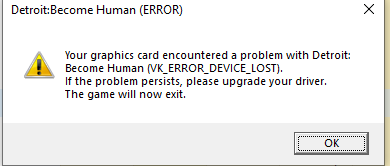
I have already updated my Intel® Arc™ graphics driver to a newer version than 31.0.101.4824 (currently using version 32.0.101.8136). After trying the previously steps I mentioned before, the game no longer crashes during Chapter 11, “Back from the Dead.” However, later in the game, it still occasionally shows the following error message before crashing:
Detroit: Become Human (ERROR)
Your graphics card encountered a problem with Detroit: Become Human (VK_ERROR_DEVICE_LOST).
If the problem persists, please upgrade your driver.
The game will now exit.
Please let me know if there are any additional steps I can try, or if there’s a recommended driver version that is more stable for this game.
Thank you again for your continued support.
Best regards,
Jesse Smith
- Mark as New
- Bookmark
- Subscribe
- Mute
- Subscribe to RSS Feed
- Permalink
- Report Inappropriate Content
Hello Jesse_Smith,
Thank you for the update.
As per the link that I provided:
This message can be ignored since it is hard-coded on the game itself.
The game should run fine with Intel graphics drivers 31.0.101.4824 or newer.
Let me check, aside from the message, are you having other issues? If you click "OK", can you play the game normally?
If you have questions, please let us know. Thank you.
Best regards,
Michael L.
Intel Customer Support Technician
- Mark as New
- Bookmark
- Subscribe
- Mute
- Subscribe to RSS Feed
- Permalink
- Report Inappropriate Content
Hi Michael,
Thank you for your follow-up.
After clicking "OK", I can continue playing the game normally for a while. However, later in the game, it still occasionally shows the following error message before crashing:
Detroit: Become Human (ERROR)
Your graphics card encountered a problem with Detroit: Become Human (VK_ERROR_DEVICE_LOST).
If the problem persists, please upgrade your driver.
The game will now exit.
So while the game runs after confirming “OK,” it eventually crashes again with the same error and crash.
Please let me know if there’s any additional troubleshooting I can try.
Best regards,
Jesse Smith

- Mark as New
- Bookmark
- Subscribe
- Mute
- Subscribe to RSS Feed
- Permalink
- Report Inappropriate Content
Hello Jesse_Smith,
Thank you for the update.
Before further checking, let me check. Have you tried contacting the game developer about this issue?
As per the link, the game just run normally and that was during our test that time.
If you have questions, please let us know. Thank you.
Best regards,
Michael L.
Intel Customer Support Technician
- Mark as New
- Bookmark
- Subscribe
- Mute
- Subscribe to RSS Feed
- Permalink
- Report Inappropriate Content
Hello Jesse_Smith,
I hope this message finds you well.
Were you able to check the previous post?
Please let us know if you still need assistance.
Best regards,
Michael L.
Intel Customer Support Technician
- Mark as New
- Bookmark
- Subscribe
- Mute
- Subscribe to RSS Feed
- Permalink
- Report Inappropriate Content
Hi Michael,
Thank you for following up.
Yes, I’ve checked your previous post. Unfortunately, the issue is still the same — the game still occasionally crashes with the VK_ERROR_DEVICE_LOST message even after updating the driver and trying the suggested steps.
I haven’t contacted the game developer yet, since I suspect the issue might be related to the graphics driver.
Please let me know if there’s anything else I can try.
Best regards,
Jesse Smith
- Mark as New
- Bookmark
- Subscribe
- Mute
- Subscribe to RSS Feed
- Permalink
- Report Inappropriate Content
Hello Jesse_Smith,
Thank you for the update.
Have you also tried to check if the game can run on embedded Graphics? I checked the system requirements it required a PCIe Graphics card.
Detroit: Become Human system requirements | Can I Run Detroit: Become Human
Please let us know if you still need assistance.
Best regards,
Michael L.
Intel Customer Support Technician
- Mark as New
- Bookmark
- Subscribe
- Mute
- Subscribe to RSS Feed
- Permalink
- Report Inappropriate Content
Hello Jesse_Smith,
I hope this message finds you well.
I am just making a follow up to check if you still have some clarifications regarding this thread.
Let me also add that based on our assessment, the game is outside the system requirements set by the developer. It would be best to consult with the game developer if they will be adding support for the Graphics card that you are using.
Please let us know if you still need assistance.
Best regards,
Michael L.
Intel Customer Support Technician
- Mark as New
- Bookmark
- Subscribe
- Mute
- Subscribe to RSS Feed
- Permalink
- Report Inappropriate Content
Hello Jesse_Smith,
I hope you are having a good day.
i am sending another follow up and hoping that you are now talking to the game developer for further assistance.
Since we have not heard back from you, I need to close this inquiry.
If you need further assistance, please post a new question as this thread will no longer be monitored.
Thank you and have a great day.
Best regards,
Michael L.
Intel Customer Support Technician

- Subscribe to RSS Feed
- Mark Topic as New
- Mark Topic as Read
- Float this Topic for Current User
- Bookmark
- Subscribe
- Printer Friendly Page