
- Mark as New
- Bookmark
- Subscribe
- Mute
- Subscribe to RSS Feed
- Permalink
- Report Inappropriate Content
I am using this exercise of vectorization:
I am using the Windows 10 operating system and command line ( Not the MVS ).
My questions is:
- What is the Windows version of the command:
ifort -real-size 64 -qopt-report=2 -qopt-report-phase=vec -D ALIGNED -ipo src/matvec.f90 src/driver.f90 -o MatVector
specifically how to instruct the aligned command there? Or how to use command line directives? How to specify the option?

- Mark as New
- Bookmark
- Subscribe
- Mute
- Subscribe to RSS Feed
- Permalink
- Report Inappropriate Content
Hi @Fortran10
most Linux command line options translate to Windows with the same name but '/' instead of '-'
In the developers guide and reference we always list the option for Linux as well for Windows:
e.g. -D becomes /D
Link Copied

- Mark as New
- Bookmark
- Subscribe
- Mute
- Subscribe to RSS Feed
- Permalink
- Report Inappropriate Content
/[no]align
analyze and reorder memory layout for variables and arrays
/align:<keyword>
specify how data items are aligned
keywords: all (same as /align), none (same as /noalign),
[no]commons, [no]dcommons,
[no]qcommons, [no]zcommons,
rec1byte, rec2byte, rec4byte,
rec8byte, rec16byte, rec32byte,
array8byte, array16byte, array32byte,
array64byte, array128byte, array256byte,
[no]records, [no]sequence
- Mark as New
- Bookmark
- Subscribe
- Mute
- Subscribe to RSS Feed
- Permalink
- Report Inappropriate Content
Hi @Fortran10
most Linux command line options translate to Windows with the same name but '/' instead of '-'
In the developers guide and reference we always list the option for Linux as well for Windows:
e.g. -D becomes /D
- Mark as New
- Bookmark
- Subscribe
- Mute
- Subscribe to RSS Feed
- Permalink
- Report Inappropriate Content
The developer guide says D :
Defines a symbol name that can be associated with an optional value.
What is the symbol here? and how optional value is related to ALIGNED. These two things are not very straightforward from here.
My initial guess was, "It is used to define Directives." D for Directive and is used in combination with ALIGNED to inform the compiler that I want to use the Compiler directive i.e. ALIGNED.

- Mark as New
- Bookmark
- Subscribe
- Mute
- Subscribe to RSS Feed
- Permalink
- Report Inappropriate Content
@TobiasK last post referred to "/" verses "-" for option indicator on command line. The D was simply a place holder, and not to be construed with an actual switch.
FWIW
/Dnewsymbol /Dnewvalue=1
...
!$if defined(newsymbol) then
! conditional code
!$endif
...
!$if (newvalue==1) then
! conditional code
!$endif
Jim Dempsey
- Mark as New
- Bookmark
- Subscribe
- Mute
- Subscribe to RSS Feed
- Permalink
- Report Inappropriate Content
In addition to what Jim said, if you look into the source code of driver.f90:
You notice some #if defined structure as Jim wrote.
That means, such a file must be processed by a preprocessor. Either you use a standalone preprocessor as cpp or fpp or you just instruct to compiler to call the preprocessor before the actual code compilation via /fpp or /cpp compiler flags.
It does not do anything at the compile step, all it affects is prior the compilation.
In the driver example you see some
!DIR$ IF DEFINED(ALIGNED)
 integer, parameter      :: ROWBUF=3
!DIR$ ELSE
 integer, parameter      :: ROWBUF=0
!DIR$ END IF
if you invoke the compiler with /fpp /D ALINGED the actual Fortran file will be: (because ALIGNED is defined by \D)
integer, parameter :: ROWBUF=3
if you invoke the compiler with /fpp /d XYZ the actual Fortran file will be: (because ALINGED is not defined by \D)
integer, parameter :: ROWBUF=0
So think of preprocessing as an automated text editor.
Best
Tobias
- Mark as New
- Bookmark
- Subscribe
- Mute
- Subscribe to RSS Feed
- Permalink
- Report Inappropriate Content
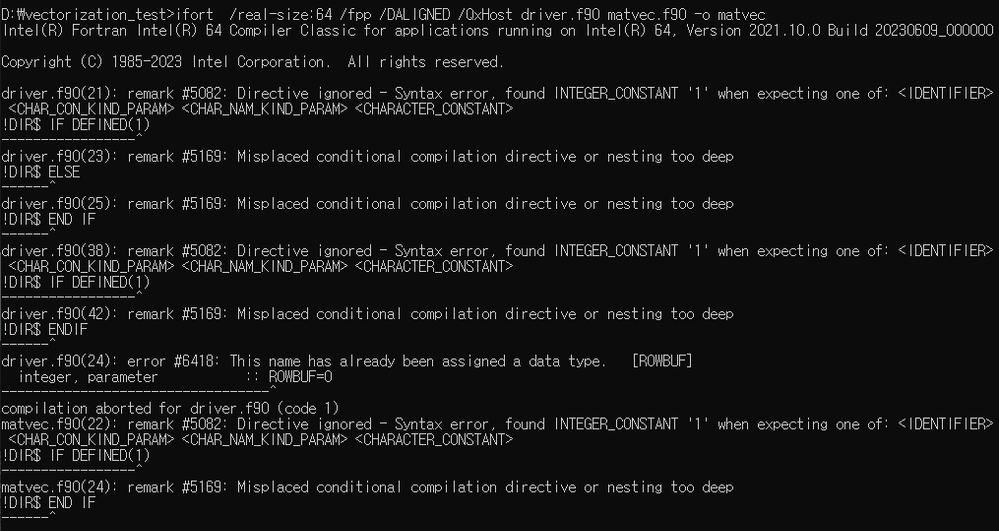
using /fpp /DALIGNED shows this error:
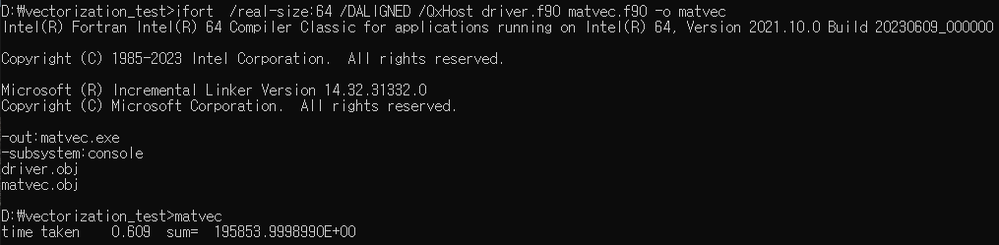
without using /fpp it does not show any error:
- Mark as New
- Bookmark
- Subscribe
- Mute
- Subscribe to RSS Feed
- Permalink
- Report Inappropriate Content
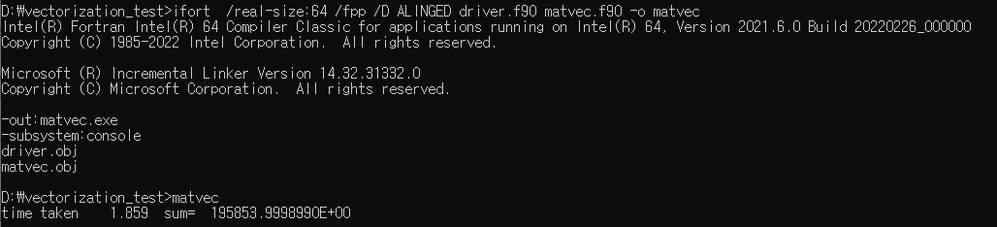
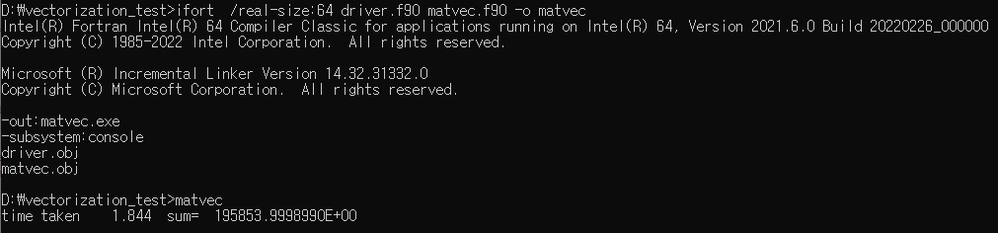
Performance baseline
I do not actually see any improvement
Using /fpp
without /fpp
My computer details are
11th Gen Intel(R) Core(TM) i5-11500 @ 2.70GHz
I tried this with both 16 and 64 bytes (driver.f90 file), but still no improvement.
!DIR$ attributes align : 16 :: a,b,c
- Mark as New
- Bookmark
- Subscribe
- Mute
- Subscribe to RSS Feed
- Permalink
- Report Inappropriate Content
If you are on an Intel CPU, try adding option /QxHost
If AMD, try adding /QxAVX
Also, it may be helpful to build optimized code with generating and keeping debug symbols, then running under VTune. Ignore the runtimes but use VTune to show the Disassembly.
With this, you can verify two things:
a) Was the ALIGNED code vectorized.
b) Was the not ALIGNED code not vectorized.
Jim Dempsey
- Mark as New
- Bookmark
- Subscribe
- Mute
- Subscribe to RSS Feed
- Permalink
- Report Inappropriate Content
Thanks for the hint. I will have a look at VTune. That tool seems to be very informative in understanding vectorization.

- Mark as New
- Bookmark
- Subscribe
- Mute
- Subscribe to RSS Feed
- Permalink
- Report Inappropriate Content
@jimdempseyatthecove wrote:If you are on an Intel CPU, try adding option /QxHost
If AMD, try adding /QxAVX
If non-Intel CPU, /arch:AVX . /QxAVX will cause a run-time error when the program starts on non-Intel CPUs.
P.S. Jim, please check your messages here on the forum.

- Mark as New
- Bookmark
- Subscribe
- Mute
- Subscribe to RSS Feed
- Permalink
- Report Inappropriate Content
@Fortran10, I see a couple of typos in the compiler options in your screenshot using /fpp. Should be
/DALIGNED
You also might want to update to the latest release of ifort. Yours is 1.5+ years old.
- Mark as New
- Bookmark
- Subscribe
- Mute
- Subscribe to RSS Feed
- Permalink
- Report Inappropriate Content
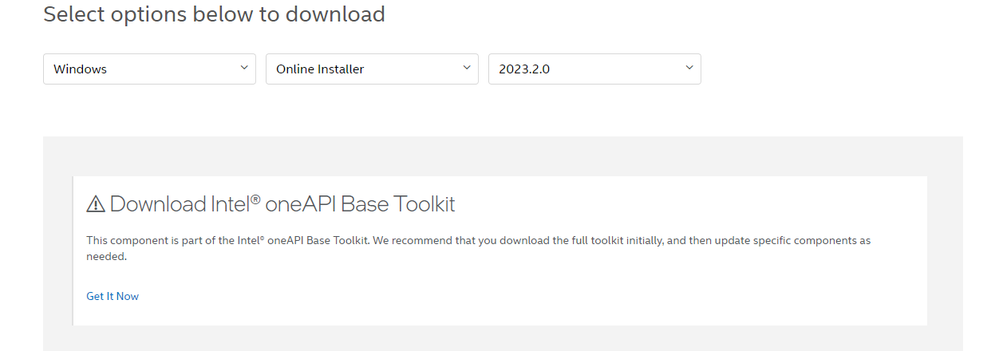
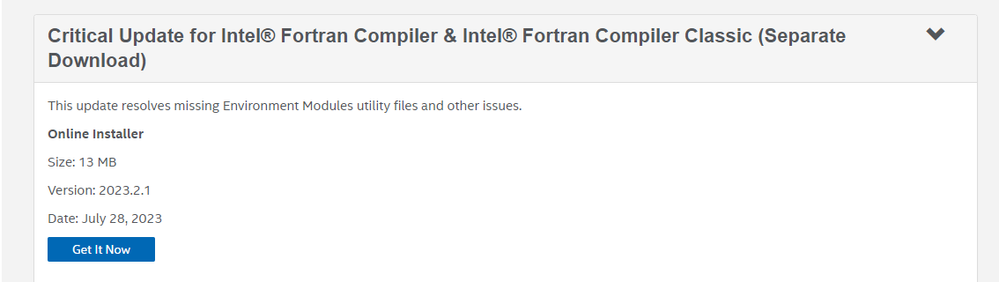
I did following steps to update:
1. download the BaseKit

2. Install
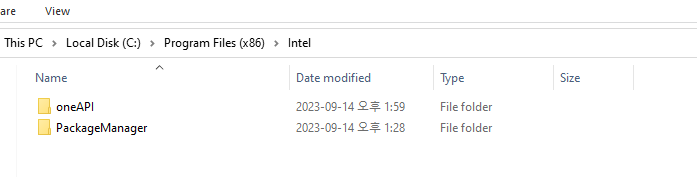
3. Download the HPC Kit shows that error
4. Separate downloading the Fortran compiler
5. Download folder looks like

6. Running Fortran code shows error
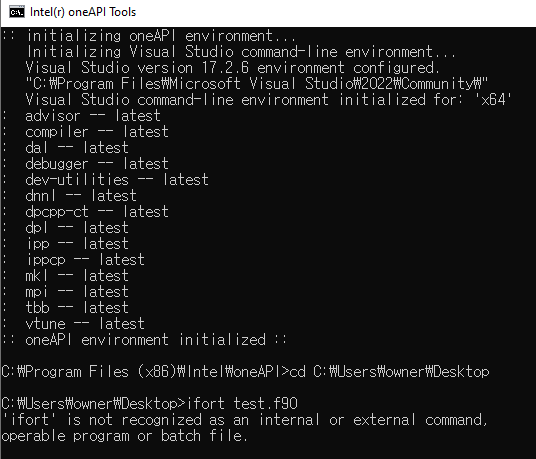
7. Start menu:
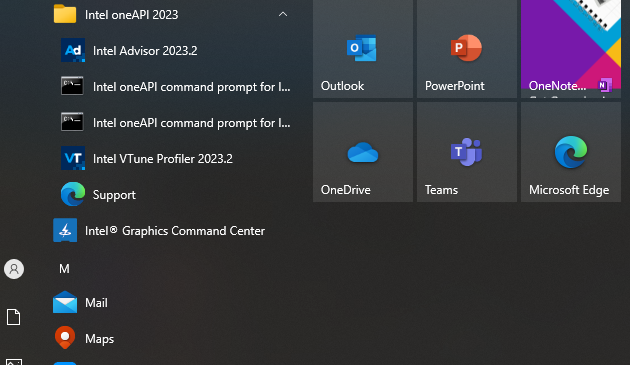
So what should be done now ?
- Mark as New
- Bookmark
- Subscribe
- Mute
- Subscribe to RSS Feed
- Permalink
- Report Inappropriate Content
I removed the installed version.
1) Now i have installed the version 2023.1.0.47256.

That seems to work fine.
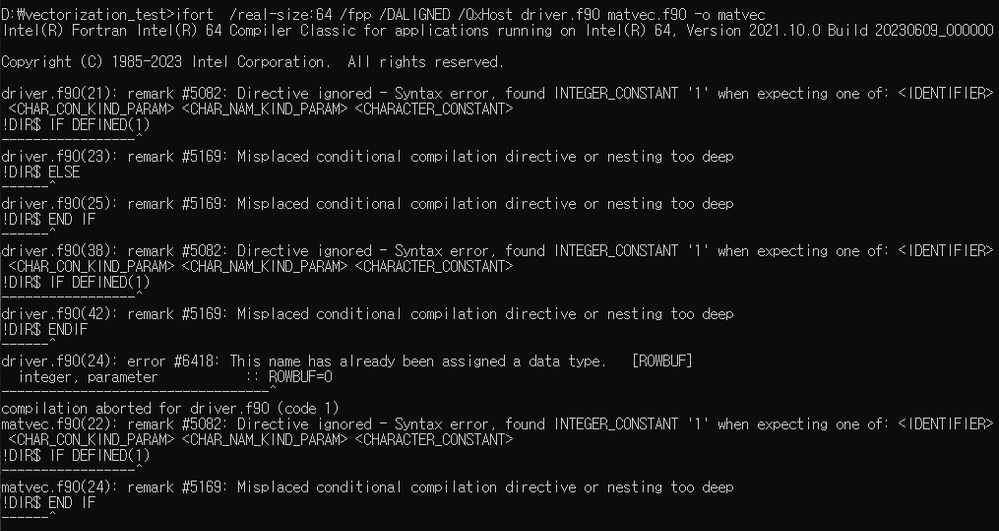
2) However using /fpp /DALIGNED shows error:
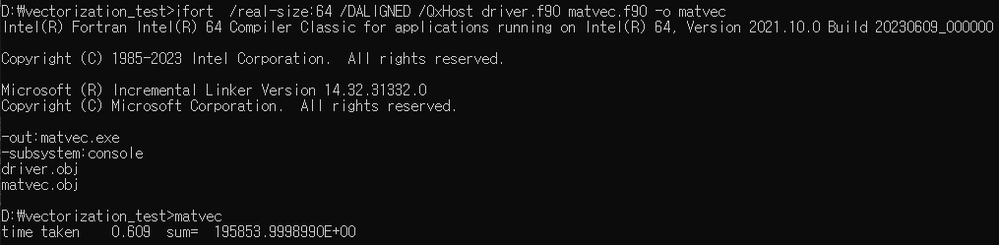
3) Without using /fpp , I do not see any error.
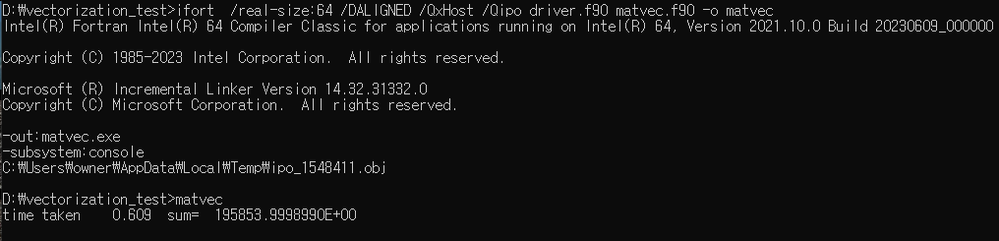
4) Also, the use of /Qipo does not improve performance.
- Mark as New
- Bookmark
- Subscribe
- Mute
- Subscribe to RSS Feed
- Permalink
- Report Inappropriate Content
@Barbara_P_Intel Thanks for the clarification.
I have performed the following tests with these outputs.
Seems like
- /fpp /DALIGNED should always be used with /QxHost.
- /QxHost alone is producing the same performance without using /fpp /DALIGNED.
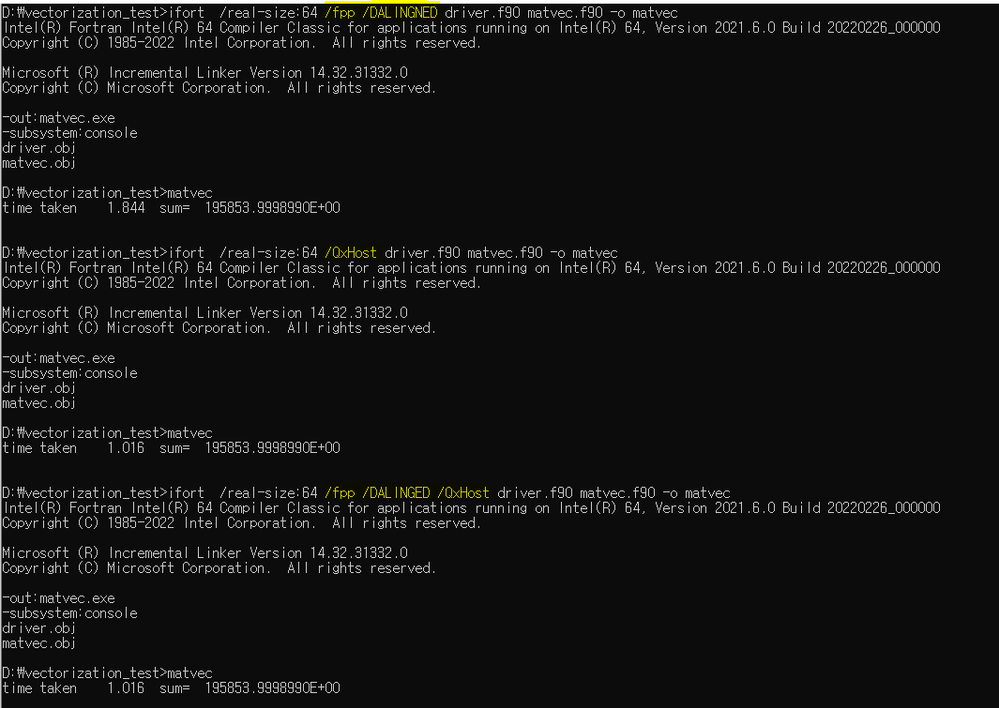
So does that mean aligning data is not compatible here?
- The use of /Qipo however improves the performance
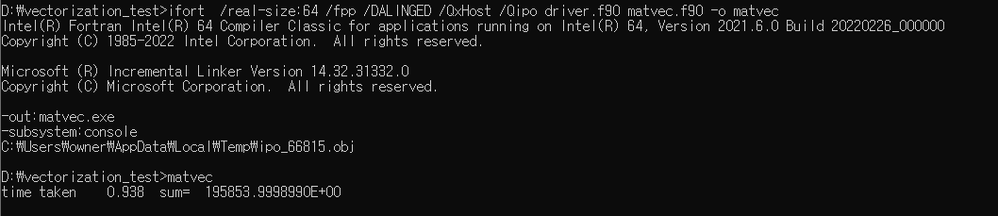
@Barbara_P_Intel Thanks for notifying me, I will try to install the new release this coming weekend and will perform the same results.
- Mark as New
- Bookmark
- Subscribe
- Mute
- Subscribe to RSS Feed
- Permalink
- Report Inappropriate Content
- Mark as New
- Bookmark
- Subscribe
- Mute
- Subscribe to RSS Feed
- Permalink
- Report Inappropriate Content
You Are combining fpp and having /DALIGNED and testing !DIR$ IF DEFIGNED(ALIGNED)
The /DALIGNED is going to set ALIGNED=1
Then fpp is going to replace the text "ALIGNED" with its content "1", and the literal 1 is not a definable variable/macro.
When you use fpp in combination with compiler directives you should be aware of these types of conflicting usage.
Because these sources have no #xxx preprocessor directives, you can remove the /fpp from your command line.
Jim Dempsey

- Subscribe to RSS Feed
- Mark Topic as New
- Mark Topic as Read
- Float this Topic for Current User
- Bookmark
- Subscribe
- Printer Friendly Page