
- Mark as New
- Bookmark
- Subscribe
- Mute
- Subscribe to RSS Feed
- Permalink
- Report Inappropriate Content
I have error PRJ0019 during linking my quickwin project (possibly for 'link' tool).
This error comes only in x64 platform (not in 32 bit)
The objectives
Intel(R) Visual Fortran Compiler XE 12.1.1.258 [IA-32]
Intel(R) Visual Fortran Compiler XE 12.1.1.258 [Intel(R) 64]
under MS visual studio 2010 SP1
Windows 7, 64 bit
Build Log
Build started: Project: Sph_proj, Configuration: Release|x64
Output
Compiling manifest to resources...
rc.exe /fo "D:\Programs\SPH_New_3_10\HD\Sph_proj\x64\Release\sph3D_intx64.exe.embed.manifest.res" "D:\Programs\SPH_New_3_10\HD\Sph_proj\x64\Release\sph3D_intx64.exe.embed.manifest.rc"
Microsoft (R) Windows (R) Resource Compiler Version 6.1.6723.1
Copyright (C) Microsoft Corporation. All rights reserved.
Linking...
Creating temporary file "RSP1.rsp" with contents
[
/OUT:"x64\Release\sph3D_intx64.exe" /NOLOGO /LIBPATH:"C:\Program Files (x86)\Intel\Composer XE 2011 SP1\\mkl\lib\intel64" /LIBPATH:"C:\Program Files (x86)\Intel\Composer XE 2011 SP1\\redist\intel64\mkl" /MANIFEST /MANIFESTFILE:"D:\Programs\SPH_New_3_10\HD\Sph_proj\x64\Release\sph3D_intx64.exe.intermediate.manifest" /MANIFESTUAC:"level='asInvoker' uiAccess='false'" /SUBSYSTEM:WINDOWS /IMPLIB:"D:\Programs\SPH_New_3_10\HD\Sph_proj\x64\Release\sph3D_intx64.lib" vfw32.lib mkl_intel_thread.lib mkl_core.lib "x64\Release\param.obj" "x64\Release\Palettin.obj" "x64\Release\Utilin.obj" "x64\Release\Listin.obj" "x64\Release\Filein.obj" "x64\Release\SingStepin.obj" "x64\Release\consolin.obj" "x64\Release\Dialin.obj" "x64\Release\Commandin.obj" "x64\Release\AVIin.obj" "x64\Release\vararrays.obj" "x64\Release\Linklin.obj" "x64\Release\Graphin.obj" "x64\Release\Tensin.obj" "x64\Release\Ggridin.obj" "x64\Release\Fmenu.obj" "x64\Release\Timingin.obj" "x64\Release\grid_geom.obj" "x64\Release\begdata_cmnd.obj" "x64\Release\DefGwin3D.obj" "x64\Release\Grinit.obj" "x64\Release\ObjProc.obj" "x64\Release\divV.obj" "x64\Release\PicPpress.obj" "x64\Release\Savefile.obj" "x64\Release\Data_input.obj" "x64\Release\NewTimeStep.obj" "x64\Release\CornMirror.obj" "x64\Release\PicFsound.obj" "x64\Release\Point.obj" "x64\Release\TuneProc.obj" "x64\Release\eos_u_call.obj" "x64\Release\art_visc.obj" "x64\Release\DefGwin.obj" "x64\Release\Graphics.obj" "x64\Release\MirrProc.obj" "x64\Release\variable_time_step.obj" "x64\Release\Density_Int.obj" "x64\Release\PicPmass.obj" "x64\Release\SaveAVI.obj" "x64\Release\CmdLine.obj" "x64\Release\Mises.obj" "x64\Release\BndMirror.obj" "x64\Release\PicFpress.obj" "x64\Release\Picture.obj" "x64\Release\TstepProc.obj" "x64\Release\eos_u.obj" "x64\Release\PicPType3D.obj" "x64\Release\time_print.obj" "x64\Release\InterfProc.obj" "x64\Release\Value_Rates.obj" "x64\Release\Density_cont.obj" "x64\Release\PicPenergy.obj" "x64\Release\PWoutput.obj" "x64\Release\AVIdraw.obj" "x64\Release\link_list.obj" "x64\Release\PicFenergy.obj" "x64\Release\Main.obj" "x64\Release\TmetProc.obj" "x64\Release\eos_call.obj" "x64\Release\PicPType.obj" "x64\Release\time_elapsed.obj" "x64\Release\DomProc.obj" "x64\Release\Time_Int_PC.obj" "x64\Release\DefPtlMass.obj" "x64\Release\PicPdens.obj" "x64\Release\PsearchStat.obj" "x64\Release\AVIcreate.obj" "x64\Release\kernel.obj" "x64\Release\PicFdens.obj" "x64\Release\Loadfile.obj" "x64\Release\TimeProc.obj" "x64\Release\eos.obj" "x64\Release\picPstr.obj" "x64\Release\SavePointAs.obj" "x64\Release\ADisProc.obj" "x64\Release\Tens.obj" "x64\Release\DefPosProp3D.obj" "x64\Release\PicGcap.obj" "x64\Release\PrintStep.obj" "x64\Release\AVIclose.obj" "x64\Release\i_force.obj" "x64\Release\LegndPal.obj" "x64\Release\Input_cmnd.obj" "x64\Release\PropProc.obj" "x64\Release\EdgeMirror.obj" "x64\Release\PicPpress3D.obj" "x64\Release\SavePCX.obj" "x64\Release\Data_inputAVI.obj" "x64\Release\sphsub.obj" "x64\Release\DefMass_a.obj" "x64\Release\PicFvelocity.obj" "x64\Release\PointVer00.obj" "x64\Release\AddCommands.obj" "x64\Release/Script_AVI.res" "x64\Release/Script1.res" "D:\Programs\SPH_New_3_10\WinKisa14\DWKisad\x64\Release\DWKisad.lib" "D:\Programs\SPH_New_3_10\Command_Lib\x64\Release\Command_Lib.lib" "D:\Programs\SPH_New_3_10\HD\Sph_proj\x64\Release\sph3D_intx64.exe.embed.manifest.res"
]
Creating command line "Link @"D:\Programs\SPH_New_3_10\HD\Sph_proj\x64\Release\RSP1.rsp""
Link: executing 'link'
Sph_proj : error PRJ0019: A tool returned an error code
Sph_proj - 1 error(s), 0 warning(s)
Link Copied

- Mark as New
- Bookmark
- Subscribe
- Mute
- Subscribe to RSS Feed
- Permalink
- Report Inappropriate Content
When you link in Visual Studio (or using the ifort command from the command line), it actually invokes xilink.exe, which is an Intel-provided wrapper for the Microsoft linker. My guess is that xilink is dying somehow, though the error message, if any, is not shown. I see you are using an old version - we have fixed many issues since 12.1 came out. Please update to the newest compiler you can and try again.
- Mark as New
- Bookmark
- Subscribe
- Mute
- Subscribe to RSS Feed
- Permalink
- Report Inappropriate Content
Thank you for quick response, Steve
But I can't upgrade my 12.1 yet (my collegues works in our old version IF and they not have a problem)
My PRJ0019 err. becomes after my migration from MSVS2008 to MSVS 2010 +SP1.
Before migration 2008 studio -> 2010+SP1 all works properly
The cause of error may be the: I do not kill 2008 studio, but install 2010 one and after that I reinstall Intel Fortran and IMSL lib.
After that the error becomes.
I kill all my MSVS 2008, 2010 and reinstall 2010 studio +SP1 with Int Fort and IMSL lib to exclude error . It not helps me.
Can it helps me if I comletely reinstall MSVS 2010 +SP1 and all related components:
uninstall IMSL lib, -> Intel Fortran -> uninstall Visual studio 2010
and after that install all in reverse order: MSVS2010+SP1-> Intel Fortran->IMSL lib ?
- Mark as New
- Bookmark
- Subscribe
- Mute
- Subscribe to RSS Feed
- Permalink
- Report Inappropriate Content
Did you try pasting in a screenshot? That doesn't work here - you'll have to attach it.
- Mark as New
- Bookmark
- Subscribe
- Mute
- Subscribe to RSS Feed
- Permalink
- Report Inappropriate Content
Sorry, it's not clear for me - screenshot of what i neeed to attach?
- Mark as New
- Bookmark
- Subscribe
- Mute
- Subscribe to RSS Feed
- Permalink
- Report Inappropriate Content
You wrote "After that the error becomes." but I don't see what the error is. I don't think installation order has anything to do with this. But you could try an uninstall and reinstall and see what that gets you.
Also, try temporarily disabling your antivirus software and see if that makes a difference. Sometimes AV software interferes with building executables.
- Mark as New
- Bookmark
- Subscribe
- Mute
- Subscribe to RSS Feed
- Permalink
- Report Inappropriate Content
"After that the error becomes." - I mean "error PRJ0019" .
In BuildLog it figured as
Link: executing 'link'
Sph_proj : error PRJ0019: A tool returned an error code
Disabling MS Security Essential real time protection don't changes anything
I'm trying to reinstall all
- Mark as New
- Bookmark
- Subscribe
- Mute
- Subscribe to RSS Feed
- Permalink
- Report Inappropriate Content
Oh, sorry, can I update my Intel Fortran for free or not?
- Mark as New
- Bookmark
- Subscribe
- Mute
- Subscribe to RSS Feed
- Permalink
- Report Inappropriate Content
I don't know - the email address you use for this forum doesn't show up in our license database. When you log in to the Intel Registration Center, it should show you the latest compiler version you are eligible for.
- Mark as New
- Bookmark
- Subscribe
- Mute
- Subscribe to RSS Feed
- Permalink
- Report Inappropriate Content
Steve Lionel (Intel) wrote:
I don't know - the email address you use for this forum doesn't show up in our license database. When you log in to the Intel Registration Center, it should show you the latest compiler version you are eligible for.
I' m registred here with my private e-mail and our manager has bought our IF version
So, I kill Fortran, MS VS 20010 and 2008 and after that
install MSVC2010, IFort .
It d'not gives me any help. The error prj0019 is presents
- Mark as New
- Bookmark
- Subscribe
- Mute
- Subscribe to RSS Feed
- Permalink
- Report Inappropriate Content
I think the problem with linking is in a some wrong environment variables.
Then I look on link.exe or (lib.exe) in bin directory of VStudio 10 (C:\Program Files (x86)\Microsoft Visual Studio 10.0\VC\bin\amd64) by Dependency walker, I have see that there are some errors listed in log files:
Error: At least one module has an unresolved import due to a missing export function in an implicitly dependent module.
Error: Modules with different CPU types were found.
Warning: At least one delay-load dependency module was not found.
Warning: At least one module has an unresolved import due to a missing export function in a delay-load dependent module.
So, i have some mistake dependencies: some dll ore components not find, or they are 32 bit, instead 64 bit for my platform and have some notification about error opening file , and some files are not finded
But if the problem is on a link.exe or lib.exe file of Visual Studio, why i can compile and link an 64 bit exe from an C++ example project?
And Dependency walker gives some error for xilink.exe on bin/intel64 directory: it can not finds some dll:
API-MS-WIN-APPMODEL-RUNTIME-L1-1-0.DLL
API-MS-WIN-CORE-WINRT-ERROR-L1-1-0.DLL
API-MS-WIN-CORE-WINRT-L1-1-0.DLL
API-MS-WIN-CORE-WINRT-ROBUFFER-L1-1-0.DLL
API-MS-WIN-CORE-WINRT-STRING-L1-1-0.DLL
API-MS-WIN-SHCORE-SCALING-L1-1-1.DLL
DCOMP.DLL
IESHIMS.DLL
Warning: At least one delay-load dependency module was not found.
Warning: At least one module has an unresolved import due to a missing export function in a delay-load dependent module.
- Mark as New
- Bookmark
- Subscribe
- Mute
- Subscribe to RSS Feed
- Permalink
- Report Inappropriate Content
All of that from Dependency Walker can be ignored. Would you please ZIP the buildlog.htm from the Debug or Release folder and attach it here?
- Mark as New
- Bookmark
- Subscribe
- Mute
- Subscribe to RSS Feed
- Permalink
- Report Inappropriate Content
Ok, I will zip and attach an new Build Log 10 hours later (I'm not at work).
But actually, I have done it on my very first post
Thanks, Steve
- Mark as New
- Bookmark
- Subscribe
- Mute
- Subscribe to RSS Feed
- Permalink
- Report Inappropriate Content
Ok, I see that is indeed the build log I was looking for. Most likely, the Intel xilink tool gave some sort of error, but it is not shown here. One would have to do the link from the command line to see it. If you can zip the project, including everything needed to build, I will try it and see what I find. It may be that there's a bug in the 12.1 xilink that is fixed in a newer release.
- Mark as New
- Bookmark
- Subscribe
- Mute
- Subscribe to RSS Feed
- Permalink
- Report Inappropriate Content
the prblem is not in my project, I suppose,
because the fortran QuickWin project sample POKER, being converted from VS2008 to 2010 (on 64 bit) gives the same error, and no any errs on 32 bit
- Mark as New
- Bookmark
- Subscribe
- Mute
- Subscribe to RSS Feed
- Permalink
- Report Inappropriate Content
So I find that any fortran project compiling and linking via IFort command prompt (C:\Windows\SysWOW64\cmd.exe /E:ON /V:ON /K ""C:\Program Files (x86)\Intel\Composer XE 2011 SP1\bin\ipsxe-comp-vars.bat" intel64 vs2010") generates error 0xc000007b for link.exe
Objectives
The Project tested: C:\Program Files (x86)\Intel\Composer XE 2011 SP1\Samples\en_US\Fortran\Dialog 10\WHIZZY
build32.txt - in attach is OK linked bat file:
build64.txt - in attach is Error 0xc000007b linked bat file:
Intel visual studio prompt 64 parameters: C:\Windows\SysWOW64\cmd.exe /E:ON /V:ON /K ""C:\Program Files (x86)\Intel\Composer XE 2011 SP1\bin\ipsxe-comp-vars.bat" intel64 vs2010"
Two of my collegues has the same configuration (visual studio 2010 and Int Vis Fort XE) like me, but no has the problem, AND our directories and files in BIN for Intel fortran (C:\Program Files (x86)\Intel\Composer XE 2011 SP1\bin) and BIN for Vis Studio 2010 (C:\Program Files (x86)\Microsoft Visual Studio 10.0\VC\bin) are identical (cheked by WinDiff)
So, I suggested, that the problem is in some pathes in the Windows registry or in elsewhere, isin't it?
But the PAth variable in windows environment is generally the same like has my colleges (C:\Program Files (x86)\Intel\Composer XE 2011 SP1\redist\ia32\mkl;%F_EM64T_REDIST12%redist\intel64\mpirt;%F_EM64T_REDIST12%redist\intel64\compiler;%F_IA32_REDIST12%redist\ia32\mpirt;%F_IA32_REDIST12%redist\ia32\compiler;C:\Program Files (x86)\Intel\Composer XE 2011 SP1\redist\intel64\mkl
)
- Mark as New
- Bookmark
- Subscribe
- Mute
- Subscribe to RSS Feed
- Permalink
- Report Inappropriate Content
Can you show me the exact output from the link on the command line?
- Mark as New
- Bookmark
- Subscribe
- Mute
- Subscribe to RSS Feed
- Permalink
- Report Inappropriate Content
There is Log for IFort sample Whizzy. It created only I run linking via IDE VS2010, not command prompt.
It shows the same error (proj0019) like in my previous project
How can I force BuildLog file generation running under command prompt?
The message about error 0xc000007b for link.exe comes only when I starts with command prompt
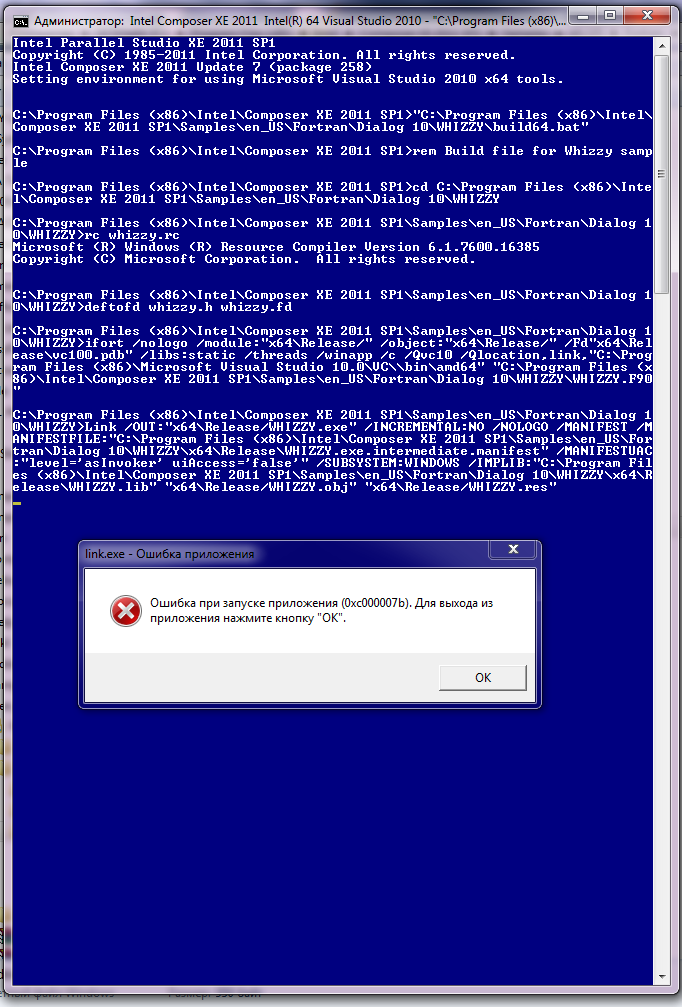
- Mark as New
- Bookmark
- Subscribe
- Mute
- Subscribe to RSS Feed
- Permalink
- Report Inappropriate Content
Ok, thanks. First, please temporarily disable any antivirus program you have installed and try the link again. Many customers find that AV software interferes with linking new executables, as it "looks like" a virus. Usually there is the ability to exclude your development area from the AV checks, and once you do that you can turn the AV software back on.
- Mark as New
- Bookmark
- Subscribe
- Mute
- Subscribe to RSS Feed
- Permalink
- Report Inappropriate Content
I have turning off AV without any success. So, any AV activity plays no matter for error.
By the way, my case is like this: http://social.msdn.microsoft.com/Forums/vstudio/en-US/a12d050e-f745-4bb1-9e81-2d4dd8c74ce8/cant-make-an-x64-library?forum=vcgeneral. And I try to link 64 bit .LIB so, and have the same fail like Lory Ann.
As we know her problem becomes when she install MSVS2010 under MSVS 2008, like me too.
And she has not solve the problem yet, like me too.
I think my prj0019 error for linker is not a problem of some corrupt file, but it is a consequence of some mistake in registry or elsewhere...
So my solution is to format C:; reinstall W 7; MSVS2010 and so on.
- Mark as New
- Bookmark
- Subscribe
- Mute
- Subscribe to RSS Feed
- Permalink
- Report Inappropriate Content
When you see in Visual Studio that it is "executing link", it is really executing xilink, which is an Intel tool that invokes link. Try the following experiment.
Open the C:\Program Files (x86)\Intel\Composer XE\bin\intel64 folder. Rename xilink.exe to be xilink_orig,exe Now copy C:\Program Files (x86)\Microsoft Visual Studio 10.0\VC\bin\amd64\link.exe into the folder where xilink.exe was and rename it to be xilink.exe
Can you build now? This is not a fix, it's just a test.

- Subscribe to RSS Feed
- Mark Topic as New
- Mark Topic as Read
- Float this Topic for Current User
- Bookmark
- Subscribe
- Printer Friendly Page