
- Mark as New
- Bookmark
- Subscribe
- Mute
- Subscribe to RSS Feed
- Permalink
- Report Inappropriate Content
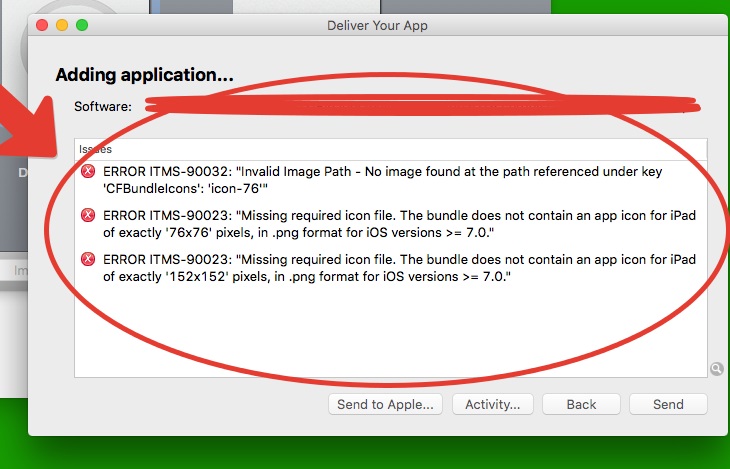
Submitting an app iOS with Application Loader got error missing icons... see attached shot ...
what to do? first time tried do submit... i put all iOS icons in xdk app settings... well
- Tags:
- HTML5
- Intel® XDK

- Mark as New
- Bookmark
- Subscribe
- Mute
- Subscribe to RSS Feed
- Permalink
- Report Inappropriate Content
Did you use PNG images? JPG images will not work. Did you build with CLI 4.1.2 or CLI 5.1.1?
Alternatively, you can add the icons using the intelxdk.config.additions.xml file. See this FAQ entry and this example set of iOS icons (below). In this example set, the pkg directory is inside your www directory:
<!-- iOS icons and splash screens -->
<platform name="ios">
    <!-- iPhone and iPod Touch App Icons -->
    <icon src="pkg/ios/icon.png" width="57" height="57" />
    <icon src="pkg/ios/icon-60.png" width="60" height="60" />
    <icon src="pkg/ios/[email protected]" width="114" height="114" />
    <icon src="pkg/ios/[email protected]" width="120" height="120" />
    <icon src="pkg/ios/[email protected]" width="180" height="180" />
    <!-- iPad, iPad Mini and iPad Pro App Icons -->
    <icon src="pkg/ios/icon-72.png" width="72" height="72" />
    <icon src="pkg/ios/icon-76.png" width="76" height="76" />
    <icon src="pkg/ios/[email protected]" width="144" height="144" />
    <icon src="pkg/ios/[email protected]" width="152" height="152" />
    <!-- Spotlight Icons -->
    <icon src="pkg/ios/icon-40.png" width="40" height="40" />
    <icon src="pkg/ios/icon-60.png" width="60" height="60" />
    <icon src="pkg/ios/[email protected]" width="80" height="80" />
    <icon src="pkg/ios/[email protected]" width="120" height="120" />
    <icon src="pkg/ios/[email protected]" width="180" height="180" />
    <!-- Settings Icons -->
    <icon src="pkg/ios/icon-small.png" width="29" height="29" />
    <icon src="pkg/ios/[email protected]" width="58" height="58" />
    <icon src="pkg/ios/[email protected]" width="87" height="87" />
    <icon src="pkg/ios/icon-50.png" width="50" height="50" />
    <icon src="pkg/ios/[email protected]" width="100" height="100" />

    <!-- iPad Splash Screens -->
    <splash src="pkg/ios/default-portrait~ipad.png" width="768" height="1024"/>
    <splash src="pkg/ios/default-landscape~ipad.png" width="1024" height="768"/>
    <splash src="pkg/ios/default-portrait@2x~ipad.png" width="1536" height="2048"/>
    <splash src="pkg/ios/default-landscape@2x~ipad.png" width="2048" height="1536"/>
    <splash src="pkg/ios/default-portrait~ipad-pro.png" width="2048" height="2732"/>
    <splash src="pkg/ios/default-landscape~ipad-pro.png" width="2732" height="2048"/>
    <!-- iPhone 6 and 6 Plus Splash Screens -->
    <splash src="pkg/ios/default-667h.png" width="750" height="1334"/>
    <splash src="pkg/ios/default-736h.png" width="1242" height="2208"/>
    <splash src="pkg/ios/default-landscape-736h.png" width="2208" height="1242"/>
    <!-- iPhone 5, iPhone 4s, iPhone Retina and iPhone Splash Screens -->
    <splash src="pkg/ios/default~iphone.png" width="320" height="480"/>
    <splash src="pkg/ios/default@2x~iphone.png" width="640" height="960"/>
    <splash src="pkg/ios/default-568h@2x~iphone.png" width="640" height="1136"/>
</platform>
Link Copied
- Mark as New
- Bookmark
- Subscribe
- Mute
- Subscribe to RSS Feed
- Permalink
- Report Inappropriate Content
Did you use PNG images? JPG images will not work. Did you build with CLI 4.1.2 or CLI 5.1.1?
Alternatively, you can add the icons using the intelxdk.config.additions.xml file. See this FAQ entry and this example set of iOS icons (below). In this example set, the pkg directory is inside your www directory:
<!-- iOS icons and splash screens -->
<platform name="ios">
    <!-- iPhone and iPod Touch App Icons -->
    <icon src="pkg/ios/icon.png" width="57" height="57" />
    <icon src="pkg/ios/icon-60.png" width="60" height="60" />
    <icon src="pkg/ios/[email protected]" width="114" height="114" />
    <icon src="pkg/ios/[email protected]" width="120" height="120" />
    <icon src="pkg/ios/[email protected]" width="180" height="180" />
    <!-- iPad, iPad Mini and iPad Pro App Icons -->
    <icon src="pkg/ios/icon-72.png" width="72" height="72" />
    <icon src="pkg/ios/icon-76.png" width="76" height="76" />
    <icon src="pkg/ios/[email protected]" width="144" height="144" />
    <icon src="pkg/ios/[email protected]" width="152" height="152" />
    <!-- Spotlight Icons -->
    <icon src="pkg/ios/icon-40.png" width="40" height="40" />
    <icon src="pkg/ios/icon-60.png" width="60" height="60" />
    <icon src="pkg/ios/[email protected]" width="80" height="80" />
    <icon src="pkg/ios/[email protected]" width="120" height="120" />
    <icon src="pkg/ios/[email protected]" width="180" height="180" />
    <!-- Settings Icons -->
    <icon src="pkg/ios/icon-small.png" width="29" height="29" />
    <icon src="pkg/ios/[email protected]" width="58" height="58" />
    <icon src="pkg/ios/[email protected]" width="87" height="87" />
    <icon src="pkg/ios/icon-50.png" width="50" height="50" />
    <icon src="pkg/ios/[email protected]" width="100" height="100" />

    <!-- iPad Splash Screens -->
    <splash src="pkg/ios/default-portrait~ipad.png" width="768" height="1024"/>
    <splash src="pkg/ios/default-landscape~ipad.png" width="1024" height="768"/>
    <splash src="pkg/ios/default-portrait@2x~ipad.png" width="1536" height="2048"/>
    <splash src="pkg/ios/default-landscape@2x~ipad.png" width="2048" height="1536"/>
    <splash src="pkg/ios/default-portrait~ipad-pro.png" width="2048" height="2732"/>
    <splash src="pkg/ios/default-landscape~ipad-pro.png" width="2732" height="2048"/>
    <!-- iPhone 6 and 6 Plus Splash Screens -->
    <splash src="pkg/ios/default-667h.png" width="750" height="1334"/>
    <splash src="pkg/ios/default-736h.png" width="1242" height="2208"/>
    <splash src="pkg/ios/default-landscape-736h.png" width="2208" height="1242"/>
    <!-- iPhone 5, iPhone 4s, iPhone Retina and iPhone Splash Screens -->
    <splash src="pkg/ios/default~iphone.png" width="320" height="480"/>
    <splash src="pkg/ios/default@2x~iphone.png" width="640" height="960"/>
    <splash src="pkg/ios/default-568h@2x~iphone.png" width="640" height="1136"/>
</platform>
- Mark as New
- Bookmark
- Subscribe
- Mute
- Subscribe to RSS Feed
- Permalink
- Report Inappropriate Content
used
CLI 4.1.2
png used
res/ios/...
the xml file above is in www/ ...?
- Mark as New
- Bookmark
- Subscribe
- Mute
- Subscribe to RSS Feed
- Permalink
- Report Inappropriate Content
resolution i think is 72ppi - i did images in 1080p monitor...
- Mark as New
- Bookmark
- Subscribe
- Mute
- Subscribe to RSS Feed
- Permalink
- Report Inappropriate Content
BTW IS OLD PROJECT XDK Without /www/ folder what to do???
- Mark as New
- Bookmark
- Subscribe
- Mute
- Subscribe to RSS Feed
- Permalink
- Report Inappropriate Content
Since it is an "old" project, your "www" directory is equal to your project root directory. There is an FAQ that explains how to fix that > https://software.intel.com/en-us/xdk/faqs/general#www-folder, I recommend you do this on a copy of your project, not on the original, so you can "go back" in case something goes wrong.
- Mark as New
- Bookmark
- Subscribe
- Mute
- Subscribe to RSS Feed
- Permalink
- Report Inappropriate Content
- Mark as New
- Bookmark
- Subscribe
- Mute
- Subscribe to RSS Feed
- Permalink
- Report Inappropriate Content
You need to move the plugins directory into the root of the new project. Did you follow all the instructions in the FAQ?
- Mark as New
- Bookmark
- Subscribe
- Mute
- Subscribe to RSS Feed
- Permalink
- Report Inappropriate Content
Are you sure? To a new Project is outside the Plugins folder...
Or because is a conversion to "www" folder , have to be inside www folder?
well where the Plugins folder,... in or out the www folder?
- Mark as New
- Bookmark
- Subscribe
- Mute
- Subscribe to RSS Feed
- Permalink
- Report Inappropriate Content
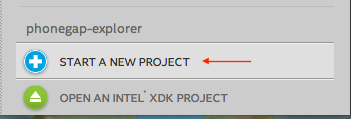
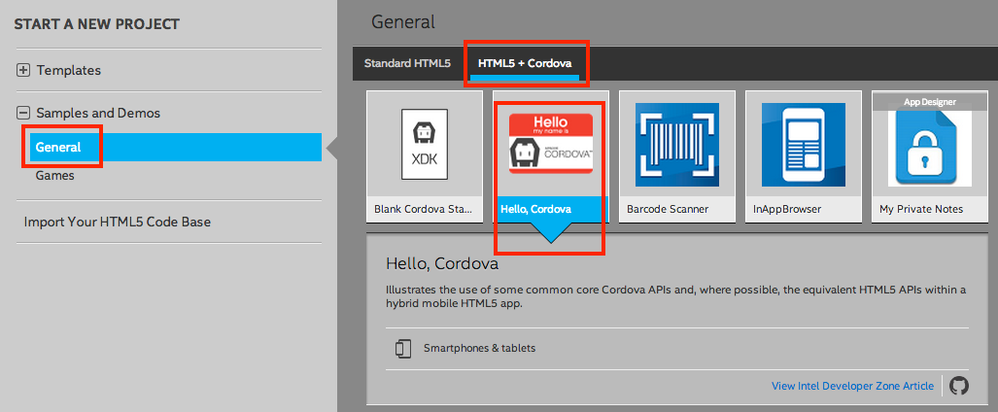
Create a new project based on the "hello-cordova" sample and you'll see how the project directory should be structured.
- Mark as New
- Bookmark
- Subscribe
- Mute
- Subscribe to RSS Feed
- Permalink
- Report Inappropriate Content
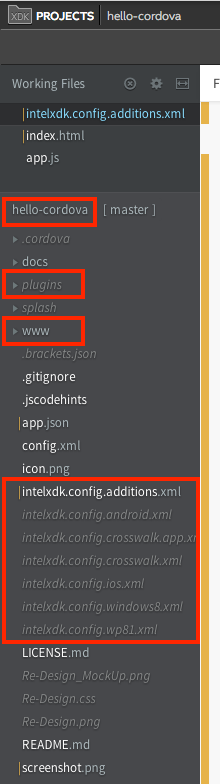
I did and plugins/ is outside... well ?
btw this File Plugin added but deleted may a setting do this...
inside www or outside www,... the PLUGINS FOLDER...?
- Mark as New
- Bookmark
- Subscribe
- Mute
- Subscribe to RSS Feed
- Permalink
- Report Inappropriate Content
plugins belong outside the www directory. Please create a demo project based on the hello cordova app to see how that app is organized:


- Mark as New
- Bookmark
- Subscribe
- Mute
- Subscribe to RSS Feed
- Permalink
- Report Inappropriate Content
ok is outside the www folder
why you say put plugins/ folder inside the www??????????????????
- Mark as New
- Bookmark
- Subscribe
- Mute
- Subscribe to RSS Feed
- Permalink
- Report Inappropriate Content
so how delete File Plugin alert getting in emulator???????????
Plugin added but deleted - not getting alert... posted in #7
- Mark as New
- Bookmark
- Subscribe
- Mute
- Subscribe to RSS Feed
- Permalink
- Report Inappropriate Content
I said to put "the pkg directory is inside your www directory" -- not the plugins directory. In my example (in #2), the pkg directory contains icons and splash screens!!!!!!!!!!
I don't understand what you mean by "Plugin added but deleted" ???? Please clarify.
- Mark as New
- Bookmark
- Subscribe
- Mute
- Subscribe to RSS Feed
- Permalink
- Report Inappropriate Content
I mean in xdk I added File Plugin via project plugins add , before long ago in the old version... but saw that this plugin was NOT so I delete it... i do not remember how deleted it... Now I am getting File Plugin alert in emulator of xdk...? See #7
- Mark as New
- Bookmark
- Subscribe
- Mute
- Subscribe to RSS Feed
- Permalink
- Report Inappropriate Content
well, is it a setting that referring File Plugin...? so remove this code lines...
- Mark as New
- Bookmark
- Subscribe
- Mute
- Subscribe to RSS Feed
- Permalink
- Report Inappropriate Content
same error getting with PNG icons in Application Loader
intelxdk.config.additions.xml try use this???
well?
- Mark as New
- Bookmark
- Subscribe
- Mute
- Subscribe to RSS Feed
- Permalink
- Report Inappropriate Content
same EXACTLY error getting as in 2015-12-07 21-13-20 error xdk app loader.jpg thread #1
I INSERTED THIS >>> IN intelxdk.config.additions.xml THAT I ADDED - NEEDED REFER IT ANYWHERE OR IS FOUND AUTO????
<!-- Change the debuggable preference to true to build a remote CDT debuggable app for -->
<!-- Crosswalk apps on Android 4.0+ devices and Cordova apps on Android 4.4+ devices. -->
<preference name="debuggable" value="false" />
<!-- IMPORTANT: set the debuggable preference to false before you build for the store! -->

<!-- 'value' = number of milliseconds to display the splash screen in a Cordova build. -->
<!-- This preference only affects Cordova builds for Crosswalk and Android. -->
<!-- <preference name="SplashScreenDelay" value="2000" /> -->

<platform name="ios">


    <!-- iPad, iPad Mini and iPad Pro App Icons -->

    <icon src="res/icon/android/icon-72-hdpi.png" width="72" height="72" />

    <icon src="res/ios/76x76.png" width="76" height="76" />

    <icon src="res/ios/144x144.png" width="144" height="144" />

    <icon src="res/ios/152x152.png" width="152" height="152" />


    <!-- below requires the splash screen plugin -->
    <!-- docs: https://github.com/apache/cordova-plugin-splashscreen -->
    <preference name="AutoHideSplashScreen" value="true" />
    <preference name="FadeSplashScreen" value="false"/>
    <preference name="FadeSplashScreenDuration" value="2"/>
    <preference name="ShowSplashScreenSpinner" value="false"/>

    <!-- below requires the status bar plugin -->
    <!-- docs: https://github.com/apache/cordova-plugin-statusbar -->
    <!-- see http://devgirl.org/2014/07/31/phonegap-developers-guid -->
    <preference name="StatusBarOverlaysWebView" value="false" />
    <preference name="StatusBarBackgroundColor" value="#000000" />
    <preference name="StatusBarStyle" value="lightcontent" />
</platform>

<platform name="android">
    <!-- below requires the splash screen plugin -->
    <!-- docs: https://github.com/apache/cordova-plugin-splashscreen -->
    <preference name="SplashMaintainAspectRatio" value="false" />
</platform>

<!-- use this feature to add command-lines to be used by Crosswalk builds on device -->
<!-- see http://peter.sh/experiments/chromium-command-line-switches/ for complete list -->
<intelxdk:crosswalk xwalk-command-line="--disable-pull-to-refresh-effect" />
<!-- ignore gpu blacklist for larger collection of gpu accelerated devices -->
<intelxdk:crosswalk xwalk-command-line="--ignore-gpu-blacklist" />
- Mark as New
- Bookmark
- Subscribe
- Mute
- Subscribe to RSS Feed
- Permalink
- Report Inappropriate Content
Leonidas, sorry, but I'm having trouble helping you and understanding your questions. It would work better if you posted detailed questions in your native language and let me translate those detailed questions. Your English is very hard to understand, it would be better if you posted detailed questions in your native language.
- Mark as New
- Bookmark
- Subscribe
- Mute
- Subscribe to RSS Feed
- Permalink
- Report Inappropriate Content
I giveup my native now only English and second Russian.
Basically tried create www folder, rebuild in xdk , same error in application loader, exactly same error.
Samely created the intelxdk.config.additions.xml above, rebuild, again Nothing changed in error... in application loader...
Error is the atrached as in initial/started post #1 - in this thread sequence... in this page in other words...
Am I clear...

- Subscribe to RSS Feed
- Mark Topic as New
- Mark Topic as Read
- Float this Topic for Current User
- Bookmark
- Subscribe
- Printer Friendly Page