
- Mark as New
- Bookmark
- Subscribe
- Mute
- Subscribe to RSS Feed
- Permalink
- Report Inappropriate Content
Hi team,
My network adapter is Intel(R) Wi-Fi 6E AX210 160MHz, tested drive version is 23.160.0.4.
System is Windows 11 25H2 26200.6899 (not insider).
WLAN band information is from https://en.wikipedia.org/wiki/List_of_WLAN_channels .
I tested some channels in 5.8 GHz (169, 173, 177), but it seems AX210 can't connect to the network which operates in these channel, even they are only a part of the network. Also I have no idea if newer devices (BE200, or others) has fixed this issue or not.
--------------------------------------------------
Here is my test result, the tested network are operated in 160 MHz:
1.Control channel was set to 169 or 173 or 177, adapter can't find the tested network.
It's expected behavior.
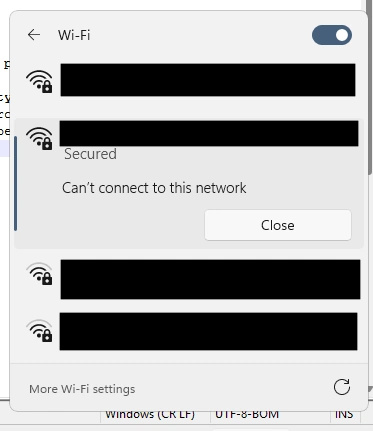
2.Control channel was set to 149 or 153 or 157 or 161 or 165, adapter can find the tested network, but when trying to connect it said it can't connect to this network.
When using other devices (such as smartphone), it can connect to the tested network with 80 MHz (control channel 149, 153, 157, 161) or 20 MHz (control channel 165). I think it's an issue, it should be work even 169 - 177 is in disallowed channel list.
--------------------------------------------------
Feel free to contract for more information, thanks.
Link Copied

- Mark as New
- Bookmark
- Subscribe
- Mute
- Subscribe to RSS Feed
- Permalink
- Report Inappropriate Content
Hello chengr28,
Thank you for posting in Intel Communities.
I'm investigating this internally and will update you with our findings.
Best regards,
JeanetteC.
Intel® Customer Support Technician
- Mark as New
- Bookmark
- Subscribe
- Mute
- Subscribe to RSS Feed
- Permalink
- Report Inappropriate Content
Hello chengr28,
I am still checking internally about this issue you've raised. However, I need the following details below, so I can fully understand and check further the possible cause and provide fix to share:
- Is this a new device and first-time setup and do not allow you to use the mentioned channels?
- Is the Intel® Wi-Fi 6E AX210 a pre-installed component on your system device or is it a replacement part/upgrade component?
- Please help share your system configuration by submitting SSU log file.
- Have you verified your Windows regional settings, if it matched your actual location?
- Have checked your router configuration and consider using channels 36-64 or 100-144 for better AX210 compatibility with 160MHz?
I look forward to your response.
Best regards,
JeanetteC.
Intel® Customer Support Technician
- Mark as New
- Bookmark
- Subscribe
- Mute
- Subscribe to RSS Feed
- Permalink
- Report Inappropriate Content
Hi JeanetteC.,
Below is the result:
1.Is this a new device and first-time setup and do not allow you to use the mentioned channels?
No, this AX210 has been installed more than 4 years and works fine. I just found the issue when tesing my devices (compter, smartpohone, etc.) wireless compatibility. Usually, I use other channels.
2.Is the Intel® Wi-Fi 6E AX210 a pre-installed component on your system device or is it a replacement part/upgrade component?
It's upgrade component, the pre-installed one (not Intel's) has been replaced long time ago.
3.Please help share your system configuration by submitting SSU log file.
Please review in the attachment.
4.Have you verified your Windows regional settings, if it matched your actual location?
No, they aren't. It's set to US in Windows regional settings, but I believe this setting is no problem.
The adapter should work in 80 MHz (149, 153, 157, 161) or 20 MHz (165) when router operating on 160 MHz rather than failed. In fact, AX210 connected successful when router operating on 80 MHz (149, 153, 157, 161) and 20 MHz (165). Please read as below point 5.
5.Have checked your router configuration and consider using channels 36-64 or 100-144 for better AX210 compatibility with 160MHz?
Yes, it's actually what I did. Both 36 - 64 and 100 - 128 work fine. I posted this issue which wants to help to improve Intel adapter compatibility.
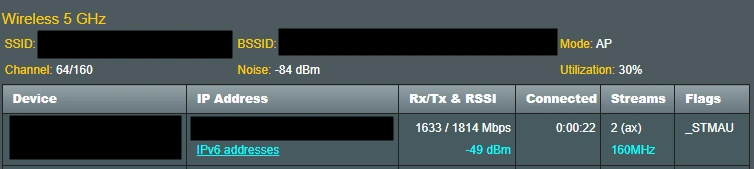
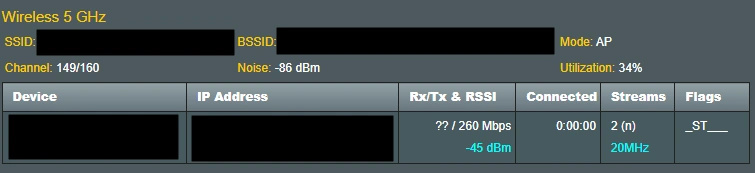
Please review connecting information in the attachment of 36 - 64 and 100 - 128 (132 - 144 can't be used in 160 MHz mode) settings, already remove some hardware serial numbers and network addresses.
(Please note that it seems AX210 has connected in <AX210_149-177_Router_02>, but it showed failed in <AX210_149-177_Windows> indeed.)



- Mark as New
- Bookmark
- Subscribe
- Mute
- Subscribe to RSS Feed
- Permalink
- Report Inappropriate Content
Hi chengr28,
Thank you for your answers and for providing the screenshots.
We're currently looking deeper into the issue and working to identify the root cause. We'll keep you posted with any updates as soon as we have more information.
Thanks for your patience and cooperation. If you have any questions or need anything in the meantime, feel free to reach out.
Best regards,
Kent Russel P.
Intel Customer Support Technician
- Mark as New
- Bookmark
- Subscribe
- Mute
- Subscribe to RSS Feed
- Permalink
- Report Inappropriate Content
Hi chengr28,
I am still checking internally about this issue you've raised. However, I need the following details below, so I can fully understand and check further the possible cause and provide fix to share:
- Is this a new device and first-time setup and do not allow you to use the mentioned channels?
- Is the Intel® Wi-Fi 6E AX210 a pre-installed component on your system device or is it a replacement part/upgrade component?
- Please help share your system configuration by submitting SSU log file.
- Have you verified your Windows regional settings, if it matched your actual location?
- Have checked your router configuration and consider using channels 36-64 or 100-144 for better AX210 compatibility with 160MHz?
If you have any additional questions or need further assistance, please don’t hesitate to contact us.
Best regards,
Kent Russel P.
Intel Customer Support Technician
- Mark as New
- Bookmark
- Subscribe
- Mute
- Subscribe to RSS Feed
- Permalink
- Report Inappropriate Content
Hi Kent,
It seems I had answered above questions few days ago.
I have more information that I think channels 169 - 171 are not in allowed when doing the compatibility test, looks like at this time only US can use them. (unfortunately I have no idea to check if the adapter lists them to blacklist)
I believe it does not affect the result. In my opinion, network adapter should be able to connect adaptively with 20 or 40 or 80 or 160 MHz, whenever some channels are not available. Other devices do, not only channels 169 - 171 but also DFS channels 52 - 64/100 - 144.
Thanks for your response.
- Mark as New
- Bookmark
- Subscribe
- Mute
- Subscribe to RSS Feed
- Permalink
- Report Inappropriate Content
Hello chengr28,
Thank you for pointing that out. I may have missed your earlier response - I appreciate you taking the time to address this again. I am still working on this internally and will share an update as soon as I can.
Best regards,
JeanetteC.
Intel Customer Support Technician
- Mark as New
- Bookmark
- Subscribe
- Mute
- Subscribe to RSS Feed
- Permalink
- Report Inappropriate Content
Hello chengr28,
Kindly proceed to update Intel AX210 Wi-Fi driver to the latest version (23.170.0.1) following clean installation process.
Why the Intel AX210 Cannot Connect at 160MHz:
- The router is currently configured to use 160MHz bandwidth with channels 149-177.
Channel Compatibility Issue:
- Intel AX210 can detect the network because it uses channel 149 (which is supported) to broadcast network information
- However, the 160MHz configuration spans into channels 169-177, which Intel AX210 doesn't support
Supported Channel Ranges for Intel AX210:
- Supported for 160MHz: Channels 36-64 and 100-128 only
- Not Supported: Channels 169-177 (UNII-4 band)
Why Other Devices Work:
- Newer smartphones (released after 2022) support the UNII-4 channels (169-177) that your Intel adapter cannot use
Solution - Router Configuration Change:
To resolve this issue, try to change router's channel bandwidth setting from "160MHz" to "Auto":
- This allows your Intel AX210 to connect at 80MHz instead of 160MHz
- The connection will use only the supported channels (149, 153, 157, 161)
- Will still get good performance, just at 80MHz instead of 160MHz
This change will ensure compatibility while maintaining a stable connection.
If further clarification is needed, please let us know.
Best regards,
JeanetteC.
Intel Customer Support Technician
- Mark as New
- Bookmark
- Subscribe
- Mute
- Subscribe to RSS Feed
- Permalink
- Report Inappropriate Content
Hi JeanetteC.,
Oh, I see. Thanks for your clear answer, but I have some other questions:
- Does the team have any plans to upgrade AX series (AX200, AX210, etc.) to let them support channels 169 - 177?
- Does BE series (such as BE200, launched date is 2023 Q3) support channels 169 - 177?
- If BE series doesn't support channels 169 - 177, are there any plans to support them?
- Mark as New
- Bookmark
- Subscribe
- Mute
- Subscribe to RSS Feed
- Permalink
- Report Inappropriate Content
Hello chengr28,
Thank you for the follow-up questions about channel 169-177 support. I'll need to verify this information internally and will get back to you with the accurate details.
Best regards,
JeanetteC.
Intel Customer Support Technician
- Mark as New
- Bookmark
- Subscribe
- Mute
- Subscribe to RSS Feed
- Permalink
- Report Inappropriate Content
Hello chengr28,
Thank you for your inquiry. After reviewing your concerns, here's what I can share:
Future availability information isn't something we can discuss at this time. UNII-4 channels are not regulated in all countries, so Intel's support for this frequency band depends on your specific region.
We cannot comment on future availability. So far, UNII-4 channels are not regulated in all countries. Intel may or may not support this band for your country.
Please refer to these relevant resources for more information:
- For AX210: https://www.intel.com/content/www/us/en/content-details/841573/modular-regulatory-certification-country-markings-for-intel-wi-fi-6e-ax210-11ax-bt.html
- For BE products: https://www.intel.com/content/www/us/en/support/articles/000098088/wireless.html
Best regards,
JeanetteC.
Intel Customer Support Technician
- Mark as New
- Bookmark
- Subscribe
- Mute
- Subscribe to RSS Feed
- Permalink
- Report Inappropriate Content
Hello chengr28,
Since I haven't received any response from you recently, I will go ahead and close this thread.
Should you need assistance in the future, please submit a new question as this thread will no longer be monitored.
Sincerely,
JeanetteC.
Intel Customer Support Technician

- Subscribe to RSS Feed
- Mark Topic as New
- Mark Topic as Read
- Float this Topic for Current User
- Bookmark
- Subscribe
- Printer Friendly Page