
- Mark as New
- Bookmark
- Subscribe
- Mute
- Subscribe to RSS Feed
- Permalink
- Report Inappropriate Content
I have installed oneAPI basic and HPC toolkit on my macpro, but it seems parallel options and MKL are not installed.
How can I make sure that MKL libraries, openMP and MPI are properly installed?
I am running ./configure script of a package (Quantum Espresso) and it says it can't find any of the corresponding libraries.
I have a MacPro with Big Sur 11.2.2
Thanks,
Link Copied

- Mark as New
- Bookmark
- Subscribe
- Mute
- Subscribe to RSS Feed
- Permalink
- Report Inappropriate Content
Hi Keivan,
There are some prerequisite steps to be done before using of OneAPI tookits.
It would be best if you source setvars.sh script before using OneAPI every time you open a new terminal. This will setup the necessary environment variables and Paths required.
You can find in the install path of OneAPI, which for roots users would be /opt/intel/oneapi.
command : /opt/intel/oneapi/setvars.sh
Refer to this document for Configure Your CPU System (intel.com) for more info.
To check if MPI is installed, try running mpiexec -V.
Let us know if you still face any issues.
Regards
Prasanth
- Mark as New
- Bookmark
- Subscribe
- Mute
- Subscribe to RSS Feed
- Permalink
- Report Inappropriate Content
Thanks Prasanth,
I had sourced setters.sh
after I typed mpiexec -V I get "-bash: mpiexec: command not found"
Is there any specific problem with MacOS?
Is there any test for openmp as well?
thanks,
- Mark as New
- Bookmark
- Subscribe
- Mute
- Subscribe to RSS Feed
- Permalink
- Report Inappropriate Content
Hi Keivan,
There seems to be an error with setavars.sh, or you might be using a different shell other than bash.
You could please provide the output of the command:
echo $SHELL
if it zsh and not /bin/bash
try using bash -c 'source /opt/intel/oneapi/setvars.sh ; exec zsh'
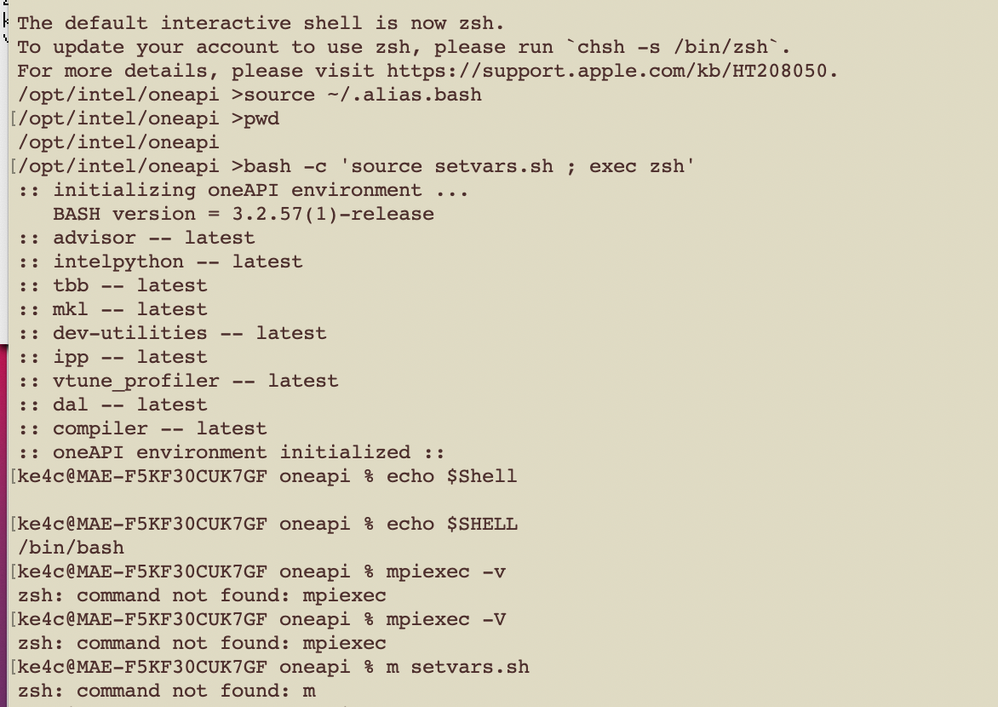
Also, take a screenshot of the setavars.sh output so I can see if there were any errors.
Regards
Prasanth
- Mark as New
- Bookmark
- Subscribe
- Mute
- Subscribe to RSS Feed
- Permalink
- Report Inappropriate Content
- Mark as New
- Bookmark
- Subscribe
- Mute
- Subscribe to RSS Feed
- Permalink
- Report Inappropriate Content
Hi Keivan,
From your setvars output, we can see that MPI has not been initialized. Have you installed both the base toolkit and HPC toolkit?
Is the installation of HPC tookit successful? Were both HPC and Basekit installed in the same path?
Regards
Prasanth
- Mark as New
- Bookmark
- Subscribe
- Mute
- Subscribe to RSS Feed
- Permalink
- Report Inappropriate Content
Hi Keivan,
We haven't heard back from you.
As you can see that your setvars output does not have any HPC toolkit components initialized. We are not sure whether you have the HPC toolkit installed.
Please check your installation once and confirm with us.
Regards
Prasanth
- Mark as New
- Bookmark
- Subscribe
- Mute
- Subscribe to RSS Feed
- Permalink
- Report Inappropriate Content
Hi Keivan,
We are closing this thread assuming your issue has been resolved. We will no longer respond to this thread. If you require additional assistance from Intel, please start a new thread. Any further interaction in this thread will be considered community only.
Regards
Prasanth

- Subscribe to RSS Feed
- Mark Topic as New
- Mark Topic as Read
- Float this Topic for Current User
- Bookmark
- Subscribe
- Printer Friendly Page