
- Отметить как новое
- Закладка
- Подписаться
- Отключить
- Подписка на RSS-канал
- Выделить
- Печать
- Сообщить о недопустимом содержимом
Hi all,
I follow the documents: https://www.intel.com/content/www/us/en/develop/documentation/edge-software-configurator-doc/edge-software-configurator-basics/create-and-manage-virtual-machines/create-virtual-machine-with-new-template.html to create a windows VM by a local windows ISO file. But I can't use this VM in the steps "Select Virtual Machine" in "Add Workload Template" of "Deploy Edge Nodes". Therefore, I can't deploy a Windows VM to a edge node.
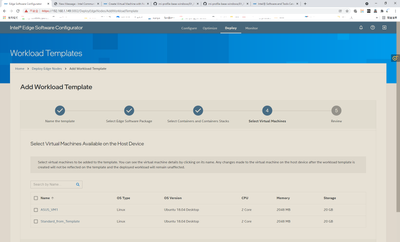
I also found that only the VM created by a default "Virtual Machine Template" ("Ubuntu 18.04 Headless" and "Ubuntu 18.04 Desktop") can be show in the steps "Select Virtual Machine" .
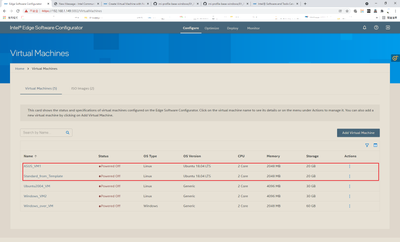
Example: I created 5 VM as below picture, but only two of them can be show in "Add Workload Template Page"
How to make the local created VM can be deployed on the remote edge nodes?
Ссылка скопирована
- Отметить как новое
- Закладка
- Подписаться
- Отключить
- Подписка на RSS-канал
- Выделить
- Печать
- Сообщить о недопустимом содержимом
Hi RWu,
It looks like the other three virtual machines you created are not being properly recognized as the OS Version is listed as "generic". How were these VMs created? Did you disable the "Enable v-GPU" flag in the virtual machine template creation step?
Sincerely,
Sahira
- Отметить как новое
- Закладка
- Подписаться
- Отключить
- Подписка на RSS-канал
- Выделить
- Печать
- Сообщить о недопустимом содержимом
Hi Sahira,
The way I created VM is follow the documents https://www.intel.com/content/www/us/en/develop/documentation/edge-software-configurator-doc/edge-software-configurator-basics/create-and-manage-virtual-machines/create-virtual-machine-with-new-template.html to create our-self VM, the OS Version option we can choose is only "Generic". I am not sure is this limitation or something else.
Best regard,
Kunyang
- Отметить как новое
- Закладка
- Подписаться
- Отключить
- Подписка на RSS-канал
- Выделить
- Печать
- Сообщить о недопустимом содержимом
Hi Kunyang,
I am looking into this for you and will respond as soon as possible.
Sincerely,
Sahira
- Отметить как новое
- Закладка
- Подписаться
- Отключить
- Подписка на RSS-канал
- Выделить
- Печать
- Сообщить о недопустимом содержимом
Hi Sahira,
Is any update we can follow ?
Best regard,
- Отметить как новое
- Закладка
- Подписаться
- Отключить
- Подписка на RSS-канал
- Выделить
- Печать
- Сообщить о недопустимом содержимом
Hi Kunyang,
There is no update from the Engineering team yet, but I will let you know as soon as there is.
Sincerely,
Sahira
- Отметить как новое
- Закладка
- Подписаться
- Отключить
- Подписка на RSS-канал
- Выделить
- Печать
- Сообщить о недопустимом содержимом
Hi Kunyang,
It looks like the "Add Workload Template" functionality is currently only supported for the original template in Edge Software Configurator. For VMs that are created using an ISO image, it won't be listed in the "Add Workload Template". This is a known limitation but will be made available in the next ESC release.
I hope this is helpful.
Sincerely,
Sahira

- Подписка на RSS-канал
- Отметить тему как новую
- Отметить тему как прочитанную
- Выполнить отслеживание данной Тема для текущего пользователя
- Закладка
- Подписаться
- Страница в формате печати