
- Mark as New
- Bookmark
- Subscribe
- Mute
- Subscribe to RSS Feed
- Permalink
- Report Inappropriate Content
Hi, first of all I would like to thank Intel for producing a great network card. Thanks also to MSI for using this excellent network card in their excellent motherboard.
I'm using the MAG Z690 TOMAHAWK WIFI DDR5 model. I just recently built my computer. The I225-V is really a nuisance. Since the first day I built the computer, even though I tested all the drivers of Windows 10-Windows 11 and tried functions such as turning off the power management, it never came to a solution. As a last resort, I'm thinking of sending the motherboard back and getting a new one. This will be a bit of a hassle for me.
Isn't there a solution to this?
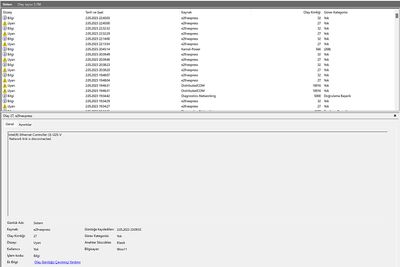
Intel(R) Ethernet Controller (3) I225-V
Network link is disconnected.
Intel(R) Ethernet Controller (3) I225-V
Network link has been established at 1Gbps full duplex.
Driver Version: 2.1.3.3
Windows 11 build version: Windows 11 Pro 22H2 22621.1555
Bios version: AMI BIOS7D32vHB
Cable Modem: Cat8
Internet connection speed: 1gb/2.5gb? 1Gbit
Speed & Duplex: Have you configure to auto or match your internet connection speed? 1.0 Gbps
Note: I even changed the modem in the process. I bought a new modem.
Link Copied
- « Previous
- Next »
- Mark as New
- Bookmark
- Subscribe
- Mute
- Subscribe to RSS Feed
- Permalink
- Report Inappropriate Content
My issue was the network cable. After I switched it to an older cable my dropped connection stopped. Hope this helps.

- Mark as New
- Bookmark
- Subscribe
- Mute
- Subscribe to RSS Feed
- Permalink
- Report Inappropriate Content

- Subscribe to RSS Feed
- Mark Topic as New
- Mark Topic as Read
- Float this Topic for Current User
- Bookmark
- Subscribe
- Printer Friendly Page
- « Previous
- Next »