
- 신규로 표시
- 북마크
- 구독
- 소거
- RSS 피드 구독
- 강조
- 인쇄
- 부적절한 컨텐트 신고
Hi
Lately I have been starting to use Zoom for video conferencing like many of us. I wanted to use the virtual background feature that Zoom offers while displaying myself in Zoom.
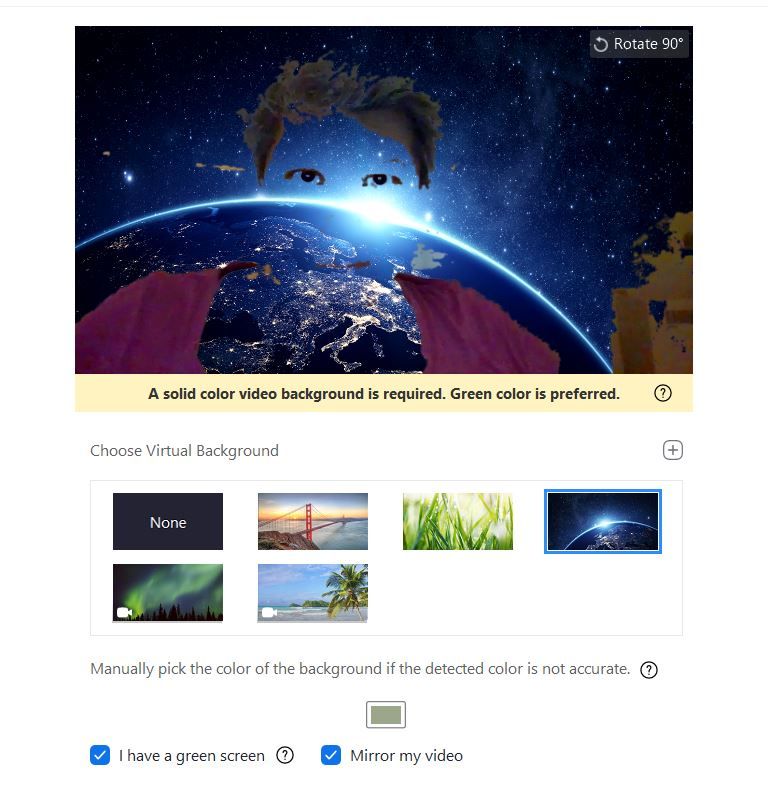
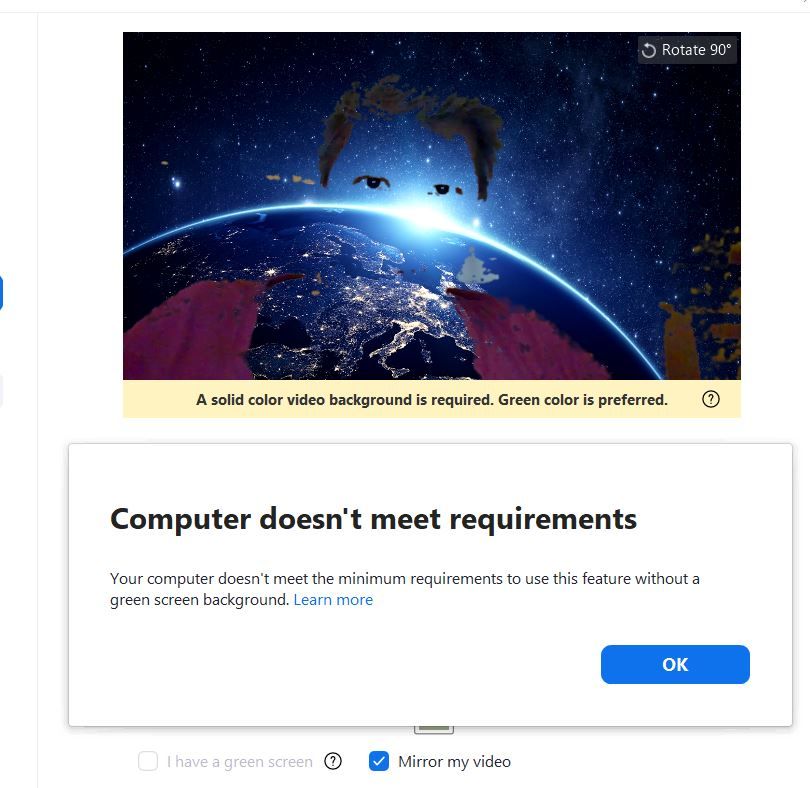
Generally Zoom will allow you to add a virtual background to your own video image without the need for a green screen. For some reason the Zoom website claims that for those that use the intel 620 HD display adapter this option is not available due to compatibility issues.
It seems like a driver issue. I have a relatively strong machine - HP elitebook 1040 g4 with an i7-7500U processor and 16GB of RAM.
Is there a ( or maybe a future) solution available for this?
Zoom becomes more and more widely used these Corona days. Besides the drawback I experience as a 620 HD user, I believe making Zoom's feature set fully available to such a widely used display adapter is of much importance.

- 신규로 표시
- 북마크
- 구독
- 소거
- RSS 피드 구독
- 강조
- 인쇄
- 부적절한 컨텐트 신고
Hi everyone,
Intel and Zoom* worked together to enable the Zoom Virtual Background feature for millions of people using Intel® UHD Graphics users. This update is available now with the release of Zoom version 5.0.3 and Intel Graphics Drivers 26.20.100.7637 or later.
To provide the best user experience, this virtual background feature is enabled only on systems with intel® UHD Graphics 620 or later.
Best Regards,
Ronald M.
링크가 복사됨
- 신규로 표시
- 북마크
- 구독
- 소거
- RSS 피드 구독
- 강조
- 인쇄
- 부적절한 컨텐트 신고
Hi everyone
Roland M, Wanner G and NLucz
i would first like to thank everyone who came aboard making the resolving
of this matter advance, while I was too busy to do so.
Please let me know if you still need the information Wanner G asked me
for
thank you again
Saar B.P

- 신규로 표시
- 북마크
- 구독
- 소거
- RSS 피드 구독
- 강조
- 인쇄
- 부적절한 컨텐트 신고
Thank goodness i found this thread. i am also experiencing the same exact issues that both SBP00 and NLucz.
i cannot wait for an update, as it is sheer envy that everyone else can have the Zoom Virtual Background, but not us it seems
Notebook - HP EliteBook 840 G5
Windows 10 Enterprise 64-bit Version: 17763.1098
Running Zoom version 4.6.17409
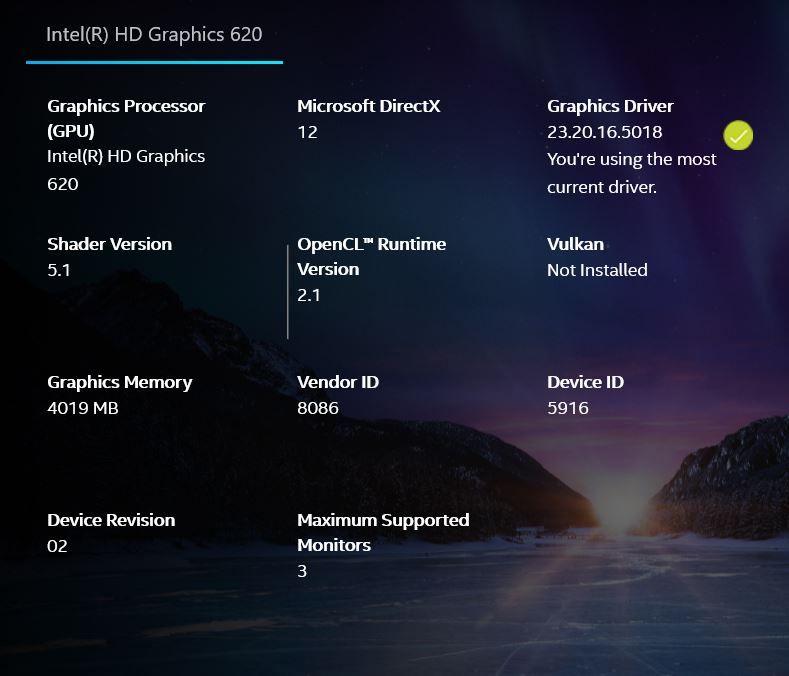
I cant even update any driver, as there seems to be none (i have the latest according to the Intel Command Centre)
Please help. Thank you
- 신규로 표시
- 북마크
- 구독
- 소거
- RSS 피드 구독
- 강조
- 인쇄
- 부적절한 컨텐트 신고
Hi Ronald
Has there been any update from the team yet please?
Thanks
J

- 신규로 표시
- 북마크
- 구독
- 소거
- RSS 피드 구독
- 강조
- 인쇄
- 부적절한 컨텐트 신고
Dear Intel support,
same Problem here - I am using a Lenovo T470s with Intel HD 620 and it's not possible to use the virtual background in Zoom. Unfortunately the Zoom support doesn't reply to my support request.
See attached a screenshot of GPU-Z for more details of my GPU:
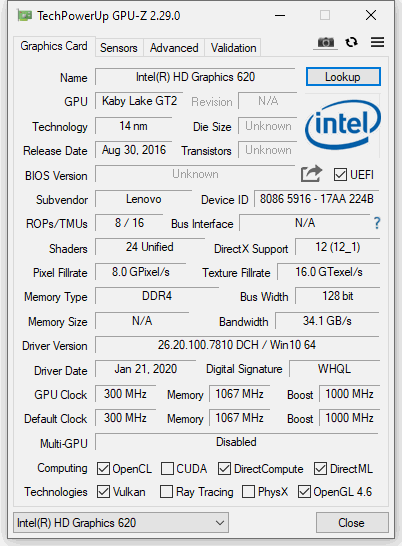
It seems to be a problem of the GPU version - colleagues using a Lenovo T490 don't have difficulties:
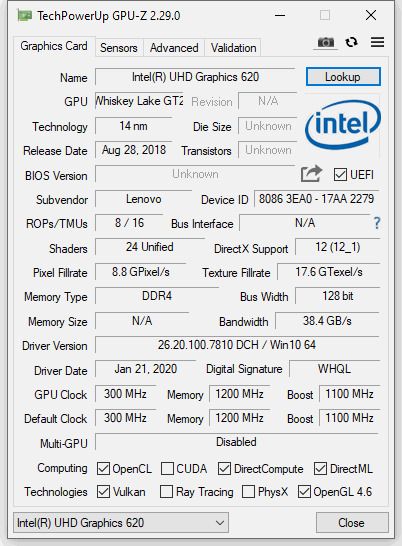
Hope that helps?

- 신규로 표시
- 북마크
- 구독
- 소거
- RSS 피드 구독
- 강조
- 인쇄
- 부적절한 컨텐트 신고
Any update from Intel would be appreciated. In our small business every user with a Thinkpad T470s is affected by this issue, and they are using the Intel 620 graphics chipset

- 신규로 표시
- 북마크
- 구독
- 소거
- RSS 피드 구독
- 강조
- 인쇄
- 부적절한 컨텐트 신고
I am having the same problem on a Surface Pro 3 with HD Graphics 620. System info:
Time of this report: 4/29/2020, 17:55:09
Operating System: Windows 10 Pro 64-bit (10.0, Build 18362) (18362.19h1_release.190318-1202)
Language: English (Regional Setting: English)
System Manufacturer: Microsoft Corporation
System Model: Surface Pro
BIOS: 234.2706.768 (type: UEFI)
Processor: Intel(R) Core(TM) i5-7300U CPU @ 2.60GHz (4 CPUs), ~2.7GHz
Memory: 8192MB RAM

- 신규로 표시
- 북마크
- 구독
- 소거
- RSS 피드 구독
- 강조
- 인쇄
- 부적절한 컨텐트 신고
I'm experiencing the same issue with Zoom on Linux. Here are the setup details:
- Dell Latitude 5300
- Intel(R) Core(TM) i7-8665U CPU
- Ubuntu 18.04
- Kernel: 5.3.0-46-generic #38~18.04.1-Ubuntu SMP Tue Mar 31 04:17:56 UTC 2020 x86_64 x86_64 x86_64 GNU/Linux
- Zoom: 5.0.398100.0427
- 신규로 표시
- 북마크
- 구독
- 소거
- RSS 피드 구독
- 강조
- 인쇄
- 부적절한 컨텐트 신고
Xorg intel driver: xserver-xorg-video-intel-hwe-18.04 2:2.99.917+git20171229-1ubuntu1~18.04.1

- 신규로 표시
- 북마크
- 구독
- 소거
- RSS 피드 구독
- 강조
- 인쇄
- 부적절한 컨텐트 신고
Dear Intel support,
I am having the same problem with Zoom virtual backgrounds on Lenovo ideapad FLEX 5-1470 System Model:"80XA" with HD Graphics 620
System info:
Operating System:Microsoft Windows 10 Home 64-bit (10.0, Build 18362)
BIOS Mode:"UEFI" BIOS Version/Date:"LENOVO 4QCN51WW(V2.15) , 11/19/2019"
"Processor" -"Intel(R) Core(TM) i7-7500U CPU @ 2.70GHz"
Architecture:"x64"
Caption:"Intel64 Family 6 Model 142 Stepping 9"
"Chipset Name":"Intel(R) Core(TM) i7-7500U CPU @ 2.70GHz"
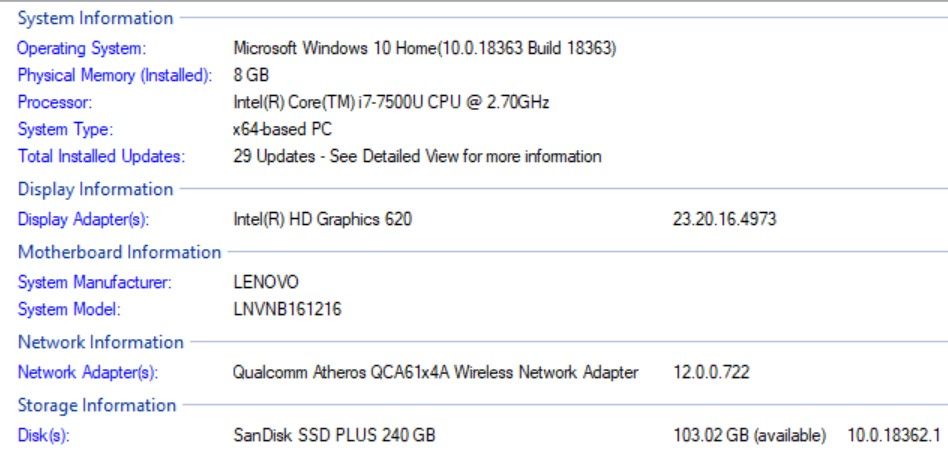
All other Info hereunder attached in "Intel SSU Scan Detailed View.txt" and DxDiag Report.txt
Kind Regards
Ron
- 신규로 표시
- 북마크
- 구독
- 소거
- RSS 피드 구독
- 강조
- 인쇄
- 부적절한 컨텐트 신고
I hacked a way in to make it work. I searched the registery for "HD Graphics 620" and changed it to "HD Graphics 621". Zoom works just fine now.
- 신규로 표시
- 북마크
- 구독
- 소거
- RSS 피드 구독
- 강조
- 인쇄
- 부적절한 컨텐트 신고
The thing this tells me is that whatever problem Zoom was having seems to be fixed in the latest driver. The funny thing is, Device Manager still shows it as a "Intel HD Graphic 620".
- 신규로 표시
- 북마크
- 구독
- 소거
- RSS 피드 구독
- 강조
- 인쇄
- 부적절한 컨텐트 신고
Rfior,
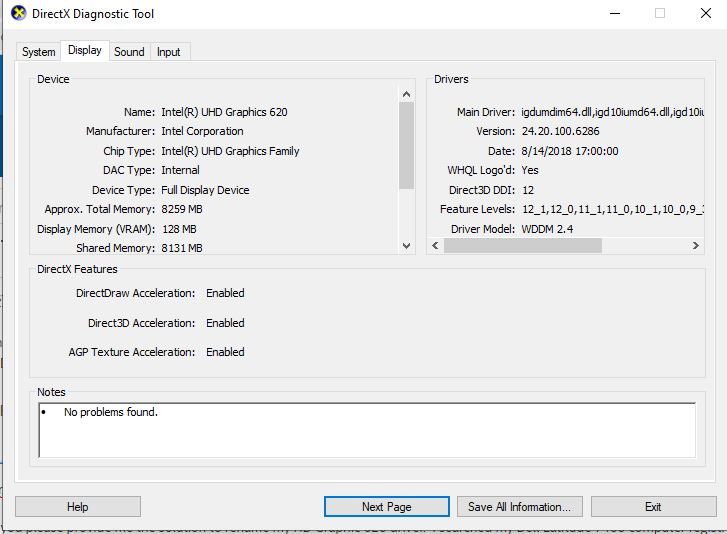
Can you please provide me the solution to rename my HD Graphic 620 driver. I searched my Dell Latitude 7490 computer registry and cannot seems to find the Intel HD Graphic 620 registry. I ran the dxdiagnostics and confirmed that my computer is running the Intel HD Graphic 620. Please see picture attached picture. Your help is much appreciated.

- 신규로 표시
- 북마크
- 구독
- 소거
- RSS 피드 구독
- 강조
- 인쇄
- 부적절한 컨텐트 신고
Hi,
I was excited to read your post as I have an Intel HD Graphic 620. Could you tell me in detail how you changed your 620 to a 621? By doing this you now can use the Zoom virtual background?
I have not heard back from INTEL with a fix for this problem.
Best,
Nancy

- 신규로 표시
- 북마크
- 구독
- 소거
- RSS 피드 구독
- 강조
- 인쇄
- 부적절한 컨텐트 신고
I recommend against these kind of hacks. When you have problems in the future, and contact Intel support, make sure you tell them what you did.
Doc (not an Intel employee or contractor)
- 신규로 표시
- 북마크
- 구독
- 소거
- RSS 피드 구독
- 강조
- 인쇄
- 부적절한 컨텐트 신고
I understand the risks, and proceeded with RFior's solution. It worked fine. Thank you!

- 신규로 표시
- 북마크
- 구독
- 소거
- RSS 피드 구독
- 강조
- 인쇄
- 부적절한 컨텐트 신고
Are there any specific registry keys to change? There seems to be a lot of "HD Graphics 620" when I try to search for it in the registry. Thanks!
- 신규로 표시
- 북마크
- 구독
- 소거
- RSS 피드 구독
- 강조
- 인쇄
- 부적절한 컨텐트 신고
I think it was like 10 entries. I did not do them 1 by 1, so I am not sure which one did the trick.
- 신규로 표시
- 북마크
- 구독
- 소거
- RSS 피드 구독
- 강조
- 인쇄
- 부적절한 컨텐트 신고
It works! I just renamed all "HD Graphics 620" found in the registry. Perhaps return it back to original once Intel or Zoom fix the issue.
- 신규로 표시
- 북마크
- 구독
- 소거
- RSS 피드 구독
- 강조
- 인쇄
- 부적절한 컨텐트 신고
Can you please share how you renamed all of your HD Graphics 620 registry keys. I cannot seem to find them on my Dell Latitude 7490 computer eventhough its the video driver installed.
