
- Mark as New
- Bookmark
- Subscribe
- Mute
- Subscribe to RSS Feed
- Permalink
- Report Inappropriate Content
Hello,
I have the ARC A770 GPU 16 GB edition, with the latest drivers (from early june, WHQL)
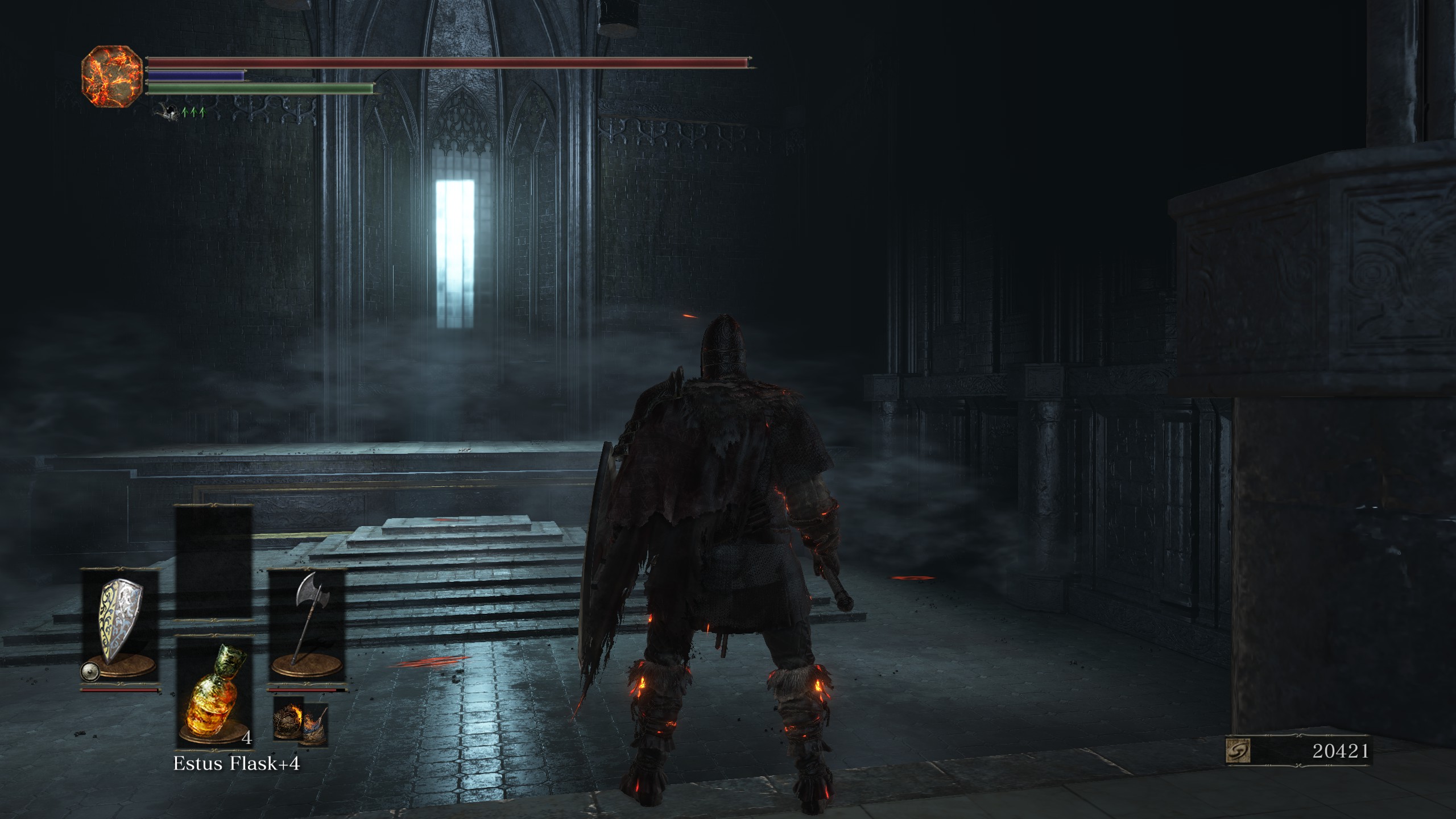
In the game dark souls 3, in areas that have windows and light, depending on the camera angle there are graphical corruption and the light on the window is shown in square patches.
I have included screenshots to make it clearer.
I can answer additional questions if needed.
Link Copied

- Mark as New
- Bookmark
- Subscribe
- Mute
- Subscribe to RSS Feed
- Permalink
- Report Inappropriate Content
Hello Eliot96,
Thank you for posting in Intel community Forum.
For me to further check this, please help provide the following details:
- Are you using an Intel brand Arc A770?
- Was it working fine before?
- If yes, what was the last change made in the system before the issue started?
- What are the troubleshooting steps that you tried so far?
If you have questions, please let us know. Thank you.
Best regards,
Michael L.
Intel Customer Support Technician
- Mark as New
- Bookmark
- Subscribe
- Mute
- Subscribe to RSS Feed
- Permalink
- Report Inappropriate Content
Hello,
I forgot to mention, but I am on windows 11.
1) Yes, I am using the Intel brand , 16 GB limited edition Arc A770
2) It wasn't working before, last I played this game almost a year ago, it had the same glitches
3) N/A
4) Other than reinstall drivers, and update drivers I have also tried DXVK dlls , and they seem to add some missing light effects that I didn't know existed, but doesn't fix this particular issue
Thank you
- Mark as New
- Bookmark
- Subscribe
- Mute
- Subscribe to RSS Feed
- Permalink
- Report Inappropriate Content
Hello Eliot96,
Thank you for the update.
Can you try to install the latest Graphics driver using DDU method and let's see if that will fix the issue?
Please refer to the links below for the steps and the latest driver update:
How to Use the Display Driver Uninstaller (DDU) to Uninstall an...
Intel® Arc™ & Iris® Xe Graphics - Windows*
Also, please check the BIOS of your motherboard if it is updated to the latest.
If you have questions, please let us know. Thank you.
Best regards,
Michael L.
Intel Customer Support Technician
- Mark as New
- Bookmark
- Subscribe
- Mute
- Subscribe to RSS Feed
- Permalink
- Report Inappropriate Content
Hello Eliot96,
I hope this message finds you well.
Were you able to check the previous post?
Please let us know if you still need assistance.
Best regards,
Michael L.
Intel Customer Support Technician
- Mark as New
- Bookmark
- Subscribe
- Mute
- Subscribe to RSS Feed
- Permalink
- Report Inappropriate Content
Hello,
I have the latest Bios for my motherboard.
it was quite a bit of hassle but I used DDU and reinstalled the drivers.
It is the same as before.
I believe this is a drivers issue, as using dxvk dlls adds some additional effects such as light or flame that were missing and I didn't even know, which for me shows that it's more of an intel driver issue.
Technically the base drivers are missing some other effects on dark souls 3 that I wasn't aware of before trying dxvk.
Thank you.
- Mark as New
- Bookmark
- Subscribe
- Mute
- Subscribe to RSS Feed
- Permalink
- Report Inappropriate Content
Hello Eliot96,
Thank you for the update.
For me to further investigate and simulate this issue, please help provide the following details:
- Please provide the screenshot of the game settings.
- Please help generate the SSU logs of your system, kindly refer to the link below on how to generate the logs:
How to get the Intel® System Support Utility Logs on Windows*
If you have questions, please let us know. Thank you.
Best regards,
Michael L.
Intel Customer Support Technician
- Mark as New
- Bookmark
- Subscribe
- Mute
- Subscribe to RSS Feed
- Permalink
- Report Inappropriate Content
Hello,
Thank you for the reply.
I have provided screenshots of the game settings, as well as intel logs.
Thank you
- Mark as New
- Bookmark
- Subscribe
- Mute
- Subscribe to RSS Feed
- Permalink
- Report Inappropriate Content
Hello Eliot96,
Thank you for the information provided.
I will do further research on this matter and post the response on this thread once it is available.
If you have questions, please let us know. Thank you.
Best regards,
Michael L.
Intel Customer Support Technician
- Mark as New
- Bookmark
- Subscribe
- Mute
- Subscribe to RSS Feed
- Permalink
- Report Inappropriate Content
Hello Eliot96,
I hope you are having a good day.
By the way, for documentation and possible simulation of the issue. What is your game launcher, or which digital platform did you use to obtain the game?
If you have questions, please let us know. Thank you.
Best regards,
Michael L.
Intel Customer Support Technician
- Mark as New
- Bookmark
- Subscribe
- Mute
- Subscribe to RSS Feed
- Permalink
- Report Inappropriate Content
Hello,
I am good thank you, hope you are having a good day as well Mike.
I got the game on steam, and launching it through steam.
Thank you.
- Mark as New
- Bookmark
- Subscribe
- Mute
- Subscribe to RSS Feed
- Permalink
- Report Inappropriate Content
Hello Eliot96,
Thank you for asking, I am doing fine also.
I will simulate this issue and post an update on this thread once it is available.
If you have questions, please let us know. Thank you.
Best regards,
Michael L.
Intel Customer Support Technician
- Mark as New
- Bookmark
- Subscribe
- Mute
- Subscribe to RSS Feed
- Permalink
- Report Inappropriate Content
Hello Eliot96,
I hope you are having a good day.
I just want to update you that we attempted to replicate the issue, however, it appears it may take some time to reach the exact location shown in their screenshot. Because of this, let me try and request for the following:
- Can you confirm if there is a save file you can share with me, as reaching that location requires considerable time?
- Is there a quicker method to access the location? If yes, can you share some guide?
- Does this issue occur only in specific locations or maps? What about other stages, such as the first stage and subsequent stages of the game?
If you have questions, please let us know. Thank you.
Best regards,
Michael L.
Intel Customer Support Technician
- Mark as New
- Bookmark
- Subscribe
- Mute
- Subscribe to RSS Feed
- Permalink
- Report Inappropriate Content
Hello,
1) You can find a SL120 save file on nexus mods, it would be much easier to download from there than to share my save file, that might have identifying information. Here is the link https://www.nexusmods.com/darksouls3/mods/203
2) If you have a sl120 save file, you can teleport to any bonefire.
- It is visible in the area with the windows and knights , upstairs, then right, from the Distant Manor Bonefire . You start from distant manor bonefire, go upstairs, and follow the lake to the right in the cave, then to the end of the cave you have another staricase on the right, follow that and you will find this zone after you traverse this room. But there are enemies here, but with a sl120 and a fire weapon they should pose no problem. or you can try to sprint through the enemies.
- Or a safer area with no enemies is the DarkMoon Tomb. To get there start from the Anor Londo bonefire then go down on the staircase (turn the lever on) then you have a invisible wall you have to attack. This area might be the easiest to access as there are no enemies there.
Here is a video on how to get there , look rather from about 1 minute in, the start of the video is another area. Start from the Anor Londo bonefire, and behind you there is a staircase, you have to pull the lever if it's not up, and in the staircase turn a lever to get it down.
https://www.youtube.com/watch?v=ZanwhyVEb_U
3) This issue happens in areas with certain windows types and light coming through them, or some areas with flames such as candles or on some enemies.
I have noticed it in multiple areas (see previous post) but not at the start of the game, as there are no such windows to my knowledge at the very start of the game.
Hope this new information is useful and can help you diagnose it.

- Mark as New
- Bookmark
- Subscribe
- Mute
- Subscribe to RSS Feed
- Permalink
- Report Inappropriate Content
Hello Eliot96,
Thank you for providing this useful information to assist with further investigation of the issue. I will update you as soon as more information is available.
Regards
JeanetteC.
Intel Customer Support Technician



- Mark as New
- Bookmark
- Subscribe
- Mute
- Subscribe to RSS Feed
- Permalink
- Report Inappropriate Content
Hello Eliot96,
I wanted to inform you that we have successfully replicated the issue you reported, and we will be forwarding this information to our development team.
We are committed to keeping you updated and will provide further information in this thread as soon as we have more details from our investigation.
Thank you for your patience and understanding.
Best regards,
Norman S.
Intel Customer Support Engineer

- Subscribe to RSS Feed
- Mark Topic as New
- Mark Topic as Read
- Float this Topic for Current User
- Bookmark
- Subscribe
- Printer Friendly Page