
- Mark as New
- Bookmark
- Subscribe
- Mute
- Subscribe to RSS Feed
- Permalink
- Report Inappropriate Content
Hello, Im used the Cinema 4D at Windows 8, after that i upgrade to 8.1 and then to Windows 10 my Cinema 4D start to getting error
I have a Intel HD Graphics Family in my notebook. Cinema write that is problem with Graphics card -
Problem : ig7icd64.dll. Please help me
- Tags:
- Intel® HD Graphics
Link Copied

- Mark as New
- Bookmark
- Subscribe
- Mute
- Subscribe to RSS Feed
- Permalink
- Report Inappropriate Content
Hi ZenPaul,
Verify if you have the latest drivers provided with your laptop manufacturer website. It is necessary to update the Chipset (INF), Management Engine driver and graphics driver.
If problem continues, reply with laptop brand name and model and processor model. Please run our tool Intel® System Support Utility and send me the results.
https://downloadcenter.intel.com/download/25293/Intel-System-Support-Utility Download Intel® System Support Utility
Regards,
Mike C
- Mark as New
- Bookmark
- Subscribe
- Mute
- Subscribe to RSS Feed
- Permalink
- Report Inappropriate Content
Hellom, Thank you for your answer, i Download The Intel Driver Update Utility and the result said that i have everythink updated. But the problem continues.
There are the result from Intel System super Utility :
<?xml version="1.0"?>
1.0.1.5
01. 19. 2016
00:00:44.2590868
<Detai...
- Mark as New
- Bookmark
- Subscribe
- Mute
- Subscribe to RSS Feed
- Permalink
- Report Inappropriate Content
Hi ZenPaul,
The graphics support for Intel® Celeron™ 1007U is limited. Windows® 10 graphics drivers are provided with Windows® 10 updates.
4th generation or higher processors are suggested for Windows® 10.
Make sure your operating system and drivers are up to date.
Regards,
Mike C
- Mark as New
- Bookmark
- Subscribe
- Mute
- Subscribe to RSS Feed
- Permalink
- Report Inappropriate Content
I have everythink updated... So you mean that i have to buy a higher procesor ? I cant unnistal Win10 from NTB ... Because i used upgrade ...
- Mark as New
- Bookmark
- Subscribe
- Mute
- Subscribe to RSS Feed
- Permalink
- Report Inappropriate Content
Hi ZenPaul,
The graphics driver update is going to be released by Windows® 10 update. Hopefully the next version will solve your issue.
Regards,
Mike C


- Mark as New
- Bookmark
- Subscribe
- Mute
- Subscribe to RSS Feed
- Permalink
- Report Inappropriate Content
Good morning
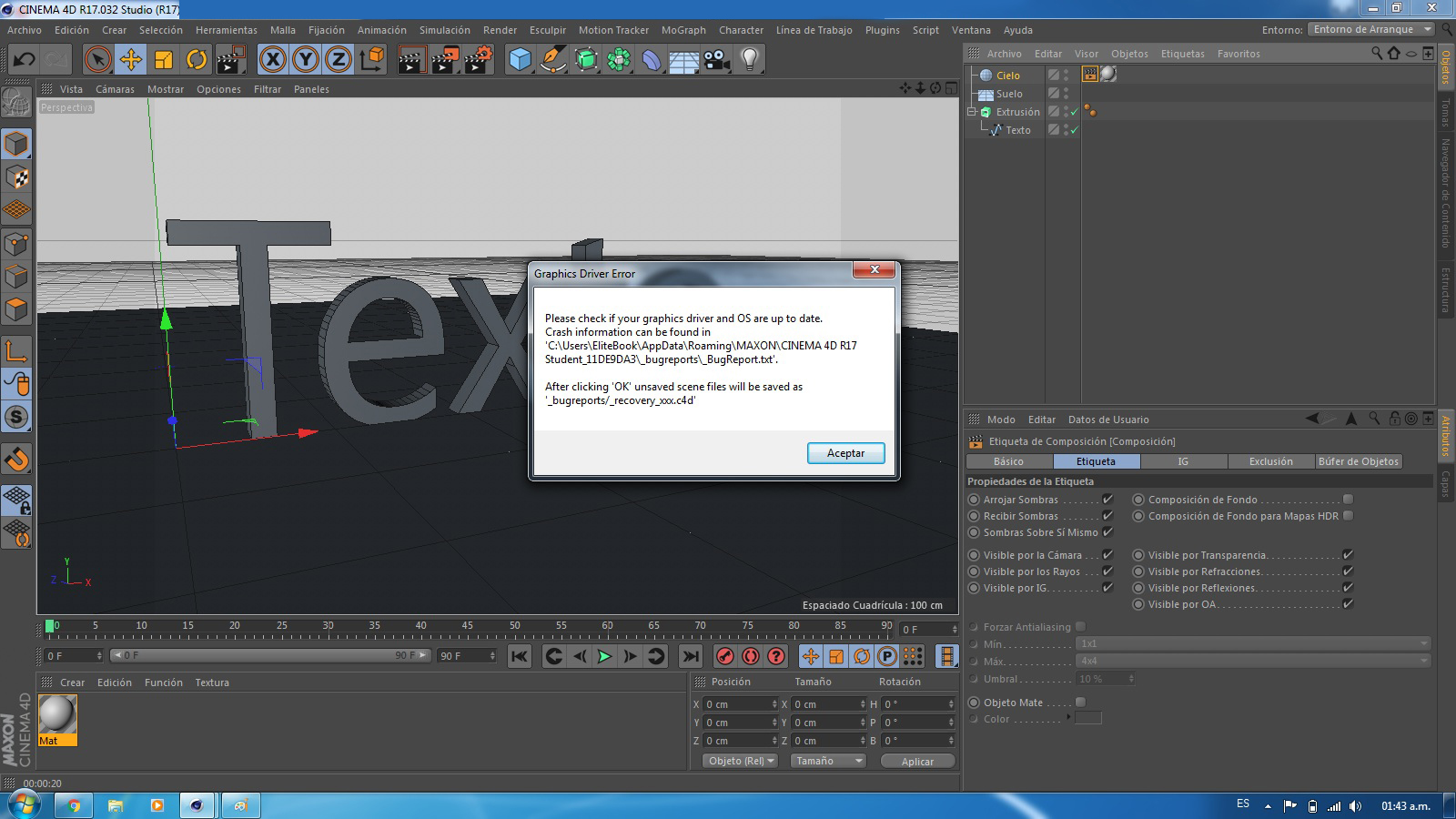
Happens to me the same in Cinema 4D, I have an HD 4000 and intel ig7icd64.dll error still occurs.
I have updated Windows 10, and the video driver to version "win64_153342" Intel® HD Graphics Driver for Windows 7 *, 8.1 *, 10 (3rd Gen & BYT) of 1/21/2016.
What can I do?
Help!
Sorry for my English ... I'm from Colombia
- Mark as New
- Bookmark
- Subscribe
- Mute
- Subscribe to RSS Feed
- Permalink
- Report Inappropriate Content
Hi roothdw,
Verify if you have the latest drivers provided with your laptop manufacturer website. It is necessary to update the Chipset (INF), Management Engine driver and graphics driver.
Uninstall and delete the current graphics driver then, run Windows® 10 update.
Regards,
Mike C
- Mark as New
- Bookmark
- Subscribe
- Mute
- Subscribe to RSS Feed
- Permalink
- Report Inappropriate Content
Good morning
I installed Windows 7 and still has the same error.
What can I do?
Help!
- Mark as New
- Bookmark
- Subscribe
- Mute
- Subscribe to RSS Feed
- Permalink
- Report Inappropriate Content
Hi roothdw,
I would like to clarify the processor model of your notebook and the type of graphics embedded on it.
The system has an Intel® Celeron® 1007U (2M Cache, 1.50 GHz) with the basic Intel® HD Graphics; it is different to HD Graphics 2000, 2500, 4000 or later.
The Asus X550CA notebook is available with the processor models and graphics as follow
https://www.asus.com/Notebooks/X550CA/specifications/ https://www.asus.com/Notebooks/X550CA/specifications/
Intel® Core™ i7 3537U Processor - Intel® HD Graphics 4000
Intel® Core™ i5 3337U Processor - Intel® HD Graphics 4000
Intel® Core™ i3 3217U Processor - Intel® HD Graphics 4000
Intel® ULV Pentium® 2117U Processor - Intel® HD Graphics
Intel® Celeron® 1007U Processor - Intel® HD Graphics
Latest drivers for Intel® Celeron™ 1007U, Intel® HD Graphics
Windows® 7: Version V9.17.10.2963.01,
Note: If you want to upgrade your OS from Win 7 to Win 8, to prevent software compatibility issue, please uninstall the older version driver before install the newer version driver.
Windows® 8: Version V9.17.10.2932.01
Note: If you want to upgrade your OS from Win 7 to Win 8, to prevent software compatibility issue, please uninstall the older version driver before install the newer version driver.
Windows® 8.1: Version V10.18.10.3308.02
Note: "Prior to Windows 8.1 upgrade, please run Windows Update and install ALL updates, including optional updates, to minimize the risk of incompatibility.
After the upgrade, please run Windows Update again. If you still experience issue with this device, please install this driver. (This driver is for Windows 8.1 upgrade.)"
Windows® 10: The operating system will search and install the latest video driver available.
The drivers are available on Asus website, sort by operating system.
https://www.asus.com/Notebooks/X550CA/HelpDesk_Download/ X550CA | Notebooks | ASUS Global
Please remember to uninstall and delete the previous graphics driver.
Regards,
Mike C
- Mark as New
- Bookmark
- Subscribe
- Mute
- Subscribe to RSS Feed
- Permalink
- Report Inappropriate Content
Hi there
I had Windows 10 I get that error, so I decided to install Windows 7 but the error continues
HP EliteBook 8470p
Intel Core i5 3360M 2.8 Ghz
8 GB RAM DDR3
HD 4000
What can I do?
Help!
- Mark as New
- Bookmark
- Subscribe
- Mute
- Subscribe to RSS Feed
- Permalink
- Report Inappropriate Content
Hi roothdw,
Please run our Intel® System Support Utility and reply with the results. I will try to help you.
https://downloadcenter.intel.com/download/25293/Intel-System-Support-Utility Download Intel® System Support Utility
Regards,
Mike C
- Mark as New
- Bookmark
- Subscribe
- Mute
- Subscribe to RSS Feed
- Permalink
- Report Inappropriate Content
Hello
Here the results in Windows 7
Thanks!
- Mark as New
- Bookmark
- Subscribe
- Mute
- Subscribe to RSS Feed
- Permalink
- Report Inappropriate Content
Hello
Here the results in Windows 10
Thanks!
- Mark as New
- Bookmark
- Subscribe
- Mute
- Subscribe to RSS Feed
- Permalink
- Report Inappropriate Content
Hi roothdw,
I noted you have the BIOS version F.31 on your HP EliteBook 8470p. According to your manufacturer website the latest BIOS version is F.62.
I suggest you to install the latest BIOS and reinstall all the drivers and firmware using Hewlett Packard website.
http://h20564.www2.hp.com/hpsc/swd/public/readIndex?sp4ts.oid=5212910&swLangOid=8&swEnvOid=4060 http://h20564.www2.hp.com/hpsc/swd/public/readIndex?sp4ts.oid=5212910&swLangOid=8&swEnvOid=4060
Regards,
Miguel C
- Subscribe to RSS Feed
- Mark Topic as New
- Mark Topic as Read
- Float this Topic for Current User
- Bookmark
- Subscribe
- Printer Friendly Page