
- Mark as New
- Bookmark
- Subscribe
- Mute
- Subscribe to RSS Feed
- Permalink
- Report Inappropriate Content
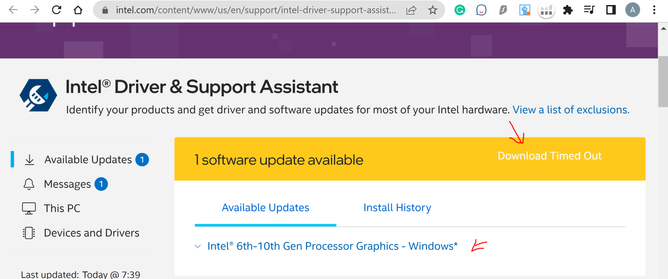
I tried downloading it multiple times in different ways but ran into the same error. I'm running Windows 10. I keep getting a message that I have an update from Intel and when I try to download I have this error. Tried different browsers and also with and without VPN but no luck. Appreciate it if someone could respond with a working solution. Thanks much in advance.

- Mark as New
- Bookmark
- Subscribe
- Mute
- Subscribe to RSS Feed
- Permalink
- Report Inappropriate Content
Intel updated the download link for the new driver, but apparently not yet in IDSA
Try here (unless you have a Skylake processor):
Link Copied
- Mark as New
- Bookmark
- Subscribe
- Mute
- Subscribe to RSS Feed
- Permalink
- Report Inappropriate Content
Intel updated the download link for the new driver, but apparently not yet in IDSA
Try here (unless you have a Skylake processor):
- Mark as New
- Bookmark
- Subscribe
- Mute
- Subscribe to RSS Feed
- Permalink
- Report Inappropriate Content
Thanks! It worked.

- Mark as New
- Bookmark
- Subscribe
- Mute
- Subscribe to RSS Feed
- Permalink
- Report Inappropriate Content
Hello learner999,
Thank you for posting on the Intel️® communities. We are glad to know that the issue is solved after following the recommendations from @Stefan3D.
However, we would like to further investigate this matter internally. If you would like to help us research this matter internally, you can share with us the following:
- Provide us with the Intel DSA folders you shared. Take a look at the article "How to Obtain the Intel® Driver & Support Assistant (Intel® DSA) Folders?" and follow either method to get the folders.
- Create a report using the Intel®️ System Support Utility (Intel®️ SSU)
- Open the application and click "Scan" to see the system and device information. By default, Intel®️ SSU will take you to the "Summary View."
- Click on the menu where it says: "Summary" to change it to "Detailed View."
- To save your scan: click "Next"; then "Save."
Best regards,
Jean O.
Intel Customer Support Technician
- Mark as New
- Bookmark
- Subscribe
- Mute
- Subscribe to RSS Feed
- Permalink
- Report Inappropriate Content
Hello learner999,
We hope you are doing fine.
Were you able to check the previous post?
Let us know if you still need assistance.
Best regards,
Jean O.
Intel Customer Support Technician
- Mark as New
- Bookmark
- Subscribe
- Mute
- Subscribe to RSS Feed
- Permalink
- Report Inappropriate Content
Hello learner999,
We hope you are doing fine.
We have not heard back from you. So we will close this thread. If you need any additional information, submit a new question, as this thread will no longer be monitored.
Best regards.
Jean O.
Intel Customer Support Technician.

- Subscribe to RSS Feed
- Mark Topic as New
- Mark Topic as Read
- Float this Topic for Current User
- Bookmark
- Subscribe
- Printer Friendly Page