
- Mark as New
- Bookmark
- Subscribe
- Mute
- Subscribe to RSS Feed
- Permalink
- Report Inappropriate Content
Intel HD Graphics driver 8.15.10.2622
Windows 7 i5 64bit
8 gigs ram
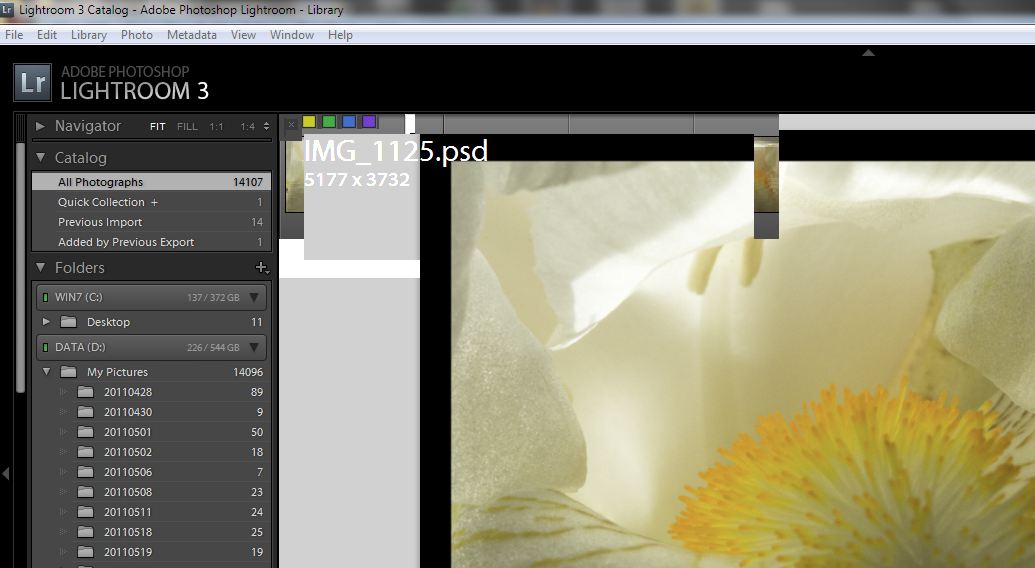
When I use Adobe LR4 I get this.
Here is my Intel info
Intel® HD Graphics (Core i5) Report Date: 3/28/2012Report Time[hr:mm:ss]: 9:45:13Driver Version: 8.15.10.2622Operating System: Windows 7 Service Pack 1(6.1.7601)Default Language: English (United States)DirectX* Version: 10.1Physical Memory: 8079 MBMinimum Graphics Memory: 32 MBMaximum Graphics Memory: 1696 MBGraphics Memory in Use: 145 MBProcessor: Intel64 Family 6 Model 37 Stepping 2Processor Speed: 3200 MHzVendor ID: 8086Device ID: 0042Device Revision: 12 * Accelerator Information * Accelerator in Use: Intel(R) HD GraphicsVideo BIOS: 1914.0Current Graphics Mode: 1920 by 1200 * Devices Connected to the Graphics Accelerator * Active Digital Displays: 1* Digital Display * Monitor Name: Generic PnP MonitorDisplay Type: DigitalGamma Value: 2.2DDC2 Protocol: Supported Maximum Image Size:Horizontal: 20.47 inchesVertical: 12.60 inches Monitor Supported Modes:640 by 480 (67 Hz)640 by 480 (72 Hz)640 by 480 (75 Hz)640 by 480 (60 Hz)720 by 400 (70 Hz)800 by 600 (72 Hz)800 by 600 (75 Hz)800 by 600 (56 Hz)800 by 600 (60 Hz)832 by 624 (75 Hz)1024 by 768 (75 Hz)1024 by 768 (70 Hz)1024 by 768 (60 Hz)1280 by 1024 (60 Hz)1280 by 960 (60 Hz)1280 by 1024 (75 Hz)1440 by 900 (60 Hz)1600 by 1200 (60 Hz)1920 by 1200 (60 Hz) Display Power Management Support:Standby Mode: Not SupportedSuspend Mode: Not SupportedActive Off Mode: Supported Raw EDID:00 FF FF FF FF FF FF 00 30 61 B2 24 01 01 01 01 23 12 01 03 80 34 20 78 2E EF 95 A3 54 4C 9B 26 0F 50 54 BF EF 00 95 00 A9 40 81 80 81 40 01 01 01 01 01 01 01 01 28 3C 80 A0 70 B0 23 40 30 20 36 00 06 44 21 00 00 1A 00 00 00 FD 00 37 4B 18 53 11 00 0A 20 20 20 20 20 20 00 00 00 FF 00 32 42 30 33 38 33 35 30 30 30 35 38 0A 00 00 00 FC 00 4C 61 43 69 65 20 33 32 34 0A 20 20 20 01 85 02 03 10 70 47 05 04 02 03 07 06 01 83 01 00 00 01 1D 80 18 71 1C 16 20 58 2C 25 00 06 24 21 00 00 9A D6 09 80 A0 20 E0 2D 10 10 60 A2 00 B0 44 11 00 00 18 01 1D 00 72 51 D0 1E 20 6E 28 55 00 06 24 21 00 00 1E 8C 0A D0 8A 20 E0 2D 10 10 3E 96 00 06 24 21 00 00 18 02 3A 80 18 71 38 2D 40 58 2C 45 00 06 24 21 00 00 1E 00 00 00 00 00 00 00 00 00 00 00 00 00 00 00 00 00 00 00 00 00 4F * Other names and brands are the property of their respective owners. *- Tags:
- Data Sheets
Link Copied

- Mark as New
- Bookmark
- Subscribe
- Mute
- Subscribe to RSS Feed
- Permalink
- Report Inappropriate Content
Hello,
I suggest you to test our generic version 8.15.10.2656 posted on the following site:
http://downloadcenter.intel.com/SearchResult.aspx?lang=eng&ProductFamily=Graphics&ProductLine=Processor+graphics&ProductProduct=2nd+Generation+Intel%C2%AE+Core%E2%84%A2+Processors+with+Intel%C2%AE+HD+Graphics+3000/2000&ProdId=3319&LineId=3310&FamilyId=39 http://downloadcenter.intel.com/SearchResult.aspx?lang=eng&ProductFamily=Graphics&ProductLine=Processor+graphics&ProductProduct=2nd+Generation+Intel%C2%AE+Core%E2%84%A2+Processors+with+Intel%C2%AE+HD+Graphics+3000/2000&ProdId=3319&LineId=3310&FamilyId=39
I addition, close any other applications that could be running on the background and load any patches and updates for the Adobe LR4. Furthermore, check with the software developer to make sure that the system meets the minimum requirements to run this application and for any additional troubleshooting assistance.
- Mark as New
- Bookmark
- Subscribe
- Mute
- Subscribe to RSS Feed
- Permalink
- Report Inappropriate Content
I tried it and got a message saying my computer doesn't meet requirements but I can't figure out why.
- Mark as New
- Bookmark
- Subscribe
- Mute
- Subscribe to RSS Feed
- Permalink
- Report Inappropriate Content
Hello,
Try using the driver posted here:
If the issue persists, check with your computer manufacturer to see if your system features switchable graphics. If so, then obtain a driver directly from your system manufacturer since the generic drivers will not work for your computer.
- Mark as New
- Bookmark
- Subscribe
- Mute
- Subscribe to RSS Feed
- Permalink
- Report Inappropriate Content
I just got the same system doesn't meet requirements message.
This is the reply from the manufacturer Asus however I haven't asked them about the switchable graphics.
Dear Valued Customer, Thank you for contacting ASUS Technical Service. This is related to software problem.Please contact Adobe and Microsoft for further check. Sorry for the trouble. Wish you a good day. If you continue to experience issues in the future, please do not hesitate to contact us again.Best Regards,CherryASUS Global Technical Support Center- Mark as New
- Bookmark
- Subscribe
- Mute
- Subscribe to RSS Feed
- Permalink
- Report Inappropriate Content
I am having the same issue!
http://forum-en.msi.com/index.php?topic=158066.0 http://forum-en.msi.com/index.php?topic=158066.0
Picture of the issue.
http://i122.photobucket.com/albums/o269/frozenfireside/Screenissues.jpg http://i122.photobucket.com/albums/o269/frozenfireside/Screenissues.jpg
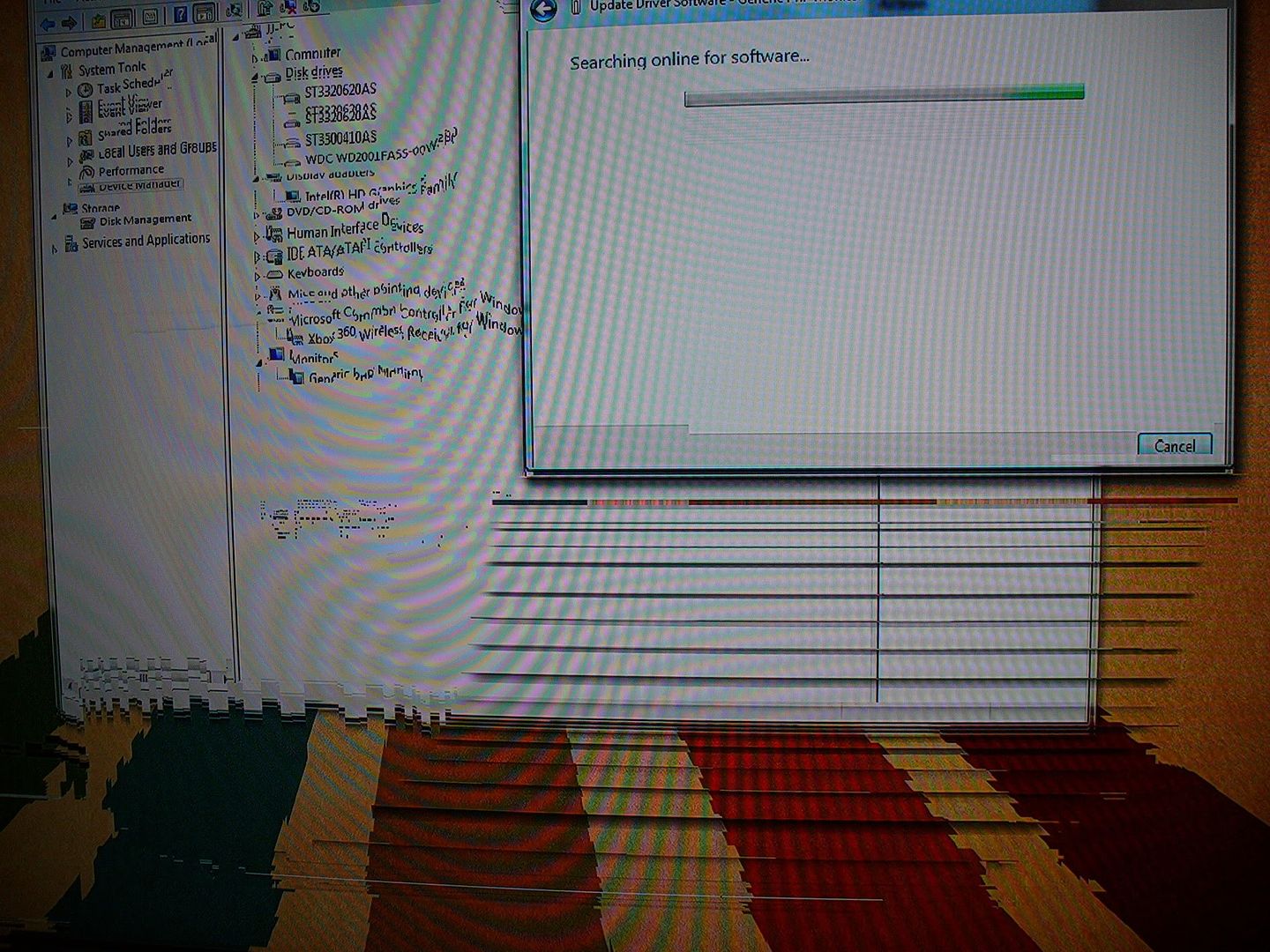
It's not a RAM issue-Checked the RAM with memtest
it's not a GPu issue-occurs with or without the GPu
it's not a motherboard-different motherboard, same issue
I think it's the CPU!

- Subscribe to RSS Feed
- Mark Topic as New
- Mark Topic as Read
- Float this Topic for Current User
- Bookmark
- Subscribe
- Printer Friendly Page