
- Mark as New
- Bookmark
- Subscribe
- Mute
- Subscribe to RSS Feed
- Permalink
- Report Inappropriate Content
im having issues trying to run gta5 on fiveM servers tried a few servers and each gives me same crash error at 64% loading in game each time ! gta 5 also crashed mid 2 mission and im just on low-med setting nothing crazy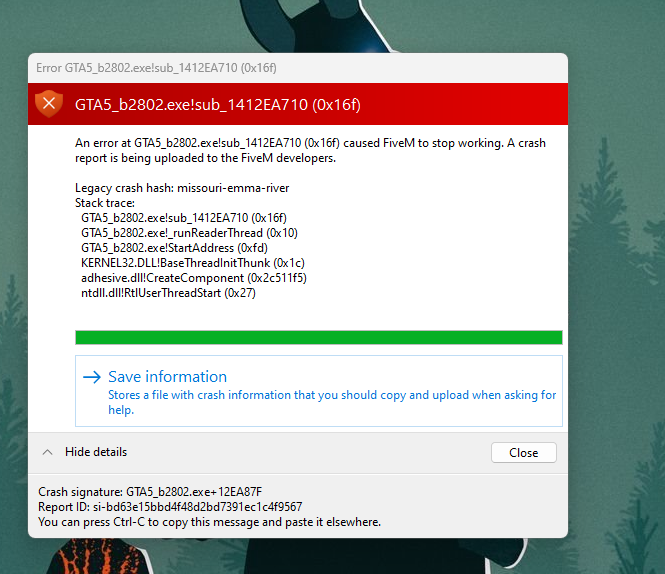
Link Copied

- Mark as New
- Bookmark
- Subscribe
- Mute
- Subscribe to RSS Feed
- Permalink
- Report Inappropriate Content
Hello ThePurgeGoblin,
Thank you for posing in the Intel Communities. We understand you are having issues when playing GTA5 and joining FiveM servers. We will help you with the problem you are experiencing.
To better support your issue, please provide us with the following:
- As per my understanding, the FiveM servers seem to be community servers. Does the problem occur when joining official servers?
- Have you reached out to FiveM support or a game developer regarding this issue?
- You mentioned that the game crashed. Was this crash when playing the Vanilla game (official version)?
- What is the game distribution service? ( Blizzard, Epic, Origin, Steam, Xbox, Ubisoft connect)
- We would like to gather more information about your system that will help us troubleshoot your issue, so please, provide us with a report using the following programs:
- Intel®️ System Support Utility (Intel®️ SSU)
- Download the Intel SSU
- Open the application and click "Scan" to see the system and device information. By default, Intel®️ SSU will take you to the "Summary View."
- Click on the menu where it says: "Summary" to change it to "Detailed View."
- To save your scan: click "Next"; then "Save."
- Intel® Graphics Command Center:
- Open the Intel Graphics Command Center
- Navigate to the Support tab
- Select System Diagnostic
- Click Generate Report
- Select Save and name the output file.
Best regards,
Jean O.
Intel Customer Support Technician
- Mark as New
- Bookmark
- Subscribe
- Mute
- Subscribe to RSS Feed
- Permalink
- Report Inappropriate Content
Hello ThePurgeGoblin,
We hope you are doing fine.
Were you able to check the previous post?
Let us know if you still need assistance.
Best regards,
Jean O.
Intel Customer Support Technician
- Mark as New
- Bookmark
- Subscribe
- Mute
- Subscribe to RSS Feed
- Permalink
- Report Inappropriate Content
i went to do a screen recorder and the game ran !

- Mark as New
- Bookmark
- Subscribe
- Mute
- Subscribe to RSS Feed
- Permalink
- Report Inappropriate Content
- Mark as New
- Bookmark
- Subscribe
- Mute
- Subscribe to RSS Feed
- Permalink
- Report Inappropriate Content
Hello ThePurgeGoblin,
Thanks for your response.
We are glad to know that the game is now working as expected. Since the thread is now solved, we will close it. If you need any additional information, please submit a new question, as this thread will no longer be monitored.
Best regards,
Jean O.
Intel Customer Support Technician
- Mark as New
- Bookmark
- Subscribe
- Mute
- Subscribe to RSS Feed
- Permalink
- Report Inappropriate Content
how do I fix it too??

- Subscribe to RSS Feed
- Mark Topic as New
- Mark Topic as Read
- Float this Topic for Current User
- Bookmark
- Subscribe
- Printer Friendly Page