
- Mark as New
- Bookmark
- Subscribe
- Mute
- Subscribe to RSS Feed
- Permalink
- Report Inappropriate Content
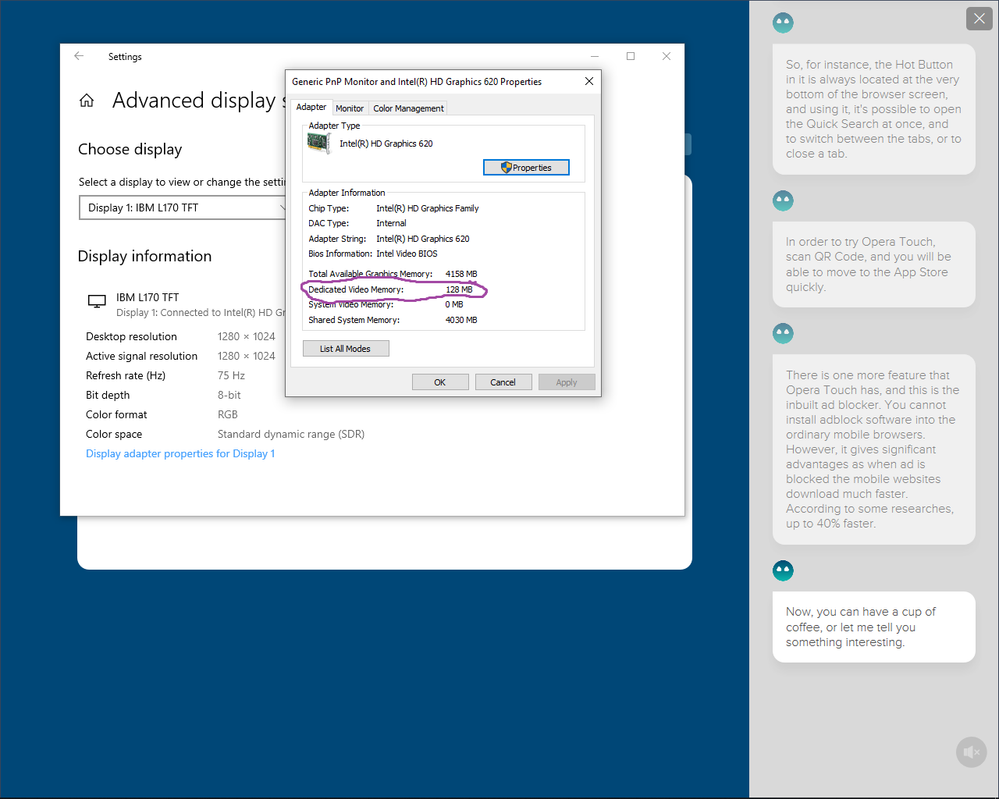
My VRam decreases from 512 mb to 128 mb after installing windows, I have windows 10 enterprise 64 bit, My procesor is intel hd graphics 620, and i have 8gb of ram ddr4. I searched all the internet and youtube to find a solution i tried all the stuff i could nothing worked, and my bios settings doesnt allow me to change anything that has memory usage! PLEASE HELP ME!
Link Copied

- Mark as New
- Bookmark
- Subscribe
- Mute
- Subscribe to RSS Feed
- Permalink
- Report Inappropriate Content
How long did it take to search "all of the internet"?
There is nothing wrong with your set. Read this: https://www.intel.com/content/www/us/en/support/articles/000020962/graphics-drivers.html
Doc

- Mark as New
- Bookmark
- Subscribe
- Mute
- Subscribe to RSS Feed
- Permalink
- Report Inappropriate Content
Al is correct; this is how it should be. Up to half (i.e. ~4GB) of system memory will be dynamically allocated to support graphics operations.
...S
- Mark as New
- Bookmark
- Subscribe
- Mute
- Subscribe to RSS Feed
- Permalink
- Report Inappropriate Content
how can it be correct if i have 128 mb of dedicated video memory instead of 512 mb, i bought the laptop 3 years ago and it had 512 mb of dedicated video memory, i used it 3 years like that and now i reinstalled windows and has dropped to 128, how can that be corret!
- Mark as New
- Bookmark
- Subscribe
- Mute
- Subscribe to RSS Feed
- Permalink
- Report Inappropriate Content
You are confusing dedicated video memory (which is limited and controlled by the bios) with system video memory (which will use upto 50% of your system memory).
You have no problems. You just think you do.
Doc
- Mark as New
- Bookmark
- Subscribe
- Mute
- Subscribe to RSS Feed
- Permalink
- Report Inappropriate Content
i am not confusing any memory , there i had 512 mb and now i have 128 mb how could i confuse thi?
- Mark as New
- Bookmark
- Subscribe
- Mute
- Subscribe to RSS Feed
- Permalink
- Report Inappropriate Content
Ignoring for the moment that you obviously don't understand the difference, what is your actual problem? Is something not working? Is something not working as well? What? The numbers being different is NOT a problem.
...S
- Mark as New
- Bookmark
- Subscribe
- Mute
- Subscribe to RSS Feed
- Permalink
- Report Inappropriate Content
Ok, then you need to contact the manufacturer of your device and or Microsoft. Intel did not make your motherboard or bios, which controls the DEDICATED video memory. That, or Microsoft is misreporting it.
Either way, this is not an Intel problem.
Doc
- Mark as New
- Bookmark
- Subscribe
- Mute
- Subscribe to RSS Feed
- Permalink
- Report Inappropriate Content
Ok i will try thanks for the help!
- Mark as New
- Bookmark
- Subscribe
- Mute
- Subscribe to RSS Feed
- Permalink
- Report Inappropriate Content
And, in your search on all of the internet, do not start making registry changes.
Doc
- Mark as New
- Bookmark
- Subscribe
- Mute
- Subscribe to RSS Feed
- Permalink
- Report Inappropriate Content
- Mark as New
- Bookmark
- Subscribe
- Mute
- Subscribe to RSS Feed
- Permalink
- Report Inappropriate Content
Well, that's better. This is what you should have said in your problem description! Coming here and saying nothing more than "the numbers are different, help me" wasn't going to get you any sympathy.
...S
- Mark as New
- Bookmark
- Subscribe
- Mute
- Subscribe to RSS Feed
- Permalink
- Report Inappropriate Content
- Mark as New
- Bookmark
- Subscribe
- Mute
- Subscribe to RSS Feed
- Permalink
- Report Inappropriate Content
No, it is not obvious. Any game that requires this kind of reservation has a horrible bug in it. You shouldn't be asking us how to make them work; you should be telling the game designers to fit their damned bugs.
...S
- Mark as New
- Bookmark
- Subscribe
- Mute
- Subscribe to RSS Feed
- Permalink
- Report Inappropriate Content
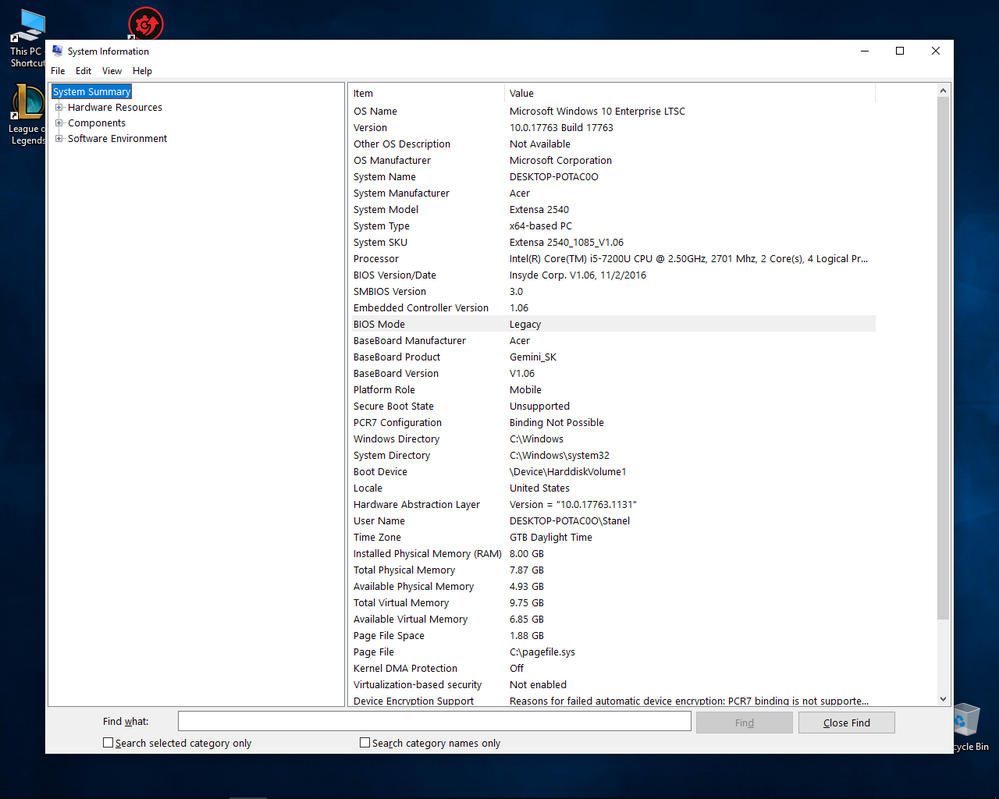
What is the model number of your laptop?
Have you updated the bios on your laptop?
What version of windows 10? 1909?
What OS did you have before installing Windows 10?
Doc
- Mark as New
- Bookmark
- Subscribe
- Mute
- Subscribe to RSS Feed
- Permalink
- Report Inappropriate Content
these are the informations you asked for, no, I didn't updated my bios, i dont know what OS i had before windows instalation!
- Mark as New
- Bookmark
- Subscribe
- Mute
- Subscribe to RSS Feed
- Permalink
- Report Inappropriate Content
"no, I didn't updated my bios, i dont know what OS i had before windows instalation!"
These are two important pieces of information, especially your previous OS.
Also, you are not on the current version of W10. Update from here:
https://www.microsoft.com/en-us/software-download/windows10
Doc
- Mark as New
- Bookmark
- Subscribe
- Mute
- Subscribe to RSS Feed
- Permalink
- Report Inappropriate Content
my OS before instalation was exactly the same as the one i have now!
- Mark as New
- Bookmark
- Subscribe
- Mute
- Subscribe to RSS Feed
- Permalink
- Report Inappropriate Content
Ok, it is difficult extracting information from you. What was the reason for installing the same OS?
If you have w10 ltsc 17763, what version did you have before?
If you have 8gb now, how much did you have before?
If you have an Acer board now, what board did you have before?
And, from what I can see, your bios is far out of date.
You really need to contact Acer to get your bios updated. And, you need to answer the questions above.
Doc
- Mark as New
- Bookmark
- Subscribe
- Mute
- Subscribe to RSS Feed
- Permalink
- Report Inappropriate Content
im updating the bios right now
the reason for installing the same OS is because my HDD died and i replaced it!
i always had 8 gb not less... not more
i had exactly the same windows version as now
- Mark as New
- Bookmark
- Subscribe
- Mute
- Subscribe to RSS Feed
- Permalink
- Report Inappropriate Content
Well, if the bios does not fix it, then this is a good question for microsoft. As I said, Intel did not make the board or the bios.
Doc

- Subscribe to RSS Feed
- Mark Topic as New
- Mark Topic as Read
- Float this Topic for Current User
- Bookmark
- Subscribe
- Printer Friendly Page