
- Mark as New
- Bookmark
- Subscribe
- Mute
- Subscribe to RSS Feed
- Permalink
- Report Inappropriate Content
Hello,
I have a problem with intel hd 4000. I have Samsung NP450R5G laptop and i have intel hd 4000 graphics card. I have 2 monitor also my laptop have an included monitor i want to use all of my monitor at the same time but when i connect one of them hdmi and other to vga only give screen which connected from hdmi but i have to use my vga monitor too at the same time.
On windows or intel hd graphics control center see both monitors like;
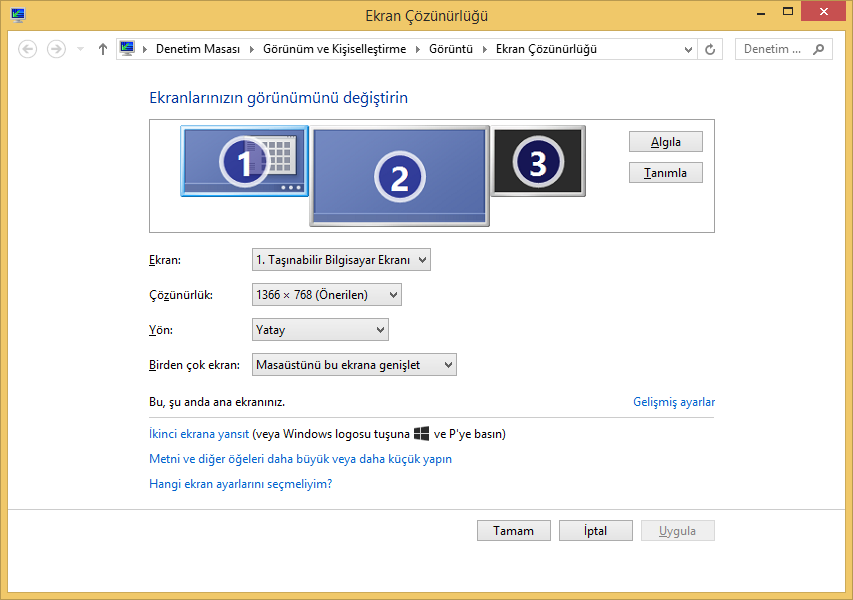
Also i can see in windows settings;
But when i try to clone my monitor which connected via vga Windows settings gives "unable to save display settings" error.
Actually i don't want to buy any usb to vga or hdmi converter also i don't want to buy any usb graphics card. I already have two output on my notebook and i want to use simultaneously.
You can found dxdiag on attachment can you help me about this ? How can i use my all monitors at the same time ?
Link Copied



- Mark as New
- Bookmark
- Subscribe
- Mute
- Subscribe to RSS Feed
- Permalink
- Report Inappropriate Content
Hello Merdincz, thanks for joining the Intel Community.
Please the following thread Post # 12
Can you change the Display mode to "Clone Display" instead of "Extended Desktop" under the Intel Graphics Control Panel? Let me know the results.
Thanks
- Mark as New
- Bookmark
- Subscribe
- Mute
- Subscribe to RSS Feed
- Permalink
- Report Inappropriate Content
sylvia_intel i've just checked link which you shared and my laptop doesn't have any display port on outside so this mean i can only use Active desktop 3 section isn't it ?
Also i've checked your suggestion. I tried to change display mode from extended desktop to clone display but seems show only 1 of my monitors.
By the way my built in display seems connected from LVDS. is this mean my built in screen connected from display port inside of my notebook?
- Mark as New
- Bookmark
- Subscribe
- Mute
- Subscribe to RSS Feed
- Permalink
- Report Inappropriate Content
Mendincz, those are the only display configuration supported.
For specific information about your system, it will be necesarry to contact Samsung.

- Subscribe to RSS Feed
- Mark Topic as New
- Mark Topic as Read
- Float this Topic for Current User
- Bookmark
- Subscribe
- Printer Friendly Page