
- Mark as New
- Bookmark
- Subscribe
- Mute
- Subscribe to RSS Feed
- Permalink
- Report Inappropriate Content
- Mark as New
- Bookmark
- Subscribe
- Mute
- Subscribe to RSS Feed
- Permalink
- Report Inappropriate Content
Hi, AIHILL
Thanks for the quick reply.
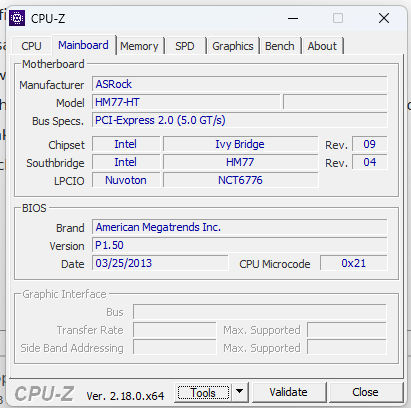
I haven't noticed any problems with Win11pro on the 5 mini PCs, despite their age. One PC has an Intel i7 CPU, see screenshot,
which I'll send later. Another screenshot shows the update history of the Intel drivers, everything is OK. The assumption that the graphics driver is the reason why memory integrity cannot be enabled is incorrect.
Yes, there is a saying in German, “Those who can read have a clear advantage.” I have found out why memory integrity cannot be enabled and just need to try it out.
Note: To use memory integrity, hardware virtualization must be enabled in your system's UEFI or BIOS.
I didn't know that before. If you're interested, I'd be happy to tell you more about it.
If not, we can close this post.
Best regards, Klaus
Translated with DeepL.com (free version)
Link Copied

- Mark as New
- Bookmark
- Subscribe
- Mute
- Subscribe to RSS Feed
- Permalink
- Report Inappropriate Content
No. You are talking about processor graphics that is more than 14-years old.
The latest/last driver from 2020 is here:
You need to get much newer hardware and step into this decade.
Doc (not an Intel employee or contractor)
[CoPilot is a virus, W11 is a keystroke logger, all from MicroSlop]
- Mark as New
- Bookmark
- Subscribe
- Mute
- Subscribe to RSS Feed
- Permalink
- Report Inappropriate Content

Der empfohlene Grafiktreiber ändert nichts.
Inzwischen habe ich bemerkt, das viele Leute Anfragen zu diesem
Thema haben, aber anscheinend keiner helfen kann.
Aus meiner Firmenauflösung habe ich 5 Mini PC's Asrock Vision HT 321B.
Es läuft Win11pro mit täglichen Updates ohne Probleme.
Sogar virtuelle Maschinen mit Hyper-V und die Security Einstellungen
mit den Microsoft Zertifikaten lassen sich im UEFI/BIOS aktivieren.
Alle Intel-Treiber (Chipsatz......) sind problemlos mit den Windows-Updates
ohne Fehler installiert worden. Keine Fehler im Gerätemanager,
auch von der Grafik nicht. Nur in den Win11-Einstellungen ,Gerätesicherheit, wird
ein Problem erkannt (Inkompatibilität).
Ich habe das Problem erstmal gelöst, in dem ich der Schalter Speicher-Integrität
auf aus gestellt habe.
Ich möchte die PC's noch weiter nutzen, solange es möglich ist. (WLAN ist aktiv
für die Drucker usw.)
Gruß Klaus
- Mark as New
- Bookmark
- Subscribe
- Mute
- Subscribe to RSS Feed
- Permalink
- Report Inappropriate Content
The driver I linked you to is the latest driver for windows 10. Also, your processor is not supported on windows 11, nor is it supported on Windows 10
You need to face the facts and stop complaining. The processor is not supported on your OS (although it may run W10 and W11), and there is no driver update for Windows 11.
The windows 10 driver should run on windows 11, but like you said, you have to disable memory integrity.
There is always the microsoft generic driver that you can use, although it has limited functionality.
Doc (not an Intel employee or contractor)
[CoPilot is a virus, W11 is a keystroke logger, all from MicroSlop]
- Mark as New
- Bookmark
- Subscribe
- Mute
- Subscribe to RSS Feed
- Permalink
- Report Inappropriate Content
Hi, AIHILL
Thanks for the quick reply.
I haven't noticed any problems with Win11pro on the 5 mini PCs, despite their age. One PC has an Intel i7 CPU, see screenshot,
which I'll send later. Another screenshot shows the update history of the Intel drivers, everything is OK. The assumption that the graphics driver is the reason why memory integrity cannot be enabled is incorrect.
Yes, there is a saying in German, “Those who can read have a clear advantage.” I have found out why memory integrity cannot be enabled and just need to try it out.
Note: To use memory integrity, hardware virtualization must be enabled in your system's UEFI or BIOS.
I didn't know that before. If you're interested, I'd be happy to tell you more about it.
If not, we can close this post.
Best regards, Klaus
Translated with DeepL.com (free version)
- Mark as New
- Bookmark
- Subscribe
- Mute
- Subscribe to RSS Feed
- Permalink
- Report Inappropriate Content



- Subscribe to RSS Feed
- Mark Topic as New
- Mark Topic as Read
- Float this Topic for Current User
- Bookmark
- Subscribe
- Printer Friendly Page