
- Mark as New
- Bookmark
- Subscribe
- Mute
- Subscribe to RSS Feed
- Permalink
- Report Inappropriate Content
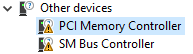
My pci memory controller driver and SM bus controller driver is not found. I went to PCI lookup and found that the drivers are as the picture seen below but I can not find it anywhere. Can someone help me find the PCI memory controller please!

if you cant see it then refer to the file below.
That is the largest I can make that. Here are the drivers. If anyone can help me fix the other one too, that will be greatly appreciated.
- Mark as New
- Bookmark
- Subscribe
- Mute
- Subscribe to RSS Feed
- Permalink
- Report Inappropriate Content
Ok so I extracted right, I go to device manager and the errors are gone now? I can't find the pci stuff anywhere. The only thing I did was install intel chipset software installer. was that a bad move?
Link Copied

- Mark as New
- Bookmark
- Subscribe
- Mute
- Subscribe to RSS Feed
- Permalink
- Report Inappropriate Content
- Mark as New
- Bookmark
- Subscribe
- Mute
- Subscribe to RSS Feed
- Permalink
- Report Inappropriate Content
- Mark as New
- Bookmark
- Subscribe
- Mute
- Subscribe to RSS Feed
- Permalink
- Report Inappropriate Content
- Mark as New
- Bookmark
- Subscribe
- Mute
- Subscribe to RSS Feed
- Permalink
- Report Inappropriate Content
Yes, sort by date to catch the latest.
Otherwise Windows update will sooner or later suggest to update a driver from 1968 🙄
- Mark as New
- Bookmark
- Subscribe
- Mute
- Subscribe to RSS Feed
- Permalink
- Report Inappropriate Content
Got it, thanks! And one more thing, after I click download a new web comes up with a link, what do I do there?
- Mark as New
- Bookmark
- Subscribe
- Mute
- Subscribe to RSS Feed
- Permalink
- Report Inappropriate Content
Click the CAB file and choose download
unpack it the same way like a ZIP file to a new folder
in device manager select update driver for the messed up device
select have disk
navigate to the download folder and select the INF file
- Mark as New
- Bookmark
- Subscribe
- Mute
- Subscribe to RSS Feed
- Permalink
- Report Inappropriate Content
- Mark as New
- Bookmark
- Subscribe
- Mute
- Subscribe to RSS Feed
- Permalink
- Report Inappropriate Content
- Mark as New
- Bookmark
- Subscribe
- Mute
- Subscribe to RSS Feed
- Permalink
- Report Inappropriate Content
Ok I got it, now Im gonna need a little more help as I dont know how to unpack it.
- Mark as New
- Bookmark
- Subscribe
- Mute
- Subscribe to RSS Feed
- Permalink
- Report Inappropriate Content
A popular unpacker is 7zip
After installation you can right-click a CAB file and select extract to "xxx"
- Mark as New
- Bookmark
- Subscribe
- Mute
- Subscribe to RSS Feed
- Permalink
- Report Inappropriate Content
Ok so I extracted right, I go to device manager and the errors are gone now? I can't find the pci stuff anywhere. The only thing I did was install intel chipset software installer. was that a bad move?
- Mark as New
- Bookmark
- Subscribe
- Mute
- Subscribe to RSS Feed
- Permalink
- Report Inappropriate Content
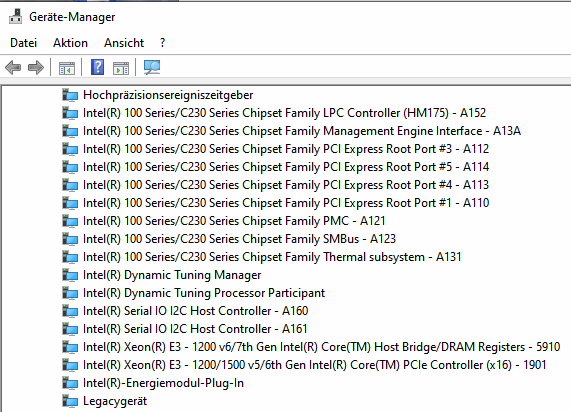
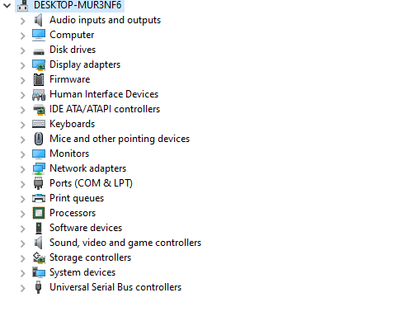
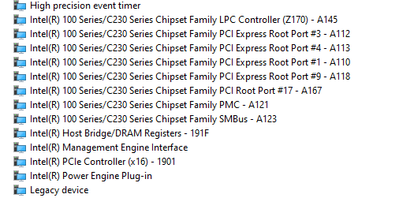
If the yellow triangles are gone everything is fine.
The devices have different names now, similar to screenshot below
- Mark as New
- Bookmark
- Subscribe
- Mute
- Subscribe to RSS Feed
- Permalink
- Report Inappropriate Content
- Mark as New
- Bookmark
- Subscribe
- Mute
- Subscribe to RSS Feed
- Permalink
- Report Inappropriate Content
Perfect. No yellow triangles anymore.
Device A121 has the official Intel name now.
- Mark as New
- Bookmark
- Subscribe
- Mute
- Subscribe to RSS Feed
- Permalink
- Report Inappropriate Content

- Mark as New
- Bookmark
- Subscribe
- Mute
- Subscribe to RSS Feed
- Permalink
- Report Inappropriate Content
You need to install the MEI (management engine).
If that does not work, So the Intel support engineers can have more information about your system, Download, run, and save the results of this utility as a text file:
https://downloadcenter.intel.com/download/25293/Intel-System-Support-Utility
Then ATTACH the text file using the instructions under the reply window ( Drag and drop here or browse files to attach ).
Doc (not an Intel employee or contractor)
- Mark as New
- Bookmark
- Subscribe
- Mute
- Subscribe to RSS Feed
- Permalink
- Report Inappropriate Content
I have that same issues too idk how to fix it i'm trying to find intel chipset driver to download it


- Mark as New
- Bookmark
- Subscribe
- Mute
- Subscribe to RSS Feed
- Permalink
- Report Inappropriate Content
@Childhood_is_over-3, over 3 what? My kids are well over 3 decades old and they still act like children ;^)
Ok, bad-attempt-at-humor over with, to answer the question for you, we need to know what chipset your motherboard has.
...S

- Mark as New
- Bookmark
- Subscribe
- Mute
- Subscribe to RSS Feed
- Permalink
- Report Inappropriate Content
Hello,
I'm having this issue with the PCI Memory Controller
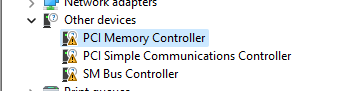
I've installed the Intel® Driver & Support Assistant and run it but didn't fix the issue.
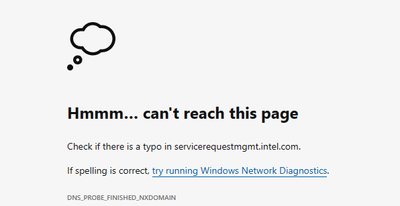
I've also run the System Support Utility but when I try to submit the report I get
Any help would be greatly appreciated.
Thanks

- Mark as New
- Bookmark
- Subscribe
- Mute
- Subscribe to RSS Feed
- Permalink
- Report Inappropriate Content
@Vulkany You need to start a new thread for your issue and provide full information, rather than hijacking an old thread.
Doc (not an Intel employee or contractor)
[Maybe Windows 12 will be better]

- Subscribe to RSS Feed
- Mark Topic as New
- Mark Topic as Read
- Float this Topic for Current User
- Bookmark
- Subscribe
- Printer Friendly Page