
- Mark as New
- Bookmark
- Subscribe
- Mute
- Subscribe to RSS Feed
- Permalink
- Report Inappropriate Content
Last time this worked was around early to mid-November, when I was doing my monthly maintenance updates (Microsoft and Intel). When I tried to do scan the system in early December, I received the first "something went wrong" message. I have tried it again several times over the last week - same thing. To my knowledge, I have not made any application changes since the November updates. I performed the DSA Uninstall/Reinstall process as well as clearing all the cache in my browser (Chrome) as recommended in the forums. SSU log is attached. Any ideas?
Link Copied

- Mark as New
- Bookmark
- Subscribe
- Mute
- Subscribe to RSS Feed
- Permalink
- Report Inappropriate Content
Hello TimAD,
Thank you for posting in Intel community Forum.
For me to better understand and diagnose the issue further, let me ask you to provide detailed responses to the following questions. This information will help me isolate the problem and determine the most appropriate course of action moving forward.
- Just to clarify, the issue is with Intel DSA right?
- What was the last change made in the system before the issue started?
- Aside from re-installation and clearing the cache, have you also tried to update the OS and BIOS?
- Have you tried manually installing the driver? If not yet, can you also share the components that you want to update?
If you have questions, please let us know. Thank you.
Best regards,
Michael L.
Intel Customer Support Technician
- Mark as New
- Bookmark
- Subscribe
- Mute
- Subscribe to RSS Feed
- Permalink
- Report Inappropriate Content
Thank you for the quick response. Answers to your questions:
1. Yes.
2. I can't recall making any system or application changes after applying Intel and Microsoft updates in November.
3. OS - no. I am still on Windows 10, so updates are no longer provided. I was up to date with OS and all patches until November. BIOS - no, but I have verified from Gigabyte that I have latest.
4. No. The components typically installed by DSA are the graphics driver, the Bluetooth driver and the Wi-Fi driver. To be clear, I am not having issues with my PC or these components: I am just ensuring I have the latest set of drivers. If I have to load them manually, that should not be a problem.
If you need more information, let me know. I appreciate the assistance.

- Mark as New
- Bookmark
- Subscribe
- Mute
- Subscribe to RSS Feed
- Permalink
- Report Inappropriate Content
I am having the same issue this morning. Restarted browser, used uninstall tool, downloaded and reinstalled latest support app, tried the repair function on the app. Widget says 2 updates available, but always a red bar: "Something went wrong."
From Event Viewer:
Faulting application name: IntelSoftwareAssetManagerService.exe, version: 3.5.5096.0, time stamp: 0x68106825
Faulting module name: ntdll.dll, version: 10.0.26100.7462, time stamp: 0x20848390
Exception code: 0xc0000374
Fault offset: 0x000fc61f
Faulting process id: 0x21A0
Faulting application start time: 0x1DC6C49AAE283DC
Faulting application path: C:\Program Files\Intel\SUR\QUEENCREEK\Updater\bin\IntelSoftwareAssetManagerService.exe
Faulting module path: C:\WINDOWS\SYSTEM32\ntdll.dll
Report Id: da58f893-0ac7-4265-902b-b0fb551409e1
Faulting package full name:
Faulting package-relative application ID:
- Mark as New
- Bookmark
- Subscribe
- Mute
- Subscribe to RSS Feed
- Permalink
- Report Inappropriate Content
Also from Event Viewer:
Secure Boot certificates have been updated but are not yet applied to the device firmware. Review the published guidance to complete the update and ensure full protection. This device signature information is included here.
DeviceAttributes: FirmwareVersion:N3QET50W (1.50 );OEMManufacturerName:LENOVO;OEMModelSKU:LENOVO_MT_21HH_BU_Think_FM_ThinkPad T16 Gen 2;OSArchitecture:amd64;
BucketId: d82ac49ca8573fa3d8aba15d2c7f543fa3e901b0597bbe97e74a0c06fc968d30
BucketConfidenceLevel:
UpdateType:
For more information, please see https://go.microsoft.com/fwlink/?linkid=2301018.
I had just done the 'official' Lenovo updates this morning, too, in hopes that it might correct the issue with Intel Driver Support Tool.
- Mark as New
- Bookmark
- Subscribe
- Mute
- Subscribe to RSS Feed
- Permalink
- Report Inappropriate Content
I also tried the DISM and SFC procedure, then back to Lenovo to update the Intel Drivers there. However, DSA widget still showing 2 updates available and "sorry, something went wrong" on website launch.
- Mark as New
- Bookmark
- Subscribe
- Mute
- Subscribe to RSS Feed
- Permalink
- Report Inappropriate Content
I think the problem is Edge Browser related. I noticed the drop-down menus were all blank on the 'sorry, try again' page.
I copied the address and pasted into another browser and it worked just fine. Download option buttons appeared and uploads installed normally.

- Mark as New
- Bookmark
- Subscribe
- Mute
- Subscribe to RSS Feed
- Permalink
- Report Inappropriate Content
Really good information. As for me, I am using Google Chrome for my browser. I have downloaded the updates from the Intel site, but I have yet to install them. Also, didn't think about looking at the Event Viewer. Thanks for the reminder. Will send an update when I find the problem.
- Mark as New
- Bookmark
- Subscribe
- Mute
- Subscribe to RSS Feed
- Permalink
- Report Inappropriate Content
Well, more information, but no solutions.
- I ran the DISM and SFC procedures. Found a few problems in SFC and repaired them. Re-booted.
- Fixed a few Errors found in the Event Viewer log: "Session "Microsoft.Windows.WindowsUpdate.RUXIMLog" failed to start with the following error: 0xC0000035", "Session "Microsoft.Windows.Remediation" failed to start with the following error: 0xC000003" and "Session "NT Kernel Logger" failed to start with the following error: 0xC0000035". I restarted and checked Event Viewer between each fix.
- Tried running Intel DSA again - still got the "Something went wrong" error.
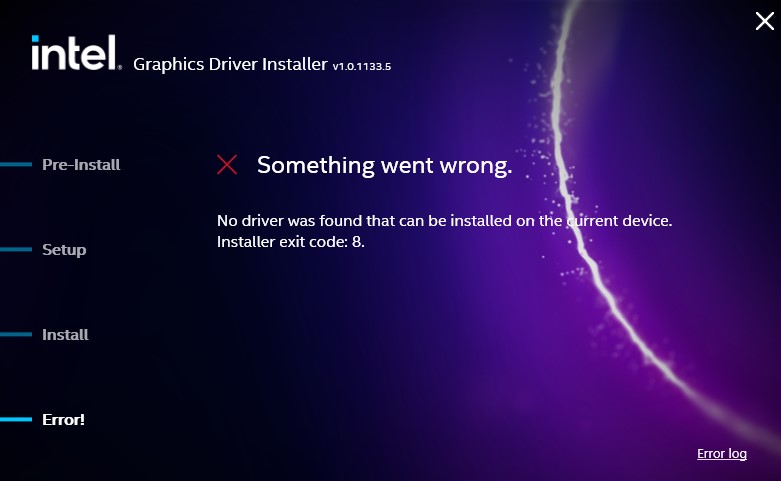
- Tried installing the graphics driver from Intel's Download Center (gfx_win_101.7082). That failed as well error message and log are attached.
Now, I am stuck again as to what to do. Looking for advice, and please remember that this all started by just trying to keep my system updated: I do not have any breakage issues (yet).
- Mark as New
- Bookmark
- Subscribe
- Mute
- Subscribe to RSS Feed
- Permalink
- Report Inappropriate Content
Hello TimAD,
Thank you for the update.
For this error message, we have a troubleshooting guide that you can follow. Please refer to the link below and update me once done.
Intel® Driver & Support Assistant (Intel® DSA) Results in “Sorry,...
If you have questions, please let us know. Thank you.
If you need assistance, please create a new thread for us to assist you on your own thread and gather the details of your systems.
Best regards,
Michael L.
Intel Customer Support Technician
- Mark as New
- Bookmark
- Subscribe
- Mute
- Subscribe to RSS Feed
- Permalink
- Report Inappropriate Content
I did everything as suggested in the troubleshooting guide. No change: neither the DSA or the direct install of the graphics driver work. Same issues.
- Mark as New
- Bookmark
- Subscribe
- Mute
- Subscribe to RSS Feed
- Permalink
- Report Inappropriate Content
As I know just enough stuff about computers to get me into trouble, I feel your pain.
My gut tells me it's a security setting or popup blocker-extension issue. It's getting trickier to "pause" anti-virus apps, too, to enable an install. Hopefully the Intel brains can figure this out for you. Good Luck!

- Subscribe to RSS Feed
- Mark Topic as New
- Mark Topic as Read
- Float this Topic for Current User
- Bookmark
- Subscribe
- Printer Friendly Page