
링크가 복사됨

- 신규로 표시
- 북마크
- 구독
- 소거
- RSS 피드 구독
- 강조
- 인쇄
- 부적절한 컨텐트 신고
Hello @Khalilbel
Thank you for posting on the Intel️® communities. We would be more than glad to help you with your issue.
According to our information, the fixes for those issues are the followings:
1. How to Fix The Yuzu* Nintendo* Switch Emulator Crashing When Loading on Intel® Arc™? The fix for this issue is included in the Intel graphics driver version 31.0.101.4382 and newer.
The Figma issue is under investigation, Intel will provide more information once it is available.
And the Apex issue ID is not on our system, can you please verify if that is the correct number to do further research?
Best regards,
Isaac Q.
Intel Customer Support Technician
- 신규로 표시
- 북마크
- 구독
- 소거
- RSS 피드 구독
- 강조
- 인쇄
- 부적절한 컨텐트 신고
same crash and same problems i talk about before
this what i got when the crash happen and distortions on the screen
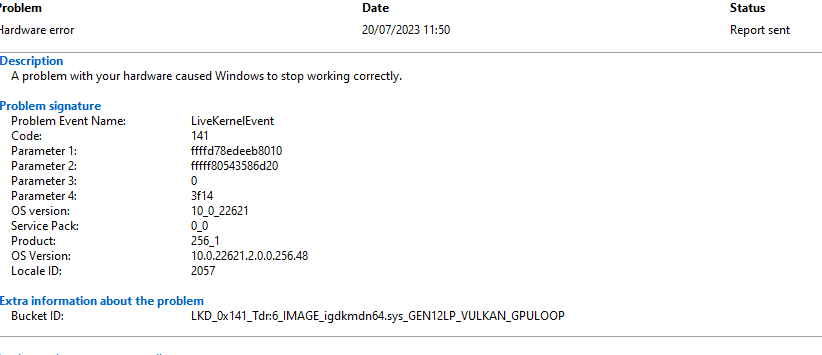
- 신규로 표시
- 북마크
- 구독
- 소거
- RSS 피드 구독
- 강조
- 인쇄
- 부적절한 컨텐트 신고
Hello @Khalilbel
Thank you for your reply.
Please provide us with the following information:
- Intel System Support Utility (Intel SSU) report.
- [Download the Intel SSU](https://www.intel.com/content/www/us/en/download/18377/25293/intel-system-support-utility-for-windows.html?)
- Open the application and click "Scan" to see the system and device information. By default, Intel SSU will take you to the "Summary View."
- Click on the menu where it says: "Summary" to change it to "Detailed View."
- To save your scan: click "Next"; then "Save."
- Intel® Graphics Command Center report:
- Open the Intel Graphics Command Center
- Navigate to the Support tab
- Select System Diagnostic
- Click Generate Report
- Select Save and name the output file.
Also, let us know the game/software version of:
· Figma
· Yuzu Emulator
· Apex Legends
Best regards,
Isaac Q.
Intel Customer Support Technician
- 신규로 표시
- 북마크
- 구독
- 소거
- RSS 피드 구독
- 강조
- 인쇄
- 부적절한 컨텐트 신고
Hello @IsaacQ_Intel
you can get report files below
all apps is update to latest version. i just got the outlast trials same problem
other game work fine fortnite and naruto shippuden ultimate ninja storm 4 and naruto to boruto shinobi striker GTA 5 ..
- 신규로 표시
- 북마크
- 구독
- 소거
- RSS 피드 구독
- 강조
- 인쇄
- 부적절한 컨텐트 신고
Hello @Khalilbel
Thank you for the information provided.
I will proceed to check the issue internally and post back soon with more details.
Best regards,
Isaac Q.
Intel Customer Support Technician

- 신규로 표시
- 북마크
- 구독
- 소거
- RSS 피드 구독
- 강조
- 인쇄
- 부적절한 컨텐트 신고
Hello Khalilbel,
I hope you are doing well. We would like to check if the Figma concern will be resolved by the latest driver release 2/26/2024. Kindly download and install the driver version: 31.0.101.5333 and let us know it was able to fix the issue.
If the issue persists kindly send us logs and crash dumps. You may see the steps below, for your reference:
Gather Application logs from Windows Event viewer "Windows Logs"
- Press the "Windows key" + "R" and type in "eventvwr.msc", then click “OK” to run the Event Viewer.
- Under "Event Viewer (Local)" > "Windows Logs", select the Application - to collect "Application Logs".
- To Save the event log. Click menu "Action" and select "Save All Events As…".
- Save the log file with your desired file name and location.
Generate Windows dump file to help us with the analysis of your concern - https://learn.microsoft.com/en-us/troubleshoot/windows-client/performance/generate-a-kernel-or-complete-crash-dump
- Follow the "Manually generate a memory dump file" procedure from the link. This command notMyfault.exe/crash will trigger BSOD which is part of generating dump file. Make sure that this data is saved and all closed prior executing this program.
- These are just examples of where the dumped files are normally located. The location might've been changed prior to running the tool from your end.
- Small Memory dump - C:\WINDOWS\Minidump directory.
- The Kernel and Complete Memory Dump - %SystemRoot%MEMORY. DMP.
- Note: The Kernel and Complete Memory Dump is a huge file(approximately around 2GB). We would suggest to consider sharing it with us via Google Drive. It is important for us to gather all the information necessary to provide you a better recommendation in resolving your concern
We will be waiting for your response. Have good one!
Best regards,
Jay B.
- 신규로 표시
- 북마크
- 구독
- 소거
- RSS 피드 구독
- 강조
- 인쇄
- 부적절한 컨텐트 신고
Hello Khalilbel,
Were you able to check the previous post? Let us know if you still need assistance.
Best regards,
Jay B.

- 신규로 표시
- 북마크
- 구독
- 소거
- RSS 피드 구독
- 강조
- 인쇄
- 부적절한 컨텐트 신고
Hello Khalilbel,
I have not heard back from you so I will close this inquiry now. If you need further assistance, please submit a new question as this thread will no longer be monitored.
Thank you for understanding.
Best regards,
Norman S.
Intel Customer Support Engineer
