
Hello Everyone!
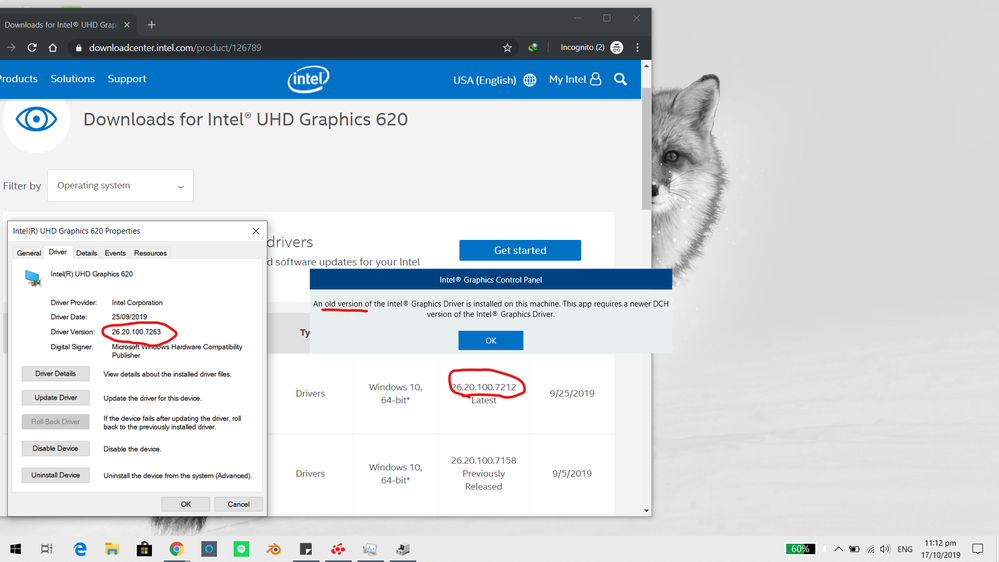
Since the new update of my graphics driver(26.20.100.7263) The control panel is nowhere to be found. Intel says I should download the app in the Microsoft store and I did, but it says an old version has been installed so I can't open. When I checked the Intel's Graphics driver update website it says the latest version for my igpu is lower than my current version. Any help would be nice.
Thanks in advance!
連結已複製


- As far I know, the version 26.20.100.7212 of Intel DCH Graphics Driver is the latest version for this driver.
- From where did yo downloaded the version 26.20.100.7263?
- The computer you have is a laptop computer? Did you downloaded this driver from the OEM site?
Leon
It was from Windows update. It was just an ordinary driver update that came with some cumulative updates from windows
- I've few Intel's NUC computers, updated with the latest updates from Microsoft. In all my computers the latest graphic driver is 26.20.100.7212.
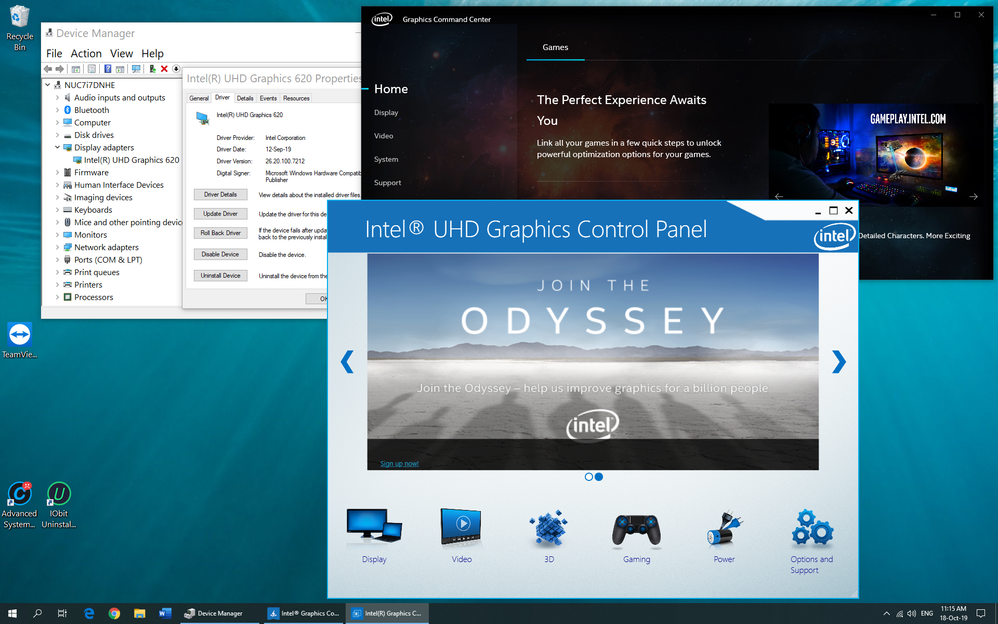
- One of my NUC's, NUC7i7DNHE has CPU with . Also on this NUC I've driver 26.20.100.7212 installed. This driver package install also the Intel Graphics Command Center (which replaces now the Intel Graphics Control Panel). However, I decided to install on this computer also the Intel Graphics Control Panel, downloaded from Microsoft Store. Both application works. See the image attached.
- You didn't specified if your computer is an laptop computer. In which case my advice is to use the latest driver found in OEM site. The same advice if you have other Graphics Card installed on your computer. However, if the only Graphics is the Integrated Intel UHD Graphics 620, follow my instructions:
- Download the latest driver from Intel https://downloadmirror.intel.com/29074/a08/igfx_win10_100.7212.exe
- Disconnect the internet.
- Open the Device Manager and uninstall the currently installed Graphics Driver 26.20.100.7263. Check the Delete option during uninstalling.
- Reboot you computer. You should see Microsoft Basic Graphic Driver in Device Manager. If not, repeat para. 6-7.
- Install the previously downloaded driver 26.20.100.7212.
- Reconnect the internet and reboot your computer.
- Now you can install the Intel Graphics Control Panel, downloaded from Microsoft Store.
Leon
- I don't know what is this update you got. I'm not sure that this from Microsoft. Check the update history and tell me what is the number if this update.
- When you have uninstalled driver 26.20.100.7263, did you checked the "Delete the driver software from this device" ? If not, do this and only then install version 26.20.100.7212.
- What is your computer/motherboard model?
- What is your Windows version?
Leon

Hi Qola !
I don't come here just to make things messier, but here's what I just noticed : https://downloadcenter.intel.com/download/29113/Intel-Graphics-Windows-10-DCH-Drivers
Even more recent, isn't it ?
As a general rule, when I want to update my graphics drivers, I prefer to start my search at https://ark.intel.com/ and from there go to my CPU's page, where there's a link to relevant drivers. So I chose a 10th gen Core i7, there was a link to graphics drivers, however there was a warning on top of the page, about a more recent version including security patches. That's where I got this link.
It's possible that Windows update forces that thing on you as part of a hotfix because it's considered security-critical, and maybe the driver has still some rough edges because it has been hastily published to fix security issues and some values still incorrectly refer to an older version. In which case, maybe that 7323 version may help... or not. I don't know for sure, but try from ARK and navigate to your iGPU drivers from your CPU's page, if I may advise.
Hi @NovHak ,
- You are right. The driver version 26.20.100.7323 is the latest version and it has higher version number than 26.20.100.7263. This version was available in Intel Download Center only from yesterday (and it wasn't available yet, in the time I wrote my post). If you look in the list of previous driver versions (in the bottom left), there is no version 26.20.100.7263 listed. This is the reason that is suspect that this is some unofficial not released version. That's why I'm asking what is the Windows version and computer Qola is using. But I've no answer for this question. Could be he is using some insider Windows version?
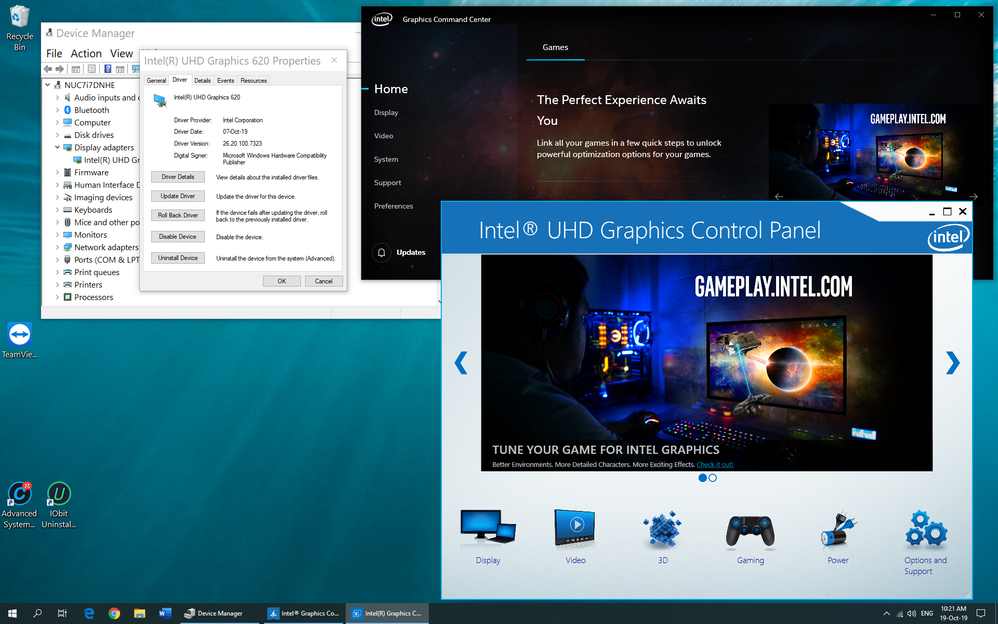
- For your information, I've installed this driver 26.20.100.7323 and the Intel Graphics Command Center, so, the Intel Graphics Control Panel functioning well. See the attached image.
Leon
Hi @LWAKSMAN ,
The drivers finally has reached the download center front page, which was not the case yesterday, that's why I felt the need to post it here since I was thinking the change may pertain to some CPUs only.
Indeed, maybe Qola has an insider version, or 7263 was part of a hardware-specific hotfix, because searching for 26.20.100.7263 on the Microsoft update catalog (https://www.catalog.update.microsoft.com/) doesn't give any results.

Hola. Quería preguntar si la sección "Juegos" les funciona a alguno de ustedes. No entiendo por qué, a pesar de que logré acceder a intelgameplay.com a través de Internet Archive. ¿Alguien podría explicarme cómo la sección "Juegos" del Panel de control de gráficos Intel detectaba los juegos?Me gustaría que un empleado de Intel se pusiera en contacto conmigo para explicarme por qué mis juegos no se detectan. No entiendo cómo las versiones anteriores del Centro de comandos de gráficos Intel detectan Fortnite automáticamente, pero el Panel de control no. Estoy usando la versión de 2018, específicamente para probar con juegos de la época en que se lanzó la optimización automática.El panel de control de gráficos de Intel se actualizó el 15 de febrero de 2018 para optimizar los juegos.Intel ha lanzado un nuevo controlador gráfico para Windows que añade nuevas opciones de juego. La versión 15.65.3.4944 es compatible con sistemas Windows 10 de 64 bits con procesadores Intel Core de sexta generación (o posteriores), incluidos aquellos con gráficos Radeon RX Vega M.En aquel momento, las opciones de optimización de juegos estaban en fase beta y se limitaban a unos pocos títulos en la sección de configuración. El objetivo era que los juegos se autoconfiguraran con los ajustes óptimos para el hardware disponible. Entre los juegos compatibles se encontraban Battlefield 1, Battlefield 4, American Truck Simulator, Call of Duty WWII, Destiny 2, DOTA 2, Grand Theft Auto V, League of Legends, Overwatch y World of Tanks.Cuando un moderador o empleado responda, preferiría que no me dijeran que el Panel de control de gráficos de Intel es una aplicación obsoleta. Sé que el Panel de control de gráficos de Intel ha sido reemplazado por el Centro de comandos de gráficos de Intel® para sistemas con procesadores Intel® de sexta generación (o posteriores). Sé que el Centro de comandos de gráficos de Intel cuenta con las funciones más recientes y sirve como interfaz de usuario para futuras mejoras.
.jpg)


