
- 新着としてマーク
- ブックマーク
- 購読
- ミュート
- RSS フィードを購読する
- ハイライト
- 印刷
- 不適切なコンテンツを報告
About a month ago, I found that I could not lower the brightness on my screen. Looking in the Devices Manager, my computer told me that the driver was broken, but offered not solutions. After looking online, I was directed to an HP program that installed three Intel graphics drivers on my machine. The fix worked but only for 2 weeks. The problem returned so I reinstalled those drivers and the problem was fixed.
Ever since then, there has been an igfxEM module taking up a lot of my CPU. It is slowing down my browsers and other programs on my computer. Could anyone tell me how to solve this or whether this has anything to do with the drivers I installed.
I'm running Windows 10 November 2015 Update x64, with Intel Celeron CPU N28 @2.16Ghz, and 4 GB of RAM
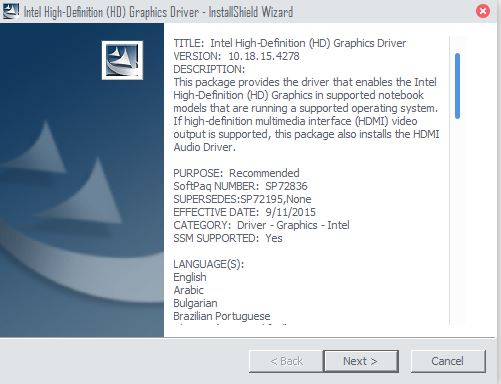
Below I've attached two pictures, the first being one of the task manager with the high CPU usage and the second of the driver installed on my machine:
- タグ:
- Modules
- 新着としてマーク
- ブックマーク
- 購読
- ミュート
- RSS フィードを購読する
- ハイライト
- 印刷
- 不適切なコンテンツを報告
I would recommend updating to the latest video drivers, there is an updated driver you might want to try: https://downloadcenter.intel.com/download/25977/Intel-Graphics-Driver-for-Windows-10-and-Windows-7-8-1-15-33-?v=t https://downloadcenter.intel.com/download/25977/Intel-Graphics-Driver-for-Windows-10-and-Windows-7-8-1-15-33-?v=t
Please let me know your findings.
Allan.
コピーされたリンク
- 新着としてマーク
- ブックマーク
- 購読
- ミュート
- RSS フィードを購読する
- ハイライト
- 印刷
- 不適切なコンテンツを報告
I would recommend updating to the latest video drivers, there is an updated driver you might want to try: https://downloadcenter.intel.com/download/25977/Intel-Graphics-Driver-for-Windows-10-and-Windows-7-8-1-15-33-?v=t https://downloadcenter.intel.com/download/25977/Intel-Graphics-Driver-for-Windows-10-and-Windows-7-8-1-15-33-?v=t
Please let me know your findings.
Allan.


- 新着としてマーク
- ブックマーク
- 購読
- ミュート
- RSS フィードを購読する
- ハイライト
- 印刷
- 不適切なコンテンツを報告
Hi.
I have the same issue - igfxEM module is using up too much CPU processig power continuously. It slows my PC right down.
I have a Dell laptop running Windows 8 and using the following processor:
Intel Core i7-5500U CPU @ 2.4GHz
with 8 GB RAM
64 Bit operating system
Which driver update would you recommend?
Thank you.
Akh
- 新着としてマーク
- ブックマーク
- 購読
- ミュート
- RSS フィードを購読する
- ハイライト
- 印刷
- 不適切なコンテンツを報告
Please try the following driver 4539
https://downloadcenter.intel.com/download/26347/Intel-Beta-Graphics-Driver-for-Windows-10-and-Windows-7-8-1-15-40-?product=86210 https://downloadcenter.intel.com/download/26347/Intel-Beta-Graphics-Driver-for-Windows-10-and-Windows-7-8-1-15-40-?product=86210
You will be loading generic drivers, it might be that your system requires customized drivers from Dell.
Allan.
- 新着としてマーク
- ブックマーク
- 購読
- ミュート
- RSS フィードを購読する
- ハイライト
- 印刷
- 不適切なコンテンツを報告
Were you able to run the latest video drivers?
Allan.
- 新着としてマーク
- ブックマーク
- 購読
- ミュート
- RSS フィードを購読する
- ハイライト
- 印刷
- 不適切なコンテンツを報告
Yes, I was. Sorry for the late reply. I was having trouble logging into this account.
Thanks, again for your help.
