
- Отметить как новое
- Закладка
- Подписаться
- Отключить
- Подписка на RSS-канал
- Выделить
- Печать
- Сообщить о недопустимом содержимом
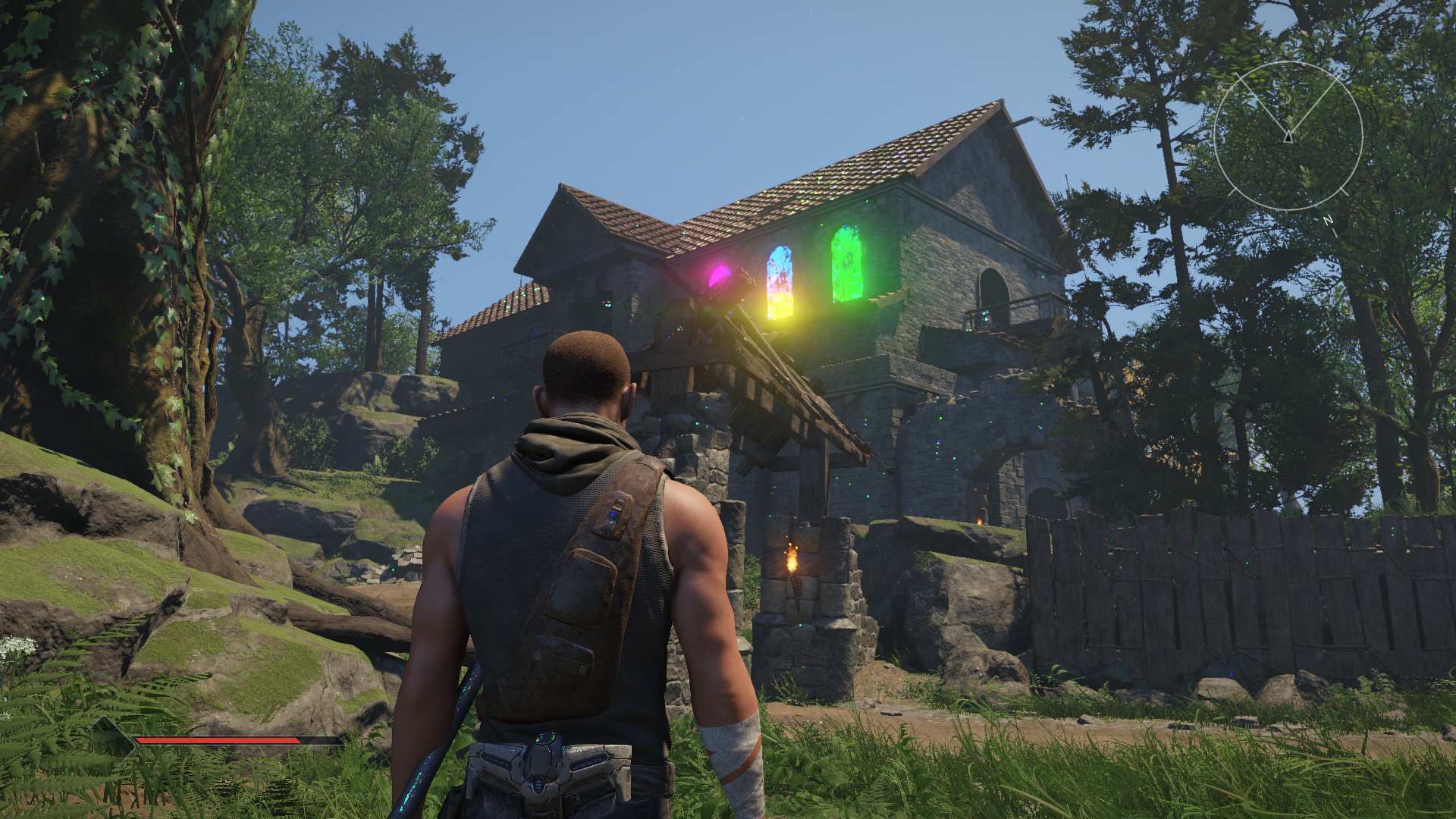
Graphikfehler in Elex 2
Die refelektierende Oberflächen sind schön farbig
Reshade installiert, keine Auswirkung
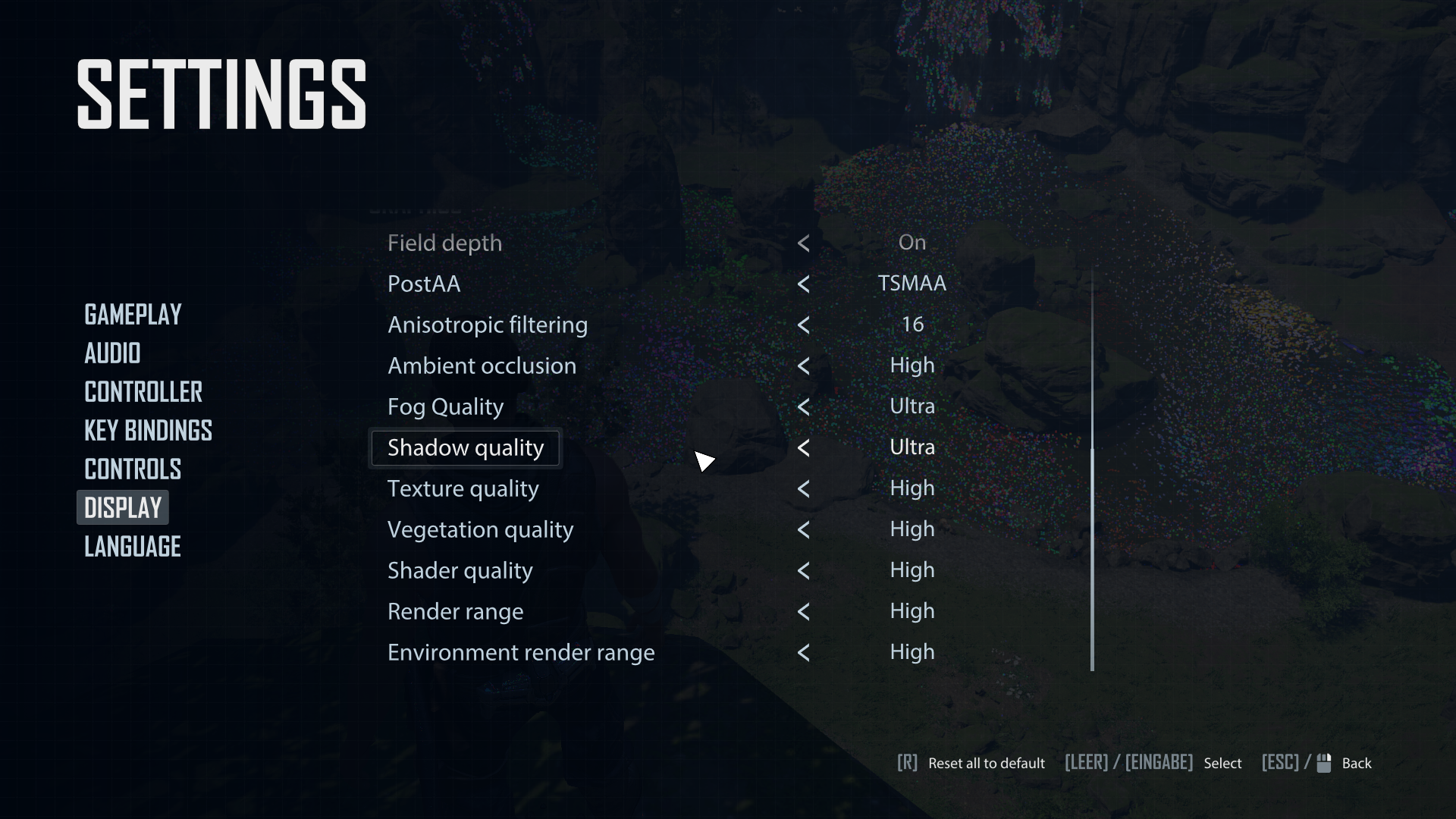
Graphikeinstellung verstellt, hat nicht viele, keine Auswirkung
Andere Tipps ?
Ссылка скопирована

- Отметить как новое
- Закладка
- Подписаться
- Отключить
- Подписка на RSS-канал
- Выделить
- Печать
- Сообщить о недопустимом содержимом
Hi @Raphael-C5284,
Bitte beachten Sie, dass ich Sie nur auf Englisch unterstützen kann. Ich habe ein Web-Übersetzungstool verwendet, um diese Antwort zu übersetzen, daher kann es zu einer ungenauen Übersetzung kommen
Thank you for posting here in our community. To effectively diagnose and address the issue you're experiencing, I kindly ask you to provide detailed responses to the following questions. This information will help us isolate the problem and determine the most appropriate course of action.
- Please provide the SSU log report and share it here so I can review your system's configuration.
- From which digital distribution platform did you download the game (e.g., Steam, Epic Games Store)?
- Can you provide the download link for the game?
- Which specific graphics settings have you adjusted in the game?
- Have you tried resetting the graphics settings to default?
- Can you describe the graphical errors in more detail? Are they consistent or intermittent?
- Do the errors occur in specific areas or throughout the game?
- Have you verified the integrity of the game files through the digital distribution platform?
- When did the issue first occur? is it working fine before?
- Have you made any software or hardware changes to the system recently?
- What troubleshooting steps have you tried so far?
- Have you noticed any signs of overheating in the system?
- Kindly share some screenshots and recordings of your game settings so we can replicate and check the issue on our end using the same settings you use during gameplay.
I look forward to your response and am committed to resolving your issue promptly.
Warm regards,
Randy T.
Intel Customer Support Technician
- Отметить как новое
- Закладка
- Подписаться
- Отключить
- Подписка на RSS-канал
- Выделить
- Печать
- Сообщить о недопустимом содержимом
Hello Randy
English is also ok
Downloaded from Steam
The graphic error is consistent throughout the game (1h playtime)
on my new pc (selfmade, three months old) the reflection error is from start
DX 11/12 change, ingame AA-Filter tested, Reshade installed, testet different filters
no overheating
for the other points or more specific, i look today evening
Raphael
- Отметить как новое
- Закладка
- Подписаться
- Отключить
- Подписка на RSS-канал
- Выделить
- Печать
- Сообщить о недопустимом содержимом
- Отметить как новое
- Закладка
- Подписаться
- Отключить
- Подписка на RSS-канал
- Выделить
- Печать
- Сообщить о недопустимом содержимом
Hi @Raphael-C5284,
Allow me some time to further investigate this on my end. I’ll share my findings once the analysis is complete. I appreciate your patience in the meantime.
Regards,
Randy T.
Intel Customer Support Technician
- Отметить как новое
- Закладка
- Подписаться
- Отключить
- Подписка на RSS-канал
- Выделить
- Печать
- Сообщить о недопустимом содержимом
Hi @Raphael-C5284,
Kindly check if there are any pending Windows updates in your system settings. If there are, please proceed with installing them.
If the issue persists after updating Windows, I recommend updating your BIOS to the latest version. Based on the SSU logs, your current BIOS is dated October 25, 2024. You can download the latest BIOS from your motherboard manufacturer's support website, or contact them directly for assistance.
After updating the BIOS, test the game again. If the problem continues, I highly suggest performing a clean installation of your graphics driver using DDU (Display Driver Uninstaller), then reinstall the latest driver version from the official website.
Please let me know if these steps help resolve the issue. I look forward to your response.
Regards,
Randy T.
Intel Customer Support Technician
- Отметить как новое
- Закладка
- Подписаться
- Отключить
- Подписка на RSS-канал
- Выделить
- Печать
- Сообщить о недопустимом содержимом
Hi @Raphael-C5284,
Just checking in on my previous message regarding your inquiry. Have you had a chance to review it? If you need more information or have any questions, feel free to reach out. I'm here to help!
Regards,
Randy T.
Intel Customer Support Technician
- Отметить как новое
- Закладка
- Подписаться
- Отключить
- Подписка на RSS-канал
- Выделить
- Печать
- Сообщить о недопустимом содержимом
just saw it now, notification-mail wanted to be spam
- Отметить как новое
- Закладка
- Подписаться
- Отключить
- Подписка на RSS-канал
- Выделить
- Печать
- Сообщить о недопустимом содержимом
bios updatet
ddu started --> clean and restart
intel graphics software installed
the same error
reinstall elex 2 ?
- Отметить как новое
- Закладка
- Подписаться
- Отключить
- Подписка на RSS-канал
- Выделить
- Печать
- Сообщить о недопустимом содержимом
Hi @Raphael-C5284,
Thank you for sharing this information. I will begin investigating the issue and attempt to replicate it on our end. I'll post an update here or notify you directly once there are any developments. If I need further details, I'll reach out to you here. I appreciate your patience as I work on this matter.
Regards,
Randy T.
Intel Customer Support Technician
- Отметить как новое
- Закладка
- Подписаться
- Отключить
- Подписка на RSS-канал
- Выделить
- Печать
- Сообщить о недопустимом содержимом
Hi @Raphael-C5284,
I wanted to let you know that I have successfully reproduced the issue you reported while playing Elex 2. I’m currently working internally to investigate further and will provide you with an update as soon as possible.
Regards,
Randy T.
Intel Customer Support Technician
- Отметить как новое
- Закладка
- Подписаться
- Отключить
- Подписка на RSS-канал
- Выделить
- Печать
- Сообщить о недопустимом содержимом
at least you are able to reproduce my error, so i am not the only one
hopfully you can solve this problem

- Отметить как новое
- Закладка
- Подписаться
- Отключить
- Подписка на RSS-канал
- Выделить
- Печать
- Сообщить о недопустимом содержимом
Hi @Raphael-C5284,
Please be assured that Intel is actively addressing this matter. I will be reporting the issue to the developers promptly, and they will prioritize finding a solution. I appreciate your patience and understanding as we work to resolve this.
I will keep you updated on our progress and provide further information as soon as possible. Thank you for your continued support and collaboration.
Regards,
Ernesto C.
Intel Customer Support Engineer



- Отметить как новое
- Закладка
- Подписаться
- Отключить
- Подписка на RSS-канал
- Выделить
- Печать
- Сообщить о недопустимом содержимом
@Ernesto_C_Intel1 I started Elex 2 game aswell, on my ARC B580, and noticed the exact same problem. All shiny textures surfaces in the game, especially on the water, became multicolored. Do we have any update on this or an estimate time of fix?


- Отметить как новое
- Закладка
- Подписаться
- Отключить
- Подписка на RSS-канал
- Выделить
- Печать
- Сообщить о недопустимом содержимом
new driver .6987 , same issue
- Отметить как новое
- Закладка
- Подписаться
- Отключить
- Подписка на RSS-канал
- Выделить
- Печать
- Сообщить о недопустимом содержимом
driver .8132 not better

- Подписка на RSS-канал
- Отметить тему как новую
- Отметить тему как прочитанную
- Выполнить отслеживание данной Тема для текущего пользователя
- Закладка
- Подписаться
- Страница в формате печати