
- Marcar como nuevo
- Favorito
- Suscribir
- Silenciar
- Suscribirse a un feed RSS
- Resaltar
- Imprimir
- Informe de contenido inapropiado
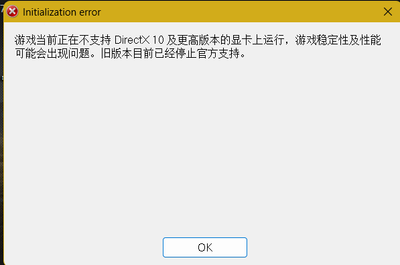
我的笔记本是nuc x15,现在发现在每次休眠启动后,如果启动调用dx11的游戏,它会提示我显卡过老不支持这类的报错,只有重启电脑才能解决这个问题。另外,solidworks依旧没有支持arc a730m,在绘图时会非常卡顿。极大的影响我的工作效率,请求解决,我上一次提出这个问题在3月份,至今问题依旧存在。
Enlace copiado
- Marcar como nuevo
- Favorito
- Suscribir
- Silenciar
- Suscribirse a un feed RSS
- Resaltar
- Imprimir
- Informe de contenido inapropiado

- Marcar como nuevo
- Favorito
- Suscribir
- Silenciar
- Suscribirse a un feed RSS
- Resaltar
- Imprimir
- Informe de contenido inapropiado
Hello Asunar114514
请注意,我只能用英语为您提供支持。我使用了网络翻译工具来翻译此回复,因此可能存在一些不准确的翻译
Thank you for posting on the Intel® ARC™ Graphics. I am sorry you are experiencing a crash when your system comes up from hibernation mode.
Please share with us the following information to assist with this issue:
- Create a log file with the Intel® System Support Utility and attach it to your response to get more information on the system configuration.
- Share a short video showing the issue.
- I see you mention the issue happens after coming up from hibernation mode. Is this actually hibernation mode or sleep mode?
- Does the issue happen only with DX11 based on games or have you experienced it with any other?
Best Regards,
Hugo O.
Intel Customer Support Technician.

- Marcar como nuevo
- Favorito
- Suscribir
- Silenciar
- Suscribirse a un feed RSS
- Resaltar
- Imprimir
- Informe de contenido inapropiado
非常抱歉听到您在使用Nuc X15笔记本时遇到了问题。针对您提到的两个问题,我会提供一些解决方案和建议:
1. 显卡报错问题:每次从休眠模式唤醒后,启动调用DirectX 11的游戏时出现显卡过老的报错。这可能是由于显卡驱动或系统配置问题引起的。请尝试以下步骤来解决该问题:
- 首先,请确保您的显卡驱动程序是最新版本。您可以访问Intel官方网站,下载并安装最新的显卡驱动程序。
- 检查操作系统和游戏的更新。确保您的Windows操作系统和游戏都是最新的版本,以获得最佳兼容性和稳定性。
- 尝试在游戏启动之前先关闭其他后台运行的程序。有时,其他应用程序可能会干扰游戏的正常运行。
- 如果问题仍然存在,请考虑联系Intel的技术支持团队,提供详细的错误信息和系统配置,以便他们能够更好地帮助您解决问题。
2. Solidworks卡顿问题:您提到在使用Solidworks进行绘图时遇到卡顿问题,并且ARC A730M显卡仍然不被支持。这可能是由于Solidworks和ARC A730M之间的兼容性问题引起的。请尝试以下方法:
- 确保您使用的是Solidworks的最新版本。更新的版本通常会修复一些已知的兼容性问题。
- 检查Solidworks的官方支持文档或社区论坛,以了解是否有关于ARC A730M兼容性的特定问题和解决方法。
- 如果问题仍然存在,建议您联系Solidworks的技术支持团队。他们可以为您提供更详细的帮助和指导,以解决与ARC A730M相关的卡顿问题。
最后,请记住,由于硬件和软件之间的复杂性,某些问题可能需要更多的时间来解决。确保保持与相关技术支持团队的沟通,并提供详细的信息,以便他们能够更好地帮助您解决问题。
希望这些信息对您有所帮助,并希望您的问题能够得到解决,以提高您的工作效率。如有任何其他问题,请随时向我提问。
- Marcar como nuevo
- Favorito
- Suscribir
- Silenciar
- Suscribirse a un feed RSS
- Resaltar
- Imprimir
- Informe de contenido inapropiado
Hello Asunar114514
I hope you are doing fine.
Were you able to check the previous post?
Let us know if you still need assistance.
Best regards,
Hugo O.
Intel Customer Support Technician.

- Suscribirse a un feed RSS
- Marcar tema como nuevo
- Marcar tema como leído
- Flotar este Tema para el usuario actual
- Favorito
- Suscribir
- Página de impresión sencilla