
- Mark as New
- Bookmark
- Subscribe
- Mute
- Subscribe to RSS Feed
- Permalink
- Report Inappropriate Content
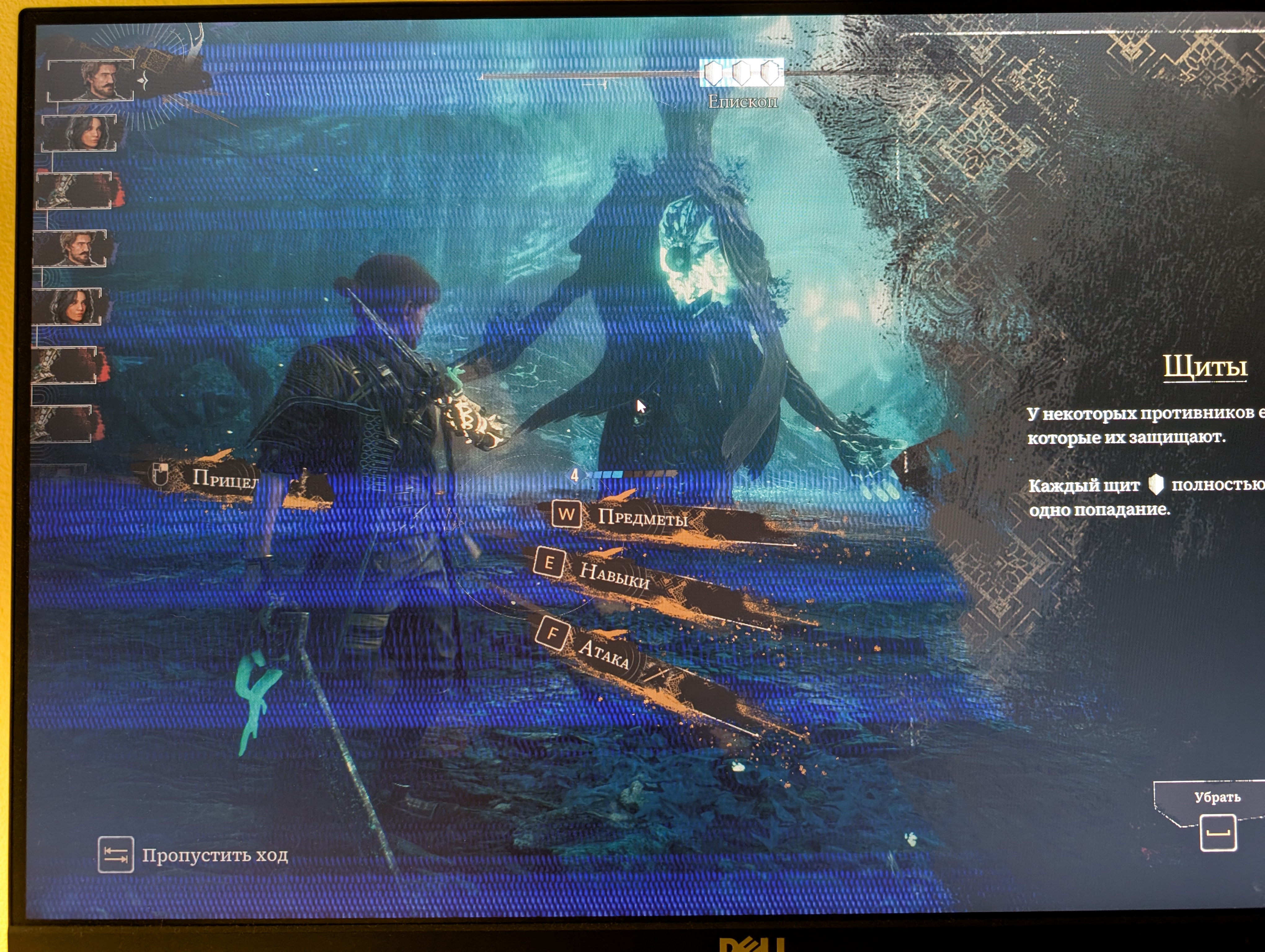
Blue dynamic lines suddenly appeared in the midst of a boss fight in Clair Obscur. Is my GPU dying?
GPU: Intel Arc B580
Driver version: 8247
Game: Clair Obscur from Steam
SSS report: attached
Steps to reproduce: Unclear. The artifacts appeared after about 90 minutes in the game. Though this doesn't look like overheating, the performance tab in Intel Graphics Software was showing 57 degree Celsius. The artifacts were only in the game, not on the desktop or in Graphics Software. They disappeared after the game restart.
Photo and video: attached
Link Copied

- Mark as New
- Bookmark
- Subscribe
- Mute
- Subscribe to RSS Feed
- Permalink
- Report Inappropriate Content
Hello Andrey123,
Thank you for posting in Intel Communities.
Based on the detailed report, attached photo/video and your description, this doesn't immediately suggest GPU failure. I did notice that the graphics driver is currently the latest version however, the BIOS firmware is outdated.
Please proceed with the following steps below:
- Contact your motherboard manufacturer support team to get assistance on updating the BIOS firmware to the latest version, 3.50 and make sure to load the BIOS defaults.
- Once done, proceed with clean installation of the latest Intel® Arc™ B580 Graphics driver version 32.0.101.8247 (WHQL Certified) using DDU (in safe mode).
If the issue persists kindly share the new SSU log file, so I can proceed with further investigation.
Best regards,
JeanetteC.
Intel® Customer Support Technician
- Mark as New
- Bookmark
- Subscribe
- Mute
- Subscribe to RSS Feed
- Permalink
- Report Inappropriate Content
Hello Andrey123,
Did you have a chance to review the previous post?
Please feel free to reach out if you have any questions.
Best regards,
JeanetteC.
Intel® Customer Support Technician
- Mark as New
- Bookmark
- Subscribe
- Mute
- Subscribe to RSS Feed
- Permalink
- Report Inappropriate Content
Yes, I followed the steps in the reply above and presently check whether it works. So far so good. However, since the issue wasn't observed to appear immediately in the first place, I feel like I need to give this test some time to be completely sure.
- Mark as New
- Bookmark
- Subscribe
- Mute
- Subscribe to RSS Feed
- Permalink
- Report Inappropriate Content
Hello Andrey123,
Thank you for the update!
That's great to hear the steps are working so far. I'll keep this thread open while you continue monitoring. Please keep me posted on how things progress, and feel free to reach out if you notice any changes or have questions.
Best regards,
JeanetteC.
Intel Customer Support Technician

- Mark as New
- Bookmark
- Subscribe
- Mute
- Subscribe to RSS Feed
- Permalink
- Report Inappropriate Content
Those blue lines are most likely a temporary rendering glitch, not GPU failure. Since they vanished after restarting the game and didn’t appear elsewhere, it’s probably a driver or shader issue. Try updating to the latest Intel Arc driver and verify the game files in Steam — that should fix it.
- Mark as New
- Bookmark
- Subscribe
- Mute
- Subscribe to RSS Feed
- Permalink
- Report Inappropriate Content
Hello Olivia342
Thanks for sharing this information with the community. Your input is greatly appreciated.
Sincerely,
JeanetteC.
Intel Customer Support Technician
- Mark as New
- Bookmark
- Subscribe
- Mute
- Subscribe to RSS Feed
- Permalink
- Report Inappropriate Content
Hello Andrey123,
I wanted to follow up on your monitoring progress. How have things been working since implementing those steps? Any changes or issues to report?
Please let me know how everything is going.
Best regards,
JeanetteC.
Intel Customer Support Technician
- Mark as New
- Bookmark
- Subscribe
- Mute
- Subscribe to RSS Feed
- Permalink
- Report Inappropriate Content
Hello, I haven't been able to reproduce this issue for the past week. So we can likely assume that both updating BIOS and GPU driver installation after DDU resolved it.
- Mark as New
- Bookmark
- Subscribe
- Mute
- Subscribe to RSS Feed
- Permalink
- Report Inappropriate Content
Hello Andrey123,
Thank you for the update! I'm glad to hear that you haven't been able to reproduce the issue for the past week. It sounds like the BIOS update and GPU driver installation after using DDU successfully resolved the problem.
Based on this positive outcome, I'll proceed with closing this thread.
Should you need assistance in the future, please submit a new question as this thread will no longer be monitored.
We appreciate your time and thank you for choosing Intel support.
Sincerely,
JeanetteC.
Intel Customer Support Technician

- Subscribe to RSS Feed
- Mark Topic as New
- Mark Topic as Read
- Float this Topic for Current User
- Bookmark
- Subscribe
- Printer Friendly Page