
- Mark as New
- Bookmark
- Subscribe
- Mute
- Subscribe to RSS Feed
- Permalink
- Report Inappropriate Content
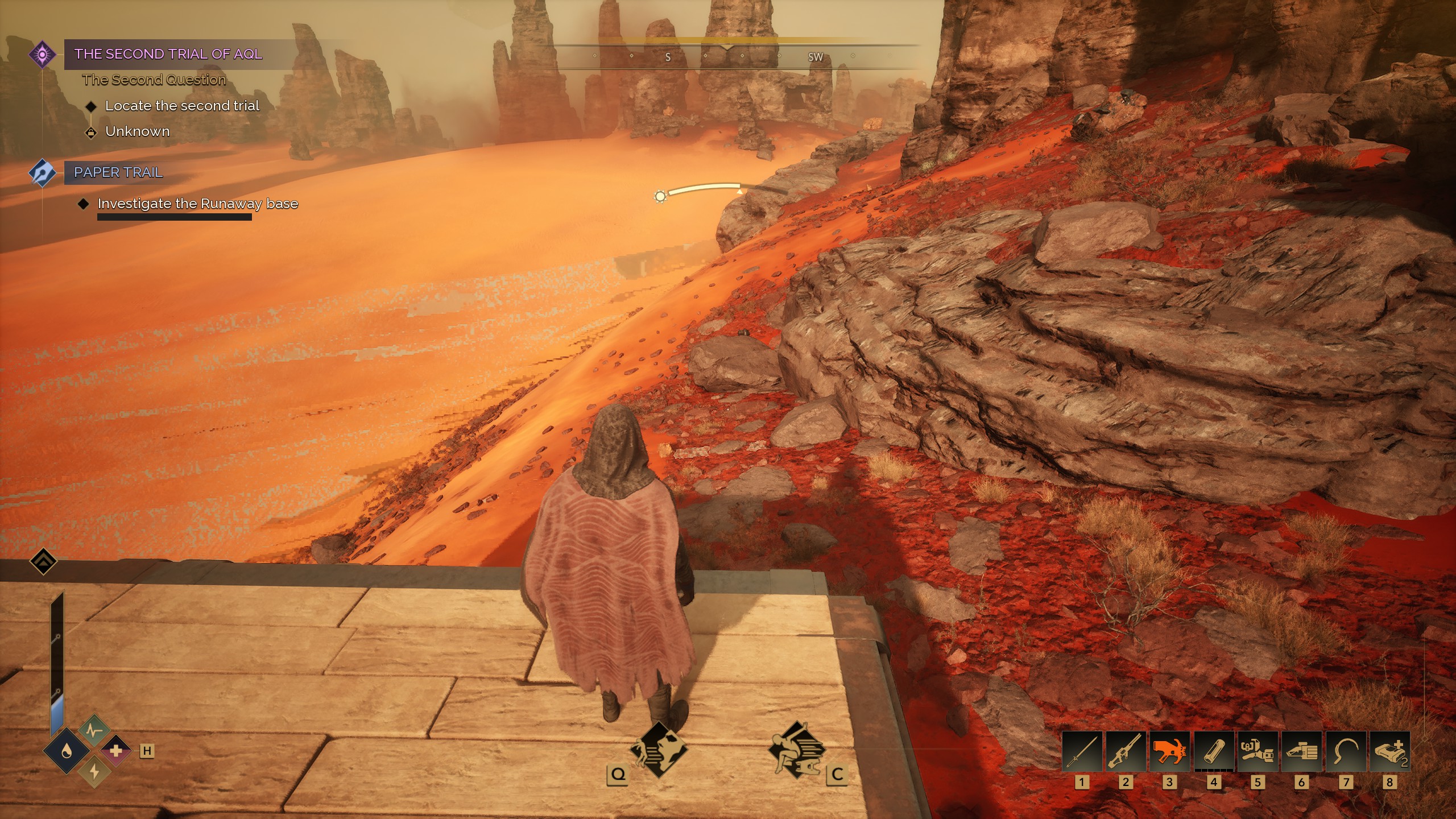
While playing Dune Awakening - I get several ground texture errors - They either flicker in and out, display poorly, or distorted.
- What is the graphics driver you are using?
I have tried that last 3 driver versions - DDU Fresh installs of each. 8425, 8509, 8531.
- Tell us the name of the game or application and where to obtain it (Steam, Epic, etc.)
Dune Awakening - Steam
- Provide us with the Intel SSU report from your system.
- Attached below - PSU 750W Corsair If i recall right.
- Tell us the steps to reproduce the issue (this is very important!).
- Run the game...
- For graphics corruption (per example artifacts, textures corruption or lighting glitches) please use any 3rd party application to capture screenshots or a video showing the bug. Alternatively you may use your phone's camera or similar.
- Attached a couple screenshots. If you need video I'll need some time to do it.
This is the ONLY game I am having issues with at this time.
I have tried with and without frame-gen - Tried all the AA options- each texture setting, each lighting setting, each shader setting, with and without lumen, with and without thier experimental shaders.
Best I can get right now is FSR Upscale - FSR Frame Gen - Any settings beyond this doesn't change anything.
Seems worse when the sun rises and sets in the area that i am in.
Link Copied
- Mark as New
- Bookmark
- Subscribe
- Mute
- Subscribe to RSS Feed
- Permalink
- Report Inappropriate Content
Is there any extra information you need to help resolve this issue?

- Mark as New
- Bookmark
- Subscribe
- Mute
- Subscribe to RSS Feed
- Permalink
- Report Inappropriate Content
Alright, here’s the situation straight up this isn’t your hardware failing, it’s more of a game engine and driver interaction issue, especially since you’ve already done clean installs and the problem only happens in Dune Awakening. The flickering and distorted ground textures, particularly during sunrise and sunset, are likely tied to how the game handles lighting (like Lumen) on Intel Arc GPUs. To stabilize things, try turning Lumen off, set Global Illumination to Medium or Low, and disable any experimental shaders, since those tend to cause rendering glitches. Stick with FSR upscaling and frame generation, and use TAA for anti-aliasing to keep things consistent. It also helps to cap your FPS to around 120–144 and enable V-Sync, as large FPS spikes can worsen the flickering. On the driver side, reset Intel Graphics settings to default and turn off any extra enhancements like sharpening. One underrated fix is clearing your shader cache (in your AppData Intel ShaderCache folder) so the game rebuilds clean shaders. Lastly, instead of jumping to the newest driver, stick with a more stable one like 8509 for now. Bottom line this is a known kind of issue with newer games and Arc, so you’ve already done the right steps; these tweaks are just about making it playable until proper driver or game updates fix it....


- Mark as New
- Bookmark
- Subscribe
- Mute
- Subscribe to RSS Feed
- Permalink
- Report Inappropriate Content
Moderators didnt even respond you

- Subscribe to RSS Feed
- Mark Topic as New
- Mark Topic as Read
- Float this Topic for Current User
- Bookmark
- Subscribe
- Printer Friendly Page