
- Mark as New
- Bookmark
- Subscribe
- Mute
- Subscribe to RSS Feed
- Permalink
- Report Inappropriate Content
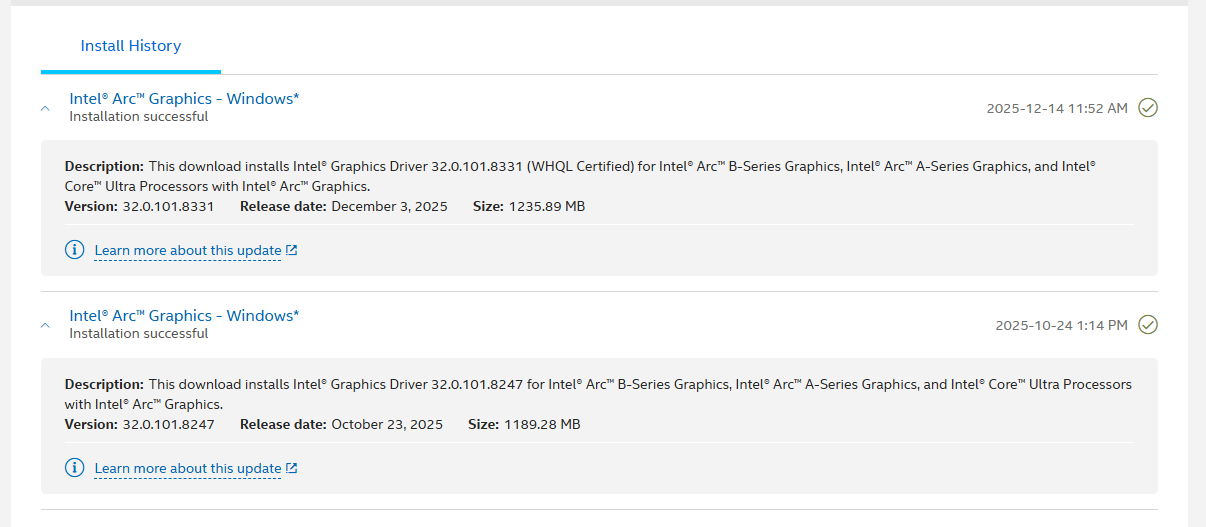
Hello, I've recently bought an ASRock Challenger OC Arc B580 2 months ago and it works wonders. After updating the drivers to latest, it was working fine for a couple hours. I was using Davinci Resolve to edit videos until later, my entire PC had a terrible lag and I got a "Faulty Hardware Corrupted Page" BSOD. I tried to boot up my PC again, there's power but shows no display. I've tried taking off each RAM stick, still no display. Tried re-seating the GPU, no display again. I connected my HDMI to onboard graphics, booted in safe-mode and used DDU to clean reinstall and revert previously installed driver version but I cannot install the previous driver because the GPU doesn't get detected by the system even if it is connected. I tried putting the GPU to a different PC and it wasn't being detected as well. I'm afraid that the problem now probably lies with the GPU itself but I am not completely certain.
My System specs:
- Ryzen 5 5600G
- Biostar B450MHP v6.3 version B45NS905.BSS
- Deepcool PF700x 700w Bronze
- 16GB DDR4 3200Mhz
- Windows 11 Pro 10.0.26100 Build 26100
Link Copied

- Mark as New
- Bookmark
- Subscribe
- Mute
- Subscribe to RSS Feed
- Permalink
- Report Inappropriate Content
Hi there. I see we are using the same chipset. Can you take a look at my post and see if any of these steps are reproduceable? While I never had BSOD, I did install updates, which causes a reboot, and that is when my problems start. https://community.intel.com/t5/Intel-Arc-Discrete-Graphics/No-Video-from-Arc-B580-with-steps-to-reproduce/m-p/1730298#M31855
- Mark as New
- Bookmark
- Subscribe
- Mute
- Subscribe to RSS Feed
- Permalink
- Report Inappropriate Content
Thank you for the reply. I've done the steps on how to get it back on but to no avail, tried to enable/disable each BIOS setting you stated and still gives me no display

- Mark as New
- Bookmark
- Subscribe
- Mute
- Subscribe to RSS Feed
- Permalink
- Report Inappropriate Content
Hi euclaze,
Thank you for reaching out to the Intel Community Forum. I appreciate your message and want to assure you that I’m here to assist you with your concern. To better understand the issue and provide accurate support, could you please share the following details:
- When you turn on the PC with the GPU installed, do the GPU fans start spinning?
- Does the GPU have any lights? If yes, what color or pattern do they show?
- Does the motherboard show any warning lights or error codes when starting up?
- Are the PCIe power cables plugged in tightly to the GPU?
- Have you tried using other PCIe power cables from the PSU?
- When you tested the GPU in another computer, what were that PC’s specs (especially PSU wattage and motherboard PCIe slot version)?
- If you remove the GPU and use the built-in graphics, does the PC start and stay stable?
- When you say “no display” with the GPU installed, is the monitor cable connected to the GPU (not the motherboard)?
- Have you tried to reset/clear the CMOS Battery and then try to start with the GPU installed?
- Does the PC show the BIOS screen with the GPU installed, or is there no display at all?
Additionally, to help us better understand your system configuration and provide accurate support, we kindly request that you share the Intel® System Support Utility (SSU) logs from your device. These logs contain important details about your hardware and software environment, which are crucial for troubleshooting.
Please follow these steps:
1. Download and run the Intel® SSU application.
2. The tool will generate a text file containing your system information.
3. Refer to this guide for detailed instructions: Help Guide for the Intel® System Support Utility
4. Once completed, please attach the generated file to your response.
If you have any additional questions or need further assistance, please don’t hesitate to contact us.
Best regards,
Kent Russel P.
Intel Customer Support Technician
- Mark as New
- Bookmark
- Subscribe
- Mute
- Subscribe to RSS Feed
- Permalink
- Report Inappropriate Content
Thank you for your response Kent!
1. Yes, the fans spin and continues until I turn the system off.
2. The GPU has lights in the front showing blue, cyan and green in gradient. I've provided an image for better clarification.
3. I'm unable to identify if the motherboard lights up, but I see no error codes when starting up.
4. Yes.
5. I tried with the other PCIe power cable, sadly still the same results.
6. The 2nd PC's specs I tested it on is:
- Ryzen 5 5600G
- ASRock B450M Steel Legend - BIOS ver 4.10 PCIe 3.0 x16
- FSP HV PRO 85+ FSP650-51AAC 650w
- 32GB DDR4 3200Mhz
- Windows 11 Pro 10.0.26100 Build 26100
7. Yes.
8. Yes, the HDMI cable was connected to the GPU and shows no display.
9. I have tried resetting CMOS, waited for around 10 minutes and it still shows nothing.
10. It shows no display even in BIOS and POST screen at all when connected to the GPU, it only shows display when I connect the HDMI to the motherboard.
I have also attached the SSU logs as requested, hoping the details I've provided prove to be useful for your troubleshooting.
- Mark as New
- Bookmark
- Subscribe
- Mute
- Subscribe to RSS Feed
- Permalink
- Report Inappropriate Content
Hi euclaze,
Thanks for you detailed response and I hope you are doing well. For further analysis and investigation of the issue, please answer the following questions:
- When the GPU is powered on, do you notice any unusual sounds such as clicking, buzzing, or coil whine? These noises can sometimes indicate hardware stress or electrical issues.
- With the GPU physically installed but using onboard graphics for display output, please check.
- In the same scenario, does the GPU show up in your system BIOS under PCIe device listings or hardware monitoring? This helps confirm whether the motherboard detects the card at a hardware level.
- When the GPU is installed, does your system’s overall power consumption seem normal? Or does it feel like the PSU is working harder or running hotter than usual?
- If you have access to another known-working discrete GPU (any brand or model), does it function properly in your system? This will help rule out motherboard or PSU issues.
- To confirm the sequence: The GPU worked flawlessly for approximately two months. After the driver update, it operated for a couple of hours before encountering a BSOD. Since that BSOD, it has not displayed any output at all. Is this timeline accurate?
If you have any additional questions or need further assistance, please don’t hesitate to contact us.
Best regards,
Kent Russel P.
Intel Customer Support Technician
- Mark as New
- Bookmark
- Subscribe
- Mute
- Subscribe to RSS Feed
- Permalink
- Report Inappropriate Content
Hello and thank you again for your response Kent!
1. Nope, I don't notice any strange or rackety sounds the GPU makes when I power it on.
2-3. With the GPU installed and the HDMI plugged into the motherboard, I can't tell if the GPU is being detected through Biostar's BIOS screen as it categorizes different settings and wording it more complex but I've browsed through some settings that are closely related. Most of them were only providing auto or disabled options, I didn't notice any particular options that shows discrete graphics or anything similar. I've also provided images for more clarity. (Please point this out as I might've missed what you're looking for.)
4. I'm sorry but I'm unable to give accurate power consumption because I don't have a wattmeter or anything so I am unable to identify. Though with the GPU plugged in, I don't notice the PSU drawing more power than usual, the PSU's fans inside spins normally and both the PSU and GPU doesn't feel very hot.
5. Unfortunately I don't have any extra discrete GPU other than the B580 in my home.
6. On how you described the sequence, yes it is accurate. The PC functioned around 13 hours after the update until it ran into a BSOD.
Please feel free to ask me more questions, I'll give as much information as I can to help you troubleshoot the problem.
- Mark as New
- Bookmark
- Subscribe
- Mute
- Subscribe to RSS Feed
- Permalink
- Report Inappropriate Content
Some more information on part 2-3:
After unplugging the GPU from the motherboard, I noticed the option 'Above 4GB MMIO Limit' inside North Bridge option was unable to be selected. So I think the GPU was indeed being detected into the BIOS? though I am not completely sure yet.



- Mark as New
- Bookmark
- Subscribe
- Mute
- Subscribe to RSS Feed
- Permalink
- Report Inappropriate Content
Your bios mode is legacy. It must be UEFI.
This also brings into question your file system. If you are MBR, you need to convert to GPT. Lookup MBR2GPT for mor info.
Doc (not an Intel employee or contractor)
[CoPilot is a virus]
- Mark as New
- Bookmark
- Subscribe
- Mute
- Subscribe to RSS Feed
- Permalink
- Report Inappropriate Content
Hello and thanks for the insights AlHill
I see that my main partition and my HDD are set to MBR. I saw a post related to what you said and I was curious to do so since their issue a bit similar to mines was fixed when they've converted to GPT. I am new to doing this so if it's okay for me to ask questions before proceeding to what you suggested:
1. Will this have some complications on older disk hardware?
2. Since I've seen that GPT is recommended on Windows 11, having MBR on my main partition didn't had any issues regarding on other components until updating the B580. Will this be able to future-proof anything related to firmware changes?
Thank you once again for this information!
- Mark as New
- Bookmark
- Subscribe
- Mute
- Subscribe to RSS Feed
- Permalink
- Report Inappropriate Content
Here is a link to arc requirements:
Under "operating system", you will find a link to microsoft regarding mbr2gpt.
Complications with other hardware? It should not.
Future proof? You should have been on UEFI in the first place.
Make sure you have a backup before you do anything. There is a lot of information on mbr2gpt on the web. Read it first before attmpting to convert to uefi and gpt.
Doc (not an Intel employee or contractor)
[CoPilot is a virus]
- Mark as New
- Bookmark
- Subscribe
- Mute
- Subscribe to RSS Feed
- Permalink
- Report Inappropriate Content
Hi again
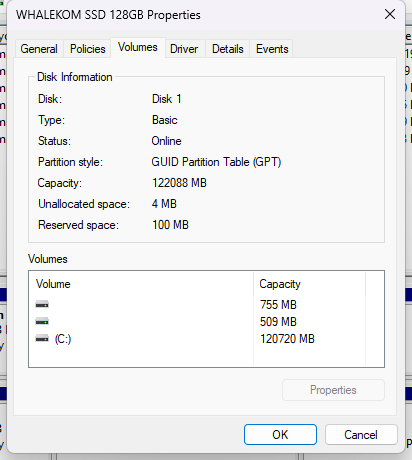
I've changed the BIOS to UEFI, enabled secure boot, turned off CSM and enabled both 4G Decoding and ReBAR. I have also made a fresh reinstallation of Windows since it's been almost a year and a half since I last did, as well as converted my boot drive to GPT. Unfortunately, the GPU still isn't giving display and undetectable.


- Mark as New
- Bookmark
- Subscribe
- Mute
- Subscribe to RSS Feed
- Permalink
- Report Inappropriate Content
Ok, at least now you are in the world of supported OS.
The ARC could be bad.
Are the bios video settings correct?
Is your cable good?
Is your power supply adequate?
Doc (not an Intel employee or contractor)
[CoPilot is a virus]
- Mark as New
- Bookmark
- Subscribe
- Mute
- Subscribe to RSS Feed
- Permalink
- Report Inappropriate Content
Hey again,
The video settings in the bios are correct. I tried resetting CMOS again, disabled integrated graphics and re-enabled both 4G Decoding and ReBAR back. Still same results.
I don't have any other spare cables in my home. But in the other PC I tested it on my friend's, the GPU wasn't being detected as well.
I have a 700w PSU and I think it's enough to power up all my components.
Maybe perhaps the B580 gave up on me, I guess there's no other choice than to issue an RMA.
- Mark as New
- Bookmark
- Subscribe
- Mute
- Subscribe to RSS Feed
- Permalink
- Report Inappropriate Content
Yes, I would do an RMA as well.
Doc (not an Intel employee or contractor)
[CoPilot is a virus]
- Mark as New
- Bookmark
- Subscribe
- Mute
- Subscribe to RSS Feed
- Permalink
- Report Inappropriate Content
Hello again and my final update, maybe
I've went to my local retailer to test out the GPU, they've told me that it is now unusable for my system unit because it's been changed to only recognize AM5 components unless flashing the vbios, which will void the warranty (well thanks a lot). The GPU still functions so they cannot suggest an RMA. So other than upgrading to AM5, I cannot use the GPU anymore.
- Mark as New
- Bookmark
- Subscribe
- Mute
- Subscribe to RSS Feed
- Permalink
- Report Inappropriate Content
Hi euclaze,
Thank you for your patience, and I hope you’re doing well. After a thorough analysis of the issue, I’d like to clarify that no firmware update on the GPU (including vBIOS) restricts it to work only with a specific platform. Therefore, the information provided by the third party you consulted is inaccurate. If the GPU functions properly on another system, the problem is likely related to the motherboard or other components in your current setup.
If you have concerns about the reliability of this GPU, we recommend contacting ASRock or your place of purchase for available warranty options. If you have any questions or need further clarification, please don’t hesitate to reach out.
Best regards,
Kent Russel P.
Intel Customer Support Technician
- Mark as New
- Bookmark
- Subscribe
- Mute
- Subscribe to RSS Feed
- Permalink
- Report Inappropriate Content
Hello!
First of all, I'd suggest updating the BIOS version on your motherboard. You indicated that your version is B45NS905.BSS from 2023-09-05. A lot of time has passed, and many BIOS versions have been updated, including AGESA versions within these BIOS versions.
Currently, the latest version for your motherboard is B45NS831.BSS from 2025-08-31.
I recommend you start with this, as BIOSTAR motherboards have very finicky BIOSes.
Link to the support page for your BIOSTAR B450MHP v6.3 motherboard:
- Mark as New
- Bookmark
- Subscribe
- Mute
- Subscribe to RSS Feed
- Permalink
- Report Inappropriate Content
Also, the Asrock B450M Steel Legend BIOS version is also very old, 4.10, dating back to 7/1/2021. The current version is 10.43 [Beta] from 9/9/2025, and I also recommend updating it.
You understand that this graphics card didn't exist in either 2021 or 2023, when these BIOS versions were released.
- Mark as New
- Bookmark
- Subscribe
- Mute
- Subscribe to RSS Feed
- Permalink
- Report Inappropriate Content
Hi euclaze,
I just wanted to follow up and check if you’ve had a chance to review the information I shared previously. Your feedback is important, and I’d appreciate it if you could share your thoughts at your earliest convenience. If you have any questions or need further clarification, please don’t hesitate to reach out.
Hi gasoline, please create a separate Intel Community post for accurate and effective support.
Best Regards,
Kent Russel P.
Intel Customer Support Technician
- Mark as New
- Bookmark
- Subscribe
- Mute
- Subscribe to RSS Feed
- Permalink
- Report Inappropriate Content
Hi euclaze,
I hope you're doing well. As I haven’t received a response, I will proceed to close this inquiry. Should you require further assistance or have additional questions, please feel free to submit a new request. Kindly note that this thread will no longer be monitored once closed.
Best regards,
Kent Russel P.
Intel Customer Support Technician

- Subscribe to RSS Feed
- Mark Topic as New
- Mark Topic as Read
- Float this Topic for Current User
- Bookmark
- Subscribe
- Printer Friendly Page