
- Marcar como novo
- Marcador
- Subscrever
- Silenciar
- Subscrever fonte RSS
- Destacar
- Imprimir
- Denunciar conteúdo inapropriado
Good morning everyone. I have a problem with Batman arkham alone. Indeed at the beginning impossible to launch the game, or else, it turned to 2-3fps (the game did not recognize my Intel arc 750 graphics card and detected Microsoft Basic Drivers). After searching on the internet, I copied a dxgi.dll file which to all solved. (the game worked perfectly from a fluidity point of view etc). However , color problems , the screen became green , purple continuously at times. So, I deleted this file and then I copied other DXKV files. The game releases my gpu again, no more display problems. Nevertheless, the FPS rate is very unstable.
Thank you for the help you can give me.
Ps: The drivers are up to date and I have a very recent pc.

- Marcar como novo
- Marcador
- Subscrever
- Silenciar
- Subscrever fonte RSS
- Destacar
- Imprimir
- Denunciar conteúdo inapropriado
Hello bandiera,
We appreciate your patience.
We would like to let you know we have been able to replicate this issue internally, and we are now investigating this matter under bug ID 14019018958. Unfortunately, we can't promise any ETA regarding this matter.
To void duplicate efforts, since this process requires further effort on our part, we are considering closing this case. However, before doing so, we would like to know if you agree with this.
Best regards,
Jean O.
Intel Customer Support Technician
Link copiado
- « Anterior
-
- 1
- 2
- Próximo »

- Marcar como novo
- Marcador
- Subscrever
- Silenciar
- Subscrever fonte RSS
- Destacar
- Imprimir
- Denunciar conteúdo inapropriado
- Marcar como novo
- Marcador
- Subscrever
- Silenciar
- Subscrever fonte RSS
- Destacar
- Imprimir
- Denunciar conteúdo inapropriado
- Marcar como novo
- Marcador
- Subscrever
- Silenciar
- Subscrever fonte RSS
- Destacar
- Imprimir
- Denunciar conteúdo inapropriado
- Marcar como novo
- Marcador
- Subscrever
- Silenciar
- Subscrever fonte RSS
- Destacar
- Imprimir
- Denunciar conteúdo inapropriado
- Marcar como novo
- Marcador
- Subscrever
- Silenciar
- Subscrever fonte RSS
- Destacar
- Imprimir
- Denunciar conteúdo inapropriado
I looked in the GTX file and the value 1 was already entered for display_Mode
- Marcar como novo
- Marcador
- Subscrever
- Silenciar
- Subscrever fonte RSS
- Destacar
- Imprimir
- Denunciar conteúdo inapropriado
I’d like to ask you a question, do you think the display problem come from the DXGI.dll file?
- Marcar como novo
- Marcador
- Subscrever
- Silenciar
- Subscrever fonte RSS
- Destacar
- Imprimir
- Denunciar conteúdo inapropriado
Hello bandiera,
We appreciate your patience.
We would like to let you know we have been able to replicate this issue internally, and we are now investigating this matter under bug ID 14019018958. Unfortunately, we can't promise any ETA regarding this matter.
To void duplicate efforts, since this process requires further effort on our part, we are considering closing this case. However, before doing so, we would like to know if you agree with this.
Best regards,
Jean O.
Intel Customer Support Technician
- Marcar como novo
- Marcador
- Subscrever
- Silenciar
- Subscrever fonte RSS
- Destacar
- Imprimir
- Denunciar conteúdo inapropriado
Hello everyone, I finally have a solution . To fix this problem, download the DXVK ASYNC 2.0 folder ( https://github.com/Sporif/dxvk-async/releases/tag/2.0) and copy to Binaries / Win 64 . Problem solved
- Marcar como novo
- Marcador
- Subscrever
- Silenciar
- Subscrever fonte RSS
- Destacar
- Imprimir
- Denunciar conteúdo inapropriado
Hello bandiera,
We are glad to know that you were able to find a workaround for this issue. Since you marked this thread solved, we will close this thread now.
If you need additional information, please submit a new question since this thread will no longer be monitored.
Best regards,
Jean O.
Intel Customer Support Technician

- Marcar como novo
- Marcador
- Subscrever
- Silenciar
- Subscrever fonte RSS
- Destacar
- Imprimir
- Denunciar conteúdo inapropriado
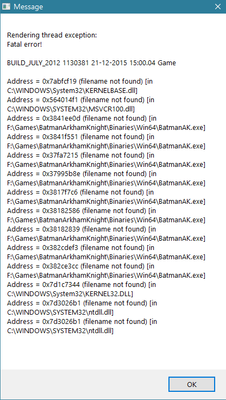
After using latest dxvk-2.3, I am unable to launch the game. PFA for error(s) message.
OS: Win10 2H22 (latest public release)
Rebar: Enabled
GPU: Intel A770 version 5186
PSA: Sharing log files really won't working because the OP has shared the similar files already and still haven't abled to run this particular game. I have made a list of games which are not working on A770/LE GPU. Let me know if your team have an API for copatible games?

- Marcar como novo
- Marcador
- Subscrever
- Silenciar
- Subscrever fonte RSS
- Destacar
- Imprimir
- Denunciar conteúdo inapropriado
Those who are having issue . download DXVK from https://github.com/doitsujin/dxvk . copy d3d11.dll and dxgi.dll into binaries/win64 . Thats it !
I am using dxvk version 2.4

- Subscrever fonte RSS
- Marcar tópico como novo
- Marcar tópico como lido
- Flutuar este Tópico para o utilizador atual
- Marcador
- Subscrever
- Página amigável para impressora
- « Anterior
-
- 1
- 2
- Próximo »