
- Mark as New
- Bookmark
- Subscribe
- Mute
- Subscribe to RSS Feed
- Permalink
- Report Inappropriate Content
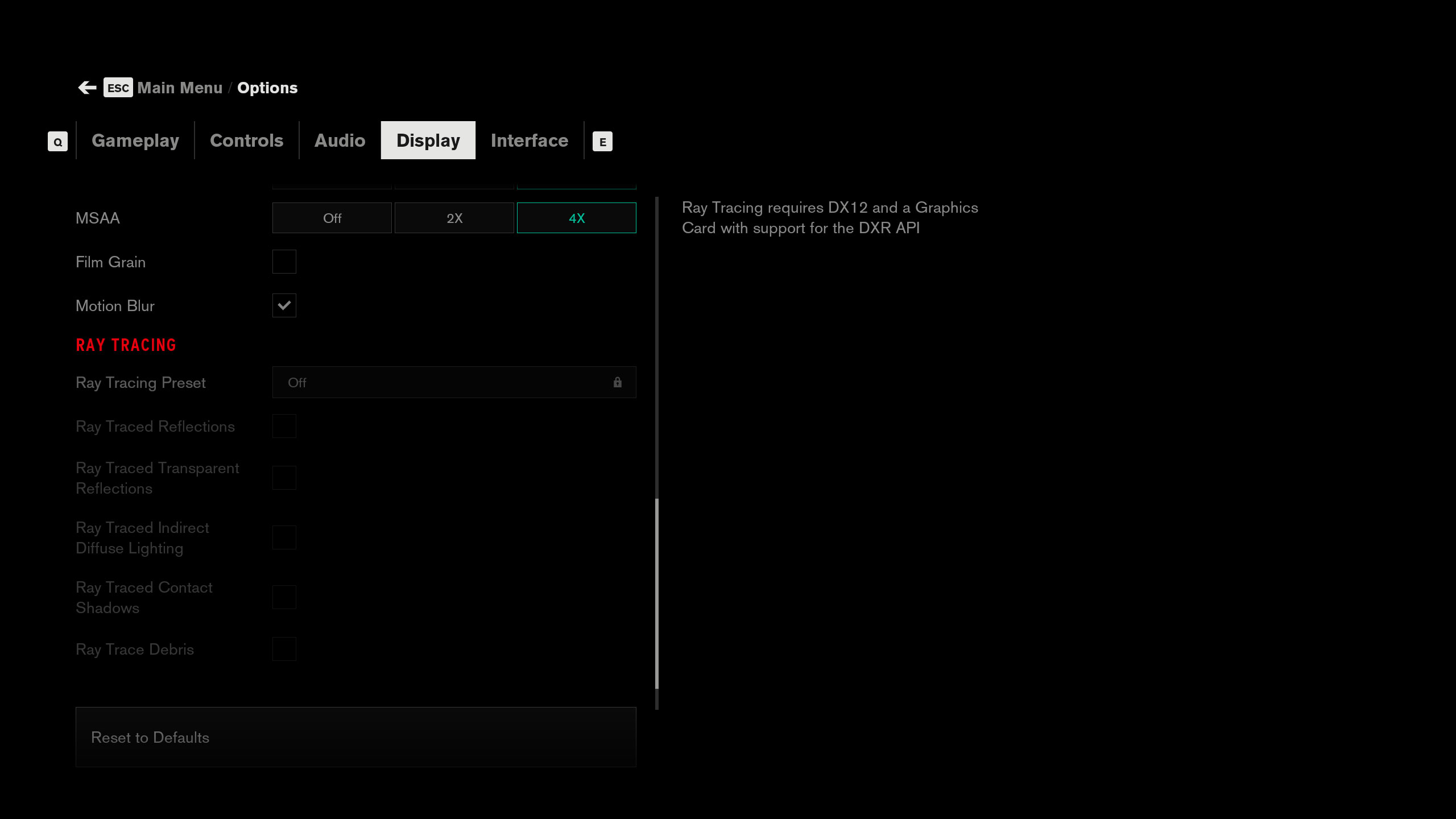
When launching Remedy's 'Control.' The settings do not allow for radiosity adjustments claiming it requires DXR API and Direct X 12, and it is being launched from the direct X 12 executable.
Running on Arc A770 with i7-9700K, 24 gb RAM.
Driver version .4123
Radiosity appears to be working in game.
Screenshot of the issue attached.
Link Copied

- Mark as New
- Bookmark
- Subscribe
- Mute
- Subscribe to RSS Feed
- Permalink
- Report Inappropriate Content
Hello misterrumbles
Thank you for posting on the Intel® ARC™ Graphics Communities. I am sorry to hear that you are experiencing issues when trying to enable RayTracing on Control. Please let me know the following information in order to assist with this issue:
- Where was the game downloaded from? (Epic, Steam)
- I see that you are using the latest driver version 30.0.101.4123, Was this issue also happening in previous versions of the drivers?
Best Regards,
Hugo O.
Intel Customer Support Technician,
- Mark as New
- Bookmark
- Subscribe
- Mute
- Subscribe to RSS Feed
- Permalink
- Report Inappropriate Content
It was downloaded off of steam. It was happening also with the previous driver that wasn’t the beta driver. The radiosity appears to be rendering on screen but the ability to change the controls in settings isn’t available.
- Mark as New
- Bookmark
- Subscribe
- Mute
- Subscribe to RSS Feed
- Permalink
- Report Inappropriate Content
Hello misterrumbles
Thank you for sharing this information with us. Please let's try the following:
- Launch the "Steam" app.
- Select "Library" and Right-click on the "Control" game from the list.
- Navigate to "Properties" and Select "General " setting.
- Key in "-dx12" on "Launch Options" box to enable Ray Tracing in the game and close "General" menu.
- Relaunch the game again and check Ray Tracing on "Display" game settings.
Best Regards,
Hugo O.
Intel Customer Support Technician.
- Mark as New
- Bookmark
- Subscribe
- Mute
- Subscribe to RSS Feed
- Permalink
- Report Inappropriate Content
That solved it. Thanks for your help, Hugo - Much appreciated!
- Mark as New
- Bookmark
- Subscribe
- Mute
- Subscribe to RSS Feed
- Permalink
- Report Inappropriate Content
Hello misterrumbles
We're glad to know the information helped. Hopefully, it will help other community members. Since the thread is now solved, we will close it. If you need any additional information, please submit a new question as this thread will no longer be monitored.
Best Regards,
Hugo O.
Intel Customer Support Technician.

- Subscribe to RSS Feed
- Mark Topic as New
- Mark Topic as Read
- Float this Topic for Current User
- Bookmark
- Subscribe
- Printer Friendly Page