
- Mark as New
- Bookmark
- Subscribe
- Mute
- Subscribe to RSS Feed
- Permalink
- Report Inappropriate Content
Hi there.
To give context I have 4 monitors connected to Intel ARC B580
3 - AOC CQ32G4VE Connected in DP with 2560 x 1440p 180 Hz Landscape
1 - Samsung LU28R55 Conected in HDMI 3840 x 2160p 60 Hz Landscape
So the issue is: at the current configuration Resolution, refresh rate and being single monitors, everything works as intended.
The problem starts when I try to merge the 3 AOCs into a "single monitor" for Sim Racing in the Intel Graphics Software. Instead of 7680x1440 the only resolution presented is 10240x1440. Try to decrease the Refresh Rate before the merge to 144, 120 and 60, only to get the same results ( 10240x1440 at 180 Hz)
Tried to Downgrade the graphic Card Driver to version 101.8509 with the same results also.
So what I'm missing here to configure the monitor as one?
Link Copied

- Mark as New
- Bookmark
- Subscribe
- Mute
- Subscribe to RSS Feed
- Permalink
- Report Inappropriate Content
Do you get the same result if you unplug the Samsung monitor from HDMI?
- Mark as New
- Bookmark
- Subscribe
- Mute
- Subscribe to RSS Feed
- Permalink
- Report Inappropriate Content
Yes. If I boot only with the 3 AOCs plugged the merged result is the same.

- Mark as New
- Bookmark
- Subscribe
- Mute
- Subscribe to RSS Feed
- Permalink
- Report Inappropriate Content
Hello ZeMike,
Thank you for raising this concern via the Intel Communities.
I understand that you would like to use four monitors with your Intel® Arc™ B580, and it appears that one of the monitors has a resolution that does not match the other three. To properly investigate this issue, kindly provide the information below:
- Have you tried connecting all four monitors using HDMI?
- Are all cables directly connected to the GPU, or are you using any adapters?
- Prior to downgrading to driver version 101.8509, which driver version were you using?
- What is the revision or specification of the cables (e.g., HDMI 2.0, HDMI 2.1, DisplayPort 1.4, etc.)?
Once I have this information, I will be able to further assist you with the troubleshooting steps.
Additionally, to help us better understand your system configuration and provide the most accurate support, we kindly ask that you share the Intel® System Support Utility (SSU) logs from your device. These logs include essential hardware and software details important for troubleshooting.
Please follow the steps below:
- Download and run the Intel® SSU application.
- Allow the tool to scan your system—it will generate a text file with your system information.
- Refer to this guide for complete instructions: Help Guide for the Intel® System Support Utility
- Once the report is generated, please attach the file to your reply.
If you have any additional questions or need further assistance, please feel free to reach out anytime.
Best regards,
John M.
Intel Customer Support Technician
- Mark as New
- Bookmark
- Subscribe
- Mute
- Subscribe to RSS Feed
- Permalink
- Report Inappropriate Content
Hi John M.
First of all thanks for taking the time to help in this matter.
I will try to answer all you questions clearly
- Have you tried connecting all four monitors using HDMI?
There is only one HDMI conector on Intel ARC B580, so unless I use an adaptor, that defies the purpose of buying a card with 4 connectors in the first place, that is not possible
- Are all cables directly connected to the GPU, or are you using any adapters?
All monitor cables are connected directly to the GPU.
- Prior to downgrading to driver version 101.8509, which driver version were you using?
I was using the latest driver from the Intel Page, the version 32.0.101.8531
- What is the revision or specification of the cables (e.g., HDMI 2.0, HDMI 2.1, DisplayPort 1.4, etc.)?
All three DP cables connecting the AOCs are DP 1.4 and the HDMI to the Samsung is HDMI 2.1.
Futhermore I can tell you that removing the Samsung from the equation retrives the same result. Wilh only the 3 DP connected to the GPU the merged resolution of the AOCs are 10240x1440.
Im attaching the requested SSU reports both with four monitor as singles and with Merged AOCs
- Mark as New
- Bookmark
- Subscribe
- Mute
- Subscribe to RSS Feed
- Permalink
- Report Inappropriate Content
Hello ZeMike,
Thank you for your response.
Upon reviewing the SSU, it appears that your BIOS is outdated. To properly isolate the issue, I highly recommend updating the BIOS to the latest version first.
Once the BIOS is updated, please disable the B580 and test using the iGPU only. For this test, it’s best to connect your display via the DP and HDMI ports on the motherboard to see if the issue persists.
After completing this isolation step, kindly let me know the results so we can continue assisting you further. I’m here to help throughout this process.
Best regards,
John M.
Intel Customer Support Technician
- Mark as New
- Bookmark
- Subscribe
- Mute
- Subscribe to RSS Feed
- Permalink
- Report Inappropriate Content
Hi Jonh M.
Just Updated the bios on the board and I'm Attaching the new SSU reports.
The problem persists.
Regarding the iGPU, has you know there is only a DP port in the MB, so I don't see the relevance in help solving the problem with the wrong resolution on merging 3 Displays
If I dont Merge the three Displays on ARC B580 thay are perfect in 2560x1440 180 Hz, If I merge 2 of them it shows 5120x1440 at 180 Hz what is correct. The problem is merging the three of them has it shows 10240 x 1440
Regards
- Mark as New
- Bookmark
- Subscribe
- Mute
- Subscribe to RSS Feed
- Permalink
- Report Inappropriate Content
Hello ZeMike,
Thank you for confirming that the BIOS has already been updated to the latest version. I understand that the issue still persists.
Upon reviewing the SSU report, I noticed that the display refresh rates are ranging from 29 Hz to 60 Hz. To properly investigate this concern, I kindly request that you provide a screenshot of the display settings for each monitor for further analysis.
Please follow the steps below for each monitor:
- Go to Display Settings.
- Select one display at a time.
- Scroll down and click on Advanced Display.
- Capture a screenshot showing the display information, including the refresh rate.
Additionally, please provide an updated SSU report with all monitors connected. The most recent SSU only shows the Samsung monitor, and I would like to review the EDID details for each connected display.
Once I receive the requested information, I will proceed with further investigation.
Best regards,
John M.
Intel Customer Support Technician
- Mark as New
- Bookmark
- Subscribe
- Mute
- Subscribe to RSS Feed
- Permalink
- Report Inappropriate Content
Hi John M
Sorry. that was my mistake. I tried the merge by downgrading from all resolution and in some point in time I forgot to put back on 180 hz
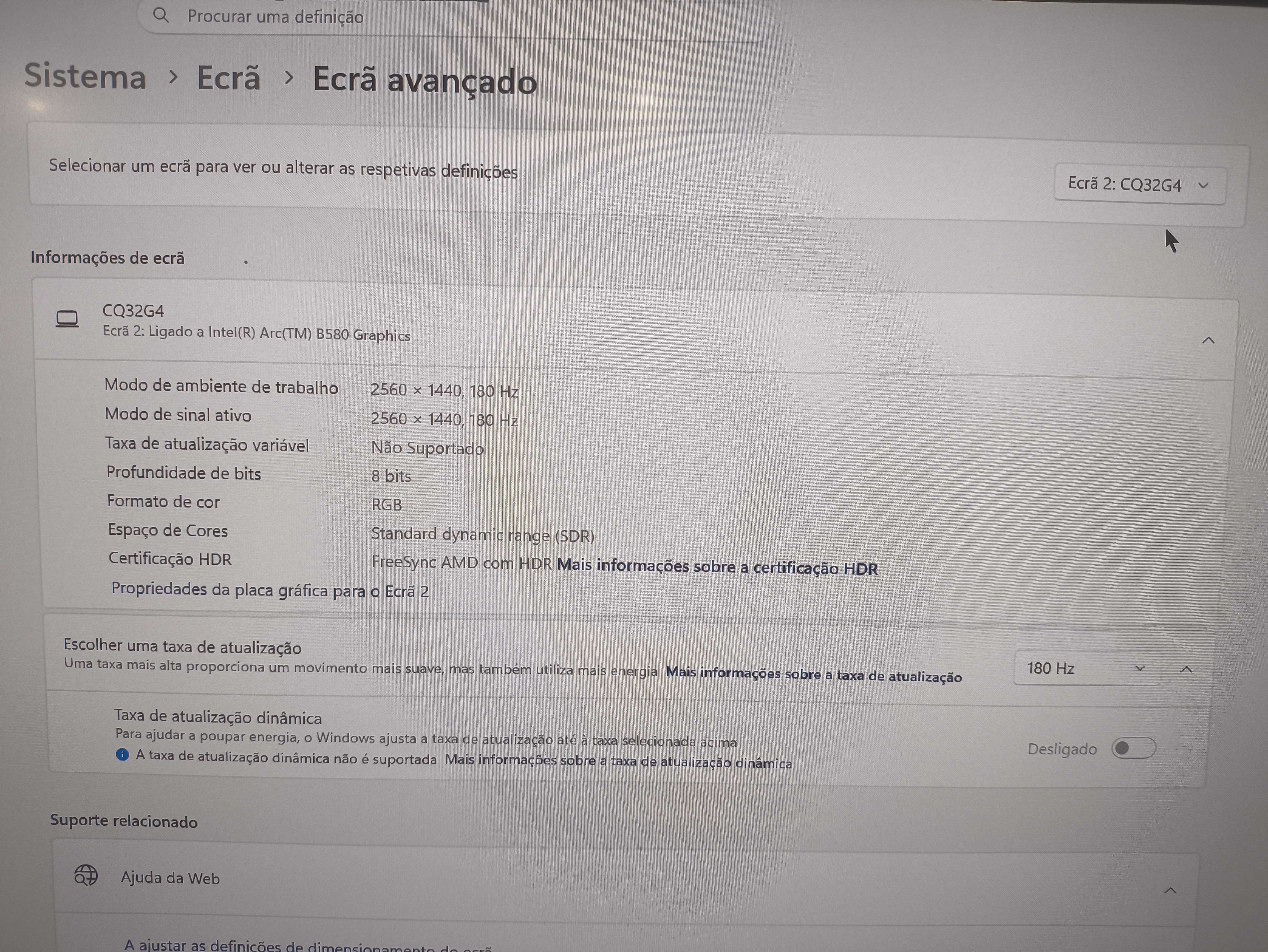
Here goes the resquested pictures of the individual monitors at 2560x1440 180 hz and merged in the 10240x11440 180 hz
The new SSU reports are provided also
Best Regards
Ze Mike



- Mark as New
- Bookmark
- Subscribe
- Mute
- Subscribe to RSS Feed
- Permalink
- Report Inappropriate Content
Hello ZeMike,
Thank you for providing the requested information. After validating the EDID report, I noticed some inconsistencies with the detected resolutions, particularly when the monitors are merged. It appears that certain resolution combinations may not be fully supported, which could be contributing to the issue.
To better isolate the concern, I recommend following the steps outlined in the article “Troubleshooting, Setup, and Resolution for Multiple Display Configurations.” Please carefully go through the solutions provided in the guide.
Once you have completed the steps, kindly let me know the results. If the issue persists after trying all the recommendations in the article, I will be happy to proceed with further investigation.
Thank you for your cooperation, and I look forward to your update.
Best regards,
John M.
Intel Customer Support Technician
- Mark as New
- Bookmark
- Subscribe
- Mute
- Subscribe to RSS Feed
- Permalink
- Report Inappropriate Content
Hi John M
All the recomendations sugested in the troubleshooting were already tried with no positive result.
There are no problems with the monitors or resolution when they are solo. Even if I combine any two of them the resolution is Spot On.
The problem seems to be some software issue in the Intel Graphics app about combining the ARC B580 and the 3 monitors, or at the very least my AOCs model, because if it supports 10240x1440 should support 7680x1440 even better
Hope te ear some kind of fix to this issue from you
Best Regards
Ze Mike
- Mark as New
- Bookmark
- Subscribe
- Mute
- Subscribe to RSS Feed
- Permalink
- Report Inappropriate Content
Hello ZeMike,
Thank you for letting me know that you’ve already tried the steps from the article. Since the issue still persists, please allow me some time to check this internally so I can properly replicate the issue with multiple monitors.
Once I have completed my review, I’ll provide you with an update.
Best regards,
John M.
Intel Customer Support Technician
- Mark as New
- Bookmark
- Subscribe
- Mute
- Subscribe to RSS Feed
- Permalink
- Report Inappropriate Content
Hello ZeMike,
Thank you for patiently waiting.
I have completed the replication of your concern, and it appears that the issue might be related to a phantom monitor. This could be the reason why the resolution is showing 10240 × 1440 instead of the expected 7680 × 1440.
To further isolate the issue, please try the following steps and let me know the resolution results.
Method 1:
- Temporarily disconnect one of the AOC monitors.
- Test the setup using 2 AOC monitors and 1 Samsung monitor only.
- Check if the resolution changes to 7680 × 1440.
Method 2:
- Connect all AOC monitors together and check the resolution.
- If the resolution shows 10240 × 1440, please disconnect the monitors one at a time.
- This will help identify which monitor may be causing the phantom display.
Additionally, I recommend performing DDU (Display Driver Uninstaller) to rule out any possible driver-related issues. After that, please reinstall the latest graphics driver version 32.0.101.8135.
Once you have completed these steps, kindly let me know the results so we can determine the next steps if the issue persists.
Thank you, and I look forward to your update.
Best regards,
John M.
Intel Customer Support Technician
- Mark as New
- Bookmark
- Subscribe
- Mute
- Subscribe to RSS Feed
- Permalink
- Report Inappropriate Content
Hi John M,
Thanks for your reply
The steps recomended were already tried as I told you on 03/04/2026
community.intel.com/t5/Intel-Arc-Discrete-Graphics/Wrong-Resolution-with-Triples-AOC-32-in-ARC-B580/m-p/1739577#M33912
But nevertheless I tried them again and the results were the same. Any two of the AOCs monitors merged presents 5120 x 1440 resolution. Only when I bring any of the AOC to the monitor trio merge it displays 10240x1440
Also, prior to this, I performed the DDU and instaled version 32.0.101.8135 of the drivers. The result were the above
Hope to ear from you soon,
Best Regards
Ze Mike
- Mark as New
- Bookmark
- Subscribe
- Mute
- Subscribe to RSS Feed
- Permalink
- Report Inappropriate Content
Hello ZeMike,
Thank you for providing that information. Please allow me some time to investigate this internally and attempt to replicate the issue on our end.
Once I complete the replication process, I will get back to you with an update.
Thank you for your patience.
Best regards,
John M.
Intel Customer Support Technician
- Mark as New
- Bookmark
- Subscribe
- Mute
- Subscribe to RSS Feed
- Permalink
- Report Inappropriate Content
Hello ZeMike,
Thank you for your patience. To further exhaust the troubleshooting for this issue, I would like to ask if you have an additional graphics card preferably an Intel® Arc™ graphics card so we can check if the issue is reproducible with another known working GPU.
If you do not have an extra Arc graphics card available, kindly try installing your Arc B580 into a working system to perform a swap test.
Lastly, could you please confirm whether your Arc B580 is an Intel Limited Edition (LE) or a partner/branded Arc card?
Best regards,
John M.
Intel Customer Support Technician
- Mark as New
- Bookmark
- Subscribe
- Mute
- Subscribe to RSS Feed
- Permalink
- Report Inappropriate Content
Hi John M,
As a personal user, I don’t have multiple Intel graphics cards available to perform the hardware swaps you suggested. Given current component prices, maintaining even a single working system is already a significant investment, having additional setups for testing isn’t feasible for me.
The Arc B580 I currently have is actually the second unit I’ve purchased. The first one exhibited the same issue, and I returned it under the assumption it was a hardware defect. However, it now appears to be related to software on Intel’s side.
For context, my triple monitor setup worked flawlessly for over 10 years with a GPU from another vendor. Unfortunately, I no longer have that card, as it has already been sold, so I’m unable to retest with it.
In your previous message, you mentioned that you would attempt to reproduce the issue on your end. Could you please share the results of your testing?
For reference, the Arc B580 I’m using is the one shown in the attached photo.
Thank you for your support, and I look forward to your update.
Best regards,"

- Mark as New
- Bookmark
- Subscribe
- Mute
- Subscribe to RSS Feed
- Permalink
- Report Inappropriate Content
The Monitor Setup didn´t had ten years, the triple monitor worked on a 10-year-old GPU from another vendor.
Sorry for the bad writting
- Mark as New
- Bookmark
- Subscribe
- Mute
- Subscribe to RSS Feed
- Permalink
- Report Inappropriate Content
Hello ZeMike,
Thank you for your response and for confirming that your graphics card is an Intel Limited Edition (LE) version.
I understand that your monitor setup has been stable when using a competitor’s GPU for the past 10 years. With that in mind, please allow me some time to check this internally and look into possible isolation steps for this issue.
I will get back to you as soon as I have an update. Thank you for your patience.
Best regards,
John M.
Intel Customer Support Technician
- Mark as New
- Bookmark
- Subscribe
- Mute
- Subscribe to RSS Feed
- Permalink
- Report Inappropriate Content
Hello ZeMike,
Thank you for your patience. Upon further checking, I have identified a similar case/thread on GitHub where this issue is currently being discussed and updated.
For reference, could you please confirm if this is your thread: Intel Arc B580 Triple monitor Merge displays 10240 x 1440 · Issue #1389 · IGCIT/Intel-GPU-Community-Issue-Tracker-IGCIT
Since the GitHub forum contains the latest updates and ongoing discussions regarding your concern, may I kindly ask if we can proceed with closing this case and continue the support through GitHub instead? This will help avoid any confusion or potential conflicts in the troubleshooting process.
Please let me know if you would prefer to proceed via GitHub or continue here in the Community.
Best regards,
John M.
Intel Customer Support Technician
- Mark as New
- Bookmark
- Subscribe
- Mute
- Subscribe to RSS Feed
- Permalink
- Report Inappropriate Content
Hi JohnM,
That thread was open by me on Github at the same time.
I would prefer that this thread stayed open. Any other member of the comunity could have similar issues and can read for the resolution here. Not everyone uses the GitHub since is it is more technical on this issues.
Isn´t this the purpose of the Intel comunity? To place the issues on the products, debate till a solution is found and when it happens to be written so that other members can read it also?
Having more visibility and reaching more members helps to solve problem with more people engaged to helps others. If he solutiuons prompts in Github I will personaly post it here also.
In one of your previous messages, you mentioned that you would attempt to reproduce the issue on your end. Could you please share the results of your testing?
Regards
Ze Mike

- Subscribe to RSS Feed
- Mark Topic as New
- Mark Topic as Read
- Float this Topic for Current User
- Bookmark
- Subscribe
- Printer Friendly Page