
- Mark as New
- Bookmark
- Subscribe
- Mute
- Subscribe to RSS Feed
- Permalink
- Report Inappropriate Content
Hi there,
The idle power consumption of my arc a770 reaches 46w, even with aspm mode activated and LSPM set to max power saving.
Link Copied

- Mark as New
- Bookmark
- Subscribe
- Mute
- Subscribe to RSS Feed
- Permalink
- Report Inappropriate Content
Hi Anas2,
Thank you for contacting the Intel Community Forum. To help us investigate your issue further, please provide the following details:
- When did you first notice the elevated idle power consumption (~46W), and was it previously lower? If yes, what was the approximate idle wattage before?
- Did anything change around that time (driver update, Windows update, BIOS update, new monitor, or new software)?
- What driver version are you currently using?
- Is this an Intel-branded Intel Arc A770 or a third-party/custom model?
- Is your A770 the 16GB or 8GB version?
- How many monitors are connected to the system?
- What are the resolution and refresh rate of each monitor?
- Have any GPU tuning or overclocking settings been applied?
If you have any further questions, let me know.
Best Regards,
Kenneth R.
Intel Customer Support Technician
- Mark as New
- Bookmark
- Subscribe
- Mute
- Subscribe to RSS Feed
- Permalink
- Report Inappropriate Content
Thanks for reacting,
Here are the response to your questions:
- When did you first notice the elevated idle power consumption (~46W), and was it previously lower? If yes, what was the approximate idle wattage before? --- Since the beginning
- Did anything change around that time (driver update, Windows update, BIOS update, new monitor, or new software)? --- Of course, I keep bios, OS and graphic card driver up to date. No new monitors.
- What driver version are you currently using? -- The latest : 32.0.101.8724
- Is this an Intel-branded Intel Arc A770 or a third-party/custom model? -- Intel arc sparkle
- Is your A770 the 16GB or 8GB version? --- 16gb
- How many monitors are connected to the system? Just one
- What are the resolution and refresh rate of each monitor? 2k 60htz
- Have any GPU tuning or overclocking settings been applied? None
- Mark as New
- Bookmark
- Subscribe
- Mute
- Subscribe to RSS Feed
- Permalink
- Report Inappropriate Content
Hi Anas2,
Thank you for your quick response. To fully resolve the issue, please follow the steps below:
The power consumption of Intel Arc Graphics cards (even during Idle state) depends largely on the number of displays connected to the card and each display's resolution/refresh rate.
| # of Displays | Can Arc A-Series enter the low power state when idle? |
| 1 | Yes, up to 4k@60 |
| 2 | Yes, up to 1080p@60 |
| 3 | No |
| 4 | No |
For most supported configurations to achieve optimal power consumption configure the BIOS as follows:
- Allow OS controlled ASPM by setting Native ASPM to Enabled.
- Enable PCI Express root port ASPM and select L1 Substates.
Consult your motherboard manual or refer to your motherboard's manufacturer if you are not sure where to locate these settings. Different manufacturers may use different names for the same setting.
Also, configure Windows* Power settings as follows:
- Go to Start > System > Power & sleep.
- Click on Additional power settings.
- Select your preferred plan and click on Change plan settings.
- Click on Change advanced power settings.
- Look for PCI Express.
- Click on the '+' sign next to PCI Express to expand the options.
- Click on the '+' sign next to Link State Power Management to expand the options.
- Select Maximum power savings as the Setting using the drop-down menu.
- Click Apply and then OK.
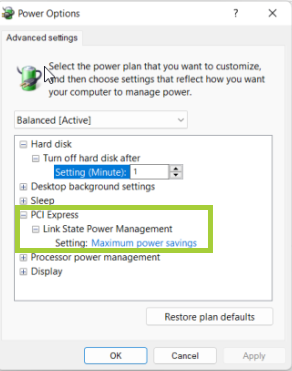
Your system is now configured.
Additional information
Active-state power management (ASPM) is a power management mechanism for PCI Express devices to garner power savings while otherwise in a fully active state. Currently, two low power modes are specified by the PCI Express 2.0 specification: L0s and L1 mode.
Our power management architecture has been designed to target technologies that exist on modern platforms and benefits from specific parameters in motherboard system settings often referred to as ASPM. Enabling those features will allow users to get optimal idle power usage with Intel® Arc™ graphics. Also note that if you attach a display to Arc graphics with a refresh rate over 60Hz requires the GPU to run at slightly higher clocks to drive the pixel throughput. We will be looking at making optimizations in future generations.
For Intel® Arc™ Graphics, ASPM L1 is required for all power states greater than G2. This means ASPM L1 and global OS settings must be enabled to support Intel Arc Graphics low power modes.
Please let us know if the issue persists after following the recommendations. I look forward to hearing your feedback.
- Mark as New
- Bookmark
- Subscribe
- Mute
- Subscribe to RSS Feed
- Permalink
- Report Inappropriate Content
Thanks for your reply
As I mentioned earlier all the configuration are set as they should be.
ASPM mode is actif and LSPM is set to max power save.
So the issue persists.
- Mark as New
- Bookmark
- Subscribe
- Mute
- Subscribe to RSS Feed
- Permalink
- Report Inappropriate Content
Hi Anas2,
Thank you for informing us that you have already attempted the resolution I provided. Since the issue persists, I will investigate this further and keep you updated as soon as a solution is identified.
I appreciate your patience and understanding as we work to resolve this matter.
Best Regards,
Kenneth R.
Intel Customer Support Technician
- Mark as New
- Bookmark
- Subscribe
- Mute
- Subscribe to RSS Feed
- Permalink
- Report Inappropriate Content
Hi Anas2,
Thank you for your patience. I am still actively investigating this issue. To help move things forward, could you please provide some additional information?
- Could you please confirm which application you are using to monitor the GPU voltage? If possible, kindly provide a screenshot of the application.
- Could you share the exact model and voltage rating of your power supply unit (PSU)?
- Are there any applications running in the background while the issue occurs? If possible, please provide a screenshot of your Task Manager.
- Have you experienced any overheating issues with the GPU?
- Have you verified that all power cables connecting the GPU to the PSU are properly connected and secured?
Best Regards,
Kenneth R.
Intel Customer Support Technician
- Mark as New
- Bookmark
- Subscribe
- Mute
- Subscribe to RSS Feed
- Permalink
- Report Inappropriate Content
- Could you please confirm which application you are using to monitor the GPU voltage? If possible, kindly provide a screenshot of the application. None, Just intel graphic software - check attached photos
- Could you share the exact model and voltage rating of your power supply unit (PSU)? corsair Rm750e
- Are there any applications running in the background while the issue occurs? If possible, please provide a screenshot of your Task Manager. check attached photos
- Have you experienced any overheating issues with the GPU? Nope
- Have you verified that all power cables connecting the GPU to the PSU are properly connected and secured? check attached photos
Thanks for your concern.


.jpeg)
.jpeg)


- Mark as New
- Bookmark
- Subscribe
- Mute
- Subscribe to RSS Feed
- Permalink
- Report Inappropriate Content
something else to add up to the issue is that the gpu, even in idle mode turn fans 5 sec and stops ... it keeps doing it repeatedly.
check the video attached.
- Mark as New
- Bookmark
- Subscribe
- Mute
- Subscribe to RSS Feed
- Permalink
- Report Inappropriate Content
when I plug in hdmi in apu port wattage drops to normal.
check attached

- Mark as New
- Bookmark
- Subscribe
- Mute
- Subscribe to RSS Feed
- Permalink
- Report Inappropriate Content
Hi Anas2,
Thank you for sending the information I asked for. I’ll look into it and update you as soon as I have a solution. I appreciate your patience.
Best Regards,
Kenneth R.
Intel Customer Support Technician
- Mark as New
- Bookmark
- Subscribe
- Mute
- Subscribe to RSS Feed
- Permalink
- Report Inappropriate Content
Hi Anas2,
Thank you for your patience. I am still investigating the issue you reported. Since you are using Intel Graphics Software, could you please provide a screenshot of the Intel Graphics Software under Performance > Tuning? This will help me continue my investigation and identify the root cause more effectively.
I appreciate your assistance and look forward to your response.
Best Regards,
Kenneth R.
Intel Customer Support Technician
- Mark as New
- Bookmark
- Subscribe
- Mute
- Subscribe to RSS Feed
- Permalink
- Report Inappropriate Content
Here are the screenshots in idle and performance mode.

- Mark as New
- Bookmark
- Subscribe
- Mute
- Subscribe to RSS Feed
- Permalink
- Report Inappropriate Content
Here is the screenshot while gaming ...

- Mark as New
- Bookmark
- Subscribe
- Mute
- Subscribe to RSS Feed
- Permalink
- Report Inappropriate Content
Hi Anas2,
Thank you for your prompt response and for providing the Metrics tab for both gaming and idle. To further assist with the investigation, could you also kindly provide a screenshot of the Tuning tab as well? This will help me continue identifying the root cause more effectively.
I truly appreciate your cooperation and look forward to your response.
Best Regards,
Kenneth R.
Intel Customer Support Technician
- Mark as New
- Bookmark
- Subscribe
- Mute
- Subscribe to RSS Feed
- Permalink
- Report Inappropriate Content
Here is the screenshot of tuning tab

- Mark as New
- Bookmark
- Subscribe
- Mute
- Subscribe to RSS Feed
- Permalink
- Report Inappropriate Content
Hi Anas2,
Thank you for providing the screenshot of the tuning tab. I wanted to let you know that I will investigate this issue further and keep you updated as soon as a solution is identified. Thank you for your patience and understanding.
Best Regards,
Kenneth R.
Intel Customer Support Technician

- Subscribe to RSS Feed
- Mark Topic as New
- Mark Topic as Read
- Float this Topic for Current User
- Bookmark
- Subscribe
- Printer Friendly Page