
- Marquer comme nouveau
- Marquer
- S'abonner
- Sourdine
- S'abonner au fil RSS
- Surligner
- Imprimer
- Signaler un contenu inapproprié
I'm running a Fedora Linux 34 box with OneAPI v. 2021.2.0 installed.
I installed the suite (including intel python) using the Fedora dnf system in /opt/intel.
After the installation, I configured the system by creating the BASH script intel_apps.sh in /etc/profile.d
The script contains the line:
source /opt/intel/oneapi/setvars.sh
The problem is that this configuration method is conflicting with the other python installations.
Fedora 34 supports python 3 (3.9) (default) and python 2 (2.7). In order to switch the default version, I employed the alternatives system. As root:
alternatives --install /usr/bin/python python /usr/bin/python3 3
alternatives --install /usr/bin/python python /usr/bin/python2 1
alternatives --install /usr/bin/python python /opt/intel/oneapi/intelpython/latest/bin/python 2
So, the system default should be the gnu python 3.9. However, whenever I open a terminal, the default reverts to:
Python 3.7.9 :: Intel Corporation
Not only that, PYTHONPATH is also set to
/opt/intel/oneapi/advisor/2021.2.0/pythonapi
One workaround would be to set the default locally, by inserting in .bashrc the alias
alias python='/usr/bin/python3'
However, PYTHONPATH remains set to the intel installation.
This is not a problem if I run the code inside the interpreter, but it can be a problem if I run an executable script, since some libraries I need are not included in the intel distribution.
Could someone point out the alternatives I have here?
Thanks.

- Marquer comme nouveau
- Marquer
- S'abonner
- Sourdine
- S'abonner au fil RSS
- Surligner
- Imprimer
- Signaler un contenu inapproprié
Hi,
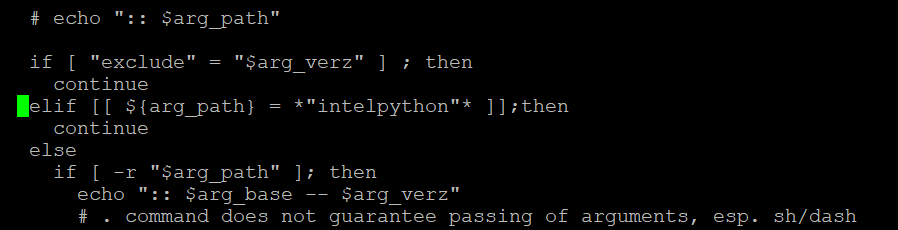
Thanks for sharing detailed information. As you are using HPC toolkit, there's no need to go for the separate conda installation of python which we suggested earlier. You can modify the "setvars.sh" script in your existing HPC tool kit installation to resolve your issue. To make the required changes follow the below steps
1. In your linux system, go to the "/opt/intel/oneapi/" and do "vi setvars.sh" to edit the setvars.sh file..
2. After that move to line number "614" using the command ":614". Move to next line (after line 614) and enter the following lines of code:
elif [[ ${arg_path} = *"intelpython"* ]]; then
continue
3. After doing the desired changes, press "esc" and save your changes using command ":wq"
I have also attached a screenshot which shows the line where you need to add the code snippet.
Another workaround is that you can list and download (using dnf) only the necessary standalone packages which you need. You can follow these below links for doing the same:
Hope this helps.
Regards,
Rahul
Lien copié
- Marquer comme nouveau
- Marquer
- S'abonner
- Sourdine
- S'abonner au fil RSS
- Surligner
- Imprimer
- Signaler un contenu inapproprié
Hi,
Thanks for sharing detailed information. As you are using HPC toolkit, there's no need to go for the separate conda installation of python which we suggested earlier. You can modify the "setvars.sh" script in your existing HPC tool kit installation to resolve your issue. To make the required changes follow the below steps
1. In your linux system, go to the "/opt/intel/oneapi/" and do "vi setvars.sh" to edit the setvars.sh file..
2. After that move to line number "614" using the command ":614". Move to next line (after line 614) and enter the following lines of code:
elif [[ ${arg_path} = *"intelpython"* ]]; then
continue
3. After doing the desired changes, press "esc" and save your changes using command ":wq"
I have also attached a screenshot which shows the line where you need to add the code snippet.
Another workaround is that you can list and download (using dnf) only the necessary standalone packages which you need. You can follow these below links for doing the same:
Hope this helps.
Regards,
Rahul
- Marquer comme nouveau
- Marquer
- S'abonner
- Sourdine
- S'abonner au fil RSS
- Surligner
- Imprimer
- Signaler un contenu inapproprié
The modification in the setvars.sh script you suggested seems to work, thank you.
Now, the python link points to the setting done by the alternatives system, which is the version 3.9.5 distributed by the Fedora repo.
The PYTHONPATH variable still contains the path
/opt/intel/oneapi/advisor/2021.3.0/pythonapi
but this does not seem to affect the default and can be useful if I revert to the distribution contained in the OneAPI pack.
- Marquer comme nouveau
- Marquer
- S'abonner
- Sourdine
- S'abonner au fil RSS
- Surligner
- Imprimer
- Signaler un contenu inapproprié
Hi,
Thanks for accepting our solution. If you need any additional information, please submit a new question as this thread will no longer be monitored.
Regards,
Rahul

- S'abonner au fil RSS
- Marquer le sujet comme nouveau
- Marquer le sujet comme lu
- Placer ce Sujet en tête de liste pour l'utilisateur actuel
- Marquer
- S'abonner
- Page imprimable