
- Marcar como novo
- Marcador
- Subscrever
- Silenciar
- Subscrever fonte RSS
- Destacar
- Imprimir
- Denunciar conteúdo inapropriado
After installing latest Intel Python 64-bit on Windows 10 1909, I get:
=================
Z:\>cd vulnerability/sahgit/python3/automateelden
Z:\Vulnerability\SAHGIT\Python3\AutomateElden>python ve.py
Traceback (most recent call last):
File "ve.py", line 336, in <module>
VirtualElden()
File "ve.py", line 255, in VirtualElden
root = tk.Tk()
File "C:\IntelPython3\lib\tkinter\__init__.py", line 2023, in __init__
self.tk = _tkinter.create(screenName, baseName, className, interactive, wantobjects, useTk, sync, use)
_tkinter.TclError: Can't find a usable init.tcl in the following directories:
{C:\IntelPython3\tcl\tcl8.6}
C:/IntelPython3/tcl/tcl8.6/init.tcl: version conflict for package "Tcl": have 8.6.4, need exactly 8.6.9
version conflict for package "Tcl": have 8.6.4, need exactly 8.6.9
while executing
"package require -exact Tcl 8.6.9"
(file "C:/IntelPython3/tcl/tcl8.6/init.tcl" line 19)
invoked from within
"source C:/IntelPython3/tcl/tcl8.6/init.tcl"
("uplevel" body line 1)
invoked from within
"uplevel #0 [list source $tclfile]"
This probably means that Tcl wasn't installed properly.
Z:\Vulnerability\SAHGIT\Python3\AutomateElden>
==============
How do I install Tcl 8.6.9 -- or is this a typo in the init file? ('4' looks a little bit like '9'??) Or can I change the "Requires exactly" to 8.6.4?
Link copiado

- Marcar como novo
- Marcador
- Subscrever
- Silenciar
- Subscrever fonte RSS
- Destacar
- Imprimir
- Denunciar conteúdo inapropriado
Hi,
Thank you for reaching us.
Could you provide the source and steps followed for installing Intel Python?
The below is the url to download and install Intel Python:
https://software.seek.intel.com/python-distribution
In that choose windows version and use exe file to install it.
- Marcar como novo
- Marcador
- Subscrever
- Silenciar
- Subscrever fonte RSS
- Destacar
- Imprimir
- Denunciar conteúdo inapropriado
Got email for new release, clicked link to download for Windows, which took me to: https://registrationcenter.intel.com/en/products/download/?ProductID=3655&EmailID=steve.holton%40das.ohio.gov&Sequence=2002642&DefaultBld=n, which downloaded w_pythoni3_p_2020.0.014.zip (not an .exe).
After unzipping, I ran "C:\intelpython3\setup_intel_python.bat", which did a bunch of Robocopying, etc.. The I re-booted
Attempting to use Python script that uses Tkinter (which worked before the update), got the above error.
- Marcar como novo
- Marcador
- Subscrever
- Silenciar
- Subscrever fonte RSS
- Destacar
- Imprimir
- Denunciar conteúdo inapropriado
Hi,
Please change the version like given below and try it:
Step 1: open C:/IntelPython3/tcl/tcl8.6/init.tcl
if {[info commands package] == ""} {
error "version mismatch: library\nscripts expect Tcl version 7.5b1 or later but the loaded version is\nonly [info patchlevel]"
}
package require -exact Tcl 8.6.9 (change 8.6.4 to 8.6.9)
Step 2: open C:/IntelPython3/tcl/tk8.6/tk.tcl
package require -exact Tk 8.6.9 (change 8.6.4 to 8.6.9)
- Marcar como novo
- Marcador
- Subscrever
- Silenciar
- Subscrever fonte RSS
- Destacar
- Imprimir
- Denunciar conteúdo inapropriado
Both were already 8.6.9, and the error message persists.
My interpretation of the error message is that
1. The software REQUIRES 8.6.9
2. It finds instead 8.6.4, which does not meet the 8.6.9 requirement
How can I install 8.6.9 on Windows 10? Or should I change both of the 8.6.9 entries to 8.6.4? (which version of Tcl/TK is installed in the distro? How can I query TCL/TK version?
- Marcar como novo
- Marcador
- Subscrever
- Silenciar
- Subscrever fonte RSS
- Destacar
- Imprimir
- Denunciar conteúdo inapropriado
Hi,
When i installed i got the default version as 8.6.9 and i also got the same error as yours, then i changed both the 8.6.9 entries to 8.6.4 and the issue got resolved.
To check TCL/TK version use below command:
1. Goto python shell
C:\w_pythoni3_p_2020.0.014\intelpython3>python
2. now import tkinter
>>> import tkinter
3. check the TCL/TK version using below command:
>>> tkinter.Tcl().eval('info patchlevel')
Then i got 8.6.4 as output after changing the version.
- Marcar como novo
- Marcador
- Subscrever
- Silenciar
- Subscrever fonte RSS
- Destacar
- Imprimir
- Denunciar conteúdo inapropriado
Hi,
Could you please confirm if the issue is resolved.
- Marcar como novo
- Marcador
- Subscrever
- Silenciar
- Subscrever fonte RSS
- Destacar
- Imprimir
- Denunciar conteúdo inapropriado
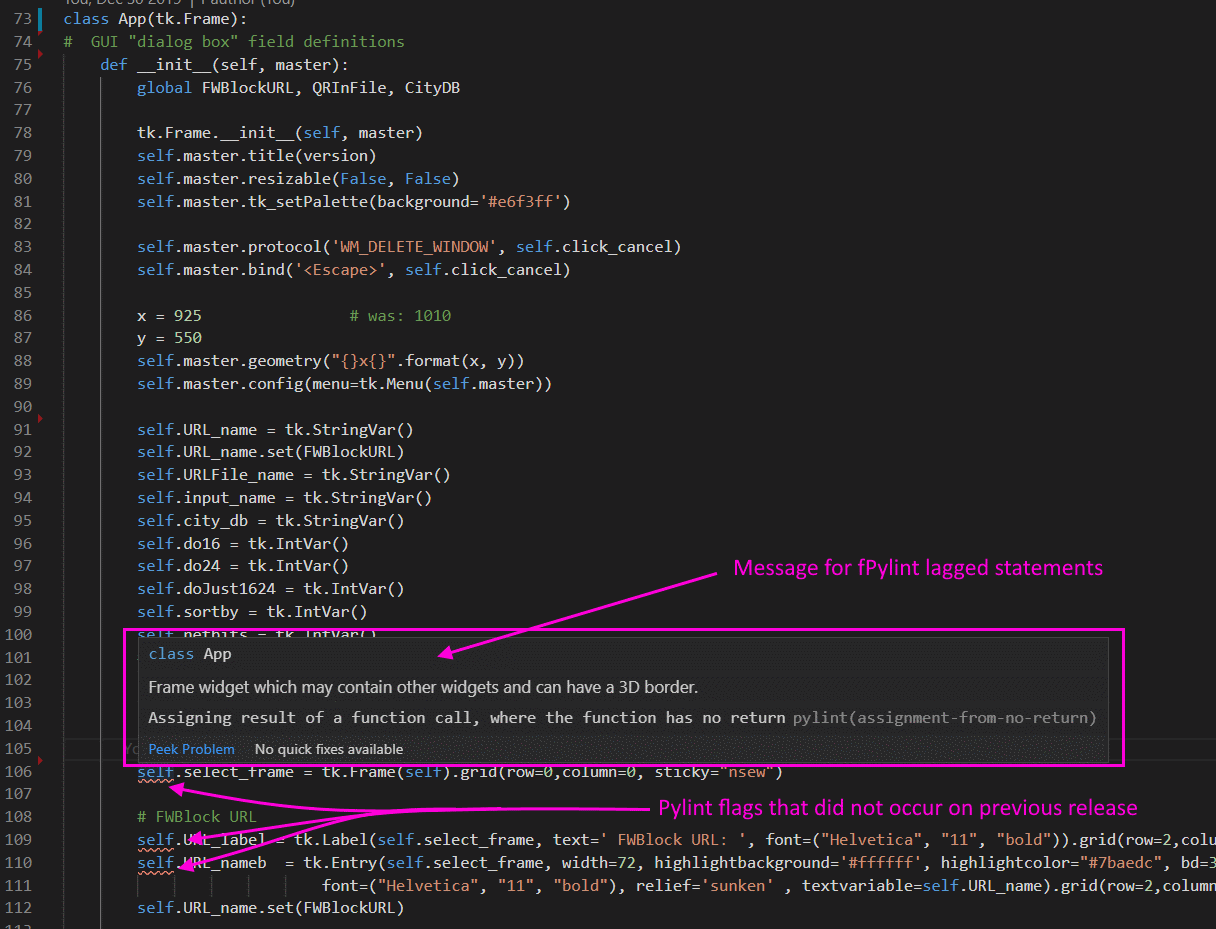
Seems to be working OK now, EXCEPT pylint (running inside of VS Code) is flagging assignments in the APP class file. I'm new to TK, so maybe
this is an error (although it runse fine...). But I don't see what's wrong (I need to be able to access the fields in the Python script, so nee do assign
them to a variable that can be referenced, which seems to work even though Pylint insists that these functions don't return a value...) Sample attached
- Marcar como novo
- Marcador
- Subscrever
- Silenciar
- Subscrever fonte RSS
- Destacar
- Imprimir
- Denunciar conteúdo inapropriado
Hi,
Glad to know that your issue got resolved.Regarding pylint,if you face any error please share the screenshot.
- Marcar como novo
- Marcador
- Subscrever
- Silenciar
- Subscrever fonte RSS
- Destacar
- Imprimir
- Denunciar conteúdo inapropriado
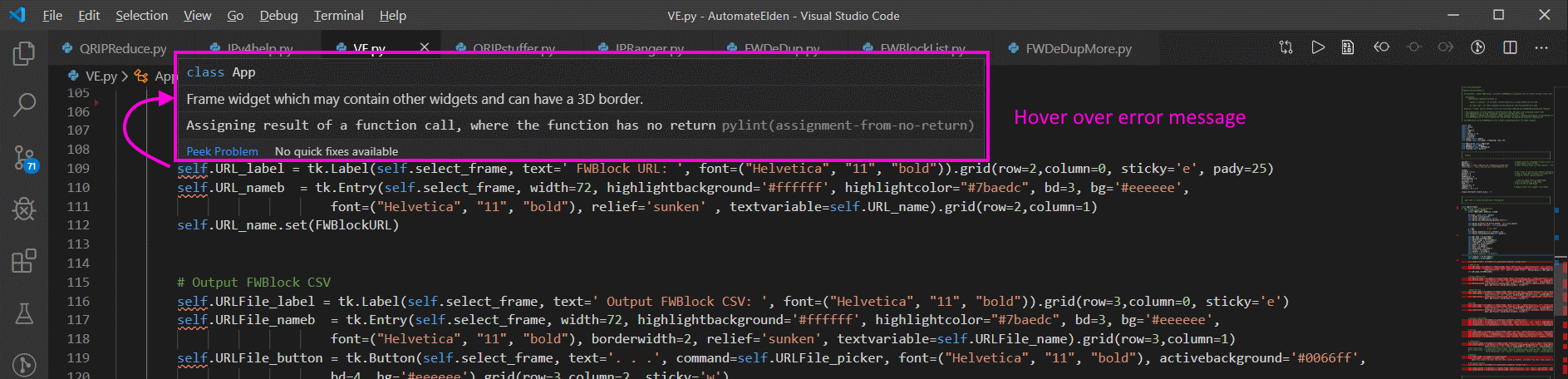
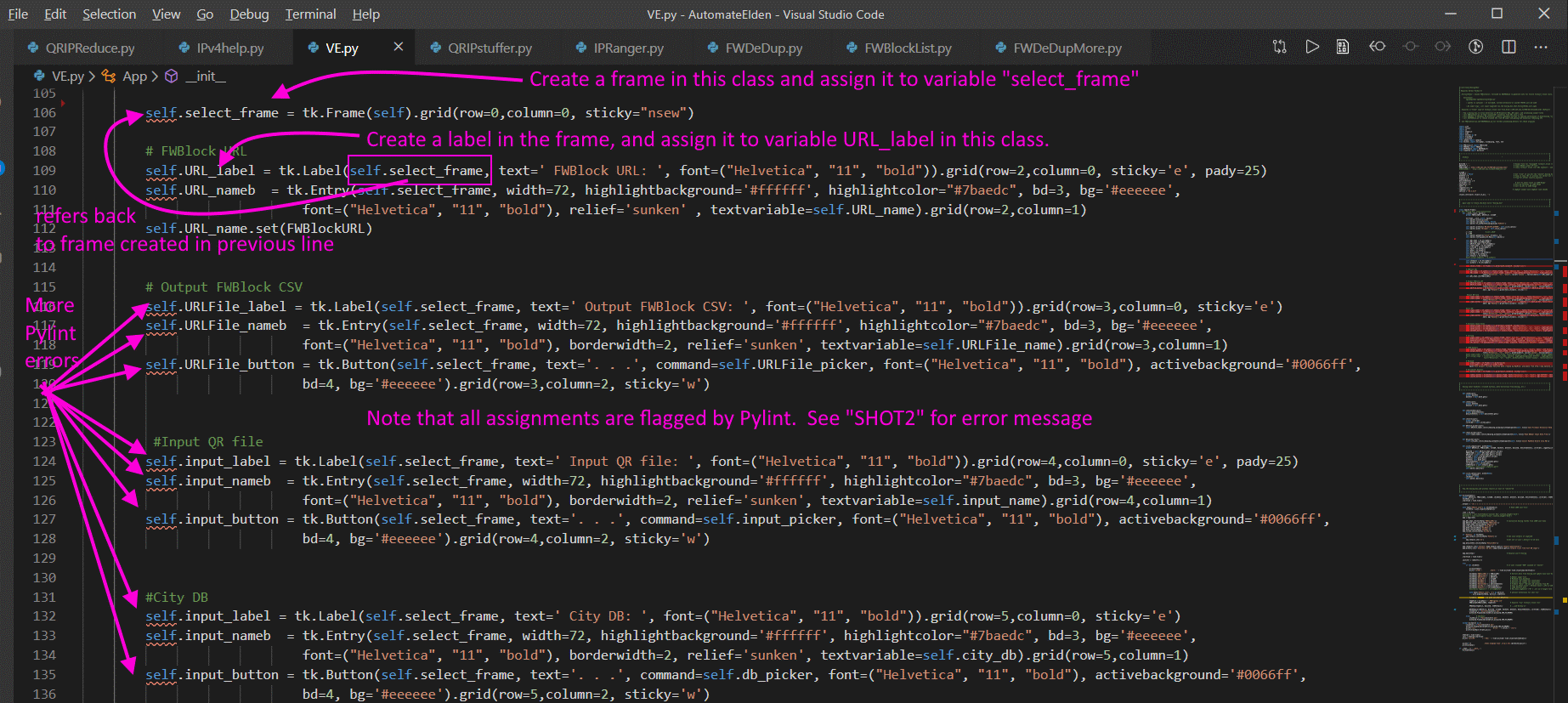
I thought that I did attach a screen shot - but have attached another (annotated) one here. Actually, 2 shots. Shot 1 shows the Pylint "errors", shot 2 I hovered over one of the errors to get a description of the problem. These are both VS Code screen shots..
- Marcar como novo
- Marcador
- Subscrever
- Silenciar
- Subscrever fonte RSS
- Destacar
- Imprimir
- Denunciar conteúdo inapropriado
P.S. The code runs, so Python allows the assignments to occur - pylint complains needlessly?
- Marcar como novo
- Marcador
- Subscrever
- Silenciar
- Subscrever fonte RSS
- Destacar
- Imprimir
- Denunciar conteúdo inapropriado
Hi,
Thanks for sharing the screenshots. Looks like the issue is related to your script and not related to any of the computational package. We would like to inform you that this is out of our support scope. However you can post this as new thread in our forum so that the public community may help.
Since your initial query regarding TCL/TK version is resolved. Can we close this case?
- Marcar como novo
- Marcador
- Subscrever
- Silenciar
- Subscrever fonte RSS
- Destacar
- Imprimir
- Denunciar conteúdo inapropriado
Yes - you can close
Tahnks
- Marcar como novo
- Marcador
- Subscrever
- Silenciar
- Subscrever fonte RSS
- Destacar
- Imprimir
- Denunciar conteúdo inapropriado

- Subscrever fonte RSS
- Marcar tópico como novo
- Marcar tópico como lido
- Flutuar este Tópico para o utilizador atual
- Marcador
- Subscrever
- Página amigável para impressora