
- 新着としてマーク
- ブックマーク
- 購読
- ミュート
- RSS フィードを購読する
- ハイライト
- 印刷
- 不適切なコンテンツを報告
Hi, the mixed C++ and Fortran code has this link problem. When I mannually add the path of ifconsol.lib, the error disappears, but other link errors pop up, for example, error LNK2019:unresolved external symbol, which means it cannot link to other files, although we has already setup the linkage of all the files together through 'Project dependences' in the MS Visual Studio. Then after I manually added all the library files in the linker, the code ran well. The software packages I use are MS Visual Studio 2008, Intel Visual Fortran w_fcompxe_2013.3.171, and Intel C++ Composer XE 2013 SP1 w_ccompxe_2013_sp1.1.139. Does anyone know the reasons of those link errors? Thanks!
コピーされたリンク

- 新着としてマーク
- ブックマーク
- 購読
- ミュート
- RSS フィードを購読する
- ハイライト
- 印刷
- 不適切なコンテンツを報告
Have you followed the instructions in How do I configure Microsoft Visual C++ for developing mixed Fortran-C applications?
- 新着としてマーク
- ブックマーク
- 購読
- ミュート
- RSS フィードを購読する
- ハイライト
- 印刷
- 不適切なコンテンツを報告
I followed the instructions, but the same error (cannot open ifconsol.lib) came out.
- 新着としてマーク
- ブックマーク
- 購読
- ミュート
- RSS フィードを購読する
- ハイライト
- 印刷
- 不適切なコンテンツを報告
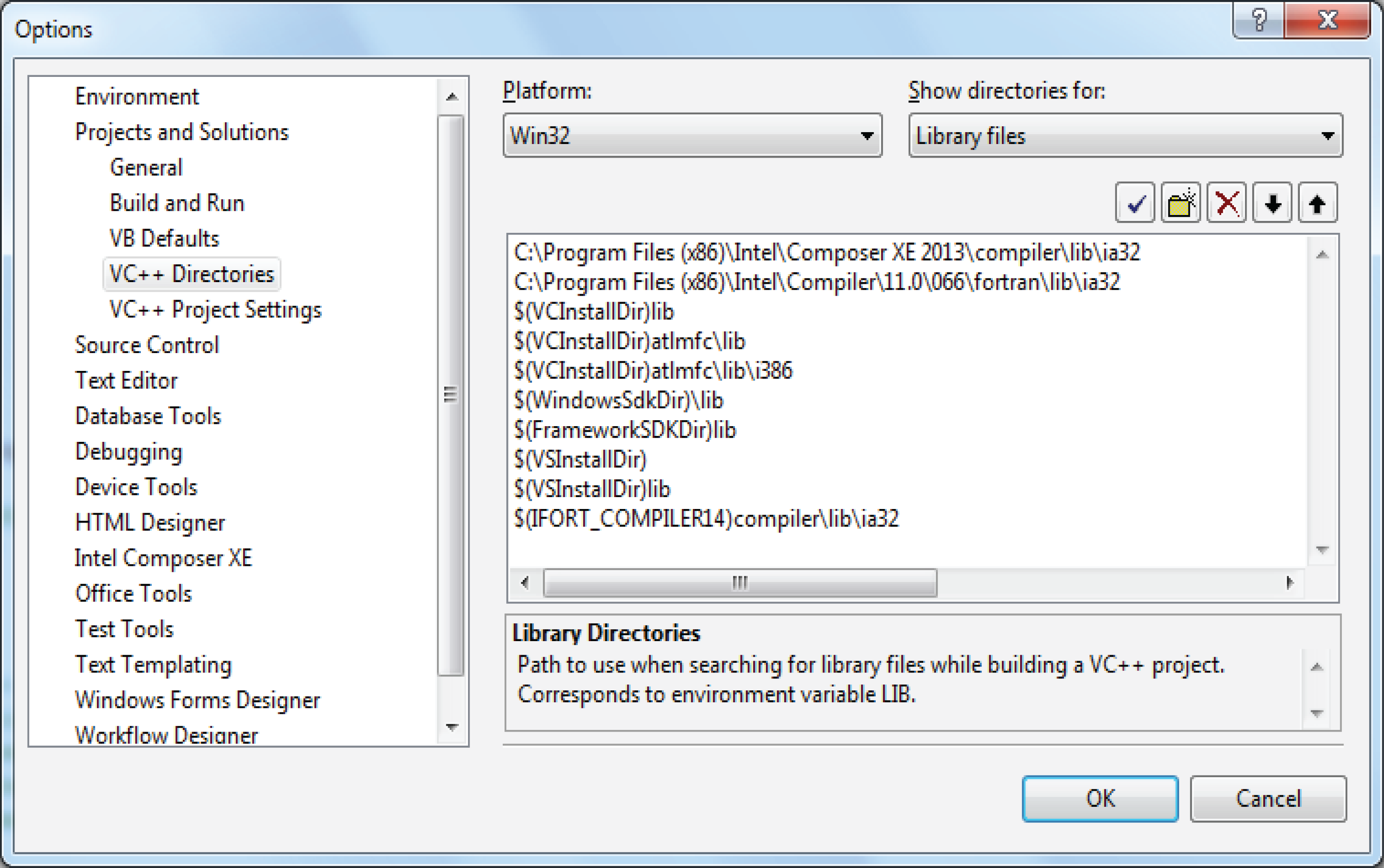
Show me a screenshot of the same screen as this one:

Note that in your case you will want IFORT_COMPILER14 there.


- 新着としてマーク
- ブックマーク
- 購読
- ミュート
- RSS フィードを購読する
- ハイライト
- 印刷
- 不適切なコンテンツを報告
I see that the first two entries in the libraries list are for older versions of Intel Fortran. Take out those entries. But I see you also have 19 warnings. Can you attach the full build log (it will be a .htm file)? ZIP it first.
Does C:\Program Files (x86)\Intel\Composer XE 2013 SP1\compiler\lib\ia32 exist on your PC? Does it contain those libraries?
- 新着としてマーク
- ブックマーク
- 購読
- ミュート
- RSS フィードを購読する
- ハイライト
- 印刷
- 不適切なコンテンツを報告
Because I tried IFORT_COMPILER14 first, it didn't work. You can see the 19th warning in the attachment. Then I found the file ia32.lib in the path C:\Program Files(x86)\Intel\Composer XE 2013 SP1\compiler\lib\, which I thought it should be same as IFORT_COMPILER14. Then I added this path, but it seems still not work.

- 新着としてマーク
- ブックマーク
- 購読
- ミュート
- RSS フィードを購読する
- ハイライト
- 印刷
- 不適切なコンテンツを報告
Do this. Click Start. In the Search box type cmd , When cmd.exe appears, click it.
Type:
set ifort
What does it show?
- 新着としてマーク
- ブックマーク
- 購読
- ミュート
- RSS フィードを購読する
- ハイライト
- 印刷
- 不適切なコンテンツを報告
It shows,
IFORT_COMPILER11=C:\Program Files (x86)\Intel\Compiler\11.1\065\
IFORT_COMPILER13=C:\Program Files (x86)\Intel\Composer XE 2013\
I tried IFORT_COMPILER13 before. It didn't work either.
- 新着としてマーク
- ブックマーク
- 購読
- ミュート
- RSS フィードを購読する
- ハイライト
- 印刷
- 不適切なコンテンツを報告
It shows,
C:\Users\lliang>set ifort
IFORT_COMPILER11=C:\Program Files (x86)\Intel\Compiler\11.1\065\
IFORT_COMPILER13=C:\Program Files (x86)\Intel\Composer XE 2013\
I tried IFORT_COMPILER13 before. It didn't work either.
- 新着としてマーク
- ブックマーク
- 購読
- ミュート
- RSS フィードを購読する
- ハイライト
- 印刷
- 不適切なコンテンツを報告
It doesn't look as if you have Composer XE 2013 SP1 installed. You may no longer have the previous version installed either.
Does folder C:\Program Files (x86)\Intel\Composer XE 2013 SP1\compiler\lib\ia32 exist on your system?
Another thing to try is a reboot. Sometimes the system environment variables don't update right away.
- 新着としてマーク
- ブックマーク
- 購読
- ミュート
- RSS フィードを購読する
- ハイライト
- 印刷
- 不適切なコンテンツを報告
I installed both Composer XE 2013 SP1 and Composer XE 2013 (see attachment), but the folders \compiler\lib\ia32 in these two composers include different files, for example, there is no ifconsol.lib in Composer XE 2013 SP1, while it exists in Composer XE 2013.
I rebooted the computer before, no use.

- 新着としてマーク
- ブックマーク
- 購読
- ミュート
- RSS フィードを購読する
- ハイライト
- 印刷
- 不適切なコンテンツを報告
You installed C++ Composer XE, not Fortran Composer XE. Please go back to the Intel Registration Center and download Intel Visual Fortran Composer XE 2013 SP1.
- 新着としてマーク
- ブックマーク
- 購読
- ミュート
- RSS フィードを購読する
- ハイライト
- 印刷
- 不適切なコンテンツを報告
Because the code is mixed with C++ and Fortran, my computer was installed both Composer XE 2013 for Fortran and Composer XE 2013 SP1 for C++. I manually added the following four paths in the linker,
C:\Program Files (x86)\Intel\Composer XE 2013\compiler\lib\ia32 (Fortran)
C:\Program Files (x86)\Intel\Composer XE 2013 SP1\compiler\lib\ia32 (C++)
C:\Program Files (x86)\Intel\Composer XE 2013\mkl\lib\ia32 (Fortran)
C:\Program Files (x86)\Intel\Composer XE 2013 SP1\mkl\lib\ia32 (C++)
and then mannually add all the compiled lib files in the linker->input->additional dependences, the whole package can be built. Actually the code had been linked in the "project dependences" before compiling. It seems Visual Studio(VS) cann't realize its functions. Is that possible VS takes Composer XE 2013 as the old version and automatically replaced it by C++ Composer XE 2013 SP1 as a newer version of Fortran composer?
- 新着としてマーク
- ブックマーク
- 購読
- ミュート
- RSS フィードを購読する
- ハイライト
- 印刷
- 不適切なコンテンツを報告
You don't have the SP1 version of Fortran installed, so IFORT_COMPILER13 would be the right choice. That should work. In recent versions of Visual Studio (2010 and later), project dependencies from C++ to Fortran don't work (this is a Microsoft restriction.)
- 新着としてマーク
- ブックマーク
- 購読
- ミュート
- RSS フィードを購読する
- ハイライト
- 印刷
- 不適切なコンテンツを報告
Thanks for your comments.I installed Fortran SP1 version. $(IFORT_COMPILER14)compiler\lib\ia32 works if I manually add its related lib folder in the project linker. However, if I add it in Visual Studio 2008->tools->Options->Projects and Solutions->VC++ Directions->Library files, it cann't work.
Also the project dependencies from C++ to Fortran work well with this Fortran SP1 version and Visual Studio 2008.
- 新着としてマーク
- ブックマーク
- 購読
- ミュート
- RSS フィードを購読する
- ハイライト
- 印刷
- 不適切なコンテンツを報告
I know it works because I've done it that way for years. I am not sure why it is not working for you, but I'm glad you have a solution. Yes, using project dependencies works in VS2008. It stops working in VS2010.
