
- 新着としてマーク
- ブックマーク
- 購読
- ミュート
- RSS フィードを購読する
- ハイライト
- 印刷
- 不適切なコンテンツを報告
Hello,
I am struggling with the installation of Intel® Parallel Studio XE 2019 Update 1. I am currently trying to initialise the tools (post installation) in command prompt, but I am receiving the following error message: 'ERROR: Visual Studio 2013, 2015 or 2017 is not found in the system'.
I have been following the installation guide provided for this release. I thought I had successfully completed the prerequisites listed but maybe I have missed something.
I am using a windows 10 machine with a 64intell architecture. I had installed Visual Studio Community 2017 prior to the Parallel Studio installation. I have also installed Windows 10 SDK on this machine.
Any help on what may be causing the problem is appreciated.
Kind Regards

- 新着としてマーク
- ブックマーク
- 購読
- ミュート
- RSS フィードを購読する
- ハイライト
- 印刷
- 不適切なコンテンツを報告
See if https://software.intel.com/en-us/articles/intel-c-fortran-compilers-for-windows-integration-into-microsoft-visual-studio-2017 helps.
コピーされたリンク
- 新着としてマーク
- ブックマーク
- 購読
- ミュート
- RSS フィードを購読する
- ハイライト
- 印刷
- 不適切なコンテンツを報告
See if https://software.intel.com/en-us/articles/intel-c-fortran-compilers-for-windows-integration-into-microsoft-visual-studio-2017 helps.
- 新着としてマーク
- ブックマーク
- 購読
- ミュート
- RSS フィードを購読する
- ハイライト
- 印刷
- 不適切なコンテンツを報告
Steve Lionel (Ret.) wrote:See if https://software.intel.com/en-us/articles/intel-c-fortran-compilers-for-... helps.
Hi Steve,
Thanks for your reply.
I have now installed the 'Desktop Development with C++' add-on (and restarted the machine). However, when trying to initialise the tools through the windows command line I am still receiving the following error.
"C:\Program Files (x86)\IntelSWTools\parallel_studio_xe_2019.1.051\bin>psxevars.bat intel64
Intel(R) Parallel Studio XE 2019 Update 1
Copyright (C) 2018 Intel Corporation. All rights reserved.
ERROR: Visual Studio 2013, 2015 or 2017 is not found in the system."
Any advice on how to proceed from here?
Thanks

- 新着としてマーク
- ブックマーク
- 購読
- ミュート
- RSS フィードを購読する
- ハイライト
- 印刷
- 不適切なコンテンツを報告
When you installed Visual Studio, did you select the "optional" C++ package? This is deselected by default. Without the C/C++ components, Intel Fortran will not work.
To test what you have, here is one way: open the Visual Studio C++ command window from the Start menu. Create a short "hello world" program in C, compile and link it using the CL command. Run the program. Note and report any/all error messages.
- 新着としてマーク
- ブックマーク
- 購読
- ミュート
- RSS フィードを購読する
- ハイライト
- 印刷
- 不適切なコンテンツを報告
Try reinstalling (or "modify/change") Parallel Studio XE.
- 新着としてマーク
- ブックマーク
- 購読
- ミュート
- RSS フィードを購読する
- ハイライト
- 印刷
- 不適切なコンテンツを報告
Steve Lionel (Ret.) wrote:Try reinstalling (or "modify/change") Parallel Studio XE.
Thank you, this has worked.

- 新着としてマーク
- ブックマーク
- 購読
- ミュート
- RSS フィードを購読する
- ハイライト
- 印刷
- 不適切なコンテンツを報告
Hi there,
I am experiencing the same problem as Elliot above and have tried 'modify', 'repair' and 'remove' and 'reinstall' for Parallel Studio XE 2020.
When I run the psxevars.bat the same error presents itself every time. I am using Visual Studio Professional 2019 and have integrated this with the Parallel Studio install.
C:\Program Files (x86)\IntelSWTools\parallel_studio_xe_2020.0.075\bin>psxevars.bat intel64
Intel(R) Parallel Studio XE 2020
Copyright (C) 2009-2019 Intel Corporation. All rights reserved.
Copyright (C) 2009-2019 Intel Corporation. All rights reserved.
Intel(R) VTune(TM) Profiler 2020 (build 605129)
Copyright (C) 2009-2019 Intel Corporation. All rights reserved.
Intel(R) Inspector 2020 (build 603904)
Copyright (C) 2009-2019 Intel Corporation. All rights reserved.
Intel(R) Advisor 2020 (build 604394)
Intel(R) MPI Library 2019 Update 6 for Windows* Target Build Environment for Intel(R) 64 applications
Copyright 2007-2019 Intel Corporation.
ERROR: Visual Studio 2013, 2015, 2017 or 2019 is not found in the system.
Any advice on how to rectify this would be greatly appreciated.
Thanks,
John

- 新着としてマーク
- ブックマーク
- 購読
- ミュート
- RSS フィードを購読する
- ハイライト
- 印刷
- 不適切なコンテンツを報告
I am having the same issue as described by John. Have you found any fix?
Thanks,
Geoff

- 新着としてマーク
- ブックマーク
- 購読
- ミュート
- RSS フィードを購読する
- ハイライト
- 印刷
- 不適切なコンテンツを報告
For me it's even worse, I am not even get the Intel PSXE 2020 Update 1 installer to recognize Visual Studio 2019 (I am using Visual Studio Professional 2019 16.6.4).
Based on the fact that this is happening so often for those Intel installers, I would suggest this bug to be marked as showstopper.
This is what I get:
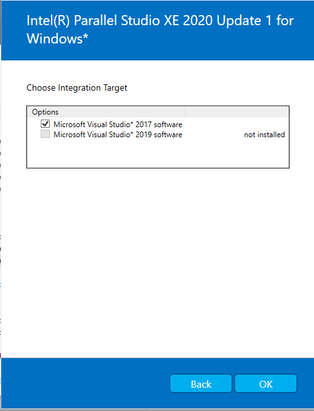
It is a fact that Microsoft is updating Visual Studio so fast now that is very difficult to keep up with. However, because of these fast update cycles, they've made it easy to find installed visual studio versions with vswhere. I would suggest to use to avoid having to release updates only to fix bugs like that.
