
- 신규로 표시
- 북마크
- 구독
- 소거
- RSS 피드 구독
- 강조
- 인쇄
- 부적절한 컨텐트 신고
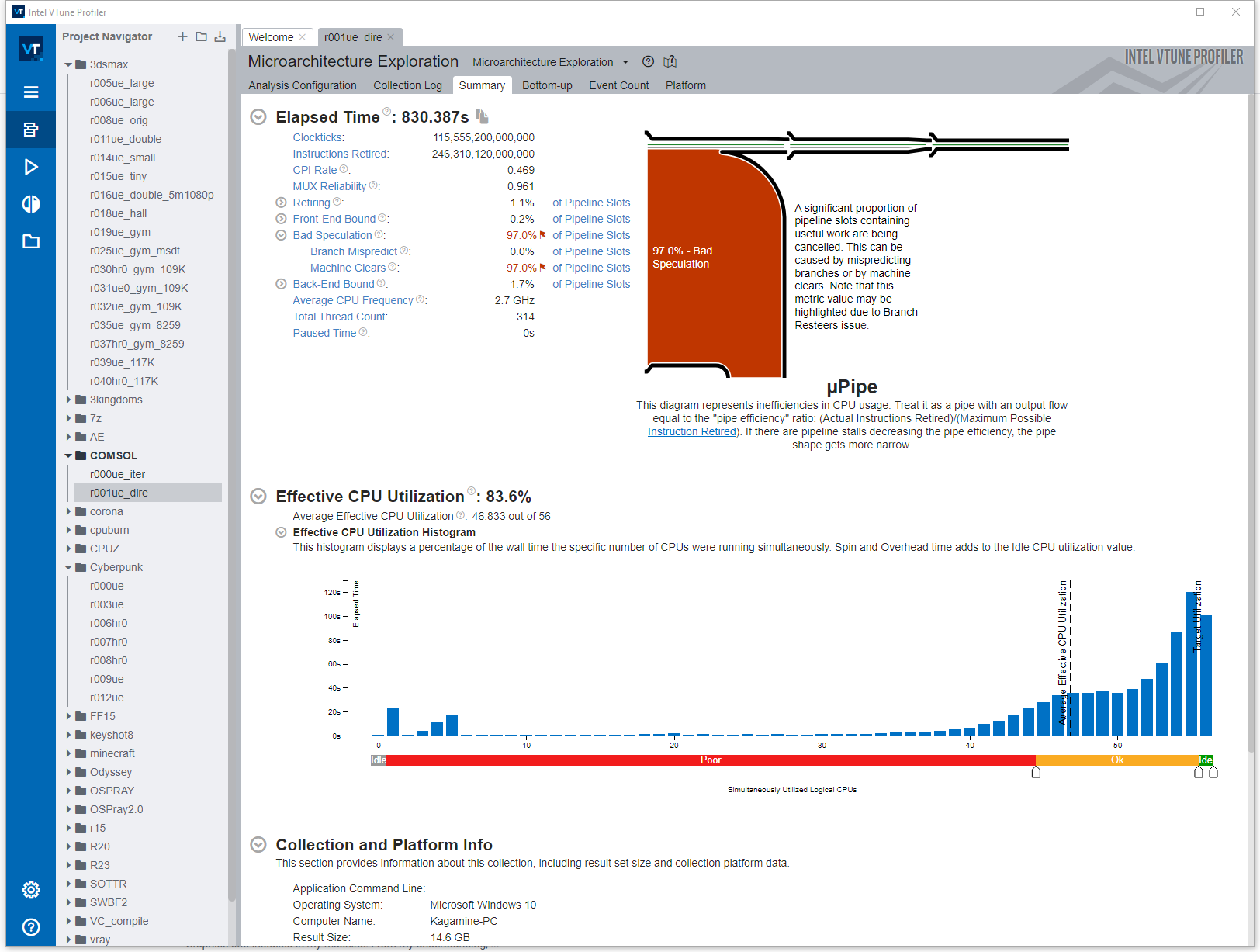
Just as the picture shown below. I found that when testing Comsol and Cinebench 2024, Vtune always generates very strange results with abnormally high numbers of "machine clear". The MACHINE_CLEARS.COUNT event always has no event or sample collected, both showing 0.
Wondering if this is normal? Or is there a fix for this problem?
The CPU is 8480+. Vtune version is 2023.20. There isn't any problem I can see with other versions of Cinebench.
Thank you.
링크가 복사됨

- 신규로 표시
- 북마크
- 구독
- 소거
- RSS 피드 구독
- 강조
- 인쇄
- 부적절한 컨텐트 신고
Hi,
Thanks for posting in Intel Communities.
Could you please share the following details:
1. Exact steps to reproduce the issue.
2. Have you encountered a similar issue on any other processor?
3. Have you experienced this issue with any other applications aside from Cinebench 2024?
Regards,
Thasneem Vazim
- 신규로 표시
- 북마크
- 구독
- 소거
- RSS 피드 구독
- 강조
- 인쇄
- 부적절한 컨텐트 신고
1. Launch both vtune and Cinebench 2024, in "configure analysis", attach to process "cinebench.exe" and select "microarchitecture exploration", then start profiling when running the multi core test.
2. Seems to be ok on Icelake, except uop cache misses metric.
3. Currently just CB2024 and COMSOL.
Thank you.
- 신규로 표시
- 북마크
- 구독
- 소거
- RSS 피드 구독
- 강조
- 인쇄
- 부적절한 컨텐트 신고
Hi,
We are checking on this internally. We will get back to you soon with an update.
Regards,
Thasneem Vazim
- 신규로 표시
- 북마크
- 구독
- 소거
- RSS 피드 구독
- 강조
- 인쇄
- 부적절한 컨텐트 신고
Hi,
To assist you better, could you kindly share the following details:
1)The result directory where you encountered the issue with Cinebench 2024 (for both icelake and 8480+ processors).
2)The result directory where you faced the issue with Comsol (for both Icelake and 8480+ processors).
Regards,
Thasneem Vazim
- 신규로 표시
- 북마크
- 구독
- 소거
- RSS 피드 구독
- 강조
- 인쇄
- 부적절한 컨텐트 신고
All are default directories.
Z:\Documents\Amplifier XE\Projects\COMSOL\r000ue
Z:\Documents\Amplifier XE\Projects\R23\r002ue
Yesterday I grabbed a new SSD and reinstalled the OS and drivers. The new directories are also default ones.
C:\Users\Kagamine\Documents\Amplifier XE\Projects\COMSOL\r000ue
C:\Users\Kagamine\Documents\Amplifier XE\Projects\R23\r002ue
All the partitions have more than 1TB of free space.
Thank you.
- 신규로 표시
- 북마크
- 구독
- 소거
- RSS 피드 구독
- 강조
- 인쇄
- 부적절한 컨텐트 신고
Hi,
Could you kindly provide the r000ue and r002ue results to address the issue effectively from our side? If the file size exceeds 100MB, please create a Google Drive link accessible to all and kindly share it with us.
Regards,
Thasneem Vazim
- 신규로 표시
- 북마크
- 구독
- 소거
- RSS 피드 구독
- 강조
- 인쇄
- 부적절한 컨텐트 신고
Hi,
We have not heard back from you. Could you please give us an update?
Regards,
Thasneem Vazim
- 신규로 표시
- 북마크
- 구독
- 소거
- RSS 피드 구독
- 강조
- 인쇄
- 부적절한 컨텐트 신고
Sorry I forgot to reply. I reran the tests to limit the file size, here's the link.
https://mega.nz/file/S4F2iQDI#CJ2c7fhaweF2BifU0fTNQbX8wP4Fek2kS5Mfppf337Q
r000ue is for Comsol
r001ue is for Cinebench 2024
Thank you.
- 신규로 표시
- 북마크
- 구독
- 소거
- RSS 피드 구독
- 강조
- 인쇄
- 부적절한 컨텐트 신고
Hi,
Since we cannot access the provided link, we have shared the procedure for uploading large files through private messages. Please refer to the instructions for uploading the file.
Regards,
Thasneem Vazim
- 신규로 표시
- 북마크
- 구독
- 소거
- RSS 피드 구독
- 강조
- 인쇄
- 부적절한 컨텐트 신고
Please give a link to the procedure, I can't find it. The private message page showed that the maximum file size is 71MB.
I have also repacked and uploaded the file to google drive, see if it helps.
https://drive.google.com/file/d/1pnjTrhGA--gE8oKkReOKQqlIGxeVgWAD/view?usp=drive_link
Thank you
- 신규로 표시
- 북마크
- 구독
- 소거
- RSS 피드 구독
- 강조
- 인쇄
- 부적절한 컨텐트 신고
Hi,
We are unable to access the Google Drive link. Kindly ensure that it is set to be accessible to all.
Regards,
Thasneem Vazim
- 신규로 표시
- 북마크
- 구독
- 소거
- RSS 피드 구독
- 강조
- 인쇄
- 부적절한 컨텐트 신고
Hi,
Thank you for providing the details. We have conveyed this information to the development team and will reach out to you once we receive their feedback.
Regards,
Thasneem Vazim
- 신규로 표시
- 북마크
- 구독
- 소거
- RSS 피드 구독
- 강조
- 인쇄
- 부적절한 컨텐트 신고
Hi,
We are checking on this internally. We will get back to you soon with an update.
Regards,
Thasneem Vazim
- 신규로 표시
- 북마크
- 구독
- 소거
- RSS 피드 구독
- 강조
- 인쇄
- 부적절한 컨텐트 신고
Hi,
To assist you better, the development team requires the following details:
1) Kindly confirm if the application's performance was less than expected.
2) Please share the results of the I/O analysis.
Please find below the reference link for performing I/O Command Line Analysis:
Regards,
Thasneem vazim
- 신규로 표시
- 북마크
- 구독
- 소거
- RSS 피드 구독
- 강조
- 인쇄
- 부적절한 컨텐트 신고
1. Although Cinebench score is less than expected, it's no less than the result from other people. For Comsol there's no problem with the performance that I can see.
2. Is there a windows version? This guide seems only for freebsd and linux.
Thank you.
- 신규로 표시
- 북마크
- 구독
- 소거
- RSS 피드 구독
- 강조
- 인쇄
- 부적절한 컨텐트 신고
Hi,
Thank you for your response. We would like to inform you that you don't have to provide the results of the I/O analysis. As per the update from the development team, there are two workarounds available for your issue. Please note that both workarounds tend to increase the postprocessing time after collection is complete.
Method 1.
a) Open command prompt as an administrator.
b) Set the environment variables.
c) If you want to keep the existing data, you can re-finalize the result in the command line after the environment variable AMPLXE_SAMPLES_TO_LOAD is set.
\> set AMPLXE_SAMPLES_TO_LOAD=0 // On Windows
\> export AMPLXE_SAMPLES_TO_LOAD=0 // On Linux
\> vtune -finalize -r <path_to_result_directory>
Method 2.
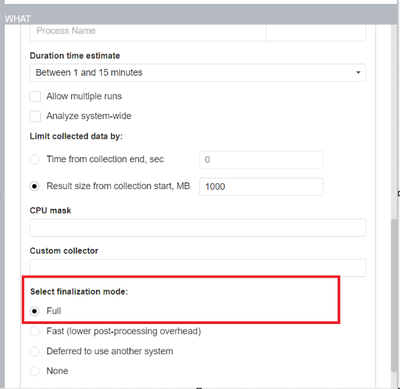
When you collect new data, you should select the Full finalization mode in the 'WHAT' pane as shown in the screenshot below:


If this resolves your issue, please accept this as a solution. It would help other users with a similar issue.
Regards,
Thasneem Vazim
- 신규로 표시
- 북마크
- 구독
- 소거
- RSS 피드 구독
- 강조
- 인쇄
- 부적절한 컨텐트 신고
Hi,
We have not heard back from you. Could you please give us an update?
Regards,
Thasneem Vazim
- 신규로 표시
- 북마크
- 구독
- 소거
- RSS 피드 구독
- 강조
- 인쇄
- 부적절한 컨텐트 신고
Hi,
We assume that your issue is resolved. If you need any additional information, please post a new question as this thread will no longer be monitored by Intel.
Regards,
Thasneem Vazim
