
- Marquer comme nouveau
- Marquer
- S'abonner
- Sourdine
- S'abonner au fil RSS
- Surligner
- Imprimer
- Signaler un contenu inapproprié
Hi,
I can create a new oneAPI Project in Visual Studio 2022 Professional and get the example code to run. I want to be able to write Unit Tests for the math work that I am doing. I want to be able create a Native Unit Test Project using the native Microsoft CppUnitTest framework. This is all done in C++. I have created a Native Unit Test Project fine and the Tests Solutions will find Tests for if I don't include the new oneAPI Project that I have created and that is fine. If I create another Test Project, add the new oneAPI project as a reference and create a simple test I keep getting the following error when I switch the project to the DPC++ compiler.
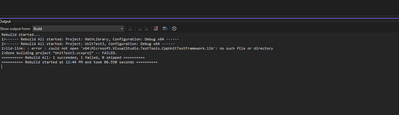
2>lld-link: : error : could not open 'x64\Microsoft.VisualStudio.TestTools.CppUnitTestFramework.lib': no such file or directory
I have tried adding the directory for the library in all the obvious places and the Unit Test Compiles and link when I don't have reference to DPC++ project and a basic dummy test in it. Could some give me some advice.
Thanks,
Shannon
- Balises:
- dpc++
- Unit Test
- visual studio
Lien copié

- Marquer comme nouveau
- Marquer
- S'abonner
- Sourdine
- S'abonner au fil RSS
- Surligner
- Imprimer
- Signaler un contenu inapproprié
Hi,
Thanks for posting on Intel communities.
Could you please share the following details so that we can understand and try to reproduce the issue on our end and help you resolve your issue?
1. The complete code you are using.
2. The steps you have followed so far.
Thanks & Regards,
Vankudothu Vaishnavi.
- Marquer comme nouveau
- Marquer
- S'abonner
- Sourdine
- S'abonner au fil RSS
- Surligner
- Imprimer
- Signaler un contenu inapproprié
Hi,
I have a attached a sample solution that has a Unit Test Project. If unzip the solution, open it and rebuild you should be able to select Test->'Run All Tests' then select Test->'Test Explorer' and see the following if you you
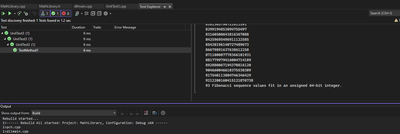
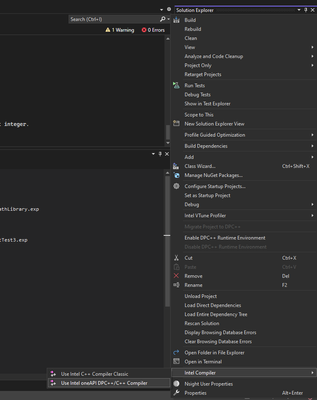
Then you select the Intel oneAPI compiler for each of the projects in the solution as follows
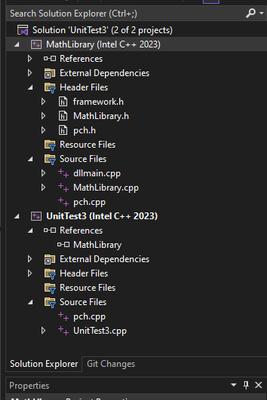
Then you solution explorer should look like this
You will then see the following error
Thanks,
Shannon
- Marquer comme nouveau
- Marquer
- S'abonner
- Sourdine
- S'abonner au fil RSS
- Surligner
- Imprimer
- Signaler un contenu inapproprié
Hi,
Thanks for sharing your code and the steps you have followed.
From your screenshots, we were able to see that you didn’t change the platform toolset to Intel DPC++ 2023. So, please try to change it to Intel DPC++ 2023 by going to the Project properties-> Configuration properties-> General-> Platform Toolset (change it to Intel DPC++ 2023).
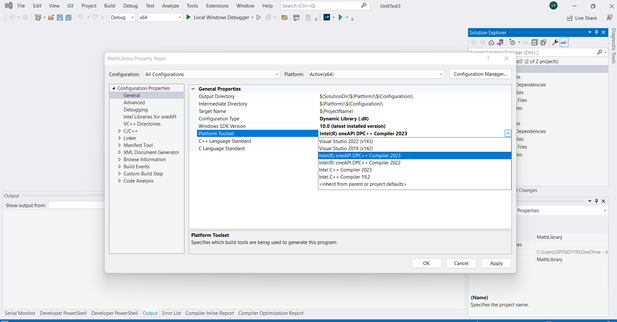
As a workaround copy Microsoft.VisualStudio.TestTools.CppUnitTestFramework.lib to the folder where UnitTest3.sln is present.
Please find the below screenshots for the output of your code with Intel DPC++ 2023 as a platform toolset in both debug and release modes,
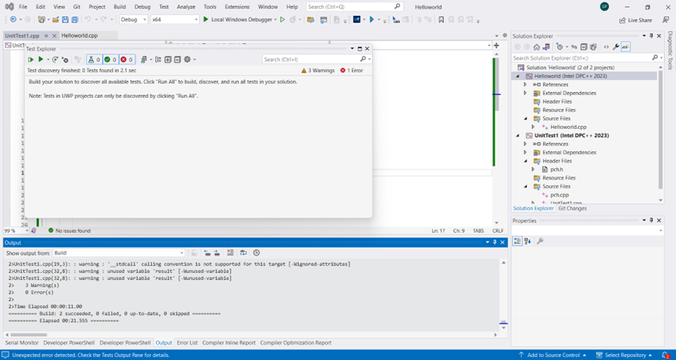
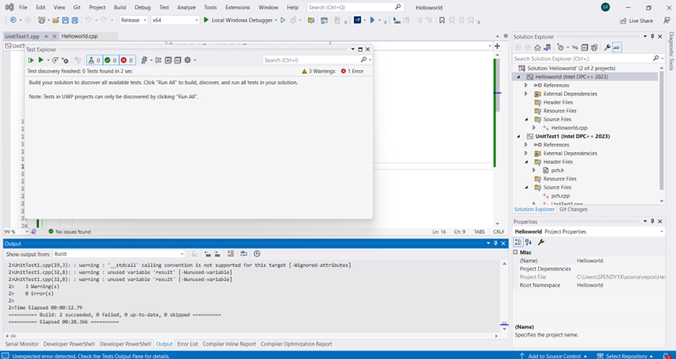
Please let us know if you still face any issues.
Thanks & Regards,
Vankudothu Vaishnavi.
- Marquer comme nouveau
- Marquer
- S'abonner
- Sourdine
- S'abonner au fil RSS
- Surligner
- Imprimer
- Signaler un contenu inapproprié
Hi,
We have not heard back from you.
Has the information provided above helped? If yes, could you please confirm whether we can close this thread from our end?
Thanks & Regards,
Vankudothu Vaishnavi.
- Marquer comme nouveau
- Marquer
- S'abonner
- Sourdine
- S'abonner au fil RSS
- Surligner
- Imprimer
- Signaler un contenu inapproprié
Thanks for the help. It worked. Please close this thread.
- Marquer comme nouveau
- Marquer
- S'abonner
- Sourdine
- S'abonner au fil RSS
- Surligner
- Imprimer
- Signaler un contenu inapproprié
Hi,
Glad to know that your issue got resolved. If you need any additional information, please post a new question as this thread will no longer be monitored by Intel.
Thanks & Regards,
Vankudothu Vaishnavi.

- S'abonner au fil RSS
- Marquer le sujet comme nouveau
- Marquer le sujet comme lu
- Placer ce Sujet en tête de liste pour l'utilisateur actuel
- Marquer
- S'abonner
- Page imprimable