
- Mark as New
- Bookmark
- Subscribe
- Mute
- Subscribe to RSS Feed
- Permalink
- Report Inappropriate Content
Hi there, when linking MKL with the GNU gold linker, the binaries seem to be broken:
#!/usr/bin/env bash

function cyan {
    echo -e "\033[1;34m$*\033[0m"
}

MKL_DIR="$HOME/intel/oneapi/mkl/latest"
MKL_LIB_DIR="$MKL_DIR/lib/intel64"
MKL_INC_DIR="$MKL_DIR/include"

cat << EOF > demo.cpp
#include <iostream>
#include <string>
#include "mkl.h"
int main() {
    std::string buffer(200, '\0');
    MKL_Get_Version_String(buffer.data(), 200);
    std::cout << buffer << std::endl;
}
EOF

COMPILER_ARGS="-I"$MKL_INC_DIR" demo.cpp -L"$MKL_LIB_DIR" -Wl,-rpath="$MKL_LIB_DIR" -lmkl_intel_ilp64 -lmkl_intel_thread -lmkl_core -liomp5"

cyan "Without gold:"
g++ $COMPILER_ARGS -o nogold
ldd nogold | grep mkl
./nogold

echo
cyan "With gold:"
g++ $COMPILER_ARGS -fuse-ld=gold -o withgold
ldd withgold | grep mkl
./withgold

echo
cyan "With mold:"
g++ $COMPILER_ARGS -fuse-ld=mold -o withmold
ldd withmold | grep mkl
./withmold

echo
cyan "Without gold, g++-12:"
g++-12 $COMPILER_ARGS -o nogold12
ldd nogold12 | grep mkl
./nogold12

echo
cyan "With gold, g++-12:"
g++-12 $COMPILER_ARGS -fuse-ld=gold -o withgold12
ldd withgold12 | grep mkl
./withgold12

echo
cyan "With mold, g++-12:"
g++-12 $COMPILER_ARGS -fuse-ld=mold -o withmold12
ldd withmold12 | grep mkl
./withmold12
The standard linker and mold do fine, but with gold I get:
With gold:
libmkl_intel_ilp64.so.2 => ~/intel/oneapi/mkl/latest/lib/intel64/libmkl_intel_ilp64.so.2 (0x00007f6b8daa3000)
./withgold: symbol lookup error: ~/intel/oneapi/mkl/latest/lib/intel64/libmkl_intel_ilp64.so.2: undefined symbol: mkl_blas_dgemm
This was tested with the latest MKL "2023.1-Product Build 20230303".

- Mark as New
- Bookmark
- Subscribe
- Mute
- Subscribe to RSS Feed
- Permalink
- Report Inappropriate Content
Hi Samuel,
Thanks for posting in Intel Communities.
Could you please try using the below command where we are able to get the expected results using the option "-fuse-ld=gold":
g++-12 -DMKL_ILP64 -m64 -I"${MKLROOT}/include" demoversion.cpp -o demogold12 -L${MKLROOT}/lib/intel64 -Wl,--no-as-needed -lmkl_intel_ilp64 -lmkl_gnu_thread -lmkl_core -lgomp -lpthread -lm -ldl -fuse-ld=gold
Please find the below screenshot where we have tried using the option -fuse-ld=gold and also without a gold linker.
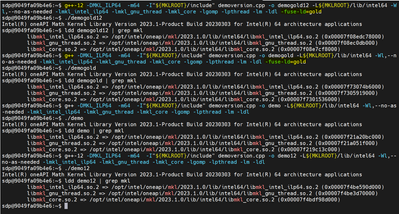
And also, you can use the tool Intel Link Line Advisor for compiling and linking your code as it is compatible with several compilers and third-party libraries and provides different interfaces to the functionality. Please find the below link for more details:
https://www.intel.com/content/www/us/en/developer/tools/oneapi/onemkl-link-line-advisor.html
Could you please try and let us know if you face any errors?
Thanks & Regards,
Varsha
Link Copied
- Mark as New
- Bookmark
- Subscribe
- Mute
- Subscribe to RSS Feed
- Permalink
- Report Inappropriate Content
Hi Samuel,
Thanks for posting in Intel Communities.
Could you please try using the below command where we are able to get the expected results using the option "-fuse-ld=gold":
g++-12 -DMKL_ILP64 -m64 -I"${MKLROOT}/include" demoversion.cpp -o demogold12 -L${MKLROOT}/lib/intel64 -Wl,--no-as-needed -lmkl_intel_ilp64 -lmkl_gnu_thread -lmkl_core -lgomp -lpthread -lm -ldl -fuse-ld=gold
Please find the below screenshot where we have tried using the option -fuse-ld=gold and also without a gold linker.
And also, you can use the tool Intel Link Line Advisor for compiling and linking your code as it is compatible with several compilers and third-party libraries and provides different interfaces to the functionality. Please find the below link for more details:
https://www.intel.com/content/www/us/en/developer/tools/oneapi/onemkl-link-line-advisor.html
Could you please try and let us know if you face any errors?
Thanks & Regards,
Varsha
- Mark as New
- Bookmark
- Subscribe
- Mute
- Subscribe to RSS Feed
- Permalink
- Report Inappropriate Content
Hi Varsha,
thanks for your tipps. The -Wl,--no-as-needed before the libs was enough that ldd printed all libs and the programm could be executed successfully.
I got the command line for the compiler from the MKL included cmake:
find_package(MKL CONFIG REQUIRED)
target_link_libraries(demo MKL::MKL)
Regards,
Samuel
- Mark as New
- Bookmark
- Subscribe
- Mute
- Subscribe to RSS Feed
- Permalink
- Report Inappropriate Content
Hi Samuel,
>>the programm could be executed successfully.
Glad to know that you are able to run without errors. Could you please confirm if we can close this case from our end?
Thanks & Regards,
Varsha
- Mark as New
- Bookmark
- Subscribe
- Mute
- Subscribe to RSS Feed
- Permalink
- Report Inappropriate Content
Hi Varsha,
for me, yes.
I'd add the -Wl,--no-as-needed to cmake, though, as the link line advisor recommends.
Regards,
Samuel
- Mark as New
- Bookmark
- Subscribe
- Mute
- Subscribe to RSS Feed
- Permalink
- Report Inappropriate Content
Hi Samuel,
>>for me, yes.
Thanks for the confirmation. Glad to know that your issue is resolved. If you need any additional information, please post a new question as this thread will
no longer be monitored by Intel.
Thanks & Regards,
Varsha

- Subscribe to RSS Feed
- Mark Topic as New
- Mark Topic as Read
- Float this Topic for Current User
- Bookmark
- Subscribe
- Printer Friendly Page