
- Mark as New
- Bookmark
- Subscribe
- Mute
- Subscribe to RSS Feed
- Permalink
- Report Inappropriate Content
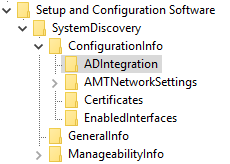
We recently received in an order of Dell Optiplex 7060's. We found that these devices had AMT v12 and required us to upgrade our SCS server to v12 to provision them. The upgrade went fine and I can now provision the new PC's. However, while the provisioning does get the AMT object created in AD and AD authentication works, it is not populating the registry like the v11 PC's do. We deploy ACUConfig.exe via SCCM and I use these registry settings for the detection method. So while the provisioning seems to work fine SCCM shows it as failed.

Link Copied

- Mark as New
- Bookmark
- Subscribe
- Mute
- Subscribe to RSS Feed
- Permalink
- Report Inappropriate Content

- Mark as New
- Bookmark
- Subscribe
- Mute
- Subscribe to RSS Feed
- Permalink
- Report Inappropriate Content
- Mark as New
- Bookmark
- Subscribe
- Mute
- Subscribe to RSS Feed
- Permalink
- Report Inappropriate Content
Michael,
I am out of office today but will get you the discovery report first thing tomorrow.
- Mark as New
- Bookmark
- Subscribe
- Mute
- Subscribe to RSS Feed
- Permalink
- Report Inappropriate Content
- Mark as New
- Bookmark
- Subscribe
- Mute
- Subscribe to RSS Feed
- Permalink
- Report Inappropriate Content
- Mark as New
- Bookmark
- Subscribe
- Mute
- Subscribe to RSS Feed
- Permalink
- Report Inappropriate Content
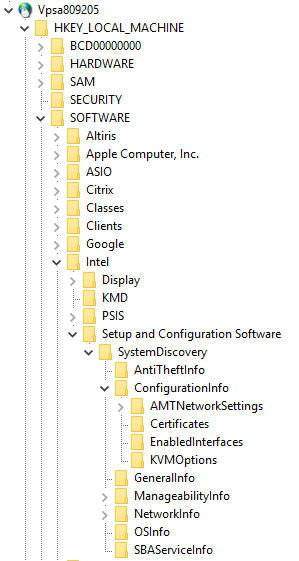
Looking into this a bit more I pulled out another device, same Optiplex 7060, asset tag 809205. Provisioning it and then running the SCSDiscovery I noticed a few differences. First, this one has an older BIOS and second, it is missing the ADIntegration registry node entirely. I have attached the SCSDiscovery file for it too. I don't know if this helps or just adds confusion.

- Subscribe to RSS Feed
- Mark Topic as New
- Mark Topic as Read
- Float this Topic for Current User
- Bookmark
- Subscribe
- Printer Friendly Page