
- 신규로 표시
- 북마크
- 구독
- 소거
- RSS 피드 구독
- 강조
- 인쇄
- 부적절한 컨텐트 신고
Hello, I'm new at using Unity and camera Realsense.
I'm making a game and and it can be only controlled using left click mouse.
I want it can be played using gesture Realsense and has same function like click mouse.
Anyone can help me to solve my problem ?
- 신규로 표시
- 북마크
- 구독
- 소거
- RSS 피드 구독
- 강조
- 인쇄
- 부적절한 컨텐트 신고
I have written a large range of detailed step by step guides in the past on numerous aspects of using RealSense with Unity. You may find some of these useful as you learn.
https://software.intel.com/en-us/forums/realsense/topic/676139 Index of Marty G's RealSense Unity How-To Guides
Also, this short guide to using the RealSense Unity Toolkit's 'SendMessageAction' script to activate a function with a gesture may be helpful.
In the guide I activate the function with a thumbs-up gesture, but you could equally use the Hand closed gesture instead as a substitute for a mouse-click.
링크가 복사됨
- 신규로 표시
- 북마크
- 구독
- 소거
- RSS 피드 구독
- 강조
- 인쇄
- 부적절한 컨텐트 신고
* Copying a PM from Chris into the public thread with his permission*
My MoveObject(); can move my gameobject in my traditional update function and run automatically and has no problem. but after i put this code "this.enabled = false;" that MoveObject() function didnt work automatically. my new update with realsense control
public void LastUpdate()
{
if (Input.GetMouseButton(0))
{
if (PutObject())
{
SpawnObject();
count++;
}
else
{
EndGame();
}
}
MoveObject();
this.enabled = false;
}
//is this wrong ?
- 신규로 표시
- 북마크
- 구독
- 소거
- RSS 피드 구독
- 강조
- 인쇄
- 부적절한 컨텐트 신고
It seems that SendMessageAction is only activating the script once when you make the Hand Closed gesture instead of triggering it multiple times. So it stops runnign after the first time because of this.enabled = false.
Ah, I think I see the problem. You have named your function LastUpdate(). The correct name is LateUpdate(). If you call it LastUpdate then Unity treats your function like a custom-made function you have defined yourself, and these are "fire once" functions - they run once and then stop unless you make a call to them with a line such as
LastUpdate();
Hopefully if you change LastUpdate to LateUpdate, it should work.
- 신규로 표시
- 북마크
- 구독
- 소거
- RSS 피드 구독
- 강조
- 인쇄
- 부적절한 컨텐트 신고
Still didnt work. It still stop automatically move after camera read my gesture, and "SpawnObject();" "count++;" didnt work too.
- 신규로 표시
- 북마크
- 구독
- 소거
- RSS 피드 구독
- 강조
- 인쇄
- 부적절한 컨텐트 신고
Is there another script that you are using that has a function called MoveObject() in it? When I read your script, it is saying to go to a function called MoveObject(), but there is no function - such as public void MoveObject() - defined in your script, so there is nowhere for the script to go to.
If the MoveObject() function is in another script, you have to tell this script how to find it. Putting
MoveObject();
only works if the MoveObject() function is inside the same script. If it is inside a different script file, you need to use an instruction such as GameObject.Find("put name of the object hosting the script in the quotation marks").GetComponent().MoveObject();
Example: if the name of the object that the other script is in is called ObjectMover, and the name of the script is ObjectMoverScript:
GameObject.Find("ObjectMover").GetComponent().MoveObject();
- 신규로 표시
- 북마크
- 구독
- 소거
- RSS 피드 구독
- 강조
- 인쇄
- 부적절한 컨텐트 신고
I put all like "private void MoveObject();" ; " private void SpawnObject();" ; "private void PutObject();" in one script with private void "Update();". << this actually run well when i use traditional control with this code :
private void Update () {
if (Input.GetMouseButton(0))
{
if (PutObject())
{
SpawnObject();
count++;
}
else
{
EndGame();
}
}
MoveObject();
}
but, when I try add "this.enabled = false;" at the end of function and rename "private void Update" to "public void LateUpdate" it didnt move the object and not spawn object too.
I use SendMessageAction and event gesture Hand Clossed and already rename Function Name with "LateUpdate".
when I try run it, the object didnt move when i close my hand.
then i check in the inspector, my script(which control the game) uncheklist itself.
its different when i use traditional control code, the script still in checklist.
- 신규로 표시
- 북마크
- 구독
- 소거
- RSS 피드 구독
- 강조
- 인쇄
- 부적절한 컨텐트 신고
Let me confirm something please. This script above is the one that is triggered by the SendMessageAction? Your object movement script is inside the same object that the SendMessageAction is in?
So effectively, the SendMessageAction is inside the object that you are trying to move?
- 신규로 표시
- 북마크
- 구독
- 소거
- RSS 피드 구독
- 강조
- 인쇄
- 부적절한 컨텐트 신고
Yes, i put the control my game mechanism like spawn, move in script called "GameScript.cs" , i put that script in 1 gameobject called "Object1"
in that gameobject, i put SendMessageAction script too, and i put "this.enabled = false;" in "GameScript.cs" and rename its function from "private void Update" to "public void "LateUpdate"
- 신규로 표시
- 북마크
- 구독
- 소거
- RSS 피드 구독
- 강조
- 인쇄
- 부적절한 컨텐트 신고
Ok, try this. Put a this.enabled = true directly under LateUpdate. Keep the this.enabled = false at the end of the script.
public void LateUpdate()
{
this.enabled = true;
*******************
I have one more thing we can try if that doesn't work.
- 신규로 표시
- 북마크
- 구독
- 소거
- RSS 피드 구독
- 강조
- 인쇄
- 부적절한 컨텐트 신고
Ok, new strategy.
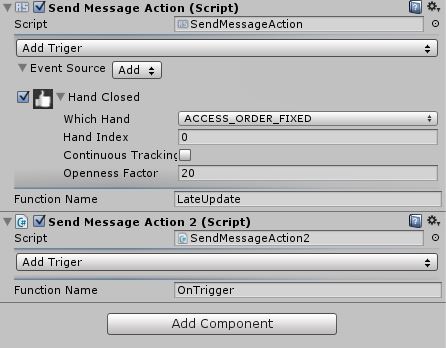
1. Create a new C# script inside the same object where your SendMessageAction is. Name this new script SendMessageAction2 (you must use this exact name, with all the capital letters)
2. Open the new SendMessageAction2 script and completely delete all the code inside it so the script is blank.
3. I have attached a document containing a script for SendMessageAction2. Do a 'select all' on the document and paste its contents into SendMessageAction2.
4. Remove the SendMessageAction2 script from your object, then drop it back in again. This will set the script up correctly, making it ready for use. You will now have the ability to have two SendMessageActions with different functions in the same object (normally, two of the same Action script in one object will not work)/
When that is done, I will explain what to do next.
- 신규로 표시
- 북마크
- 구독
- 소거
- RSS 피드 구독
- 강조
- 인쇄
- 부적절한 컨텐트 신고
I already done making script and copy all to new script. and in the inspector become like this ?
like this ?
- 신규로 표시
- 북마크
- 구독
- 소거
- RSS 피드 구독
- 강조
- 인쇄
- 부적절한 컨텐트 신고
Yes, that looks perfect! Here are the final steps.
1. Delete the 'this.enabled = false' from the bottom of the script (I'm sure you will be happy about that!)
2. Put the following two functions in the script.
public void ScriptOn()
{
this.enabled = true;
}
public void ScriptOff()
{
this.enabled = false;
}
3. In the Function Name section of SendMessageAction, put ScriptOn instead of LateUpdate.
In the Function Name section of SendMessageAction2, put ScriptOff
4. In SendMessageAction2, choose a gesture or action that will cause the movement script to be deactivated when the camera sees it. A good one may be 'Hand Lost', so that when you drop your hand down, the camera decides that the hand is 'lost' from view.
So with these two SendMessageActions, each with its own gesture, you can do two things.
- Activate the script, and so the movement of your object, by making the Hand Closed gesture.
- Deactivate the script and stop movement by making the stop gesture in SendMessageAction2.
- 신규로 표시
- 북마크
- 구독
- 소거
- RSS 피드 구독
- 강조
- 인쇄
- 부적절한 컨텐트 신고
Wow, it really works to my me.
now my object can move when my hand detected in camera, and my object stop moving when my i drop my hand. and moving again when i close my hand in front camera.
but the problem is my function like "spawnObject();" ; "PutObject()" still in public void Update();
should i move it to function "public void ScriptOff()"?
Thank you very much.
- 신규로 표시
- 북마크
- 구독
- 소거
- RSS 피드 구독
- 강조
- 인쇄
- 부적절한 컨텐트 신고
I'm glad we finally got it working!
You should not need to move your other items out of Update(). Once the script activates then whatever is inside Update() will run automatically on a continuous loop until the script is deactivated again.
