
- Mark as New
- Bookmark
- Subscribe
- Mute
- Subscribe to RSS Feed
- Permalink
- Report Inappropriate Content
@s001-n058:~/vector_addition_cuda$ dpct vector_addition.cu NOTE: Could not auto-detect compilation database for file 'vector_addition.cu' in '/home/u171596/vector_addition_cuda' or any parent directory.
dpct exited with code: -32 (Error: Could not detect path to CUDA header files. Use --cuda-include-path to specify the correct path to the header files.)
u171596@s001-n058:~/vector_addition_cuda$ cat vector_addition.cu
#include</usr/include/linux/cuda.h>
#include <stdio.h>
// Size of array
#define N 1048576
// Kernel
__global__ void add_vectors(double *a, double *b, double *c)
{
int id = blockDim.x * blockIdx.x + threadIdx.x;
if(id < N) c[id] = a[id] + b[id];
}
// Main program
int main()
{
// Number of bytes to allocate for N doubles
size_t bytes = N*sizeof(double);
// Allocate memory for arrays A, B, and C on host
double *A = (double*)malloc(bytes);
double *B = (double*)malloc(bytes);
double *C = (double*)malloc(bytes);
// Allocate memory for arrays d_A, d_B, and d_C on device
double *d_A, *d_B, *d_C;
cudaMalloc(&d_A, bytes);
cudaMalloc(&d_B, bytes);
cudaMalloc(&d_C, bytes);
// Fill host arrays A and B
for(int i=0; i<N; i++)
{
A[i] = 1.0;
B[i] = 2.0;
}
// Copy data from host arrays A and B to device arrays d_A and d_B
cudaMemcpy(d_A, A, bytes, cudaMemcpyHostToDevice);
cudaMemcpy(d_B, B, bytes, cudaMemcpyHostToDevice);
// Set execution configuration parameters
// thr_per_blk: number of CUDA threads per grid block
// blk_in_grid: number of blocks in grid
int thr_per_blk = 256;
int blk_in_grid = ceil( float(N) / thr_per_blk );
// Launch kernel
add_vectors<<< blk_in_grid, thr_per_blk >>>(d_A, d_B, d_C);
// Copy data from device array d_C to host array C
cudaMemcpy(C, d_C, bytes, cudaMemcpyDeviceToHost);
// Verify results
double tolerance = 1.0e-14;
for(int i=0; i<N; i++)
{
if( fabs(C[i] - 3.0) > tolerance)
{
printf("\nError: value of C[%d] = %d instead of 3.0\n\n", i, C[i]);
exit(1);
}
}
// Free CPU memory
free(A);
free(B);
free(C);
// Free GPU memory
cudaFree(d_A);
cudaFree(d_B);
cudaFree(d_C);
printf("\n---------------------------\n");
printf("__SUCCESS__\n");
printf("---------------------------\n");
printf("N = %d\n", N);
printf("Threads Per Block = %d\n", thr_per_blk);
printf("Blocks In Grid = %d\n", blk_in_grid);
printf("---------------------------\n\n");
return 0;
}
Link Copied

- Mark as New
- Bookmark
- Subscribe
- Mute
- Subscribe to RSS Feed
- Permalink
- Report Inappropriate Content
Hi,
Thanks for reaching out to us.
Follow the below command to migrate the sample. Make sure the system has Nvidia CUDA SDK installed (in the default path).
dpct vector_addition.cu --cuda-include-path=<cuda-path>/include/ For more information refer to Intel® DPC++ Compatibility Tool Best Practices.
Hope the provided details will help you to resolve your issues.
Regards,
Manjula
- Mark as New
- Bookmark
- Subscribe
- Mute
- Subscribe to RSS Feed
- Permalink
- Report Inappropriate Content
Hi,
A gentle reminder to respond.
Regards,
Manjula
- Mark as New
- Bookmark
- Subscribe
- Mute
- Subscribe to RSS Feed
- Permalink
- Report Inappropriate Content
Thank you Manjula for response.
I am using Intel devcloud environment for migration. Could you please suggest how to install Nvidia CUDA SDK ?
- Mark as New
- Bookmark
- Subscribe
- Mute
- Subscribe to RSS Feed
- Permalink
- Report Inappropriate Content
Am I even allowed to install on Intel devcloud environment?
- Mark as New
- Bookmark
- Subscribe
- Mute
- Subscribe to RSS Feed
- Permalink
- Report Inappropriate Content
Hi,
Can you try installing the CUDA Toolkit from the below link, by selecting the appropriate OS, Distribution and Version?
DPCT only needs CUDA headers from the supported versions. So, if you could manage to get headers from these supported versions and provide its path to the --cuda-include-path flag it could work.
As per the latest oneAPI beta08 DPCT requirements, the only supported CUDA versions are: 8.0, 9.x, 10.1, 10.2, 11.0 ~11.8.
Regards,
Manjula
- Mark as New
- Bookmark
- Subscribe
- Mute
- Subscribe to RSS Feed
- Permalink
- Report Inappropriate Content
Hello Manjula,
I am working on Intel devcloud oneAPI environment. I am not sure how to install CUDA toolkit here.
with reference to the thread below, I am sure if it is possible/recommended. Please suggest.
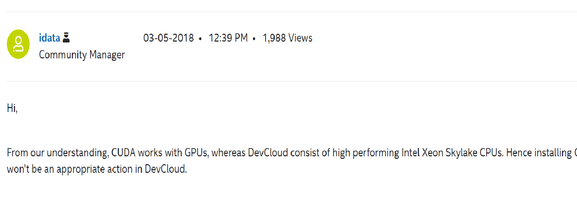
Regards,
Garvita
- Mark as New
- Bookmark
- Subscribe
- Mute
- Subscribe to RSS Feed
- Permalink
- Report Inappropriate Content
Hi,
As per my previous response, DPCT only needs CUDA headers from the supported versions. So, if you could manage to get headers from these supported versions and provide its path to the --cuda-include-path flag it could work.
Follow the below link for CUDA Toolkit installation by selecting the appropriate OS, Distribution and Version.
https://developer.nvidia.com/cuda-11.0-download-archive?target_os=Linux&target_arch=x86_64&target_di...
Attached the image below which has CUDA headers in Devcloud for your reference.
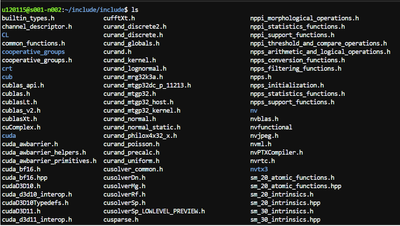
Regards,
Manjula
- Mark as New
- Bookmark
- Subscribe
- Mute
- Subscribe to RSS Feed
- Permalink
- Report Inappropriate Content
Hi,
A gentle reminder to respond.
Regards,
Manjula
- Mark as New
- Bookmark
- Subscribe
- Mute
- Subscribe to RSS Feed
- Permalink
- Report Inappropriate Content
I am still looking the way to copy headers in devcloud environment since "scp" is also not working. Please refer the screenshots below. Once I an able to copy files, I might copy headers. Any Suggestions please?


- Mark as New
- Bookmark
- Subscribe
- Mute
- Subscribe to RSS Feed
- Permalink
- Report Inappropriate Content
Hi,
Can you try installing the CUDA Headers in Intel Devcloud directly using the below link without using "scp".
Follow the below link for CUDA Toolkit installation by selecting the appropriate OS, Distribution and Version.
https://developer.nvidia.com/cuda-11.0-download-archive?target_os=Linux&target_arch=x86_64&target_di...
Regards,
Manjula
- Mark as New
- Bookmark
- Subscribe
- Mute
- Subscribe to RSS Feed
- Permalink
- Report Inappropriate Content
Hi,
Since your initial query is resolved. Please post any additional questions in a new thread. This thread will be no longer monitored by Intel.
Regards,
Manjula

- Subscribe to RSS Feed
- Mark Topic as New
- Mark Topic as Read
- Float this Topic for Current User
- Bookmark
- Subscribe
- Printer Friendly Page