
- Mark as New
- Bookmark
- Subscribe
- Mute
- Subscribe to RSS Feed
- Permalink
- Report Inappropriate Content
270k so far is junk try everything notting works i did all the steps
1. Download the installation file from here:killer
2. Uninstall the Intel Killer Performance Suite manually:
a. Go to your Windows search bar.
b. Type in and go to Apps & features.
c. Find the Intel Killer Performance Suite from the list.
d. Click the Intel Killer Performance Suite and select the option to uninstall.
e. Restart your machine by clicking Start > Power > Restart.
3. Once your computer has rebooted, access your temporary files folder and delete the contents.
a. Click Start.
b. Type %temp% and press Enter. Your temp folder should open.
c. Delete all files in the temp folder. These are all temporary install files and are safe to delete. If you receive a prompt saying that a file cannot be deleted, you can safely select Skip All.
d. Close the temp folder.
4. Run the installer that you downloaded for the Intel Killer Performance Suite.
5. Select Complete when asked Complete Install or Custom Install. The software package only installs the Intel Killer Performance Suite and the device drivers.
6. Follow the remaining prompts to complete the installation.
7. The final part of the installation will involve forwarding you to the Microsoft Store* to download the Killer Performance Suite user interface. This is required to use the Intel Killer Performance Suite.
8. Restart your machine if the installer requested a restart.
9. Test to see if the issue is resolved.
and npu all faded out in the bios will not work disable ram over clock
Link Copied


- Mark as New
- Bookmark
- Subscribe
- Mute
- Subscribe to RSS Feed
- Permalink
- Report Inappropriate Content
Hi knighttemplar45,
I appreciate you bringing multiple concerns to my attention, and I want to ensure each receives the focused attention it deserves. To provide you with the most effective support, I'll be able to address one issue thoroughly in this thread.
For any additional matters, please feel free to create a new thread and share the link here - I'll be grateful to assist you with those as well.
Could you please let me know which issue you'd like to prioritize first: the NPU concern or the Killer Performance Suite matter? I'm here to help resolve whichever is most important to you right now.
Best regards,
Sesan N.
Intel Customer Support Technician
- Mark as New
- Bookmark
- Subscribe
- Mute
- Subscribe to RSS Feed
- Permalink
- Report Inappropriate Content
blue screens from Memory Management" Blue Screen of Death (BSOD) error page fault in nonpaged area many more lot of intel errors
intel dynamic tuning technology fails to install
intel 200s boost is off xmp1 is off boards set to factory defult useing bios AMI BIOS7E58v1A80
msi PRO Z890-S WIFI PZ board
try bios
- Description:- Optimized memory overclocking adjustment function. - Updated security settings.
- Description:- Support and optimized for the future Intel Core Ultra series CPU. - Implemented the anti-cheat mechanism. - Optimized for working with the latest IPPP (Intel Platform Performance Package) driver for a better gaming experience. **For additional details, please visit the driver download page.
- Description:- Improve MultiMonitor support. - Modify security setting. - Update MicroCode. - Update GOP.

- Mark as New
- Bookmark
- Subscribe
- Mute
- Subscribe to RSS Feed
- Permalink
- Report Inappropriate Content
Hi knighttemplar45,
I've sent you an email requesting some additional information to help resolve your concern. Please check both your inbox and spam folders to ensure you don't miss it. We recommend including the required logs in your next email response, as this will allow us to conduct a thorough analysis of your system.
We appreciate your cooperation in providing these details so we can move forward with an effective solution.
Best regards,
Sesan N.
Intel Customer Support Technician
- Mark as New
- Bookmark
- Subscribe
- Mute
- Subscribe to RSS Feed
- Permalink
- Report Inappropriate Content
- Mark as New
- Bookmark
- Subscribe
- Mute
- Subscribe to RSS Feed
- Permalink
- Report Inappropriate Content
A timeout was reached (45000 milliseconds) while waiting for the Intel(R) Platform License Manager Service service to connect.
-------------------------------------------------------------------
-------------------------------------------------------------------
-------------------------------------------------------------------
A timeout was reached (45000 milliseconds) while waiting for the Intel(R) Platform License Manager Service service to connect.
-------------------------------------------------------------------
-------------------------------------------------------------------
-------------------------------------------------------------------
-------------------------------------------------------------------
-------------------------------------------------------------------
A fatal error occurred while creating a TLS client credential. The internal error state is 10013.
-------------------------------------------------------------------
A fatal error occurred while creating a TLS client credential. The internal error state is 10013.
-------------------------------------------------------------------
A fatal error occurred while creating a TLS client credential. The internal error state is 10013.
-------------------------------------------------------------------
A fatal error occurred while creating a TLS client credential. The internal error state is 10013.
-------------------------------------------------------------------
-------------------------------------------------------------------
A timeout was reached (30000 milliseconds) while waiting for the Steam Client Service service to connect.
-------------------------------------------------------------------
A timeout was reached (45000 milliseconds) while waiting for the Intel(R) Platform License Manager Service service to connect.
-------------------------------------------------------------------
-------------------------------------------------------------------
-------------------------------------------------------------------
The netprofm service terminated with the following error:
The device is not ready.
...#SSU#...
#Logs#Direct-X Diagnostics#Included
- Mark as New
- Bookmark
- Subscribe
- Mute
- Subscribe to RSS Feed
- Permalink
- Report Inappropriate Content
Hi knighttemplar45,
Thank you for sending the necessary logs we needed for investigation. We will check this issue thoroughly and provide you an update as soon as possible.
Best regards,
Sesan N.
Intel Customer Support Technician
- Mark as New
- Bookmark
- Subscribe
- Mute
- Subscribe to RSS Feed
- Permalink
- Report Inappropriate Content
Hi knighttemplar45,
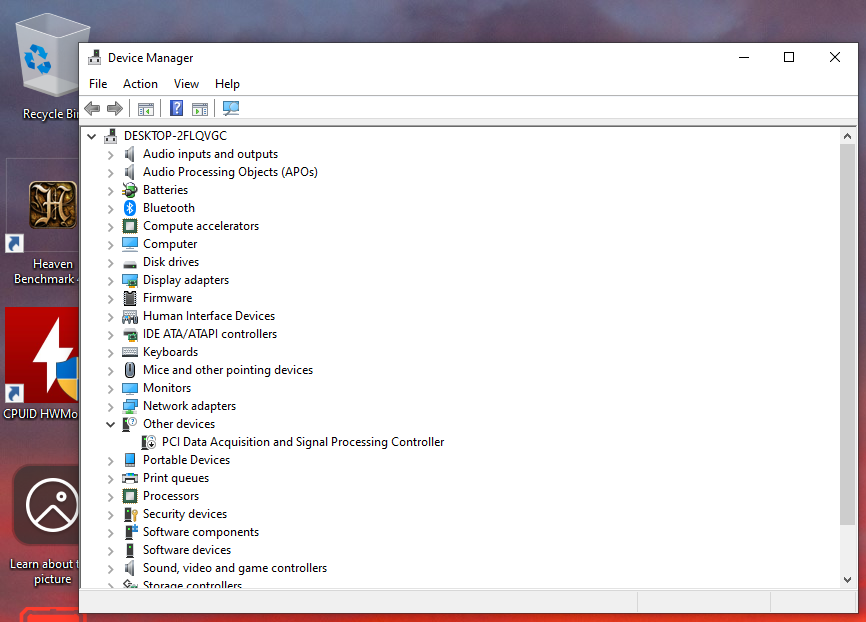
Here's a recommendation regarding the NPU issue you are experiencing. Please make sure to download and use all drivers from the OEM website of your motherboard, you can access it here on this link PRO Z890-S WIFI PZ.
After that, please send us a screenshot showing the driver versions of the following, you can see it in Device Manager.
- Intel Platform Performance Package
- Intel NPU drivers
- Intel Management Engine Driver
Let me know how it goes, do not hesitate to reach out if you have any questions.
Best regards,
Sesan N.
Intel Customer Support Technician
- Mark as New
- Bookmark
- Subscribe
- Mute
- Subscribe to RSS Feed
- Permalink
- Report Inappropriate Content
intel drivers and software is junk from msi site
msi intel software or drivers cuase huge blue screen all the windows 10 intel drivers and software is junk trash
270k plus needs a recall or fefund people money back
going back to AMD


- Mark as New
- Bookmark
- Subscribe
- Mute
- Subscribe to RSS Feed
- Permalink
- Report Inappropriate Content
Hello knighttemplar45,
You can locate the Intel Platform Performance Package, Intel NPU driver, and Intel Management Engine Driver under Device Manager to verify their presence on your system.
If these components cannot be found on your device and you'd like to pursue your processor warranty, you may create a support ticket at https://supporttickets.intel.com/s/?language=en_US and reference your case number for continuity.
I've sent you an email containing your case number for your records and future reference
Best regards,
Sesan N.
Intel Customer Support Technician

- Subscribe to RSS Feed
- Mark Topic as New
- Mark Topic as Read
- Float this Topic for Current User
- Bookmark
- Subscribe
- Printer Friendly Page