
- Marcar como nuevo
- Favorito
- Suscribir
- Silenciar
- Suscribirse a un feed RSS
- Resaltar
- Imprimir
- Informe de contenido inapropiado
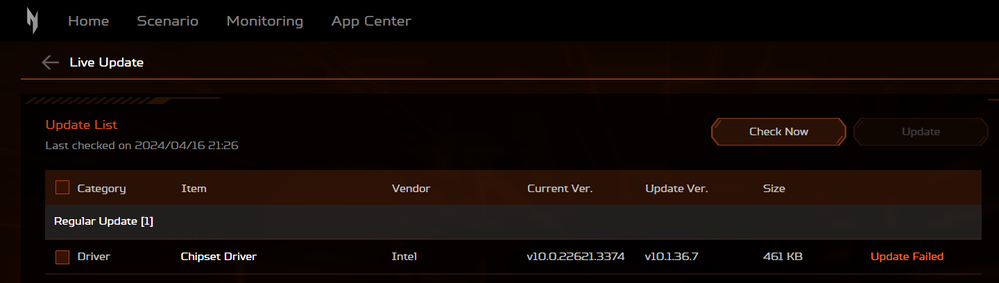
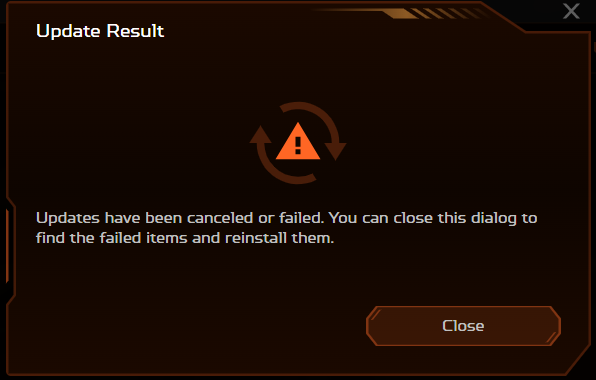
Hi guys! Why I can't update my Chipset Driver (Intel)? I'm using Acer Nitro V15, Windows 11. Thank You.
Enlace copiado
2 Respuestas

- Marcar como nuevo
- Favorito
- Suscribir
- Silenciar
- Suscribirse a un feed RSS
- Resaltar
- Imprimir
- Informe de contenido inapropiado
Go to Acer and get the chipset device software for your device. If it does not install, ask acer for assistance.
Doc (not an Intel employee or contractor)
[If you find any Intel driver you might need, download and save it now.]

- Marcar como nuevo
- Favorito
- Suscribir
- Silenciar
- Suscribirse a un feed RSS
- Resaltar
- Imprimir
- Informe de contenido inapropiado
I suggest that you clean install the package. Here is the process:
- If you haven't already, download the Chipset Device Software package in ZIP file form.
- Extract the contents of this package to a temporary folder.
- Open a Command or PowerShell Window and make this temporary folder the current folder.
- Run command ".\SetupChipset.exe -overall".
- Reboot.
If the installer is not available in ZIP file form, using a tool like 7-ZIP, attempt to open the executable as an archive and, if you can, extract the files from there.
Hope this helps,
...S

Responder
Opciones de temas
- Suscribirse a un feed RSS
- Marcar tema como nuevo
- Marcar tema como leído
- Flotar este Tema para el usuario actual
- Favorito
- Suscribir
- Página de impresión sencilla