
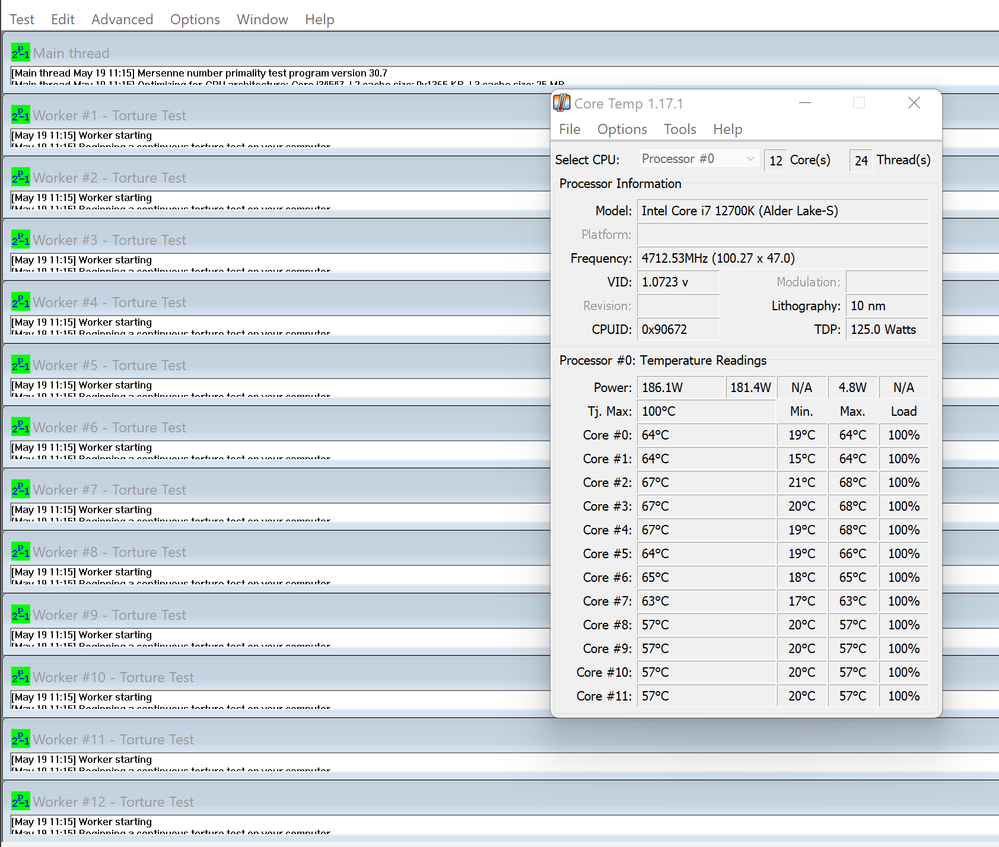
Recently purchased an i7 12700k and NH-D15S and have noticed that my idle temps are dropping as low as 14c...which should be impossible. The ambient temperature in my room is 20c right now, and the cores will occasionally drop to the minimum values seen here

It has me wondering if these "load" temps are even accurate, as they seem pretty low too. I've been searching the internet for weeks to see if anyone else has this problem...but it seems i'm the only one. I have tested the CPU in two different motherboards (both ROG STRIX Z690-A) and the same issue persists.
連結已複製

Hello rabithole1234,
Thank you for posting on the Intel® communities.
In order to better assist you, please perform the following:
- Download and run the Intel® Processor Diagnostic Tool and to ensure there is no issue with the processor. https://www.intel.com/content/www/us/en/download/15951/19792/intel-processor-diagnostic-tool.html?
- Download and run the Intel® Processor Identification Utility to ensure the processor information is correct. https://www.intel.com/content/www/us/en/download/12136/intel-processor-identification-utility-windows-version.html
- Download and run the Intel® Extreme Tuning Utility (Intel® XTU) and check if it is reporting the same temperatures. https://www.intel.com/content/www/us/en/download/17881/29183/intel-extreme-tuning-utility-intel-xtu.html?wapkw=xtu
Please let us know of the outcome of all three.
Best regards,
Steven G.
Intel Customer Support Technician.
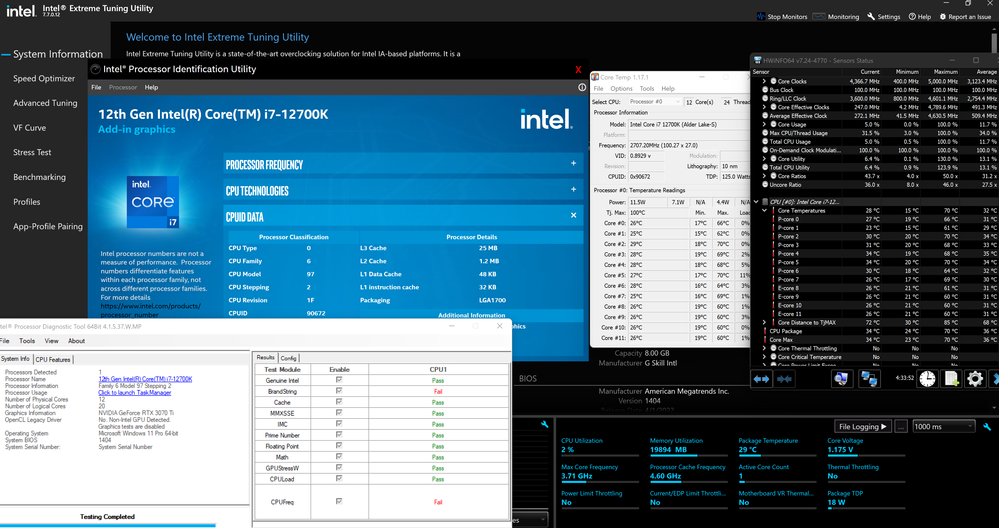
Tried to fit everything in one screenshot. I've run Intel Processor Diagnostic before, but I have to turn "Stop testing on fail" for it to actually complete. I'm assuming "BrandString" and "CPUFreq" fail because the tool hasn't been updated for 12th generation processors yet. The temperatures appear similar in all applications and the BIOS. Package temperature is always taken from the hottest core.
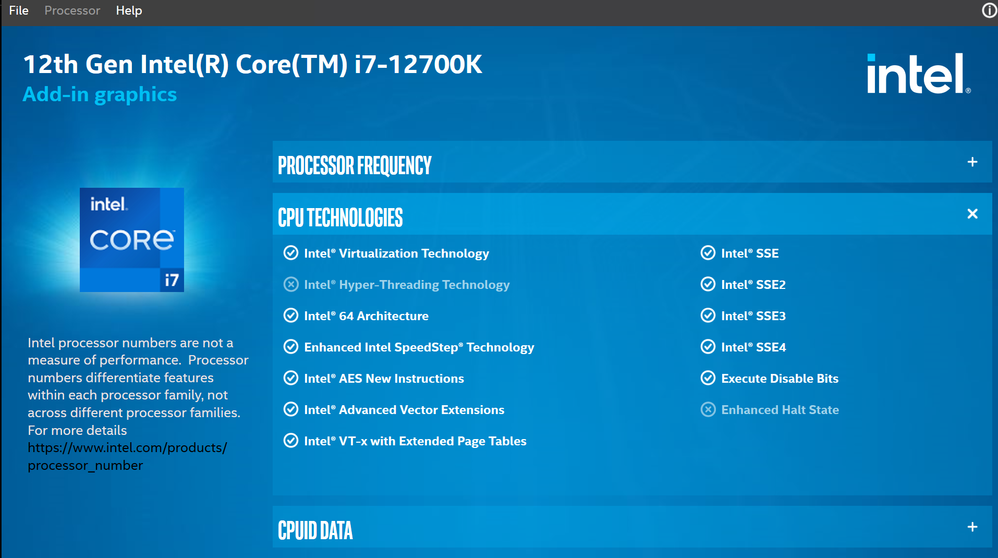
This tool says the CPU doesn't support hyper threading for some reason, despite it being enabled. Package temperature seems to be the same in all software and the BIOS and it reflects the hottest core.
Thank you for your response.
I would like to research about this, in order to do so, please download the Intel® SSU https://downloadcenter.intel.com/download/25293/Intel-System-Support-Utility-for-Windows-
Open the application and select "Everything", click on "Scan" to see the system and device information. By default, Intel® SSU will take you to the "Summary View". Click on the menu where it says "Summary" to change to "Detailed View". To save your scan, click on "Next", then "Save". Please attach the file to your reply.
Best regards,
Steven G.
Intel Customer Support Technician.
Hello rabithole1234,
Based on our research, there seems to be no issues with your processor. If there is low workload, there will be low temperatures. As well, we cannot validate reports by third party tools.
Also, the Intel® Processor Diagnostic Tool does not support 12th generation processor yet, I apologize for the inconvenience.
Regarding Hyper Threading, when Intel® Processor Identification Utility version 6.7.24.0211 is run on Intel Alder Lake processors it shows Intel® Hyper-Threading Technology as disable or grayed-out because Intel Processor Identification Utility(ProcID) tool goes through a CPUID algorithm to detect cores, and it ends with the E-Cores and its supported features, hence Hyper Threading disabled and possibly other features.
Are you having any issues starting or running apps?
Best regards,
Steven G.
Intel Customer Support Technician.


Hi! I'm facing the same issue as rabithole1234. Temps are below ambient. Maybe it's a faulty sensor that comes with this CPUs. I have an i5-13400and it seems that it's defying the laws of thermodynamics.
Since we have not heard back from you, we will close this thread. If you need any additional information, please submit a new question, as this thread will no longer be monitored.
Best regards,
Steven G.
Intel Customer Support Technician.
Hi! I'm facing the same issue as rabithole1234. Temps are below ambient. Maybe it's a faulty sensor that comes with this CPUs. I have an i5-13400and it seems that it's defying the laws of thermodynamics.
Hey, I saw your message here and on some other boards. Just wanted to let you know that I still have this CPU and it still reports lower than ambient temperatures when idle. I've tested it in multiple motherboards and it still has the same problem. I've just simply stopped caring, haha. The temperatures seem to be accurate at max load and during general use, so It's not really that big of a deal.
Oh, i just see this. You have the same issue as i do then and if you said the CPU is still working fine then i don't need to care. For how long have you been using the 12700K. I think it's an issue with some ADL CPU's, because i tried a 13400F (based on RPL, because it have two variants) and temps were accurate even at idle. But that CPU causes some freezes on a B660 board. I returned the 13400 (ADL variant) to intel and i am using a 12700 (yes, with the SAME issue). You saved me from buying another board to try. I was blaming ASUS on this one, lol. Thanks very much!
EDIT: Can you attach a couple of pictures of your BIOS temperatures, running CB R23 and, if you have it, RE4 Remake? Thanks again!!!
P.S.: It's just to compare. Cheers!!!
EDIT 2: Did you try all Asus boards or another brands aswell?
