
- Mark as New
- Bookmark
- Subscribe
- Mute
- Subscribe to RSS Feed
- Permalink
- Report Inappropriate Content
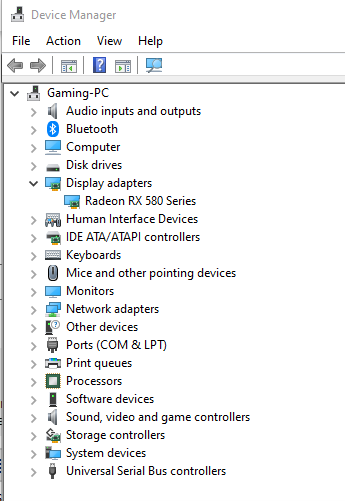
I recently installed DisplayCal on my computer and since then I am missing the Intel Integrated graphics option on my PC. I have two monitors setup on my GPU and a TV linked to the motherboards HDMI port (My RX580 only has one HDMI port). I have lost the ability to detect my TV and have lost the Intel Graphics Settings from my right-click context menu on the desktop. I have tried doing a registry fix, reinstalling the Intel drivers but nothing has worked. When installing the Intel drivers I get an error stating "This computer does not meet the minimum requirement for installing the software." I have also tried doing a windows restore point and nothing has worked. I would appreciate any suggestions on how to fix this issue. Thanks!
Link Copied



- Mark as New
- Bookmark
- Subscribe
- Mute
- Subscribe to RSS Feed
- Permalink
- Report Inappropriate Content
This typically means that the intel HD Graphics engine has been disabled in the BIOS. The BIOS does this by default of it recognizes that an add-in graphics card is included. You need to go into BIOS Setup and change the Internal Graphics parameter (from Auto or Disabled) to Enabled.
Hope this helps,
...S

- Subscribe to RSS Feed
- Mark Topic as New
- Mark Topic as Read
- Float this Topic for Current User
- Bookmark
- Subscribe
- Printer Friendly Page