
- Marcar como novo
- Marcador
- Subscrever
- Silenciar
- Subscrever fonte RSS
- Destacar
- Imprimir
- Denunciar conteúdo inapropriado
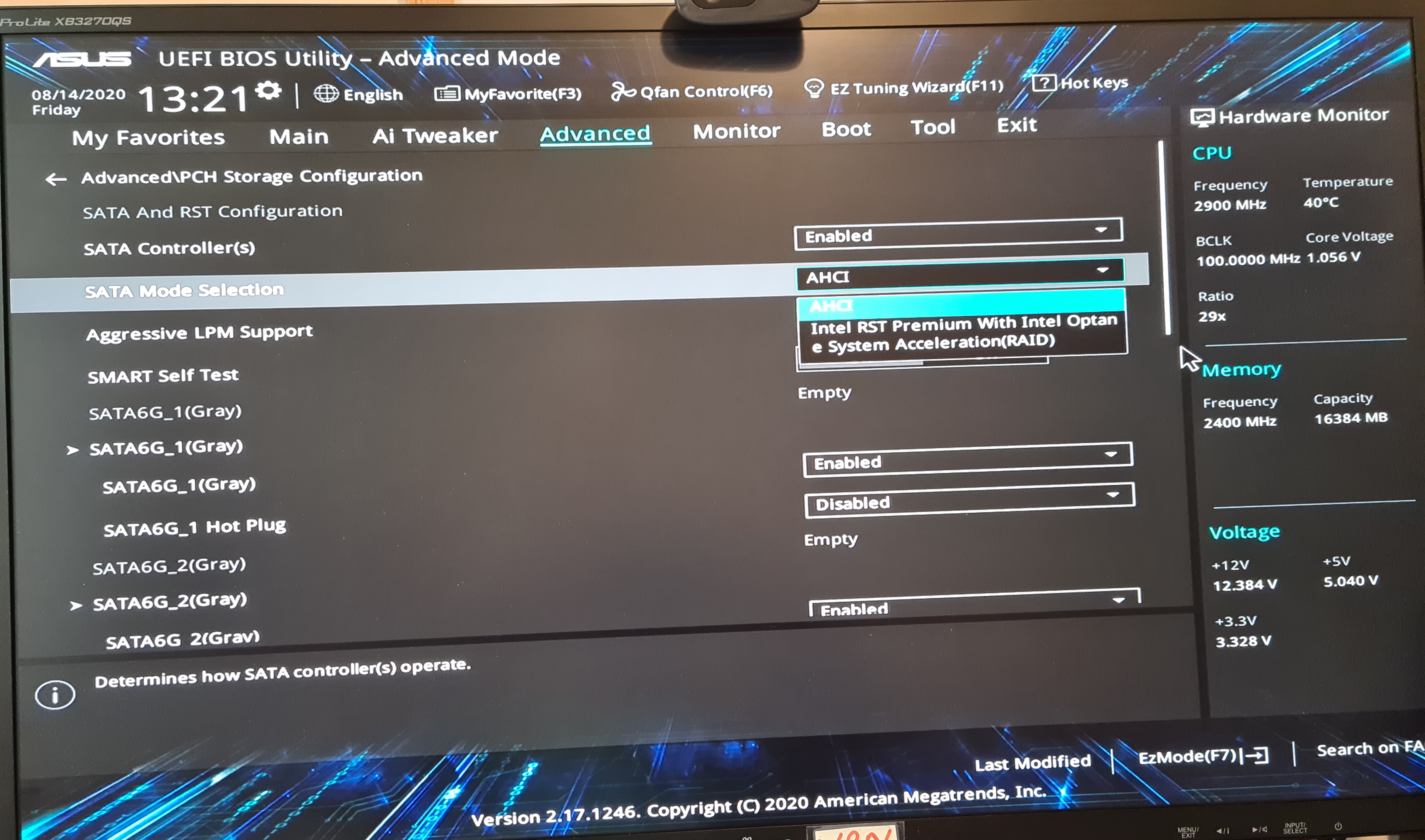
I have an Asus Prime B565M-A motherboard running the Intel B365 chipset fitted with two Intel 660p series 1TB M.2 NVMe SSDs on board. My aim is to get this up running as a RAID1 (mirroring) system.
I get a problem when I set the SATA mode on the motherboard to 'Intel RST Premium With Intel Optane System Acceleration (RAID)'. I boot into set up from a Windows 10 usb drive and get to the Windows set up screens. I then try and install the O/S on the M.2 drive and Windows objects saying this is is not a bootable disc. If I change the SATA mode to the Advanced Host Controller Interface (ACHI), Windows installs on the M.2 drive without problem.
Any ideas as to what i am doing wrong?
thnx. bill
- Marcar como novo
- Marcador
- Subscrever
- Silenciar
- Subscrever fonte RSS
- Destacar
- Imprimir
- Denunciar conteúdo inapropriado
Link copiado

- Marcar como novo
- Marcador
- Subscrever
- Silenciar
- Subscrever fonte RSS
- Destacar
- Imprimir
- Denunciar conteúdo inapropriado

- Marcar como novo
- Marcador
- Subscrever
- Silenciar
- Subscrever fonte RSS
- Destacar
- Imprimir
- Denunciar conteúdo inapropriado
It says it is not a bootable disk because it does not have the device drivers that would indicate so. When installing Windows, when you get to the scene where you are selecting the drive and partition to install Windows onto, you need to load the intel RST drivers. This is the F6FLPY.ZIP file that you see in the list of downloads for RST (and Optane).
...S
- Marcar como novo
- Marcador
- Subscrever
- Silenciar
- Subscrever fonte RSS
- Destacar
- Imprimir
- Denunciar conteúdo inapropriado
thnx scott, i think i understand what i have got to do now. will try it out next week. bill
- Marcar como novo
- Marcador
- Subscrever
- Silenciar
- Subscrever fonte RSS
- Destacar
- Imprimir
- Denunciar conteúdo inapropriado
Hi Scott
All sorted now. FYI I used the Intel drivers from the Asus site rather than the Inte site for safety. Thanks a loy for the steer. bill
- Marcar como novo
- Marcador
- Subscrever
- Silenciar
- Subscrever fonte RSS
- Destacar
- Imprimir
- Denunciar conteúdo inapropriado
Thanx Leon, I've had a quick read and I think i understand the process now. will give it a try next week. bill
- Marcar como novo
- Marcador
- Subscrever
- Silenciar
- Subscrever fonte RSS
- Destacar
- Imprimir
- Denunciar conteúdo inapropriado
Hi Leon
All sorted - many thanks for you help. bill

- Marcar como novo
- Marcador
- Subscrever
- Silenciar
- Subscrever fonte RSS
- Destacar
- Imprimir
- Denunciar conteúdo inapropriado
I suggest using the SSD discretely and get a hard disk and use it for backups. Backup disks in a desktop rig make it easier when Windows needs to be repaired or reset.
- Marcar como novo
- Marcador
- Subscrever
- Silenciar
- Subscrever fonte RSS
- Destacar
- Imprimir
- Denunciar conteúdo inapropriado
thnx Vegan, thanks for the advice. i really want to set up RAID1 but i am using an onboard hdd and a NAS (hdd) for backup so i am hopefully covered belt & braces. bill
- Marcar como novo
- Marcador
- Subscrever
- Silenciar
- Subscrever fonte RSS
- Destacar
- Imprimir
- Denunciar conteúdo inapropriado
windows 10 file history can use a secondary hard disk for fault tolerance. Its one option.
I use 7-zip and make wholesale backups to removable disks. I have a USB cable and old laptop disks make for a handy backup device.
- Marcas:
- Windows
- Marcar como novo
- Marcador
- Subscrever
- Silenciar
- Subscrever fonte RSS
- Destacar
- Imprimir
- Denunciar conteúdo inapropriado
Hi Vegan - i am up and running and it's all tickety boo. thnx bill

- Subscrever fonte RSS
- Marcar tópico como novo
- Marcar tópico como lido
- Flutuar este Tópico para o utilizador atual
- Marcador
- Subscrever
- Página amigável para impressora