
- 신규로 표시
- 북마크
- 구독
- 소거
- RSS 피드 구독
- 강조
- 인쇄
- 부적절한 컨텐트 신고
Hello,
I'm able to use the FaceTracking solution from the SDK with a standard 2D webcam for detecting expression and pulse; but I would like to know if it's possible to load a recorded video (such as a .avi file for example) to process it with the SDK.
Thanks.
링크가 복사됨

- 신규로 표시
- 북마크
- 구독
- 소거
- RSS 피드 구독
- 강조
- 인쇄
- 부적절한 컨텐트 신고
Yes, you can. You can use OpenCV to get each image and then convert to PXCImage format then feed to face module to process. Thanks!

- 신규로 표시
- 북마크
- 구독
- 소거
- RSS 피드 구독
- 강조
- 인쇄
- 부적절한 컨텐트 신고
And here is a video tutorial that shows exactly how to get the raw images from the camera and convert them into OpenCV:
- 신규로 표시
- 북마크
- 구독
- 소거
- RSS 피드 구독
- 강조
- 인쇄
- 부적절한 컨텐트 신고
Thanks David and Samontab for your prompt answers.
Samontab, in your video you show how to convert a RealSense image into an OpenCV but what I want to do is the other way around. As said David, I need to convert an OpenCV image to PXCImage.
Actually, I'm working in C#, so I would like to know if there is a way to convert a Bitmap image to PXCMImage. But actually, even if I can do it, PXCMImage is not used in the sample code so I don't understand how can I give it to the face module:
            // Create the SenseManager instance
            PXCMSenseManager sm = PXCMSenseManager.CreateInstance();

            // Enable face trackcing
            sm.EnableFace();

            // Get a face instance here (or inside the AcquireFrame/ReleaseFrame loop) for configuration
            PXCMFaceModule face = sm.QueryFace();

            // Initialize the pipeline
            sm.Init();

            // Stream data
            while (sm.AcquireFrame(true).IsSuccessful())
            {
                // retrieve the face tracking results
                PXCMFaceModule face2 = sm.QueryFace();
                if (face2 != null)
                {

                }

                // Resume next frame processing
                sm.ReleaseFrame();
            }

            // Clean up
            sm.Dispose();
- 신규로 표시
- 북마크
- 구독
- 소거
- RSS 피드 구독
- 강조
- 인쇄
- 부적절한 컨텐트 신고
You can get the raw image data from the OpenCV cv::Mat image, and pass it to the CreateImage method of the RealSense SDK:
//First define an ImageInfo object
PXCImage::ImageInfo info={};
info.format=PXCImage::PIXEL_FORMAT_RGB32; //Change this to match your data
//You can get these easily from an OpenCV Mat
info.width=image_width;
info.height=image_height;


//And now define the actual Image data
PXCImage::ImageData data={};
data.format=PXCImage::PIXEL_FORMAT_RGB32;//This should match the info object I reckon
data.planes[0]=image_buffer; //This is the critical bit. This is the actual data, the uchar array from cv::Mat
data.pitches[0]=ALIGN64(info.width*4); //This is because RGB32 is used (8bits * 4), change accordingly

// Finally Create the image instance
PXCImage *image=session->CreateImage(&info,0,&data);

//Now you have image ready to roll.
- 신규로 표시
- 북마크
- 구독
- 소거
- RSS 피드 구독
- 강조
- 인쇄
- 부적절한 컨텐트 신고
Great! Thanks for the detailed answer. I can now create a image. I missed that in the documentation, thanks for pointing it out.
Now I get this PXCImage, how can I gave it to the PXCMSenseManager ? I understood that AcquireFrame() get an image from the camera but I didn't find a way to give the PXCImage instead of this. When I call QueryFaceSample() or QueryFace() it process the image from AcquireFrame()... Or maybe I need to use another function for processing?

- 신규로 표시
- 북마크
- 구독
- 소거
- RSS 피드 구독
- 강조
- 인쇄
- 부적절한 컨텐트 신고
David Lu (Intel) wrote:
Yes, you can. You can use OpenCV to get each image and then convert to PXCImage format then feed to face module to process. Thanks!
Hi David, thank you for your helpful answers and hints in so many threads.
I would like to know how to "feed an image to face module to process".
I'am thinking of an image whose origin is not the color-stream of a realsense camera. My problem is not how to create an PXCImage buffer out of my image data, but how to feed an PXCImage instance to the face module (or any other module) for processing by the algorithms.
Thanks!
Hape

- 신규로 표시
- 북마크
- 구독
- 소거
- RSS 피드 구독
- 강조
- 인쇄
- 부적절한 컨텐트 신고
hape wrote:
My problem is not how to create an PXCImage buffer out of my image data, but how to feed an PXCImage instance to the face module (or any other module) for processing by the algorithms.
I have that same problem. I tried to run the face tracking application in the Playback mode using a .rssdk video, obviously the AcquireFrame() function was called, and I tried to change the PXCImage of the color channel in the current frame, but it looks like the face tracking were applied over the background .rssdk video. Finally in this is what I got:
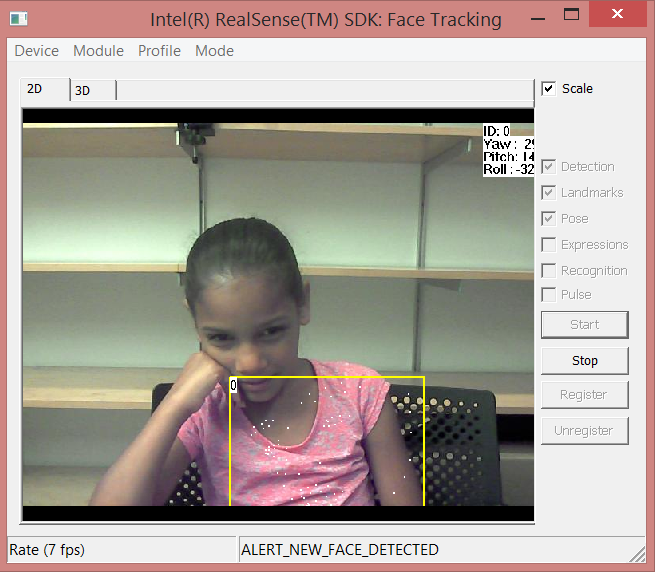
As you can see, the application is not working in my wished image. Thanks for the help
- 신규로 표시
- 북마크
- 구독
- 소거
- RSS 피드 구독
- 강조
- 인쇄
- 부적절한 컨텐트 신고
(name withheld) wrote:
data.pitches[0]=ALIGN64(info.width*4); //This is because RGB32 is used (8bits * 4), change accordingly
What is ALIGN64? Thanks

- 신규로 표시
- 북마크
- 구독
- 소거
- RSS 피드 구독
- 강조
- 인쇄
- 부적절한 컨텐트 신고
I am thinking that the image is processed in Acquireframe(), and this is a function of the libraries, but I am still working on it

- 신규로 표시
- 북마크
- 구독
- 소거
- RSS 피드 구독
- 강조
- 인쇄
- 부적절한 컨텐트 신고
@David and @Alejandro,
So the reality is that you can't feed an image to the face tracking library? In other words, that the RealSense SDK get's the image directly from a device during AcquireFrame and currently does not offer you way to "feed" it an image of your own?
- 신규로 표시
- 북마크
- 구독
- 소거
- RSS 피드 구독
- 강조
- 인쇄
- 부적절한 컨텐트 신고
Robert Oschler wrote:
So the reality is that you can't feed an image to the face tracking library? In other words, that the RealSense SDK get's the image directly from a device during AcquireFrame and currently does not offer you way to "feed" it an image of your own?
Well, that's what I am trying to figure it out, but no one has told me how

- 신규로 표시
- 북마크
- 구독
- 소거
- RSS 피드 구독
- 강조
- 인쇄
- 부적절한 컨텐트 신고
You may try to get PXCVideoModule interface from the Face implementation:
PXCVideoModule *module=face->QueryInstance<PXCVideoModule>();
Then use PXCVideoModule APIs to setup the Face profile (PXCVideoModule::SetCaptureProfile) and feed the samples with ProcessImageAsync(PXCCapture::Sample* images, PXCSyncPoint** sp).
I haven't tried it but this should be fastest way. Another way it to create your own Device and Capture implementations but it's probably longer way.
- 신규로 표시
- 북마크
- 구독
- 소거
- RSS 피드 구독
- 강조
- 인쇄
- 부적절한 컨텐트 신고
DMITRY Z. (Intel) wrote:
use PXCVideoModule APIs to setup the Face profile (PXCVideoModule::SetCaptureProfile)
Hi, I am a newbie in the use of RealSense technology, How should I setup the Face profile using the PXCVideoModule?, I would also appreciate a tutorial of how to use the ProcessImageAsync() function Thank's!
- 신규로 표시
- 북마크
- 구독
- 소거
- RSS 피드 구독
- 강조
- 인쇄
- 부적절한 컨텐트 신고
You need to set Face configuration to color only (CreateConfiguration, SetTrackingMode(2D) ).
To setup profile you need something like:
for (int i = 0; ; i++)
{
	PXCVideoModule::DataDesc inputs;
	pxcStatus status;
	status = videoModule->QueryCaptureProfile(i, &inputs);
	if (status < PXC_STATUS_NO_ERROR) {
		break;
	}
	if (inputs.deviceInfo.model == CamModel &&
		inputs.streams.color.sizeMax.width == width &&
		inputs.streams.color.sizeMin.width == width &&
		...) // Check your camera type and streams parameters
	{
		status = videoModule->SetCaptureProfile(&inputs);
		if (status < PXC_STATUS_NO_ERROR) { // handle fail}
	}
}
To feed the sample, something like:
pxcStatus status;

PXCCapture::Sample images;

//fill sample images with your data here

PXCSyncPoint* sp;

status = videoModule->ProcessImageAsync(&images, &sp);
if (status < PXC_STATUS_NO_ERROR) { // handle fail}

sp->Synchronize();

//face processing is done at this point, you can query face data

images.ReleaseImages();
- 신규로 표시
- 북마크
- 구독
- 소거
- RSS 피드 구독
- 강조
- 인쇄
- 부적절한 컨텐트 신고
Thank you so much DMITRY Z. finally I could load the images using your help!
- 신규로 표시
- 북마크
- 구독
- 소거
- RSS 피드 구독
- 강조
- 인쇄
- 부적절한 컨텐트 신고
videoModule->SetCaptureProfile(&inputs)
method as described in your last post. In fact, all profiles from QueryCaptureProfile(i, &inputs) loaded by this method result in PXC_STATUS_ITEM_UNAVAILABLE(-3). This is very confusing to me and I do not know what I'm doing wrong. My cameras in use are F200, R200 or SR300 (not used in parallel). All show the same behaviour but work normal in all other situations.
Another problem is the following. During program execution I want to switch from time to time between two different (different resollution, image format and camera) image streams for the face module. This does not seem to work with my current approach using the sensemanager.
I suppose that I need to work with two face module instances and two video module instances obtained by:
session->CreateImpl(&face_desc, &face_a)
session->CreateImpl(&face_desc, &face_b)

vm_a = face_a->QueryInstance<PXCVideoModule>();
vm_b = face_b->QueryInstance<PXCVideoModule>();
Now I would like to setup the stream profiles for each image source with the above mentioned approach.
- 신규로 표시
- 북마크
- 구독
- 소거
- RSS 피드 구독
- 강조
- 인쇄
- 부적절한 컨텐트 신고
Hi Hape,
In your case you're using RealSense cameras as a source, right? So, it should be possible to use existing SenseManager pipeline for all stream setup and streaming operations. Take Face sample as a starting point. You should be able to select desired stream profile with FilterByStreamProfiles(). Then start streaming. When you need to switch, stop SenseManager and re-initialize it with new parameters.
- 신규로 표시
- 북마크
- 구독
- 소거
- RSS 피드 구독
- 강조
- 인쇄
- 부적절한 컨텐트 신고
DMITRY Z. (Intel) wrote:
Hi Hape,
In your case you're using RealSense cameras as a source, right? So, it should be possible to use existing SenseManager pipeline for all stream setup and streaming operations. Take Face sample as a starting point. You should be able to select desired stream profile with FilterByStreamProfiles(). Then start streaming. When you need to switch, stop SenseManager and re-initialize it with new parameters.
- under normal circumstances use the color+depth streams for the face module processing
- in the case the color stream quality is too bad, i.e. too dark light conditions, use the ir+depth-streams for the face module processing
const pxcI32 width = 640; const pxcI32 height = 480;

// activate and obtain the face module interface
sm->EnableFace(); face = sm->QueryFace();

// query the video configuration from the face module
vm = face->QueryInstance<PXCVideoModule>();

// setup stream configuration HERE, with one of the methods below
...
initFaceModule(...); // setup face module configuration

sm->Init();

while (sm-AcquireFrame(true) >= PXC_STATUS_NO_ERROR) {
  PXCCapture::Sample* sample = sm->QuerySample();

  info_ir = sample->ir->QueryInfo();
  info_depth = sample->depth->QueryInfo();
  info_color = info_ir; info_color.format = PXCImage::PIXEL_FORMAT_RGB24;

  PXCCapture::Sample images{};
  images.ir = session->CreateImage(&info_ir);
  images.color = session->CreateImage(&info_color);
  images.depth = session->CreateImage(&info_depth);

  // fill sample images with data
  images.ir->CopyImage(sample->ir);
  images.color->CopyImage(sample->ir); // USE ir-stream for face module, instead of color stream
  images.depth->CopyImage(sample->depth);

  PXCSyncPoint* sp;
  status = vm->ProcessImageAsync(&images, &sp);
  if (status >= PXC_STATUS_NO_ERROR) {

    status = sp->Synchronize();
    // face processing is done at this point, query face data
    status = face_data->Update();

    if (status == PXC_STATUS_NO_ERROR) {
      pxcI32 fnum = face_data->QueryNumberOfDetectedFaces();

      // DEBUG output
      std::cout << "#faces = " << fnum << std::endl;
      if (fnum > 0) {
        // do face processing
      }
    }
    sp->Release();
  }
  images->ReleaseImage();
  sm->ReleaseFrame();
}
Until now I figured out 5 different possibilities to setup stream configurations:
PXCVideoModule::DataDesc inputs{};
inputs.streams.color.sizeMax = { width, height };
inputs.streams.depth.sizeMax = { width, height };
inputs.streams.ir.sizeMax = { width, height };

sm->EnableStreams(&inputs);
problem: calling sp->Synchronize() results in: Unhandled Exception: Access Violation reading location 0x0
sm->EnableStream(PXCCapture::STREAM_TYPE_IR, width, height)
sm->EnableStream(PXCCapture::STREAM_TYPE_COLOR, width, height)
sm->EnableStream(PXCCapture::STREAM_TYPE_DEPTH, width, height)
problem: it basically works, but the face detection and the landmarks are not stable.
In the case I occlude the color camera, the accuracy and stability of the landmarks are much better.
In the case I omit enabling the color stream, which, at least from my understanding, also should work, the same problem as in method 1) occurs.
That's why I assume that with this method I do not have enough control about the stream settings of the face module.
Of course it could also be a problem with my method copying the data from the ir-image to the color-image, but the returned status value does not hint something.
PXCCapture::Device::StreamProfileSet profiles = {};
memset(&profiles, 0, sizeof(profiles));

profiles.color.imageInfo.width = width;
profiles.color.imageInfo.height = height;
profiles.depth.imageInfo.width = width;
profiles.depth.imageInfo.height = height;
profiles.ir.imageInfo.width = width;
profiles.ir.imageInfo.height = height;

cm->FilterByStreamProfiles(&profiles);
problem: sample = sm->QuerySample() does not contain an ir image, sample->ir is a null pointer. Why?
PXCVideoModule::DataDesc inputs{};
inputs.streams.color.sizeMax = { width, height };
inputs.streams.depth.sizeMax = { width, height };
inputs.streams.ir.sizeMax = { width, height };

cm->RequestStreams(face->CUID, &inputs);
cm->LocateStreams();
problem: (same as method 3) sample = sm->QuerySample() does not contain an ir image, sample->ir is a null pointer. Why?
for (int i = 0;; i++) {
PXCVideoModule::DataDesc inputs;
status = vm->QueryCaptureProfile(i, &inputs);
// filter streams of interest
...
status = vm->SetCaptureProfile(&inputs);
if (status < PXC_STATUS_NO_ERROR) { continue; }
status = vm->QueryCaptureProfile(¤t);
if (status < PXC_STATUS_NO_ERROR) { continue; }
std::wcout << "SUCCESS! " << PXCCapture::DeviceModelToString(current.deviceInfo.model) << std::endl; // never reached until here
}
problem: does not work at all. See my last message...
Thus, I'm stuck. Any hint for resolving these issues would be very helpful :)
- 신규로 표시
- 북마크
- 구독
- 소거
- RSS 피드 구독
- 강조
- 인쇄
- 부적절한 컨텐트 신고
Hi Hape,
You're trying to feed IR stream to Face module as color stream w/o notifying module about it. It cannot work as color and IR not aligned. SDK developers work on using IR while poor lighting condition. This may become part of future SDK release.
