
- Mark as New
- Bookmark
- Subscribe
- Mute
- Subscribe to RSS Feed
- Permalink
- Report Inappropriate Content
Hi
No idea why this changed ? .... in the past
How to create iOS P12 certification ?
Is not a way to compile as past ... just using CSR certification ??
thanks in advance
- Tags:
- HTML5
- Intel® XDK
Link Copied

- Mark as New
- Bookmark
- Subscribe
- Mute
- Subscribe to RSS Feed
- Permalink
- Report Inappropriate Content
Here is new instructions, please refer to this documentation: https://software.intel.com/en-us/xdk/articles/walkthrough-obtain-ios-appstore-adhoc-cert-and-p12
- Mark as New
- Bookmark
- Subscribe
- Mute
- Subscribe to RSS Feed
- Permalink
- Report Inappropriate Content
Hello,
Ok I got the point for new projects
But if I have an already csr file from former versions of Intel XDK ... will it can be used or how to proceed ?
Because I want to update the already version of app into itunes.com
thanks in advance

- Mark as New
- Bookmark
- Subscribe
- Mute
- Subscribe to RSS Feed
- Permalink
- Report Inappropriate Content
If you already have a distribution certificate and want to update your app in the store, create a P12 through Keychain Access.
1. If you have not copied your certificate in your keychain earlier, download the certificate you used to publish the app from Apple Developer Portal (.cer file) and copy in the keychain.
2. Go to Keychain Access, Under the Keys you will find the private key for your certificate
3. Select the private key for your certificate
4. Under the File menu, select Export items (or Right Click on the private key and select Export)
5. Save as P12 file format
6. Create a password for P12 - you will be asked to enter a password for P12, select a simple password that you remember (this will be used to unlock your P12 when you try to build your app in XDK)
- Mark as New
- Bookmark
- Subscribe
- Mute
- Subscribe to RSS Feed
- Permalink
- Report Inappropriate Content
- Mark as New
- Bookmark
- Subscribe
- Mute
- Subscribe to RSS Feed
- Permalink
- Report Inappropriate Content
Marcos, the steps to create P12 from scratch will not work with your existing .csr file. Those steps are for creating P12 from scratch. You have to be in the same XDK session while generating P12 as you generated your .csr. Follow the steps I described in the earlier post.
- Mark as New
- Bookmark
- Subscribe
- Mute
- Subscribe to RSS Feed
- Permalink
- Report Inappropriate Content
Hello,
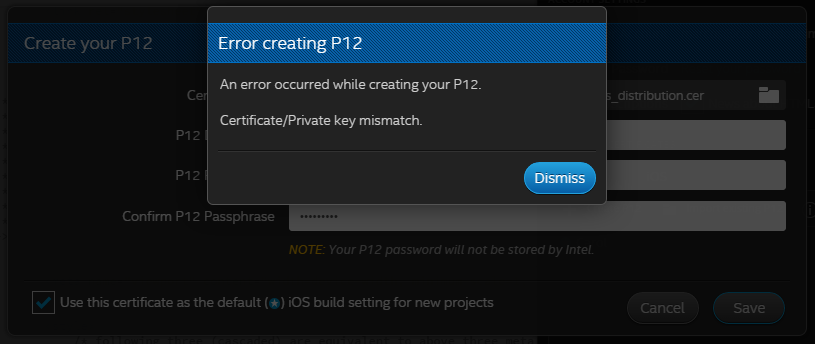
Im not used to Keychain .... no idea how to proceed to get instructions below done ... any picture to help me ?
1. If you have not copied your certificate in your keychain earlier, download the certificate you used to publish the app from Apple Developer Portal (.cer file) and copy in the keychain.
2. Go to Keychain Access, Under the Keys you will find the private key for your certificate
thanks in advance

- Mark as New
- Bookmark
- Subscribe
- Mute
- Subscribe to RSS Feed
- Permalink
- Report Inappropriate Content
Marcos, rather than trying to reuse your existing iOS certificates, it is easier to start from the beginning and create a new set. When publishing to the Apple store it is not a requirement to use the same certificates for each new publication. If the certs you have do not work, you can get rid of them and start over with new ones from your Apple developer account. Please see the instructions provided by the XDK.
- Mark as New
- Bookmark
- Subscribe
- Mute
- Subscribe to RSS Feed
- Permalink
- Report Inappropriate Content

- Subscribe to RSS Feed
- Mark Topic as New
- Mark Topic as Read
- Float this Topic for Current User
- Bookmark
- Subscribe
- Printer Friendly Page