
- Mark as New
- Bookmark
- Subscribe
- Mute
- Subscribe to RSS Feed
- Permalink
- Report Inappropriate Content
Hi
This is my current config
Network Adapter(s): Intel(R) Wireless-AC 9560 160MHz 21.80.0.4
Realtek PCIe GBE Family Controller 10.23.1003.2017
Following update is advised
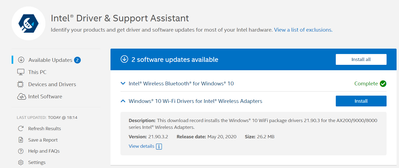
But when i try to install i get the following error
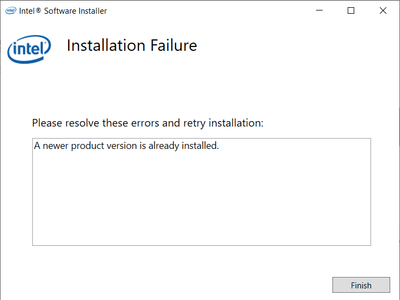
Can anyone advise how to get this resolved?
This causes wireless connection to crash and after that it does not show the networks available.

- Mark as New
- Bookmark
- Subscribe
- Mute
- Subscribe to RSS Feed
- Permalink
- Report Inappropriate Content
1. You may try clean installation of an WiFi driver:
2. Download the latest WiFi driver package Intel® PROSet/Wireless Software and Drivers for IT Admins
Unzip the WiFi_21.120.0_Driver64_Win10.zip on your drive .
3. In the Device Manager > Network Adapters click on WiFi adapter and chose Uninstall (check the "Delete this software... option). Reboot your computer.
4. In the Device Manager click on the default WiFi driver and chose Update. Browse to the directory with the unzipped WiFi Driver and continue with installation.
6. Reboot your laptop.
Leon
Link Copied
- Mark as New
- Bookmark
- Subscribe
- Mute
- Subscribe to RSS Feed
- Permalink
- Report Inappropriate Content
I had the same problem, and I solved by using IT administrators .zip files.
Install any included .INF file.
- Mark as New
- Bookmark
- Subscribe
- Mute
- Subscribe to RSS Feed
- Permalink
- Report Inappropriate Content
1. You may try clean installation of an WiFi driver:
2. Download the latest WiFi driver package Intel® PROSet/Wireless Software and Drivers for IT Admins
Unzip the WiFi_21.120.0_Driver64_Win10.zip on your drive .
3. In the Device Manager > Network Adapters click on WiFi adapter and chose Uninstall (check the "Delete this software... option). Reboot your computer.
4. In the Device Manager click on the default WiFi driver and chose Update. Browse to the directory with the unzipped WiFi Driver and continue with installation.
6. Reboot your laptop.
Leon
- Mark as New
- Bookmark
- Subscribe
- Mute
- Subscribe to RSS Feed
- Permalink
- Report Inappropriate Content

- Subscribe to RSS Feed
- Mark Topic as New
- Mark Topic as Read
- Float this Topic for Current User
- Bookmark
- Subscribe
- Printer Friendly Page