
- Als neu kennzeichnen
- Lesezeichen
- Abonnieren
- Stummschalten
- RSS-Feed abonnieren
- Kennzeichnen
- Anstößigen Inhalt melden
Hello everyone,
I own a Dell G7 7700 that I got in december 2020 and I have been running into the same issue several times with the Wireless Card Killer Wi-Fi 6 AX1650i.
The first time when it happened (in May/June 2021) Dell support took care of it by replacing the card. For a while it worked fine, but I got the same issue again (in October 2021), and this time Dell sent a technician at home who again replaced the card, yet explained to me that the issue was not caused by the hardware but rather the software (drivers and OS).
However, today I am having the same issue again and tried several solutions:
- first I followed instructions the Dell technician told me last time, which is to Deactivate and Reactivate the card from the Device Manager. I also tried uninstalling the device and restarting my laptop.
- after that, I tried to update the drivers using Driver Booster. But that did not solve anything either.
- and then I tried to reinstall Windows 10 (and keep personnal files) which deleted all of my softwares but didn't solve anything.
- then I followed the clean driver installation tutorial as showed here . I did it both ways, with the latest Dell drivers and the latest Intel driver. Again the issue remains unsolved.
- Finally, I tried installing Killer Performance Suite but that did still not solve the issue.
Can anyone help me with this please?

- Als neu kennzeichnen
- Lesezeichen
- Abonnieren
- Stummschalten
- RSS-Feed abonnieren
- Kennzeichnen
- Anstößigen Inhalt melden
Hello Harpartap,
In order to help you further, please try the following:
1. To correct the 43 code:
- Open Internet Explorer, select Tools > Internet options.
- Go to the Connections tab
- Click LAN Settings
- uncheck Automatically detect settings
- Uninstall your Antivirus Software
2. Restart the WLAN service:
- Press Windows Key + R and enter “services.msc” followed by the ENTER key.
- Find “WLAN AutoConfig” in the list of service, right-click it and select Properties.
- Press Start & change the startup type as "Automatic".
- Restart your computer
3. Perform a clean install of the tool:
4. Also, you can follow these steps:
5. If possible, you can reseat the card then make all connections are well and inspect for any hardware damage.
Regards,
Deivid A.
Intel Customer Support Technician
Link kopiert

- Als neu kennzeichnen
- Lesezeichen
- Abonnieren
- Stummschalten
- RSS-Feed abonnieren
- Kennzeichnen
- Anstößigen Inhalt melden
Please do yourself a favor and NOT use 3rd party driver sites like driver booster. You never know what information from your machine they are uploading (and to what country it is going), and you never know what payload is in the packages they are downloading.
Doc (not an Intel employee or contractor)
[Waiting for Windows 12]
- Als neu kennzeichnen
- Lesezeichen
- Abonnieren
- Stummschalten
- RSS-Feed abonnieren
- Kennzeichnen
- Anstößigen Inhalt melden
Well I do agree with your concern, but when you're an architecture student who really needs to work on his projects you have to try everything to fix the issue that the manufacturer seems not to be efficient in solving...
- Als neu kennzeichnen
- Lesezeichen
- Abonnieren
- Stummschalten
- RSS-Feed abonnieren
- Kennzeichnen
- Anstößigen Inhalt melden
Hello Harpartap,
Thank you for posting on the Intel® communities. I understand you are having issues with your Intel® Killer™ Wi-Fi 6 AX1650.
In order to better assist you, please provide the following:
1. Run the Intel® System Support Utility (Intel® SSU) to gather more details about the system.
- Download the Intel® SSU and save the application on your computer: https://www.intel.com/content/www/us/en/download/18377/intel-system-support-utility-for-windows.html
- Open the application, check the "Everything" checkbox, and click "Scan" to see the system and device information. The Intel® SSU defaults to the "Summary View" on the output screen following the scan. Click the menu where it says "Summary" to change to "Detailed View".
- To save your scan, click Next and click Save.
2. Is the Bluetooth working properly?
3. Have you checked with DELL to confirm if this is a known issue? Since they have replaced the wireless adapter several times.
Regards,
Deivid A.
Intel Customer Support Technician
- Als neu kennzeichnen
- Lesezeichen
- Abonnieren
- Stummschalten
- RSS-Feed abonnieren
- Kennzeichnen
- Anstößigen Inhalt melden
Hi,
I ran the Intel SSU and all the details are in the file attached to this message.
I just checked both with my headphones and the device manager and the Bluetooth seems to work fine.
Yes I have contacted Dell and they're still saying it's a software issue and spent 2 days trying to solve the problem but couldn't.
I can't allow myself to spend more time over the phone with them and I need this issue solved asap so that I can continue to work properly.
Regards,
Harpartap Cheema
- Als neu kennzeichnen
- Lesezeichen
- Abonnieren
- Stummschalten
- RSS-Feed abonnieren
- Kennzeichnen
- Anstößigen Inhalt melden
Hello Harpartap,
Thanks for the information provided and the report sent. I will review this issue internally and as soon as I have datils for you I will let you know.
Regards,
Deivid A.
Intel Customer Support Technician
- Als neu kennzeichnen
- Lesezeichen
- Abonnieren
- Stummschalten
- RSS-Feed abonnieren
- Kennzeichnen
- Anstößigen Inhalt melden
Hello Harpartap,
In order to help you further, please try the following:
1. To correct the 43 code:
- Open Internet Explorer, select Tools > Internet options.
- Go to the Connections tab
- Click LAN Settings
- uncheck Automatically detect settings
- Uninstall your Antivirus Software
2. Restart the WLAN service:
- Press Windows Key + R and enter “services.msc” followed by the ENTER key.
- Find “WLAN AutoConfig” in the list of service, right-click it and select Properties.
- Press Start & change the startup type as "Automatic".
- Restart your computer
3. Perform a clean install of the tool:
4. Also, you can follow these steps:
5. If possible, you can reseat the card then make all connections are well and inspect for any hardware damage.
Regards,
Deivid A.
Intel Customer Support Technician
- Als neu kennzeichnen
- Lesezeichen
- Abonnieren
- Stummschalten
- RSS-Feed abonnieren
- Kennzeichnen
- Anstößigen Inhalt melden
Hello Harpartap,
I reviewed your post, please let me know if the issue was resolved, if not, do not hesitate, just reply back.
Regards,
Deivid A.
Intel Customer Support Technician
- Als neu kennzeichnen
- Lesezeichen
- Abonnieren
- Stummschalten
- RSS-Feed abonnieren
- Kennzeichnen
- Anstößigen Inhalt melden
Hi Deivid,
Thank you very much for reviewing my post.
I did the first two steps and WiFi started working again after Restarting the WLAN Autoconfig.
Regards,
Harpartap
- Als neu kennzeichnen
- Lesezeichen
- Abonnieren
- Stummschalten
- RSS-Feed abonnieren
- Kennzeichnen
- Anstößigen Inhalt melden
Hello Harpartap,
I am glad to know that the is now fixed. I will proceed to close this thread, however, you can open a new thread if you face this or any other issues related to Intel products.
Regards,
Deivid A.
Intel Customer Support Technician



- Als neu kennzeichnen
- Lesezeichen
- Abonnieren
- Stummschalten
- RSS-Feed abonnieren
- Kennzeichnen
- Anstößigen Inhalt melden
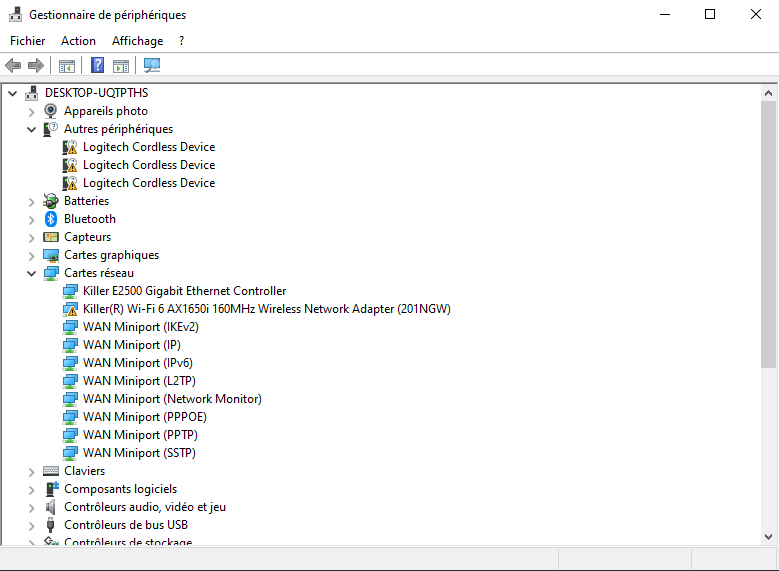
Happened to me on:
Acer Predator Triton 500,
WIFI adapter: Killer(R) Wi-Fi 6 AX1650i 160MHz(201NGW).
Windows 11.
Happened after Windows Update, I didn't have the "Killer Performance Suite" software installed when the Wifi disappeared (driver error code 10). but I saw on some forum that uninstall the Killer suite will fix it.
I tried Uninstall the Wifi driver but it didn't help.
The only thing that helped is to download the Killer Suite (this alone didn't fix the problem) but when I Uninstall the Killer Suite it fix it.
Hope it will help
I.E. it happened to me a couple months ago when I was on Windows 10, I didn't try hard to fix it - I just upgrade to Windows 11 and it fixed it.

- RSS-Feed abonnieren
- Thema als neu kennzeichnen
- Thema als gelesen kennzeichnen
- Diesen Thema für aktuellen Benutzer floaten
- Lesezeichen
- Abonnieren
- Drucker-Anzeigeseite